Can You Charge Thunderbolt 3 With USB C Fast Charging
Yes, you can charge Thunderbolt 3 with USB C because Thunderbolt 3 uses the same USB-C connector and supports USB power delivery standards. This means your existing USB-C charger or cable can power your Thunderbolt 3 devices without any extra adapters. Understanding how this works helps you avoid buying unnecessary gear and keeps your devices charged and ready to go.
If you own a laptop or gadget with a Thunderbolt 3 port, you have probably wondered about charging it. The good news is that Thunderbolt 3 uses the same USB-C connector that many modern chargers already use. So yes, you can charge Thunderbolt 3 with USB C cables and chargers. But there are some important details you should know before you plug anything in.
Many people assume that because Thunderbolt 3 and USB-C look the same, they are exactly the same thing. That is not quite true. Thunderbolt 3 is a protocol that runs through the USB-C connector. It supports data transfer, video output, and power delivery all through one tiny cable. Understanding this difference helps you make better choices about your charging setup.
In this article, we will walk you through everything you need to know. We will cover how USB-C power delivery works, which devices support Thunderbolt 3 charging, and common mistakes to avoid. By the end, you will feel confident about your charging options. Let us get started.
Key Takeaways
- Thunderbolt 3 uses USB-C: The connector is identical, so USB-C chargers work with Thunderbolt 3 devices.
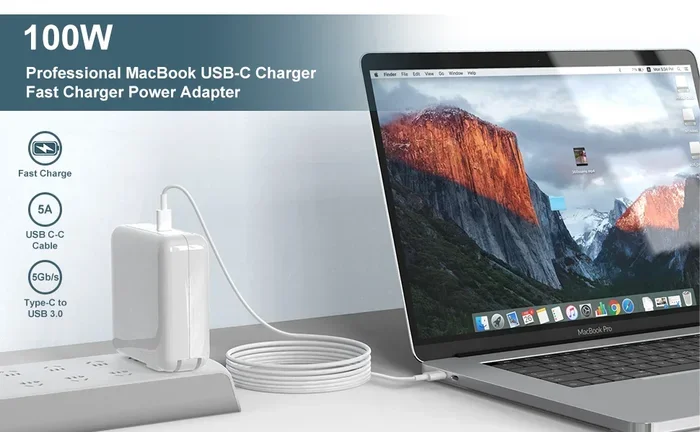
- USB-C Power Delivery is the key: This standard allows up to 100 watts of charging power through a single USB-C cable.
- Not all USB-C chargers are equal: Some deliver more power than others, so check wattage before buying.
- Bidirectional charging is supported: Thunderbolt 3 can both send and receive power through the same port.
- Cable quality matters: Using a cheap or damaged USB-C cable can slow down or prevent charging.
- Most modern laptops support this: MacBook, Dell XPS, and many other brands use Thunderbolt 3 with USB-C charging.
- Avoid common mistakes: Using non-compliant cables or wrong adapters can cause slow charging or damage.
📑 Table of Contents
- What Is Thunderbolt 3 and How Does It Work?
- Can You Charge Thunderbolt 3 With USB C?
- Understanding USB-C Power Delivery and Charging Speeds
- Which Devices Support Thunderbolt 3 Charging?
- Common Mistakes When Charging Thunderbolt 3 With USB C
- Tips for Getting the Best Charging Experience
- Expert Insights and Final Thoughts
What Is Thunderbolt 3 and How Does It Work?
Thunderbolt 3 is a hardware interface developed by Intel. It was introduced in 2015 and quickly became a standard in laptops and desktops. The key feature of Thunderbolt 3 is that it uses the USB-C connector. This made it easy to adopt because USB-C was already becoming popular across the tech world.
Here are the main features of Thunderbolt 3:
- Data transfer speeds: Up to 40 gigabits per second. That is four times faster than standard USB 3.0.
- Video output: Supports dual 4K displays or a single 5K display through one cable.
- Power delivery: Supports up to 100 watts of USB-C power delivery for charging.
- Compatibility: Works with USB-C devices and accessories, even if they are not Thunderbolt-enabled.
Because Thunderbolt 3 uses the USB-C connector, it is backward compatible with USB-C devices. You can plug a regular USB-C flash drive into a Thunderbolt 3 port, and it will work. However, you will not get the full 40 Gbps speed. You will only get the speed of the USB device itself.
The Thunderbolt protocol handles all of these functions through a single port. This is why Thunderbolt 3 has become so popular. It replaces the need for multiple ports and cables. One Thunderbolt 3 port can handle charging, data, and display output simultaneously.
Thunderbolt 3 vs USB-C: What Is the Difference?
This is one of the most common questions people ask. The physical connector is the same. Both Thunderbolt 3 and standard USB-C use the same oval-shaped plug. The difference lies in the technology inside.
USB-C is just a connector shape. It does not define what the port can do. Thunderbolt 3 is a protocol that defines what the port can do. A Thunderbolt 3 port can do everything USB-C can do, plus much more. Think of USB-C as the shape and Thunderbolt 3 as the engine inside.
Here is a simple comparison:
- USB-C port: Supports basic data transfer and power delivery. Speeds vary depending on the USB version.
- Thunderbolt 3 port: Supports all USB-C features plus 40 Gbps data, display output, and Daisy-chaining.
When you plug a USB-C charger into a Thunderbolt 3 port, the port uses the USB-C power delivery protocol to charge the device. This is exactly how USB-C charging works on any device with a USB-C port.
Can You Charge Thunderbolt 3 With USB C?
The short answer is absolutely yes. You can charge Thunderbolt 3 with USB C cables and chargers. Thunderbolt 3 was designed from the start to support USB power delivery. This means any compliant USB-C charger can supply power to a Thunderbolt 3 device.
When you connect a USB-C charger to a Thunderbolt 3 port, the two devices negotiate the power delivery. This process is called USB-C power delivery or PD for short. The devices communicate and agree on the right amount of power to send. This happens automatically and safely.
The USB-C power delivery standard supports up to 100 watts of power. This is plenty for most laptops and tablets. Some Thunderbolt 3 devices may charge slower or faster depending on the charger and cable you use. But the basic function of charging works perfectly.
How USB-C Power Delivery Works
USB-C power delivery is a smart charging system. It is not just about sending raw electricity through a wire. The devices talk to each other before power flows. This negotiation ensures the right voltage and current are used.
Here is how the process works in simple steps:
- The charger sends a small signal to the device when you plug it in.
- The device responds with its power needs and capabilities.
- The charger and device agree on the voltage and current level.
- Power begins flowing at the agreed-upon level.
- The connection is monitored and adjusted if needed.
This negotiation process is what makes USB-C charging so versatile. A single charger can power a phone, a tablet, and a laptop. Each device gets the exact amount of power it needs. The charger adjusts automatically for each device.
For Thunderbolt 3 devices, this same process applies. The Thunderbolt 3 port on your laptop will negotiate with the USB-C charger just like any other USB-C device would. The only difference is that the Thunderbolt 3 port can handle more data and video functions at the same time.
Can You Use Any USB-C Charger for Thunderbolt 3?
Most USB-C chargers will work with Thunderbolt 3 devices. However, not all chargers are created equal. The charging speed depends on the wattage of the charger and the quality of the cable.
Here are some important things to keep in mind:
- Wattage matters: A 60-watt charger works fine for most laptops. But a 100-watt charger will charge faster or support charging while doing heavy tasks.
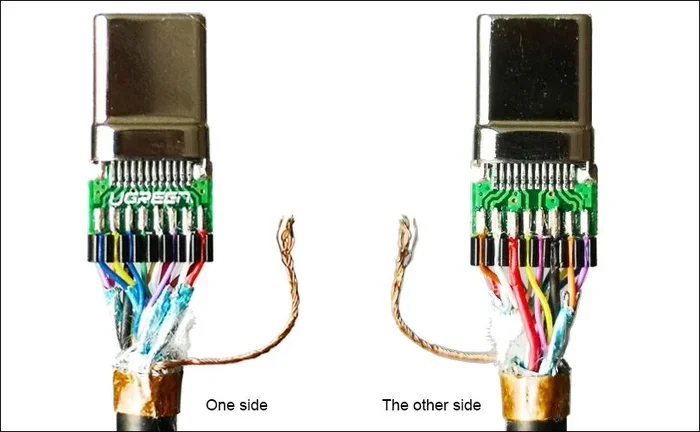
- Cable quality matters: A cheap USB-C cable may not support the full power delivery. Look for cables rated for at least 60 watts.
- Charger compatibility: Chargers that follow the USB-C power delivery standard will work with Thunderbolt 3. Non-compliant chargers may cause issues.
- Brand reputation: Stick with trusted brands like Anker, Belkin, Apple, or Dell for reliable charging.
Using a non-compliant or low-quality charger can lead to slow charging. In rare cases, it could even damage your device. Always check that your USB-C charger supports the USB-C power delivery protocol.
Understanding USB-C Power Delivery and Charging Speeds
USB-C power delivery has different power profiles. These profiles define how much power can be delivered through a USB-C connection. The standard has evolved over time, and newer versions support more power.
The USB-C power delivery standard supports the following power levels:
- 2.5 watts: The basic USB power level. Enough for small devices like earbuds.
- 15 watts: Common for tablets and phones. Supports fast charging for most mobile devices.
- 27 watts: Typical for many laptops. Provides steady charging for moderate use.
- 45 watts: Good for mid-range laptops. Supports charging during normal use.
- 60 watts: Standard for most Thunderbolt 3 laptops. Handles charging and light workloads.
- 100 watts: The maximum for USB-C power delivery. Supports even high-performance laptops.
When you charge Thunderbolt 3 with USB C, the power level depends on your charger and cable. A 60-watt USB-C charger will charge most Thunderbolt 3 laptops at full speed. A 100-watt charger will do the same but also support more demanding tasks while charging.
Why Charging Speed Varies
You might notice that your Thunderbolt 3 device charges at different speeds with different chargers. This is normal and expected. Several factors affect USB-C charging speed.
The first factor is the charger wattage. A 100-watt charger will always charge faster than a 30-watt charger. The second factor is the cable quality. A thin or cheap cable limits the amount of power that can flow through. The third factor is the device itself. Some laptops draw more power than others based on their hardware.
Another factor is what you are doing while charging. If you are running a demanding application or using an external display, your laptop uses more power. This can slow down the charging speed. The charger needs to supply enough power for both the device usage and the battery charging.
To get the fastest fast charging with your Thunderbolt 3 device, use a high-quality USB-C charger with a high wattage rating. Also, use a short, thick USB-C cable that supports the full power delivery spec.
Which Devices Support Thunderbolt 3 Charging?
Thunderbolt 3 has been adopted by many major tech brands. You will find Thunderbolt 3 ports on laptops, desktops, and even some docking stations. Most of these devices support charging through their Thunderbolt 3 USB-C port.
Here are some popular devices that support Thunderbolt 3 charging:
- Apple MacBook Pro: All models from 2016 onward use Thunderbolt 3 USB-C ports for charging.
- Apple MacBook Air: Models from 2018 onward support Thunderbolt 3 charging.
- Dell XPS 13 and 15: Many models feature Thunderbolt 3 ports with USB-C charging.
- HP Spectre and EliteBook: Several business and consumer laptops use Thunderbolt 3.
- Lenovo ThinkPad: Many ThinkPad models support Thunderbolt 3 with USB-C charging.
- Microsoft Surface Laptop: Some models use Thunderbolt 3 for charging and data.
- Google Pixelbook: Uses Thunderbolt 3 USB-C for charging and connectivity.
When you buy a device with a Thunderbolt 3 port, you get the benefit of USB-C charging right out of the box. You can use any compatible USB-C charger to power your device. This gives you a lot of flexibility compared to older laptops that required proprietary chargers.
Do All Thunderbolt 3 Devices Charge Through USB-C?
Almost all Thunderbolt 3 devices charge through the USB-C port. This is by design. Thunderbolt 3 supports bidirectional power delivery, which means the port can both send and receive power.
Bidirectional charging is a great feature. It means your Thunderbolt 3 laptop can charge a phone through its USB-C port. Or your laptop can receive power from a USB-C charger. This flexibility is one of the biggest advantages of the Thunderbolt 3 standard.
There are a few rare exceptions. Some devices might use a different port for charging even if they have Thunderbolt 3. But this is uncommon. The vast majority of Thunderbolt 3 devices use USB-C for both data and charging.
Common Mistakes When Charging Thunderbolt 3 With USB C
Even though charging Thunderbolt 3 with USB C is straightforward, people still make mistakes. These mistakes can lead to slow charging, damaged cables, or even device problems. Here are the most common errors to avoid.
Using Non-Compliant Cables
The USB-C cable market is full of cheap, non-compliant options. These cables may look the same as quality cables but do not meet the USB-C power delivery standard. Using a non-compliant cable can result in slow charging or no charging at all.
Always buy cables from reputable brands. Look for cables that are explicitly rated for USB-C power delivery. A good cable will support at least 60 watts of power. For the fastest charging, choose a cable rated for 100 watts.
Using the Wrong Charger
Not all USB-C chargers are the same. Some chargers only support 10 or 15 watts. If you use a low-wattage charger with a Thunderbolt 3 laptop, it will charge very slowly. In some cases, the laptop may even drain battery while plugged in if the charger cannot keep up with the power demand.
Make sure your USB-C charger supports the USB-C power delivery protocol. Check the wattage rating and make sure it meets your device requirements. A 60-watt charger is a safe choice for most Thunderbolt 3 laptops.
Ignoring Cable Length
Cable length affects charging performance. Longer USB-C cables have more resistance, which can reduce the power that reaches your device. A 2-foot cable will charge faster than a 6-foot cable of the same quality.
If you need a longer cable, invest in a higher-quality one that is rated for the full power delivery. Avoid cheap long cables from unknown brands. They often cannot deliver the full wattage advertised.
Using Damaged Cables or Ports
A damaged USB-C cable or port can cause all sorts of problems. Frayed cables, bent connectors, or dirty ports can all reduce charging performance. In some cases, a damaged port can prevent charging entirely.
Inspect your cables regularly. Replace any cable that shows signs of wear. Keep your USB-C ports clean and free of dust. A small amount of debris in the port can interfere with the connection.
Tips for Getting the Best Charging Experience
Getting the most out of your Thunderbolt 3 USB-C charging setup is easy. Follow these practical tips for the best results.
1. Invest in Quality USB-C Chargers
A good USB-C charger is worth the investment. Look for chargers that support the USB-C power delivery standard with at least 60 watts. Brands like Anker, Belkin, and Apple make reliable options that will last for years.
For the fastest charging, choose a 100-watt USB-C charger. This gives you the flexibility to charge your laptop quickly or power multiple devices at once.
2. Use Short, Thick Cables
Shorter and thicker USB-C cables deliver power more efficiently. If you do not need a long cable, go with a shorter one. This will give you faster and more reliable charging.
Look for cables with a thicker wire gauge. A 20-gauge wire is better than a 28-gauge wire for power delivery. The difference in charging speed can be noticeable.
3. Close Your Laptop While Charging
When you close your laptop lid, it uses less power. This means more of the charger’s power goes to the battery. You will notice faster charging times when your laptop is closed or in sleep mode.
If you need to use your laptop while it charges, expect slightly slower charging. This is normal. The charger is splitting power between running the laptop and refilling the battery.
4. Avoid Using Your Laptop While It Charges
Heavy use while charging can slow down the process. Running demanding applications, playing games, or using an external display all draw power. The charger has to supply power for both the tasks and the battery.
If you want the fastest possible fast charging, let your laptop rest while it charges. Close all unnecessary applications and give it time to refill the battery.
5. Keep Your Firmware Updated
Device manufacturers sometimes release firmware updates that improve charging performance. These updates can fix bugs and optimize how your device handles USB-C power delivery.
Check for firmware updates regularly. Most laptops have a built-in update tool that makes this easy. Keeping your device updated ensures the best charging experience.
Expert Insights and Final Thoughts
Charging Thunderbolt 3 devices with USB C is one of the best things about modern tech. The universal USB-C connector has simplified our lives in so many ways. No more carrying multiple chargers for different devices. One USB-C charger can handle your phone, tablet, and laptop.
The USB-C power delivery standard has made charging smarter and safer. Devices negotiate power levels automatically. This prevents overcharging and ensures your battery stays healthy. The bidirectional power feature adds even more flexibility to the mix.
If you are shopping for a new charger or cable, focus on quality and compliance. Look for USB-C power delivery certification. Choose well-known brands with good reviews. A quality setup will serve you well for years.
One thing to keep in mind is that Thunderbolt 3 is still evolving. The Thunderbolt 4 standard has arrived, and it builds on the Thunderbolt 3 foundation. Thunderbolt 4 also uses USB-C and supports the same power delivery standards. So everything we have discussed applies to Thunderbolt 4 as well.
The future of charging is universal. USB-C is becoming the standard for almost every device. From phones to laptops to monitors, USB-C handles it all. Embracing this standard now means you are ready for whatever comes next.
So the next time you pick up your USB-C charger and plug it into your Thunderbolt 3 laptop, know that you are using one of the most versatile and powerful charging technologies available today. It just works, and it works well.
Remember the key points we covered. Thunderbolt 3 uses the USB-C connector. USB-C power delivery supports up to 100 watts. Most Thunderbolt 3 devices charge through USB-C without any special adapters. Avoid common mistakes like using cheap cables or non-compliant chargers. And invest in quality gear for the best experience.
With the right USB-C charger and cable, your Thunderbolt 3 device will stay powered up and ready to go wherever you need it. Happy charging.
Frequently Asked Questions
Can I use a phone charger to charge my Thunderbolt 3 laptop?
You can, but it will charge very slowly. Most phone chargers only deliver 10 to 15 watts. Thunderbolt 3 laptops need at least 45 to 60 watts for reasonable charging speed. Using a phone charger might keep your laptop alive in an emergency, but it is not ideal for regular use.
Do I need a special Thunderbolt 3 cable to charge my laptop?
No, you do not need a special Thunderbolt 3 cable for charging. Any compliant USB-C cable that supports power delivery will work. However, if you want the fastest charging, choose a high-quality USB-C cable rated for at least 60 watts.
Why is my Thunderbolt 3 laptop not charging with a USB-C charger?
This can happen for a few reasons. The charger might not support USB-C power delivery. The cable might be damaged or non-compliant. Or the charger wattage might be too low for your laptop. Try a different charger or cable to see if that fixes the issue.
Can I charge my Thunderbolt 3 laptop while using an external display?
Yes, you can. Thunderbolt 3 supports simultaneous data, video, and power delivery through one cable. However, using an external display will draw extra power. If your charger is not powerful enough, charging might be slower while the display is connected.
Is USB-C charging safe for my Thunderbolt 3 device?
Yes, USB-C charging is completely safe. The USB-C power delivery standard includes built-in safety features. The devices negotiate power levels before any electricity flows. This prevents overcharging, overheating, and damage to your battery.
Can I use a Thunderbolt 3 dock to charge my laptop?
Yes, many Thunderbolt 3 docks have a built-in USB-C power delivery port. You can plug your laptop into the dock and charge it while connected to other peripherals. Make sure the dock supports enough wattage to charge your laptop while powering other devices.
=== CONCLUSION ===
Can you charge Thunderbolt 3 with USB C? Absolutely yes. Thunderbolt 3 was built on the USB-C foundation, and USB-C power delivery makes charging simple and universal. You can use any compliant USB-C charger and cable to power your Thunderbolt 3 devices. Just make sure your charger and cable support the power levels your device needs.
By following the tips in this article, you can get the best charging experience every time. Invest in quality gear, avoid common mistakes, and enjoy the convenience of universal USB-C charging. Your Thunderbolt 3 devices are designed to work seamlessly with USB-C, and now you know exactly how to make the most of it.