Can I Use My Phone As An OBD2 Scanner to Diagnose My Car
Yes, you can absolutely use your phone as an OBD2 scanner with the right adapter and app. This simple setup lets you read diagnostic trouble codes, monitor engine performance, and spot problems early without visiting a mechanic. A phone as OBD2 scanner setup costs a fraction of traditional tools and fits in your pocket. We will walk you through every step, from choosing the best adapter to interpreting your car’s data. By the end, you will feel confident diagnosing common car issues on your own.
If you have ever seen the dreaded check engine light pop up on your dashboard, you know how stressful it can feel. Your first instinct might be to drive straight to the mechanic and pay for a diagnostic scan. But what if you could do that same scan right from your phone? The truth is, you can use your phone as an OBD2 scanner, and it is far easier than most people think. With a small adapter that plugs into your car and a free app, your smartphone becomes a full-featured car diagnostic tool. This guide will show you exactly how it works, which tools to pick, and what you can expect when scanning your vehicle.
The idea of turning your phone into a diagnostic reader might sound like something from a sci-fi movie. Yet, it is very real and very practical. Thousands of car owners are already using phone as OBD2 scanner setups to save money and understand their vehicles better. Whether you are a DIY car enthusiast or someone who just wants to know what that blinking light means, this approach puts professional-grade diagnostics in the palm of your hand. Let us dive into everything you need to know.
Key Takeaways
- Your phone can replace expensive scan tools: A simple OBD2 adapter and free app turn any smartphone into a powerful diagnostic reader.
- Bluetooth and WiFi adapters are the two main options: Each has its pros, and most users prefer Bluetooth for ease of use.
- You can diagnose check engine lights and more: From engine faults to transmission codes, a phone covers a wide range of diagnostic needs.
- Free and paid apps are available: Apps like Torque, Car Scanner, and OBD Fusion offer different feature levels for all budgets.
- Knowing common mistakes helps you avoid frustration: Picking the wrong adapter or misreading codes are the top pitfalls to watch for.
- Phone-based diagnostics save real money: Catching problems early can prevent costly repairs down the road.
📑 Table of Contents
- What Is an OBD2 Scanner and Why Does It Matter?
- How to Turn Your Phone Into an OBD2 Scanner
- Best OBD2 Apps for Smartphone Diagnostics
- Comparing Phone-Based Scanners vs Traditional OBD2 Tools
- Common Car Problems You Can Diagnose with Your Phone
- Tips for Getting the Most Out of Phone-Based OBD2 Scanning
- Common Mistakes to Avoid When Using Your Phone as an OBD2 Scanner
- Expert Insights on Phone-Based Car Diagnostics
- Conclusion
What Is an OBD2 Scanner and Why Does It Matter?
OBD2 stands for On-Board Diagnostics, second generation. It is a standard system built into every car sold in the United States since 1996. The system monitors your engine, transmission, emissions, and other critical components. When something goes wrong, the system stores a diagnostic trouble code, commonly called a DTC. These codes give you a starting point for figuring out what is wrong with your car.
A traditional OBD2 scanner is a standalone device that plugs into your car’s diagnostic port. It reads those codes and displays them on a screen. But your phone can do the exact same thing with the right setup. A car diagnostic tool that runs on your smartphone offers the same readings, often with better graphs and more detailed explanations. The onboard diagnostics system in your car speaks a standardized language, and your phone can learn to understand it too.
Using your phone for vehicle diagnostics has several big advantages. First, you always have your phone with you. Second, the apps are often free or very cheap. Third, you get instant access to a wealth of information about your car’s health. You no longer need to wait at a repair shop just to find out what a warning light means.
How to Turn Your Phone Into an OBD2 Scanner
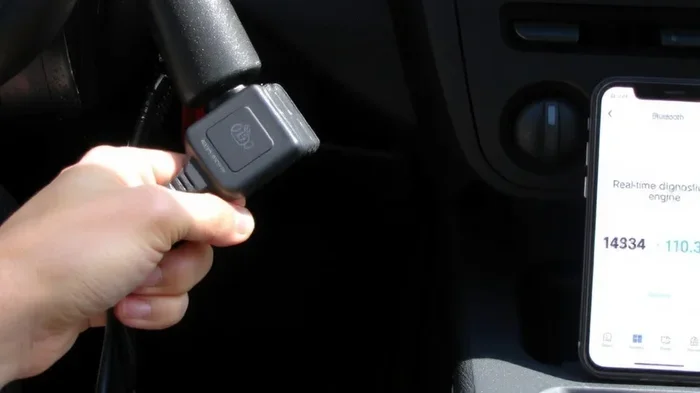
Setting up your phone as a diagnostic reader is straightforward. You need two things: an OBD2 adapter and a compatible app. The adapter connects to your car’s port, and the app reads the data from the adapter and displays it on your screen. Let us break down each step.
Step 1: Find Your OBD2 Port
Every car made after 1996 has an OBD2 port. It is usually located under the dashboard on the driver’s side. You might need to look slightly to the left of the steering column. Some cars hide the port behind a small cover that pops off easily. If you cannot find yours, check your owner’s manual. The port is a trapezoidal-shaped connector with 16 pins. Once you locate it, you are ready for the next step.
Step 2: Choose the Right OBD2 Adapter
The adapter is the bridge between your car and your phone. There are two main types: Bluetooth OBD2 adapters and WiFi OBD2 scanners. Most people prefer Bluetooth because it is simple and works with both Android and iPhone. A Bluetooth OBD2 adapter pairs with your phone wirelessly, so you do not need to run any cables across your dashboard.
WiFi adapters connect directly to your car’s WiFi network. They tend to be a bit faster and more stable, but they also drain your phone battery faster. A popular choice for many users is the ELM327 adapter. This chip is the industry standard for OBD2 communication, and most adapters use it. Just make sure you buy from a reputable brand, because cheap knockoff ELM327 adapters can be unreliable.
Here are some quick tips for picking the right adapter:
- Check compatibility: Make sure the adapter works with your phone’s operating system.
- Go for Bluetooth: It is the most convenient option for everyday use.
- Look for an ELM327 v1.5 chip: This version is the most widely supported and reliable.
- Read reviews: Other users will tell you about real-world performance and durability.
- Consider a WiFi adapter if you want faster data: It is great for live streaming sensor data.
Step 3: Download a Car Diagnostic App
Once you have your adapter, you need an app that can read the data. Both Android and iOS have many excellent options. Some of the best car diagnostic app choices include Torque Pro, Car Scanner, and OBD Fusion. These apps connect to your adapter and display engine fault codes, live sensor data, and even freeze frame data.
Torque Pro is one of the most popular options for Android users. It offers a clean interface and supports a wide range of OBD2 protocol types. Car Scanner is a great choice for iPhone users and also works well on Android. It provides clear graphs and easy-to-understand reports. OBD Fusion works on both platforms and offers a free version that covers most basic scanning needs.
After downloading your app, simply pair it with your adapter through your phone’s Bluetooth or WiFi settings. Open the app, and it will start communicating with your car. Within seconds, you can read codes, view live data, and even clear certain engine check lights. The whole process usually takes less than five minutes.
Best OBD2 Apps for Smartphone Diagnostics
The app you choose makes a big difference in your experience. Not all diagnostic reader apps are created equal. Some are basic and only read codes, while others offer deep customization and advanced features. Here is a closer look at the top options.
Torque Pro
Torque Pro has been a favorite among car enthusiasts for years. It reads and clears diagnostic trouble codes, shows live sensor data, and even lets you log trips. The app also provides a description for each code, which is incredibly helpful if you are not a mechanic. One standout feature is the ability to export your diagnostic data as a PDF, which you can share with your mechanic if needed.
Car Scanner
Car Scanner is known for its user-friendly interface and beautiful graphs. It is especially great for people who are new to car diagnostics. The app shows live data in easy-to-read charts, so you can see how your engine parameters change over time. It also supports a wide range of adapters and vehicles. The free version covers most basic needs, but a paid upgrade unlocks advanced features like data logging and custom dashboards.
OBD Fusion
OBD Fusion is a solid all-around choice that works on both Android and iOS. It reads and clears codes, displays freeze frame data, and provides detailed descriptions for each engine fault code. The app also supports custom PIDs, which lets you monitor specific sensors that matter most to you. It is a great option if you want something straightforward without a steep learning curve.
Comparing Phone-Based Scanners vs Traditional OBD2 Tools
It is natural to wonder how a phone-based setup compares to a traditional scan tool or standalone OBD2 device. The truth is, each has its strengths. Let us break down the key differences so you can decide what works best for you.
| Feature | Phone + Adapter | Traditional OBD2 Scanner |
|---|---|---|
| Cost | $10 to $30 for adapter, app often free | $30 to $200+ for standalone device |
| Portability | Always with your phone | Bulky, needs separate storage |
| Screen Size | Phone screen, large and colorful | Small built-in display |
| Data Depth | Live graphs, trip logs, PDF reports | Basic code read and clear |
| Ease of Use | Simple pairing and intuitive apps | Basic menus, limited features |
| Updates | Apps updated regularly for free | Firmware updates may cost extra |
| Additional Features | GPS tracking, fuel economy, maintenance reminders | Usually code reading only |
As you can see, a phone as OBD2 scanner setup wins on almost every front for the average car owner. Traditional scanners still have a place, especially for professional mechanics who need rugged, dedicated tools. But for everyday diagnostics, your phone is hard to beat. It gives you more information, costs less, and is always in your pocket.
Common Car Problems You Can Diagnose with Your Phone
One of the biggest benefits of using your phone for car maintenance is the ability to identify problems early. Many issues start small but can become expensive if ignored. Here are some of the most common problems you can diagnose with a phone as OBD2 scanner setup.
Check Engine Light Issues
The check engine light is the most common reason people reach for a diagnostic tool. A phone as OBD2 scanner can read the code behind that light and tell you exactly what triggered it. Common causes include a loose gas cap, a faulty oxygen sensor, or a problem with the catalytic converter. By reading the code yourself, you can decide whether it is a quick fix or something that needs professional attention.
Emissions and Sensor Problems
Your car has dozens of sensors that monitor everything from oxygen levels to exhaust temperature. When one of these sensors fails, it can trigger a warning light and affect your car’s performance. A phone as OBD2 scanner lets you see which sensor is acting up, so you can address it before it leads to bigger problems. This is especially important for passing emissions inspections.
Transmission Faults
Transmission issues can be scary and expensive. But many transmission problems start with small codes that are easy to catch early. A car diagnostic tool on your phone can read transmission-specific codes and give you a heads-up. Catching these early can save you from a costly transmission rebuild down the road.
Fuel and Economy Issues
If you notice your fuel economy dropping, your phone can help you figure out why. Live data from your OBD2 adapter lets you monitor fuel trim values, oxygen sensor readings, and other parameters that affect mileage. This kind of vehicle diagnostics can reveal problems like a leaking fuel injector or a failing mass airflow sensor.
Tips for Getting the Most Out of Phone-Based OBD2 Scanning
Using your phone for diagnostics is simple, but a few tips can make the experience much better. Here are some practical suggestions to help you get accurate results and avoid frustration.
Keep Your Adapter Plugged in Securely
A loose connection can cause intermittent errors or missed codes. Make sure your OBD2 adapter clicks firmly into the port. If your adapter keeps wiggling loose, try wrapping a small piece of tape around the connector for a snugger fit.
Clear Codes Only After Fixing the Problem
It can be tempting to clear a code and forget about it. But if the underlying problem is not fixed, the code will come right back. Always address the root cause before clearing any engine fault codes. Your phone will let you monitor the codes over time, so you can confirm the fix worked.
Learn What the Codes Mean
Not all codes are equally urgent. Some are minor and safe to drive with, while others signal serious problems. Take a moment to read the code description in your app before deciding what to do next. If a code sounds serious, do not ignore it. Pull over safely and get your car checked.
Use Live Data for Deeper Insights
Reading codes is just the beginning. Most apps also show live sensor data, which gives you a real-time view of how your car is performing. Watching live data can help you spot trends that point to developing problems. For example, a slowly rising coolant temperature over several trips could hint at a cooling system issue before it becomes a major failure.
Update Your App and Adapter Firmware
App updates often include new vehicle support and bug fixes. Keep your diagnostic app up to date for the best experience. Some adapters also have firmware updates available through their companion apps. Taking a few minutes to update can improve compatibility and accuracy.
Do Not Rely Solely on Your Phone for Major Repairs
Your phone is an excellent diagnostic tool, but it is not a replacement for a professional mechanic. Use it to identify problems, monitor your car’s health, and decide when to seek professional help. Think of it as your first line of defense in car repair and maintenance.
Common Mistakes to Avoid When Using Your Phone as an OBD2 Scanner
Even with a simple setup, there are a few common pitfalls that can cause headaches. Knowing these mistakes ahead of time will save you time and frustration.
Buying a cheap, no-name adapter: Bargain adapters often use outdated chips or poor-quality wiring. They may not connect reliably or could give inaccurate readings. Stick with well-reviewed adapters from trusted brands.
Using the wrong app for your adapter: Not all apps work with all adapters. Before buying, check that the app you want supports your specific adapter model. Most popular apps list compatible adapters on their website or in the app store description.
Ignoring pending codes: Some apps show both current and pending codes. Pending codes are problems that have been detected but have not yet triggered a warning light. These are early warning signs that something is developing. Addressing them early can prevent a check engine light from coming on.
Clearing codes without understanding them: Clearing a code without knowing what caused it is like taking a fever reducer without treating the infection. The symptom disappears, but the problem remains. Always investigate the code first.
Leaving the adapter plugged in when the car is off: Some adapters draw a small amount of power even when the ignition is off. Over time, this can drain your car battery. Unplug the adapter when you are done scanning.
Expert Insights on Phone-Based Car Diagnostics
Many professional mechanics now recommend phone-based scanning to their customers. The technology has matured significantly in recent years, and modern adapters and apps are remarkably accurate. According to automotive experts, a phone as OBD2 scanner is perfectly suitable for 90% of the diagnostic needs that everyday car owners face.
Experienced technicians also point out that phone-based tools empower car owners to take a more active role in their car maintenance. When you can see your car’s data in real time, you make better decisions about when to repair, what to repair, and whether a mechanic is quoting you fairly. This transparency builds trust and can save you hundreds of dollars over the life of your vehicle.
The onboard diagnostics system in your car was designed to give you information. A phone-based setup is the most accessible way to access that information. Whether you are a seasoned DIYer or a complete beginner, the tools and apps available today make it easy to understand what your car is telling you.
Conclusion
Using your phone as an OBD2 scanner is one of the smartest moves any car owner can make. It gives you real-time access to your vehicle’s health, helps you catch problems early, and saves you money on unnecessary trips to the mechanic. With an affordable OBD2 adapter and a free app, your smartphone becomes a powerful car diagnostic tool that fits right in your pocket.
The process is simple: plug in your adapter, pair it with your phone, and start scanning. You can read and clear diagnostic trouble codes, monitor live sensor data, and track your car’s performance over time. Whether you want to understand a check engine light, diagnose a mysterious rattle, or simply stay on top of your car’s engine check system, a phone-based setup delivers professional-grade results at a fraction of the cost.
Start with a reliable Bluetooth adapter, download a well-reviewed app, and spend some time exploring your car’s data. You will be surprised at how much you can learn. Can I use my phone as an OBD2 scanner? Absolutely, and now you know exactly how to do it.
Frequently Asked Questions
Is it safe to use my phone as an OBD2 scanner?
Yes, it is completely safe. The OBD2 port provides data only and does not control any vehicle systems. Your phone simply reads the information the car’s computer sends. As long as you use a reputable adapter and a trusted app, there is no risk to your car’s electronics or your personal data.
Will using my phone as an OBD2 scanner drain my car battery?
A properly used adapter draws very little power. However, if you leave the adapter plugged in with the ignition off for extended periods, it can slowly drain your battery. Always unplug the adapter after you finish scanning to avoid any battery issues.
Can I use my phone as an OBD2 scanner on any car?
You can use it on any car made after 1996 in the United States, as all those vehicles are required to have an OBD2 port. Cars sold in Europe and other regions may have OBD2 compliance as well, usually from 2001 onward for gasoline engines and 2004 for diesel engines. Check your owner’s manual if you are unsure.
Do I need a special phone to use it as an OBD2 scanner?
No special phone is needed. Most modern smartphones, whether Android or iPhone, work perfectly with OBD2 adapters and diagnostic apps. You only need Bluetooth or WiFi capability, which every smartphone made in the last decade has. The app and adapter do the heavy lifting, not your phone’s internal hardware.
Can a phone-based OBD2 scanner fix my car problems?
An OBD2 scanner cannot fix problems, but it can identify them. It reads the codes stored in your car’s computer and shows you what is wrong. Once you know the issue, you can decide whether to fix it yourself or take it to a mechanic. Think of it as a diagnostic tool, not a repair tool.
How accurate are phone-based OBD2 scanners compared to professional tools?
Phone-based scanners are highly accurate for reading and clearing codes. They use the same OBD2 protocol as professional tools. The main difference is in additional features like live data graphs, reporting, and advanced diagnostics. For the vast majority of car owners, a phone-based setup provides more than enough accuracy and detail for everyday diagnostics and maintenance decisions.