Can I Get A Free Label Printer From Ups For My Business
Can you get a free label printer from UPS? The answer depends on your business type, shipping volume, and UPS program eligibility. Many small business owners wonder about free label printer from UPS offers, and the truth is that UPS has run promotions and partnered with printer brands to help sellers save money. In this guide, we break down every option, requirement, and alternative so you can make a smart choice for your shipping label printer needs.
Running a small business means watching every dollar. You want to save where you can, especially on shipping supplies. One question we hear often is whether you can actually get a free label printer from UPS. The short answer is yes, sometimes. But the full picture is a bit more nuanced, and that is exactly what we are going to walk through today.
Whether you are a growing ecommerce store, a dropshipping operation, or a local business that ships orders daily, a shipping label printer can change your workflow completely. It speeds up fulfillment, cuts errors, and makes your packages look professional. So let us dig into how UPS makes this possible and what you need to know before you jump in.
Key Takeaways
- UPS does offer free or discounted label printers through select promotions and business partnerships, but availability changes often.
- Eligibility depends on your shipping volume, UPS account type, and whether you meet minimum monthly label thresholds.
- Thermal printers are the most common free option because they use heat instead of ink, making them ideal for shipping labels.
- Alternatives exist if you don’t qualify, including manufacturer rebates, Amazon deals, and UPS discount programs.
- Setting up your printer correctly saves time and reduces shipping errors for your business.
📑 Table of Contents
- Does UPS Actually Offer a Free Label Printer?
- How the UPS Free Label Printer Program Works
- Who Qualifies for a Free Label Printer from UPS?
- Alternatives to Getting a Free Label Printer
- Setting Up Your Label Printer for Business Use
- Tips to Maximize Your UPS Shipping Benefits
- Final Thoughts on Getting a Free Label Printer from UPS
Does UPS Actually Offer a Free Label Printer?
Here is the honest truth. UPS has not had a permanent, always-available free label printer program for every customer. What they do have are seasonal promotions, business partnership deals, and volume-based incentives that can land you a printer at no cost. These offers typically target businesses that ship a certain number of labels each month through their UPS account.
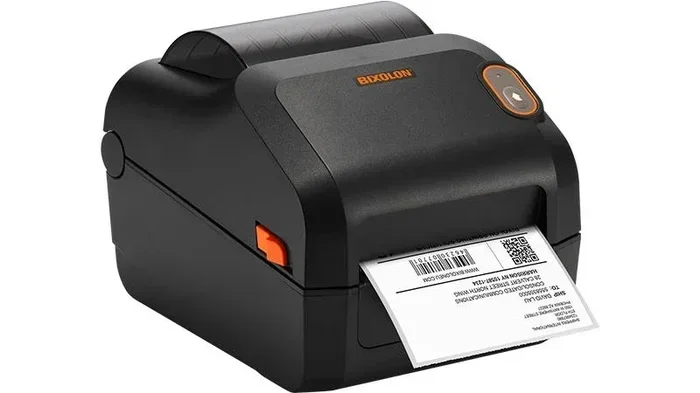
The most common type of printer you will see in these offers is a thermal label printer. Brands like Zebra, Rollo, and DYMO frequently partner with shipping carriers to bundle their printers with service commitments. Thermal printers are perfect for shipping because they do not require ink cartridges. They use heat to print directly on label paper, which keeps your costs low and your labels looking clean.
You might also hear about UPS Ready programs and similar initiatives. These are designed to help businesses set up their entire shipping station with discounted or free equipment. The key is staying updated on current offers, because these promotions come and go throughout the year.
Types of Printers UPS Partners With
Not all printers are created equal when it comes to shipping. Here are the main types you will encounter in UPS free printer offers:
- Thermal printers: These are the gold standard for shipping labels. They print quickly, do not smudge, and require no ink. Think of brands like Rollo, Zebra, or Brother thermal models.
- Inkjet printers: Sometimes included in promotions, but less ideal for shipping labels because ink can smear when exposed to moisture or friction during transit.
- Laser printers: A solid middle ground. They use toner instead of ink and produce smudge-resistant labels. However, they tend to be bulkier than thermal options.
For most businesses shipping packages daily, a thermal printer is the clear winner. It is fast, reliable, and built specifically for label printing. If UPS offers you a free thermal printer, that is almost always a great deal.
How the UPS Free Label Printer Program Works
Understanding the mechanics of how UPS delivers free printers helps you set realistic expectations. Here is a breakdown of the typical process.
Step 1: Meet the Shipping Volume Requirement
Most free printer offers from UPS come with a condition. You need to ship a minimum number of labels per month through your UPS account. This could be as low as 25 labels a month or as high as 200, depending on the specific promotion. The idea is simple: UPS wants to keep you shipping through their platform, and a free printer is a great incentive to lock you in.
Step 2: Choose an Eligible Printer Model
UPS does not always let you pick any printer you want. Instead, they partner with specific manufacturers and offer a curated list of models. These are printers that UPS has tested and trusts for label quality and reliability. You usually get to choose from two or three options at a discounted price or at no cost if you meet the volume threshold.
Step 3: Activate and Start Shipping
Once you receive your printer, you need to activate it with your UPS account. This typically involves downloading the UPS shipping software or connecting the printer to your preferred shipping platform. After setup, you can start printing labels right away. Most thermal printers connect via USB or Wi-Fi, making them easy to set up even if you are not very tech-savvy.
One thing that often trips people up is managing their shipping data. If you use spreadsheets to track orders or manage inventory, you might run into issues like a line that will not delete in your document. In those cases, checking out resources on fixing common spreadsheet problems can save you hours of frustration before your labels go out the door.
Who Qualifies for a Free Label Printer from UPS?
Not every business automatically qualifies for a free label printer from UPS. Let us break down the typical eligibility requirements so you know where you stand.
- Active UPS account: You need a business UPS account, not just a personal shipping profile. Personal accounts rarely qualify for equipment promotions.
- Minimum monthly shipping volume: Most programs require you to ship between 25 and 200 labels per month. The higher the volume, the better the printer deal.
- New UPS customers: Some promotions are exclusive to new UPS business accounts. If you have been shipping with UPS for years, you might miss out on certain offers.
- Business verification: UPS may ask for proof that you are a legitimate business, such as a tax ID, business license, or resale certificate.
- Geographic eligibility: Certain promotions are limited to specific regions or countries. Make sure the offer applies to your location.
If you do not meet these requirements right now, do not worry. There are still plenty of ways to get a quality label printer without spending a fortune, which we will cover in the next section.
Alternatives to Getting a Free Label Printer
What if UPS does not have an active free printer offer right now? Or what if your shipping volume does not qualify? You still have options. Let us look at the best alternatives.
Manufacturer Rebates and Mail-In Offers
Printer brands like Zebra, Rollo, and DYMO frequently run their own rebate programs. You buy the printer at full price, submit your receipt, and they mail you a check for a large portion of the cost. In some cases, this effectively makes the printer free. These rebates are often available year-round, unlike UPS promotions that come and go with the seasons.
Amazon and Retailer Deals
Amazon is a goldmine for affordable label printers. You can find thermal printers from brands like Rollo and Kores for under $200, and during sales events like Prime Day or Black Friday, prices drop even further. Some budget-friendly options work perfectly well for small to medium shipping volumes.
UPS Discounted Printer Programs
Even when UPS is not offering a completely free printer, they often have deeply discounted options for business customers. These discounts can range from 20% to 50% off retail price. It is worth checking the UPS Shipping Supplies page regularly or signing up for their business newsletter to catch these deals.
Shipping Platform Bundles
Platforms like ShipStation, Pirate Ship, and Shippo sometimes offer printer discounts as part of their onboarding promotions. If you are already using one of these platforms for your shipping workflow, check their partner deals. You might find a printer offer that is just as good as what UPS provides.
| Option | Typical Cost | Best For |
|---|---|---|
| UPS Free Printer Promotion | $0 | Businesses meeting volume requirements |
| Manufacturer Rebate | $0 after rebate | Patient buyers willing to wait for refund |
| Amazon Deal | $100-$200 | Small businesses needing affordable options |
| UPS Discounted Printer | $50-$150 | Businesses wanting UPS-branded support |
| Shipping Platform Bundle | Varies | Businesses already on the platform |
Setting Up Your Label Printer for Business Use
Once you have your printer, whether it came free from UPS or you purchased it through a rebate, proper setup is essential. A poorly configured printer leads to wasted labels, misprints, and frustration.
Connect the Printer to Your Computer
Most thermal printers connect via USB for a reliable wired connection. If your model supports Wi-Fi, take the time to set up the wireless connection during initial installation. This gives you the flexibility to place the printer anywhere in your workspace without worrying about cable length.
Install the Correct Drivers and Software
Download the latest drivers from the printer manufacturer’s website. Do not rely on the disc that came in the box, as those often have outdated software. For UPS label printing, you will also need the UPS WorldShip software or your preferred shipping platform installed and configured to communicate with your printer.
Test Print Before Your First Real Shipment
Always run a test print before you send out your first batch of packages. Check the label alignment, scan the barcode to make sure it is readable, and verify that the text is crisp and clear. Fixing alignment issues on a test print takes seconds. Fixing them on 100 real packages takes hours.
Keeping your data organized is also critical. Many businesses use spreadsheets to manage their order information and shipping data. If you ever find yourself struggling with formatting issues in your spreadsheets, it helps to know how to troubleshoot common problems, such as a stubborn line that will not delete in Microsoft Excel, so your workflow stays smooth.
Tips to Maximize Your UPS Shipping Benefits
Getting a free printer is just the beginning. Here are some expert tips to make sure you get the most value out of your UPS relationship and your new printer.
- Negotiate your UPS rates: Do not accept the default pricing. Contact your UPS account representative and ask for a volume discount. Even a small percentage reduction adds up fast if you ship hundreds of packages a month.
- Use UPS One Rate for predictable costs: This pricing model gives you a flat fee based on package size, making it easier to budget for shipping and avoid surprise costs.
- Print labels in batches: Rather than printing one label at a time, batch your labels by destination or shipping class. This reduces printer wear and speeds up your fulfillment process.
- Keep your printer maintained: Clean the print head regularly with a lint-free cloth and isopropyl alcohol. This prevents buildup that can cause blurry or incomplete labels.
- Track your savings: Keep a record of how much you spend on labels, ink, and printer maintenance. Over time, this data helps you justify the investment and identify further cost-saving opportunities.
Common Mistakes to Avoid
- Using the wrong label stock: Not all label paper works with thermal printers. Always use labels designed for your specific printer model to avoid jams and poor print quality.
- Ignoring software updates: Both your printer drivers and UPS shipping software need regular updates. Outdated software can cause compatibility issues and printing errors.
- Waiting too long to act on promotions: UPS free printer offers are time-sensitive. If you see a deal that fits your needs, act quickly before it expires.
Expert Insights on Free Printer Offers
Industry experts consistently advise small business owners to take advantage of free equipment offers when they can. A label printer is one of the highest-impact, lowest-cost investments you can make for your shipping operation. Even if you only save $150 to $300 on a thermal printer, that is money you can put toward marketing, inventory, or other business needs. The key is to stay informed about current offers, maintain an active UPS business account, and be ready to act when a promotion aligns with your shipping volume.
Remember that UPS is not the only carrier with equipment programs. FedEx and USPS also run similar promotions from time to time. It pays to compare across carriers before committing to a single program. Sometimes a competitor’s offer is better, and sometimes UPS simply has the most generous deal available.
Final Thoughts on Getting a Free Label Printer from UPS
So, can you get a free label printer from UPS? Absolutely, under the right circumstances. The key is understanding the program requirements, staying informed about current promotions, and being ready to act when an offer matches your business needs. A free shipping label printer can transform how you fulfill orders, save you money on supplies, and give your business a more professional look.
Whether you qualify for a UPS promotion, snag a manufacturer rebate, or find a great deal on Amazon, the most important step is taking action. Do not let another month go by printing labels on your home inkjet printer when a dedicated thermal printer could make your life so much easier. Start by checking your UPS account for current offers, and explore the alternatives we covered if the timing is not right yet.
Your business deserves efficient, reliable shipping tools. And the best part is that you do not always have to spend a fortune to get them. Keep shipping smart, keep saving, and keep growing.
Frequently Asked Questions
How do I get a free label printer from UPS?
You can get a free label printer from UPS by meeting the requirements of their current promotional offers. These typically include having an active UPS business account and shipping a minimum number of labels per month. Check the UPS website or contact your UPS account representative for the latest available programs.
What kind of printer does UPS give away for free?
UPS most commonly offers thermal label printers through their promotions. Thermal printers are ideal for shipping because they do not use ink and produce smudge-resistant labels quickly. Popular brands include Rollo, Zebra, and DYMO, depending on the current promotion.
Do I need a UPS business account to qualify?
Yes, most free printer offers from UPS require a business account. Personal or residential UPS accounts generally do not qualify for equipment promotions. Make sure your account is set up as a business account with the proper verification documents.
Can I use a non-UPS printer for shipping labels?
Absolutely. You are not locked into UPS-branded equipment. Any compatible thermal or laser printer can print UPS shipping labels. The UPS software works with most standard printers, so you have flexibility in choosing the model that fits your budget and needs.
How often does UPS run free printer promotions?
UPS free printer promotions come and go throughout the year. They are often tied to seasonal peaks like the holiday shipping season or new business account sign-up drives. It is a good idea to check the UPS shipping supplies page regularly or subscribe to their business newsletter so you do not miss an offer.
What should I do if I do not qualify for a free UPS printer?
If you do not qualify for a UPS promotion, look into manufacturer rebates from brands like Zebra or Rollo, discounted printers on Amazon, or bundles from shipping platforms like ShipStation. These alternatives can still save you significant money on a quality label printer for your business.
=== CONCLUSION ===
Getting a free label printer from UPS is a real opportunity for businesses that ship regularly. By understanding the eligibility requirements, exploring alternatives, and setting up your equipment correctly, you can save money and streamline your fulfillment process from day one. The free label printer from UPS program is just one of many ways UPS supports its business customers. Stay proactive, keep an eye on promotions, and invest in the tools that help your business grow. Your future self, standing at a fast and efficient shipping station, will thank you.