Can I Convert Usb C To Lightning Your Complete Guide
Yes, you can convert USB C to Lightning using a USB C to Lightning cable or adapter. This connection lets you charge iPhones, iPads, and other Apple devices with USB C power sources and computers. Understanding USB C to Lightning compatibility, cable quality, and speed differences helps you make the best choice for your setup.
The question of whether you can convert USB C to Lightning comes up a lot among Apple users. The short answer is yes. You can use a USB C to Lightning cable to connect your Apple devices to USB C power sources, laptops, and wall chargers. This USB C to Lightning connection has become essential as Apple transitions its entire lineup to USB C ports.
In this guide, you will learn everything you need to know about converting USB C to Lightning. We will cover how the connection works, which devices support it, how to choose the right cable, and common problems you might run into. By the end, you will feel confident picking the right USB C to Lightning setup for your needs.
Whether you are charging your iPhone from a MacBook, syncing data, or just trying to understand what the fuss is about, this guide has you covered. Let us dive into the world of USB C to Lightning compatibility and accessories.
Key Takeaways
- USB C to Lightning cables are real and widely available: Apple and many third-party brands make them for charging and data transfer.
- Not all cables are created equal: MFi-certified cables offer better safety, speed, and reliability than uncertified options.
- USB C to Lightning enables fast charging: With the right power source, you can charge compatible iPhones up to 50% in about 30 minutes.
- Data transfer speeds vary: USB C to Lightning cables support up to 480 Mbps, the same as older Lightning cables.
- Apple is moving toward USB C entirely: Newer iPads and MacBooks already use USB C, and future iPhones may follow the same path.
- Always check device compatibility: Not every Lightning device supports the same charging speeds or data rates over USB C.
📑 Table of Contents
- What Is USB C to Lightning and Why Does It Matter
- How USB C to Lightning Conversion Works
- Devices That Support USB C to Lightning
- How to Choose the Right USB C to Lightning Cable
- Common Problems When Converting USB C to Lightning
- Expert Tips for Getting the Best Performance
- The Future of USB C and Lightning on Apple Devices
- Conclusion
What Is USB C to Lightning and Why Does It Matter
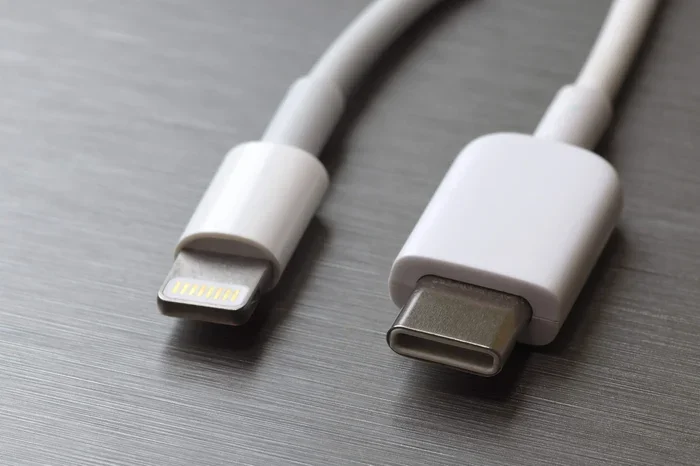
A USB C to Lightning cable has a USB C connector on one end and a Lightning connector on the other. The USB C side plugs into power banks, laptops, wall chargers, and car adapters. The Lightning side connects to your iPhone, iPad, or iPod. It is a simple bridge between two different connector types.
This matters because Apple has been shifting its devices toward USB C. The newer iPads and MacBooks already use USB C. But many iPhones still rely on the Lightning port. A USB C to Lightning cable lets you use one charger or cable across multiple devices. This reduces clutter and makes life simpler.
Here are some key reasons why USB C to Lightning conversion is important:
- Universal charging: Use one USB C charger for your phone, tablet, and laptop.
- Faster charging: USB C supports higher wattage than older USB A connections.
- Data transfer: Move photos, files, and backups between devices and computers.
- Future-proofing: Prepare for the day when even iPhones switch to USB C.
- Fewer cables: Reduce the number of different cords you need to carry.
If you want to explore more useful tech accessories that simplify everyday life, check out our guide on 10 Gadgets To Make Moms Life Easier for some great ideas that pair well with USB C to Lightning setups.
How USB C to Lightning Conversion Works
Understanding how USB C to Lightning conversion works helps you avoid confusion and pick the right gear. The process is straightforward, but there are some technical details worth knowing.
The Connector Types Explained
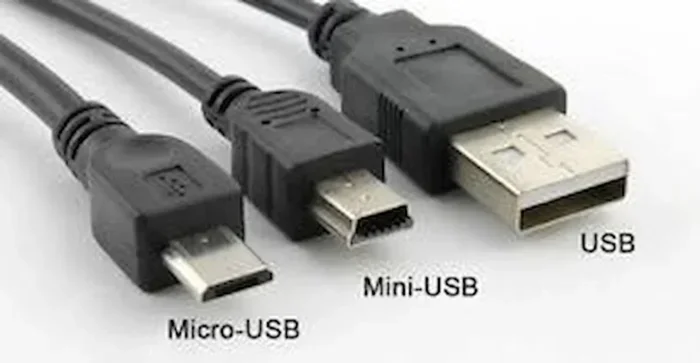
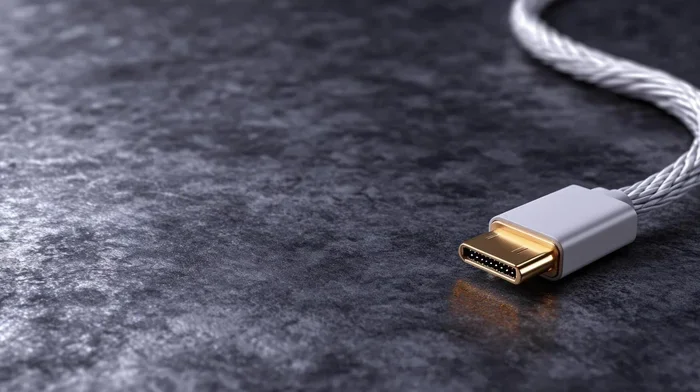
USB C is a small, reversible connector. You can plug it in either way, which is a big improvement over older USB types. Lightning is Apple’s proprietary connector. It is also reversible but smaller than USB C. A USB C to Lightning cable simply bridges these two connector types with wiring inside the cable.
The USB C side handles the power and data input. The Lightning side delivers that power and data to your Apple device. Inside the cable, a small chip manages communication between the two ends. This chip is part of what makes MFi certification so important.
Power Delivery and Charging Speeds
USB C supports USB Power Delivery, which allows for higher wattage charging. When you pair a USB C to Lightning cable with a USB C power adapter that supports fast charging, you can charge compatible iPhones much faster.
Here is a quick comparison of charging speeds:
| Charging Method | Wattage | iPhone 15 Charge Time (0-50%) |
|---|---|---|
| Standard USB C to Lightning | 5W to 12W | About 30 minutes |
| USB C Fast Charging (20W+) | 20W to 27W | About 30 minutes |
| USB C Fast Charging (30W+) | 30W+ | About 25 minutes |
As you can see, using a higher-wattage USB C charger with your USB C to Lightning cable makes a real difference. A 5-watt charger will take much longer than a 20-watt or 30-watt option.
Data Transfer Speeds
When it comes to data transfer, a USB C to Lightning cable supports speeds up to 480 Mbps. This is the same speed as older USB 2.0 Lightning cables. It is fast enough for syncing photos, backing up your device, and transferring music or videos. However, it is not as fast as USB 3.0 or Thunderbolt connections.
If you need faster data transfer, you may want to look into wireless options or newer devices that support faster wired connections. For iPhone users looking to keep their contacts organized, you might also enjoy learning about adding prefixes to numbers on iPhone to keep your contact list neat and easy to navigate.
Devices That Support USB C to Lightning
Not every Apple device works the same way with USB C to Lightning cables. Apple has been updating its lineup, and device compatibility matters a lot. Let us break down which devices support this connection.
iPhones That Work with USB C to Lightning
Every iPhone from iPhone 5 onward uses the Lightning port. This means all of these models can use a USB C to Lightning cable for charging and data transfer. However, fast charging over USB C is only available on iPhone 8 and later models.
Here is a list of iPhone models that support USB C to Lightning charging:
- iPhone 8 and iPhone 8 Plus
- iPhone X
- iPhone XR and iPhone XS
- iPhone 11, 11 Pro, and 11 Pro Max
- iPhone 12, 12 Mini, 12 Pro, and 12 Pro Max
- iPhone 13, 13 Mini, 13 Pro, and 13 Pro Max
- iPhone 14, 14 Plus, 14 Pro, and 14 Pro Max
- iPhone 15 and iPhone 15 Plus (these already use USB C natively)
For the best fast-charging experience, pair your USB C to Lightning cable with a 20-watt or higher USB C power adapter. Apple sells its own 20-watt USB C adapter, and many third-party options work great too.
iPads and MacBooks with USB C to Lightning Support
Many iPads still use the Lightning port, even as Apple pushes USB C on its newer models. iPads like the iPad (10th generation), iPad mini (6th generation), and iPad Air (4th and 5th generation) use Lightning and work with USB C to Lightning cables.
MacBooks, on the other hand, use USB C or Thunderbolt ports exclusively. You can absolutely use a USB C to Lightning cable to charge your iPad or iPhone from a MacBook. This is one of the biggest advantages of the USB C ecosystem. You can carry one charger and cable setup for all your Apple devices.
Here are some quick tips for getting the best results with your USB C to Lightning setup:
- Use a high-quality power adapter: Look for at least 20 watts for fast charging.
- Keep cables short for best performance: Longer cables may lose some charging speed.
- Avoid cheap unbranded cables: They may not support fast charging or data transfer.
- Check for MFi certification: This ensures the cable is safe and compatible.
How to Choose the Right USB C to Lightning Cable
Not all USB C to Lightning cables are the same. Choosing the right one depends on what you need. Do you want fast charging? Data transfer? Durability? Let us look at what to consider.
Certified vs. Non-Certified Cables
MFi certification stands for Made for iPhone/iPad/iPod. It is Apple’s licensing program for accessories. When you buy an MFi-certified USB C to Lightning cable, you get a product that has been tested for safety and compatibility.
Non-certified cables can still work, but they come with risks. They may overheat, charge slowly, or stop working after a few months. Some non-certified cables can even damage your device. Always look for the MFi badge when shopping for a USB C to Lightning cable.
Here is a quick comparison of certified versus non-certified cables:
| Feature | MFi-Certified Cable | Non-Certified Cable |
|---|---|---|
| Safety | Tested and approved by Apple | No guaranteed safety standards |
| Charging Speed | Supports full fast-charging speeds | May limit charging speed |
| Data Transfer | Full 480 Mbps support | May have reduced or unstable speeds |
| Durability | Higher quality materials | Often cheaper and less durable |
| Compatibility | Works with all iOS updates | May break after software updates |
| Price | Slightly higher | Usually cheaper upfront |
The price difference is small compared to the peace of mind you get from a certified cable. Investing in a good USB C to Lightning cable saves you money and frustration in the long run.
Cable Length and Durability Considerations
Cable length matters more than people think. A shorter cable charges faster and is less likely to create voltage drop. However, longer cables give you more flexibility. If you like to charge your phone while sitting on the couch and your charger is across the room, a longer cable is helpful.
Look for cables with braided nylon or Kevlar reinforcement. These materials resist fraying and last much longer than basic rubber cables. A USB C to Lightning cable that costs a little more upfront will often last years longer than a cheap alternative.
Brands Worth Considering
Apple makes its own USB C to Lightning cable, and it is an excellent product. But there are also great third-party options. Anker, Belkin, and Nomad all make high-quality certified cables. These brands offer warranties and strong build quality.
When shopping, look for these trusted brands and always verify MFi certification. Avoid mystery brands sold at very low prices on marketplaces. They rarely deliver on their promises.
Common Problems When Converting USB C to Lightning
Even with the right cable, you may run into issues. USB C to Lightning conversion is not always plug-and-play. Here are the most common problems and how to fix them.
Charging Issues and Speed Problems
If your iPhone is charging slowly, the first thing to check is your power adapter. A 5-watt charger will charge your device much slower than a 20-watt or 30-watt adapter. Also, make sure your USB C to Lightning cable supports fast charging.
Another common issue is debris in the Lightning port. Dust, lint, and pocket crumbs can block the connection. Use a soft brush or compressed air to clean the port gently. Never use metal objects, as they can damage the pins inside.
Sometimes the cable itself is the problem. A damaged or frayed cable will not deliver consistent power. Inspect your cable regularly and replace it if you see any wear.
Data Transfer Troubles
If your computer does not recognize your iPhone when connected via a USB C to Lightning cable, try these steps:
- Unlock your iPhone and trust the computer when prompted.
- Try a different USB port on your computer.
- Restart both your iPhone and your computer.
- Update your iOS and your computer’s operating system.
- Try a different USB C to Lightning cable to rule out a faulty cable.
Data transfer issues are usually caused by software glitches or cable problems. A certified cable almost always solves the issue.
Cable Compatibility Confusion
One thing that trips people up is the difference between USB C to Lightning and USB A to Lightning cables. USB A is the older, rectangular connector found on most wall chargers and computers. A USB C to Lightning cable will not work with a USB A port without an adapter.
Make sure you know which connector type your charger or port uses. If you have a newer MacBook or a modern wall charger, it likely uses USB C. Older chargers and computers usually use USB A.
Expert Tips for Getting the Best Performance
Getting the most out of your USB C to Lightning setup is easier than you think. Here are some expert-backed tips to improve your experience.
Tip 1: Invest in a quality power adapter. The cable is only half the equation. A good 20-watt or 30-watt USB C adapter makes a huge difference in charging speed. Apple’s own adapters are reliable, but brands like Anker and Belkin also offer excellent options.
Tip 2: Avoid charging in extreme temperatures. Both hot and cold environments can slow down charging and potentially damage your battery. Charge your device in a cool, dry place for the best results.
Tip 3: Enable optimized battery charging. On iPhones running iOS 13 or later, go to Settings, then Battery, then Battery Health. Turn on Optimized Battery Charging. This feature learns your charging habits and reduces battery wear.
Tip 4: Keep your cables neatly stored. Coil your cables loosely and avoid wrapping them tightly. Tight wrapping can damage the internal wires over time. A simple cable organizer or pouch keeps your USB C to Lightning cables in great shape.
Tip 5: Update your devices regularly. Software updates often include improvements to charging and data transfer performance. Keeping your iPhone and iPad updated ensures the best compatibility with your cables and accessories.
Tip 6: Use wireless charging when possible. If you have a MagSafe or Qi-compatible charger, use it for everyday charging. This reduces wear on your Lightning port and cable, extending their lifespan.
The Future of USB C and Lightning on Apple Devices
Apple has been moving toward USB C for several years now. The iPad Air, iPad Pro, MacBooks, and even the iPhone 15 all use USB C. This shift means that USB C to Lightning cables are likely a transitional solution.
What does this mean for you? If you currently use Lightning devices, a USB C to Lightning cable is a smart investment now. It keeps your devices compatible with modern chargers and computers. But in the coming years, Apple may fully retire the Lightning port.
When that happens, all your cables and accessories will shift to USB C. Until then, having a few high-quality USB C to Lightning cables on hand is a practical move. You get the best of both worlds today while preparing for tomorrow.
The transition to USB C also brings benefits beyond just cables. USB C supports faster data transfer, higher power delivery, and video output. These features make it a superior connector in almost every way. Embracing USB C to Lightning now means you are already part of this future.
Conclusion
So, can you convert USB C to Lightning? Absolutely yes. A USB C to Lightning cable is a simple, effective way to charge and sync your Apple devices with modern USB C power sources and computers. Whether you are using a MacBook, a USB C wall charger, or a portable power bank, this cable bridges the gap between old and new technology.
The key is to choose the right cable. Look for MFi certification, pick the right length, and invest in a quality power adapter for the best fast-charging experience. Avoid cheap, uncertified cables that may cause problems down the road.
USB C to Lightning is not just a cable. It is a practical solution that keeps your Apple devices powered and connected in a rapidly changing world. With the right setup, you will enjoy faster charging, reliable data transfer, and fewer cables cluttering your space. Make the switch today and experience the difference a quality USB C to Lightning cable can make.
Frequently Asked Questions
Can I use a USB C to Lightning cable for fast charging?
Yes, you can. To get fast charging, you need a USB C to Lightning cable paired with a 20-watt or higher USB C power adapter. This combination charges compatible iPhones up to 50% in about 30 minutes. Make sure your cable is MFi-certified for the best results.
Is a USB C to Lightning cable the same as a USB A to Lightning cable?
No, they are different. The USB C end is smaller and reversible, while the USB A end is the older rectangular shape. You cannot plug a USB C to Lightning cable directly into a USB A port without an adapter. Always check which connector type your charger or device uses.
Do all iPhones support fast charging with USB C to Lightning?
No, only iPhone 8 and later models support fast charging over USB C to Lightning. Older iPhones like the iPhone 7 and earlier will charge at standard speeds regardless of the charger you use. Always check your specific model for fast-charging compatibility.
Can I transfer data with a USB C to Lightning cable?
Yes, you can transfer data between your iPhone and a computer using a USB C to Lightning cable. The speeds are up to 480 Mbps, which is the same as standard Lightning cables. This is fast enough for syncing photos, backing up your device, and transferring files.
Are third-party USB C to Lightning cables safe to use?
Third-party cables are safe as long as they are MFi-certified. MFi certification means Apple has tested the cable for safety and compatibility. Avoid cheap, uncertified cables from unknown brands, as they may overheat or damage your device.
Will Apple discontinue Lightning devices in the future?
Apple has been transitioning its entire lineup to USB C. The iPhone 15 already uses USB C natively, and future iPhones are expected to follow. For now, USB C to Lightning cables remain essential for anyone with Lightning-based iPads, iPods, or older iPhones.