Are Tv Hdmi Ports Male Or Female Answered Right Here
TV HDMI ports are female connectors that receive male plugs on cables. Understanding this basic fact helps you troubleshoot connection issues and choose the right cables for your setup. Every TV has female HDMI ports built into the back or side panel, while the cables you plug in have male ends. This guide covers everything from port types to common problems.
Have you ever looked at the back of your television and wondered about those small rectangular slots? They are called HDMI ports, and they play a huge role in how you enjoy your favorite shows, movies, and games. But here is a question many people never think to ask: are TV HDMI ports male or female?
The answer is simpler than you might think. TV HDMI ports are female connectors. They are the recessed sockets built into the back or side of your television. The cables you use have male plugs on each end that fit right into those slots. Understanding this basic fact can save you a lot of confusion when setting up your home entertainment system.
In this guide, we will walk through everything you need to know about HDMI port gender. You will learn what male and female mean in this context, why it matters, and how to troubleshoot common connection issues. Whether you are a tech beginner or someone who just wants a quick refresher, this article has you covered.
Key Takeaways
- TV HDMI ports are always female: The port on your television is a recessed socket designed to receive a male connector.
- HDMI cables have male ends on both sides: Both plugs on a standard HDMI cable are male, designed to fit into female ports.
- Different HDMI versions exist: HDMI 1.4, 2.0, and 2.1 ports support different features like 4K, 8K, and eARC.
- Port gender matters for adapters: Knowing male vs. female helps you pick the right adapter or converter for your setup.
- Common issues are easy to fix: Loose connections, dust, and damaged cables cause most HDMI problems.
- Smart TVs use the same port design: Whether you have a budget TV or a premium smart TV, HDMI port gender stays the same.
📑 Table of Contents
- What Is an HDMI Port and How Does It Work?
- Are TV HDMI Ports Male or Female?
- Types of HDMI Ports and Versions
- Why Knowing Port Gender Matters
- Common HDMI Port Problems and How to Fix Them
- Quick Tips for HDMI Port Care
- Expert Insights on HDMI Port Design
- How HDMI Ports Compare to Other Video Connections
- Final Thoughts
What Is an HDMI Port and How Does It Work?
HDMI stands for High Definition Multimedia Interface. It is the standard connection used to send both audio and video signals from a source device to a display. Think of your Blu-ray player, gaming console, or streaming stick. These devices send picture and sound to your TV through a single cable.
The HDMI connector has been around since the early 2000s. It replaced older cables that needed separate connections for video and audio. Today, one HDMI cable handles everything. This makes setup much easier for everyday users.
The Basic Anatomy of an HDMI Connection
Every HDMI connection involves two parts. The first is the port on your TV, which is the female end. The second is the plug on your cable, which is the male end. The male plug slides into the female port and locks in place with small tabs called retention clips.
Inside the port, there are tiny metal contacts that align with the corresponding pins on the cable plug. These contacts carry the digital signal. When the connection is secure, you get a clear picture and sound. When it is loose or dirty, you might see flickering or no signal at all.
Why HDMI Became the Standard
HDMI won popularity because of its simplicity. Before HDMI, people needed multiple cables. One for video. Another for left audio. Another for right audio. HDMI combined all of that into a single cable. Today, HDMI ports are found on almost every TV, monitor, projector, and streaming device sold.
The technology has also evolved over the years. Newer versions support higher resolutions, faster refresh rates, and advanced features like eARC audio. But the basic port design and gender have stayed the same across all versions.
Are TV HDMI Ports Male or Female?
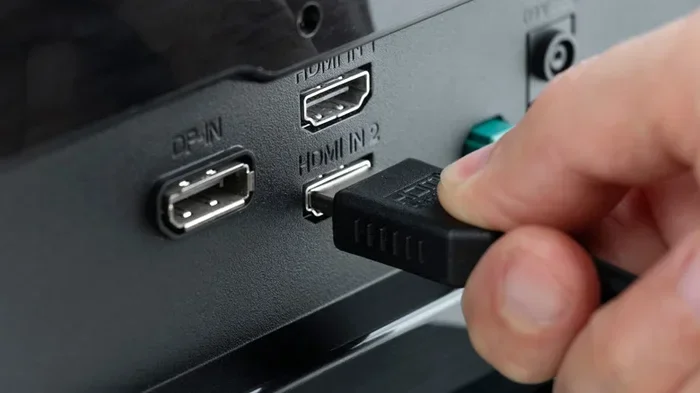
This is the core question, and the answer is clear. TV HDMI ports are female. They are socket-style openings designed to receive a male HDMI plug. You can see this yourself when you look at the back of your TV. The ports are flush with the surface or slightly recessed into the panel.
The male connector is the part you hold when you pick up an HDMI cable. It is the protruding plug with a trapezoidal shape. When you push it into the TV, it clicks into place. The retention clips keep it secure and prevent it from pulling out easily.
Understanding Port Gender in Electronics
The concept of male and female connectors is not unique to HDMI. It applies across many types of electronic connections. In general, the female part is the fixed, receiving side. The male part is the moving, inserting side. This design has been used for decades in audio jacks, USB ports, and power plugs.
For HDMI, the female port stays attached to the TV or display. The male plug stays attached to the cable. This separation makes cables replaceable. If a cable gets damaged, you just swap it out. The port on the TV remains untouched.
What About the HDMI Port on Other Devices?
The same gender rule applies to other devices. The HDMI port on your laptop, soundbar, or game console is also female. The HDMI cable itself has male ends on both sides. This is true for every standard HDMI connection you will encounter in a home setup.
Some devices, like capture cards or HDMI switches, may have both input and output ports. All of these ports are female. The cables connecting them have male ends. The gender never changes, no matter what type of device you are using.
Types of HDMI Ports and Versions
Not all HDMI ports are created equal. Over the years, HDMI standards have evolved to support new features. Here is a breakdown of the main versions you will encounter.
Standard HDMI (Type A)
This is the most common HDMI port. It has 19 pins and is found on virtually every TV, monitor, and streaming device. Standard HDMI supports resolutions up to 1080p and is still widely used today.
Even though it is the oldest version, standard HDMI Type A ports are still relevant. Many devices, like basic cable boxes and older gaming consoles, work perfectly with this port type.
Mini HDMI (Type C)
Mini HDMI is a smaller version of the standard port. It is commonly found on tablets, DSLR cameras, and some laptops. The port is still female, and the cable has a male mini plug on one end and a standard male plug on the other.
Mini HDMI ports are less common than standard ones, but they serve an important purpose. They allow compact devices to output high-definition video without needing a bulky connection.
Micro HDMI (Type D)
Micro HDMI is even smaller than mini HDMI. You will find it on some smartphones and action cameras. Like the other types, the port on the device is female, and the cable has a male micro plug.
This port type is rare but useful for mobile devices that need a compact connection. If you have a camera or phone with a micro HDMI port, you will need a special cable to connect it to your TV.
HDMI Version Numbers and What They Mean
HDMI versions refer to the capabilities of the port and cable, not the physical shape. Here is a quick comparison of the main versions:
- HDMI 1.4: Supports 4K at 30Hz. Common on TVs from the mid-2000s to early 2010s.
- HDMI 2.0: Supports 4K at 60Hz. Found on most modern TVs and streaming devices.
- HDMI 2.1: Supports 4K at 120Hz and 8K at 60Hz. Found on premium TVs and next-gen consoles.
No matter the version, the port gender remains the same. All HDMI ports are female, and all HDMI cable ends are male.
Why Knowing Port Gender Matters
Understanding whether an HDMI port is male or female might seem like a small detail. But it actually matters in several practical situations.
Choosing the Right Adapter
Adapters are used to convert one type of connection to another. If you need an HDMI to DisplayPort adapter, for example, you need to know the port gender. The HDMI side of the adapter will be female, and the DisplayPort side will also be female. The adapter has male plugs on both ends that connect to your cables.
Buying the wrong adapter can cause frustration. If you know that your TV port is female, you will look for an adapter with a male input side. This simple knowledge saves time and money.
Building a Home Theater Setup
When setting up a home theater, you often need to connect multiple devices. A soundbar, a cable box, a gaming console, and a streaming stick might all share your TV’s HDMI ports. Knowing that these ports are female helps you plan your cable runs correctly.
You will also need to understand HDMI ARC (Audio Return Channel) and eARC ports. These are special female HDMI ports that allow your TV to send audio back to a soundbar or receiver. They use the same gender principle as standard HDMI ports.
Troubleshooting Connection Issues
When your TV shows no signal, the first thing to check is the connection. A loose male plug or a dirty female port can cause problems. Knowing the port gender helps you understand what to inspect and how to fix it.
For example, if the cable feels wobbly, the male plug might be worn out. If there is dust inside the port, you can gently clean the female opening with compressed air. These simple steps often solve HDMI issues without needing professional help.
Common HDMI Port Problems and How to Fix Them
HDMI ports are generally reliable, but problems do happen. Here are the most common issues and their solutions.
No Signal on the Screen
This is the most frequent HDMI problem. It usually means the male plug is not making proper contact with the female port. Start by unplugging the cable and plugging it back in firmly. Check that the plug goes in straight and clicks into place.
If the signal still does not appear, try a different cable. The cable itself might be damaged. A faulty HDMI cable can cause the same symptoms as a bad port.
Intermittent Signal or Flickering
Intermittent issues often point to a loose connection. The retention clips on the male plug might be worn or broken. When the clips do not grip the female port properly, the connection becomes unstable.
You can try gently bending the retention clip to tighten the fit. If that does not work, replacing the cable is the best solution. Avoid forcing the plug into the port, as this can damage both the male plug and the female socket.
Dirty or Dusty Ports
Dust and lint can accumulate inside HDMI ports over time. This debris blocks the metal contacts and causes signal problems. Use a can of compressed air to blow out the port. You can also use a soft, dry brush to gently remove particles.
Never use liquids to clean HDMI ports. Moisture can damage the internal electronics. Keep your ports clean and free of debris for the best performance.
Bent or Damaged Pins
The pins inside a female HDMI port are delicate. If a cable is forced in at an angle, the pins can bend or break. A damaged port may need professional repair or replacement.
To prevent pin damage, always insert the cable straight and gently. Do not yank or pull the cable at an angle. Handle the connection with care, especially with children or pets around.
Quick Tips for HDMI Port Care
Taking care of your HDMI ports extends their lifespan and keeps your setup running smoothly. Here are some quick tips to follow:
- Always insert cables straight: Never force a plug in at an angle.
- Use cable management: Avoid letting cables hang or pull on the ports.
- Clean ports regularly: Use compressed air to remove dust and debris.
- Check for firmware updates: Some TV HDMI issues are fixed through software updates.
- Label your cables: This helps you quickly identify which cable goes where.
- Use high-quality cables: Cheap cables can cause signal loss and damage ports over time.
Expert Insights on HDMI Port Design
HDMI port design has remained remarkably consistent over the years. Engineers have focused on improving signal quality and bandwidth rather than changing the physical port shape. This consistency is a big advantage for consumers.
According to HDMI licensing experts, the female port design was chosen for durability. A recessed socket is less likely to be damaged than a exposed connector. The male plug, being the removable part, absorbs the wear and tear of daily use.
This design philosophy is similar to how other connectors work. USB ports are female, and the cable plugs are male. The same principle applies to audio jacks, power outlets, and Ethernet ports. Understanding this pattern makes it easy to figure out port gender for any connection type.
The HDMI Forum continues to update the standard to support new technologies. But the core design of male plugs and female ports remains unchanged. This means that cables and adapters you buy today will work with TVs and devices for years to come.
How HDMI Ports Compare to Other Video Connections
While HDMI is the most common connection today, other video ports exist. Here is how they compare in terms of port gender and design.
| Connection Type | Port Gender on TV | Cable End Gender | Common Use |
|---|---|---|---|
| HDMI | Female | Male on both ends | Audio and video |
| DisplayPort | Female | Male on both ends | PC monitors |
| VGA | Female | Male on both ends | Older PCs and projectors |
| Composite AV | Female | Male on both ends | Legacy devices |
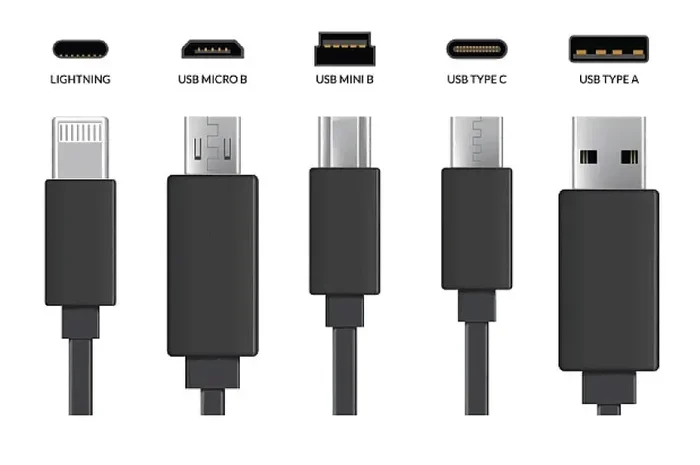
| USB-C | Female (on device) | Male (on cable) | Modern laptops and phones |
As you can see, the female port design is universal across all these connection types. The gender concept is consistent and easy to understand once you know the basics.
Final Thoughts
So, to answer the question directly: TV HDMI ports are female. The ports on your television are sockets designed to receive the male plugs on your HDMI cables. This simple fact is the foundation of understanding how your home entertainment connections work.
Knowing the port gender helps you choose the right adapters, troubleshoot connection problems, and plan your setup with confidence. It is a small piece of knowledge that makes a big difference in your daily tech experience.
Take a moment to look at the back of your TV. Those HDMI ports are waiting to connect your favorite devices. With the right cables and a little care, you can enjoy crystal-clear picture and sound for years to come.
Whether you are setting up a new TV, fixing a stubborn connection, or just curious about how things work, you now have the answers you need. Share this knowledge with friends and family who might be struggling with their own HDMI setup. A little understanding goes a long way.
Frequently Asked Questions
Can an HDMI port be male?
No, HDMI ports on TVs and devices are always female. The male part is the plug on the end of the HDMI cable. The port on the TV is a recessed socket designed to receive that male plug.
What is the difference between HDMI input and output ports?
An HDMI input port on your TV receives a signal from a device like a cable box or game console. An HDMI output port on a device sends a signal to a display. Both are female ports, and both use male cable ends to connect.
Do all HDMI cables have male ends on both sides?
Yes, standard HDMI cables have male plugs on both ends. Both plugs are designed to fit into female ports on TVs, monitors, and other devices. There are no HDMI cables with female ends on both sides.
Can a damaged HDMI port be repaired?
In most cases, yes. A damaged female HDMI port can be repaired by a technician. The repair involves replacing the port on the TV’s circuit board. However, simple issues like dust or a loose cable are much easier to fix at home.
Why does my HDMI cable keep falling out of the port?
This usually happens when the retention clips on the male plug are worn or broken. The clips are what hold the cable securely in the female port. Try gently bending the clips inward for a tighter fit, or replace the cable if the clips are damaged.
Are HDMI adapters gender-specific?
Yes, HDMI adapters are designed with specific gender connections. Most adapters have female ports on both ends and male plugs on both sides of the adapter. This allows you to connect a male cable to another male cable or device. Always check the adapter specifications to make sure you get the right gender configuration.