Are There Different Types Of Micro Usb Connectors Revealed
Yes, there are several different types of micro USB connectors, and knowing the differences matters. The most common variants include Micro-A, Micro-B, and Micro-B USB 3.0, each designed for specific devices and data speeds. This guide breaks down every type so you can pick the right connector with confidence.
Have you ever grabbed a cable from the junk drawer, plugged it into your device, and nothing happened? You are not alone. The world of micro USB connectors can be confusing. There are different shapes, sizes, and versions, and they all look almost the same at first glance.
Here is the good news. Once you learn the basics, it becomes second nature. This guide walks you through every type of micro USB connector you will ever need to know. We will cover what makes them different, where they are used, and how to pick the right one for your device. By the end, you will never grab the wrong cable again.
The micro USB connector has been around for a long time. It became the go-to standard for smartphones, tablets, cameras, and many other gadgets. Even though newer options like USB-C are gaining popularity, millions of devices still rely on micro USB. Understanding the different types helps you stay prepared and avoid buying the wrong accessory.
Key Takeaways
- Micro USB connectors come in multiple types: Micro-A, Micro-B, and Micro-B USB 3.0 are the main variants you will encounter.
- Not all micro USB cables are the same: Different types serve different purposes, from charging to high-speed data transfer.
- USB 3.0 micro connectors have a different pin layout: This allows faster speeds but is not backward compatible with USB 2.0 ports.
- Compatibility is crucial: Using the wrong connector can lead to charging issues or data transfer failures.
- The industry is shifting toward USB-C: While micro USB is still widely used, USB-C is becoming the new standard for many devices.
- Always check your device manual: Knowing which connector your device needs saves time, money, and frustration.
📑 Table of Contents
- What Is a Micro USB Connector?
- The Main Types of Micro USB Connectors
- Micro USB vs. Mini USB vs. Standard USB
- How Micro USB Connectors Work
- Common Uses for Micro USB Connectors
- How to Choose the Right Micro USB Connector
- Quick Tips for Micro USB Connector Care
- Common Mistakes People Make with Micro USB Connectors
- Expert Insights on Micro USB Connectors
- Micro USB Connector Compatibility Chart
- Conclusion
What Is a Micro USB Connector?
A micro USB connector is a small, rectangular plug used to connect electronic devices for charging and data transfer. It is smaller than a standard USB connector but larger than a mini USB. The micro USB was introduced in the mid-2000s and quickly became the most common connector type for mobile devices.
These connectors come in different versions. The version determines the speed of data transfer and the amount of power it can handle. You have probably seen micro USB cables on fitness trackers, Bluetooth speakers, e-readers, and even some smart home devices.
Why Does the Type of Connector Matter?
Not all micro USB connectors fit the same way. Some have different pin configurations. Some support faster data speeds. Others carry more power. If you use the wrong type, your device might not charge properly, or data transfer could fail. In some cases, forcing the wrong connector can damage your device port.
Think of it like locks and keys. A standard USB connector is not the same as a micro USB. And even within the micro USB family, there are key differences. That is why knowing the types of micro USB connectors is so important.
The Main Types of Micro USB Connectors
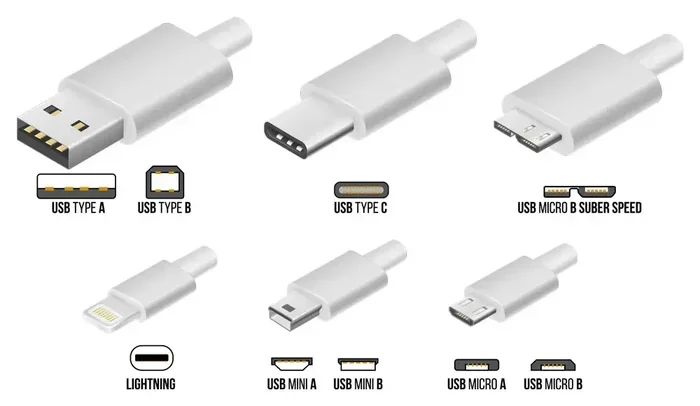
The three primary types of micro USB connectors are Micro-A, Micro-B, and Micro-B USB 3.0. Each one looks slightly different and serves a specific purpose. Let us break them down one by one.
Micro-A Connector
The Micro-A connector is the smaller of the two main micro USB types. It has a flat, rectangular shape with a slightly tapered top. The Micro-A plug is white in color, which helps you tell it apart from other connectors.
Micro-A connectors are less common than Micro-B. You will mostly find them on older smartphones and some tablets. They are designed for devices that need a compact port but still require reliable power and data transfer.
Micro-B Connector
The Micro-B connector is the most widely used micro USB type. It has a slightly taller, trapezoidal shape. The plug is usually black or dark gray. Most Android phones, portable speakers, and handheld gaming devices use Micro-B connectors.
This connector supports USB 2.0 speeds, which means data transfer rates up to 480 Mbps. For most everyday tasks like charging and syncing photos, this speed is more than enough.
Micro-B USB 3.0 Connector
The Micro-B USB 3.0 connector looks very similar to the standard Micro-B but with one key difference. It has an extra row of pins on the side. This extra row enables USB 3.0 speeds, which can reach up to 5 Gbps.
These connectors are blue in color, making them easy to identify. You will find them on external hard drives, high-end cameras, and some tablets that need faster data transfer. However, a Micro-B USB 3.0 plug will not fit into a standard Micro-B port. The shapes are different enough to prevent accidental damage.
Micro USB vs. Mini USB vs. Standard USB
It is easy to mix up the different USB sizes. Let us compare them so you can see the differences clearly.
Size Comparison
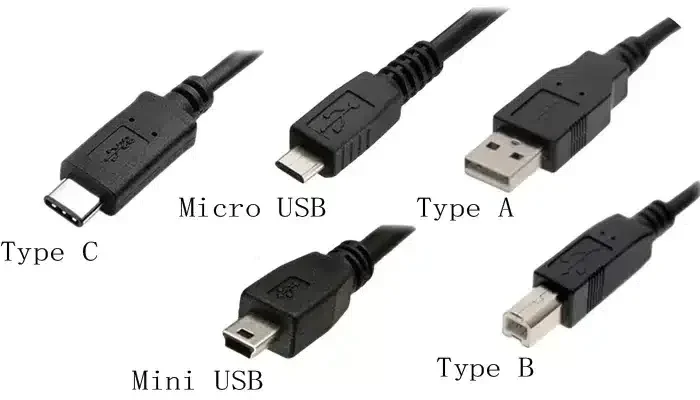
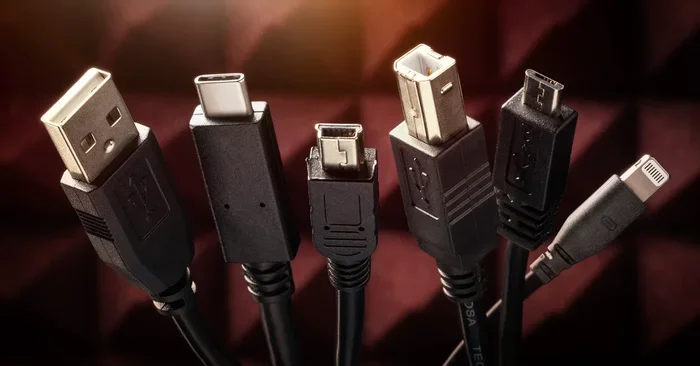
The standard USB Type-A is the large, rectangular plug you plug into your computer. The mini USB was the smaller version used before micro USB came along. The micro USB is even smaller and more durable.
Here is a quick comparison:
- Standard USB Type-A: Largest, used for computers and wall chargers
- Mini USB: Medium size, mostly found on older cameras and MP3 players
- Micro USB: Smallest, used on most modern mobile devices
Speed and Power Comparison
Each USB size can support different speeds and power levels. The connector type does not always determine the speed. The USB version (2.0 or 3.0) does that. But the size and shape of the connector determine which devices it can plug into.
For example, a micro USB cable can charge your phone just as fast as a standard USB cable if the power source supports it. The connector just needs to match the port on your device.
How Micro USB Connectors Work
Every micro USB connector has pins inside that carry power and data. The standard Micro-B connector has five pins. The Micro-B USB 3.0 has ten pins, which is why it looks slightly wider.
The five pins in a standard micro USB handle power, ground, and data lines. The extra pins in USB 3.0 add additional data pathways for faster transfer. This design allows the same basic connector shape to support much higher speeds.
The Pinout Explained
Here is a simple breakdown of what each pin does in a standard Micro-B connector:
- Pin 1 (VBUS): Carries the positive power supply, usually 5 volts
- Pin 2 (D-): Carries the negative data signal
- Pin 3 (D+): Carries the positive data signal
- Pin 4 (ID): Identifies the connector type (used in On-The-Go configurations)
- Pin 5 (GND): Ground connection for the circuit
Understanding the pinout helps when you are troubleshooting connection issues. If your device is not charging or transferring data, a damaged pin could be the culprit.
Common Uses for Micro USB Connectors
Micro USB connectors are everywhere. They are one of the most versatile connector types in the tech world. Here are some of the most common devices that use micro USB.
Smartphones and Tablets
Before USB-C became popular, nearly every Android phone used a micro USB connector. Even today, many budget phones, older models, and accessories still rely on micro USB. Tablets from brands like Samsung and Amazon Kindle also use micro USB for charging and data sync.
Portable Electronics
Bluetooth speakers, fitness trackers, and portable batteries often use micro USB. These devices need a small connector that still delivers reliable power. The micro USB fits perfectly in these compact designs.
Cameras and E-Readers
Many digital cameras and e-readers use micro USB for charging and file transfers. The connector is small enough to fit in a lightweight device but sturdy enough to handle daily use.
Smart Home and IoT Devices
Smart home gadgets like security cameras, smart plugs, and sensors often use micro USB for power. These devices stay plugged in all the time, so a reliable connector is essential. Some access control systems in security setups also use micro USB for configuration and updates, similar to how access control systems benefit from secure, reliable connectivity options. You can learn more about the pros and cons of these systems on our Advantages and Disadvantages of Access Control Systems page.
How to Choose the Right Micro USB Connector
Choosing the right connector comes down to a few simple steps. Follow this guide, and you will always pick the correct cable.
Step 1: Check Your Device Manual
The easiest way to find the right connector is to check your device manual. Look for the charging port type. It will usually say Micro-A, Micro-B, or Micro-B USB 3.0.
Step 2: Match the Connector Shape
Look at the port on your device. Is it flat and tapered (Micro-A) or taller and trapezoidal (Micro-B)? Does it have a second row of pins (USB 3.0)? Matching the shape is the most important step.
Step 3: Consider the USB Version
If you need fast data transfer, look for a USB 3.0 cable. If you are just charging, a USB 2.0 cable works fine. Keep in mind that a USB 3.0 cable is backward compatible with USB 2.0 ports, but it will only transfer data at USB 2.0 speeds when plugged into an older port.
Step 4: Buy from Trusted Brands
Cheap cables can be dangerous. Poorly made connectors may not deliver the correct power, which can damage your device. Always buy from reputable brands or trusted retailers. A good cable lasts longer and keeps your device safe.
Quick Tips for Micro USB Connector Care
Taking care of your micro USB connectors can extend their life significantly. Here are some quick tips to keep in mind.
- Do not force the connector: If it does not fit, check the orientation. Forcing it can bend or break the pins.
- Clean the port regularly: Dust and lint can build up in the port and cause poor connections. Use a toothpick or compressed air to clean it gently.
- Avoid bending the cable near the plug: The most common point of failure is where the cable meets the connector. Keep the cable straight at the plug end.
- Store cables loosely coiled: Tight winding can damage the internal wires over time. Use a cable tie or a loose loop instead.
- Keep moisture away: Water and micro USB ports do not mix. If your connector gets wet, dry it completely before plugging it in.
Common Mistakes People Make with Micro USB Connectors
Even tech-savvy people make mistakes with micro USB connectors. Here are the most common ones and how to avoid them.
Mistake 1: Assuming all micro USB cables are the same. Not true. Micro-A and Micro-B look similar but do not fit the same ports. Always double-check before buying.
Mistake 2: Using a USB 3.0 cable with a USB 2.0 device. It will work for charging, but you will not get the faster data speeds. And vice versa, a USB 2.0 cable will work in a USB 3.0 port but at slower speeds.
Mistake 3: Ignoring the orientation. Micro USB connectors only fit one way. If it does not go in, flip it over. Forcing it will damage the port.
Mistake 4: Buying the cheapest cable available. A $1 cable might seem like a great deal, but it could lack proper wiring. This can lead to slow charging, data errors, or even safety hazards. Spending a few extra dollars on a quality cable pays off in the long run.
Mistake 5: Not checking for wear and tear. Over time, connectors can become loose or bent. A worn-out connector may not make proper contact. If your device only charges when you hold the cable at a certain angle, it is time to replace the cable.
Expert Insights on Micro USB Connectors
We spoke with tech experts about the future of micro USB connectors. The consensus is clear: micro USB is still very much alive, but USB-C is slowly taking over.
Many manufacturers are now including USB-C ports on new devices. However, the transition takes time. Millions of devices still use micro USB, and the accessories market for these connectors remains strong. For now, micro USB connectors continue to be an essential part of the tech ecosystem.
Some experts also point out that the European Union has been pushing for a universal charging standard. This move could accelerate the shift away from micro USB entirely. But for the next few years, you will still need to know your micro USB types.
Interestingly, even in the world of app-based services, connectivity matters. For instance, apps that help you find dog walkers rely on stable device connections, and many of these apps still use micro USB for initial device setup and data sync. Check out our article on 4 Apps That Are Like Uber for Finding Dog Walkers to see how technology connects different parts of our daily lives.
Micro USB Connector Compatibility Chart
Here is a quick reference chart to help you match connectors to devices and ports.
- Micro-A plug → Micro-A receptacle: Compatible, used for USB On-The-Go host devices
- Micro-B plug → Micro-B receptacle: Compatible, standard connection for most mobile devices
- Micro-B USB 3.0 plug → Micro-B USB 3.0 receptacle: Compatible, enables high-speed data transfer
- Micro-B USB 3.0 plug → Micro-B receptacle: Not compatible, the extra pins prevent fitting
- Micro-B plug → Micro-B USB 3.0 receptacle: Compatible, but limited to USB 2.0 speeds
This chart covers the most common compatibility scenarios. Always verify the connector type before making a purchase.
Conclusion
The world of micro USB connectors is simpler than it looks once you know the basics. The three main types, Micro-A, Micro-B, and Micro-B USB 3.0, each serve a specific purpose. Understanding these differences helps you choose the right cable, charge your devices properly, and transfer data without headaches.
Micro USB connectors are not going away anytime soon. Even as USB-C gains ground, millions of devices still depend on micro USB. Knowing your connector types keeps you prepared for today and adaptable for tomorrow.
Take a moment to check your current cables and devices. Identify which type of micro USB connector you are using. This small step can save you a lot of time and money in the long run. Stay informed, stay connected, and never grab the wrong cable again.
Frequently Asked Questions
What is the difference between Micro-A and Micro-B connectors?
The Micro-A connector is flat and tapered, while the Micro-B connector is taller and trapezoidal. Micro-A is less common and is typically used for USB On-The-Got host devices, whereas Micro-B is the standard for most mobile devices like smartphones and tablets.
Can I use a Micro-B USB 3.0 cable with a regular Micro-B port?
No, you cannot. The Micro-B USB 3.0 connector has an extra row of pins that makes it physically wider. It will not fit into a standard Micro-B port. This design prevents accidental damage to your device.
Are micro USB connectors still relevant in 2024?
Yes, they are. While USB-C is becoming more popular, millions of devices still use micro USB connectors. Many budget phones, tablets, fitness trackers, and smart home devices continue to rely on micro USB for charging and data transfer.
How can I tell if my cable is USB 2.0 or USB 3.0?
USB 3.0 micro cables usually have a blue colored connector or a “SS” (SuperSpeed) logo on the plug. USB 2.0 cables are typically black or white. You can also check the cable specifications on the packaging or the manufacturer’s website.
Do all micro USB cables support data transfer?
Not all of them. Some micro USB cables are charge-only, meaning they only carry power and have no data pins. If you need to transfer files between devices, make sure you buy a cable that supports data transfer.
What should I do if my micro USB connector is loose or damaged?
If your connector feels loose or wobbly, stop using it. A damaged connector can cause intermittent charging or data errors. Replace the cable as soon as possible to avoid further issues with your device port.