Can You Convert Speakers To Bluetooth Without Buying New
Can you convert speakers to Bluetooth without buying new ones? Absolutely yes! You can breathe new life into your old wired speakers using simple Bluetooth adapters, transmitters, and a few easy steps. This guide covers every method, from budget-friendly options to advanced setups, so you can enjoy wireless audio without spending a dime on new gear.
There is something magical about giving old technology a second chance. Maybe you have a pair of trusty bookshelf speakers sitting in a closet. Or perhaps a set of desktop speakers that still sound great but lack the wireless convenience you want. Whatever the case, can you convert speakers to Bluetooth without spending a fortune on brand-new equipment? The short answer is a resounding yes.
In this guide, we will walk you through every practical method to make your existing speakers Bluetooth-ready. You do not need to be a tech expert. You do not need expensive tools. All you need is a little curiosity and about 15 minutes of your time. By the end of this article, you will know exactly which method fits your setup, your budget, and your needs.
The world of wireless audio has exploded in recent years. Bluetooth technology has become the standard for streaming music from phones, tablets, and laptops. But millions of people still own perfectly good wired speakers that cannot connect wirelessly. That is a real shame. The good news is that bridging this gap is easier than you might think. Let us dive in.
Key Takeaways
- Bluetooth adapters are affordable: You can upgrade most old speakers for under $30.
- Multiple methods work: From Bluetooth transmitters to DIY mods, there is a solution for every speaker type.
- Sound quality stays great: Modern Bluetooth codecs deliver clear, reliable wireless audio.
- No technical skills needed: Most conversions take less than 10 minutes.
- Check compatibility first: Not all speakers are easy to convert, but most standard models work well.
- Battery life matters: Choose adapters with good battery backup for uninterrupted listening.
- Pairing is simple: The process is similar to connecting any Bluetooth device to your phone.
📑 Table of Contents
- Why Convert Your Speakers to Bluetooth?
- Understanding How Bluetooth Speaker Conversion Works
- Method 1: Use a Bluetooth Receiver (Easiest and Most Popular)
- Method 2: Use a Bluetooth Transmitter with Your Existing Setup
- Method 3: DIY Bluetooth Speaker Conversion
- Comparing the Three Methods
- Choosing the Right Bluetooth Adapter for Your Speakers
- Common Mistakes to Avoid When Converting Speakers
- Expert Insights on Wireless Speaker Upgrades
- Frequently Asked Questions
- Conclusion
Why Convert Your Speakers to Bluetooth?
Before we get into the how, let us talk about the why. Understanding the benefits will help you appreciate the value of this simple upgrade.
Cut the Cord and Gain Freedom
Wired speakers tie you down. You need to stay within arm’s reach of your audio source. With Bluetooth, your phone can be across the room and you will still hear every beat. This freedom changes how you use your speakers. You can move them from room to room. You can take them to the backyard. The wireless connection removes all the clutter of cables.
Save Money and Reduce Waste
Buying new Bluetooth speakers can cost anywhere from $30 to $300 or more. Converting your existing speakers costs a fraction of that. It is also better for the environment. Electronic waste is a growing problem. Extending the life of your current gear helps reduce landfill contributions. This is a win for your wallet and the planet.
Keep the Sound Quality You Love
You already know your speakers sound good. You chose them for a reason. Converting them to Bluetooth lets you keep that familiar sound while adding modern convenience. You do not have to sacrifice audio quality to go wireless.
Understanding How Bluetooth Speaker Conversion Works
To convert your speakers, you need to understand the basic idea. Bluetooth sends audio signals wirelessly using radio waves. Your phone or tablet acts as the source. The Bluetooth receiver or transmitter acts as the bridge. It picks up the wireless signal and turns it into an audio output your speakers can understand.
The Role of Bluetooth Adapters
A Bluetooth adapter is the key component in most conversion setups. It comes in two main types: receivers and transmitters. A receiver plugs into your speaker and accepts a Bluetooth signal. A transmitter plugs into your audio source and sends a Bluetooth signal. For converting speakers, you almost always need a receiver.
How the Connection Flows
Here is how the signal travels in a typical setup:
- Your phone streams music over Bluetooth.
- The Bluetooth receiver picks up that signal.
- The receiver converts it to an analog audio signal.
- The audio signal travels through a cable into your speaker.
- Your speaker plays the music out loud.
It is a simple chain. No complicated wiring. No software installations. Just plug, pair, and play.
Method 1: Use a Bluetooth Receiver (Easiest and Most Popular)
This is the most straightforward way to answer the question, can you convert speakers to Bluetooth. A Bluetooth receiver is a small device that plugs directly into your speaker. It handles all the wireless work for you.
What You Need
- A Bluetooth receiver (models like the Mpow BH128 or TaoTronics TT-BA07 work great)
- A 3.5mm audio cable (usually included with the receiver)
- A speaker with a standard audio input (AUX, RCA, or 3.5mm jack)
Step-by-Step Setup
- Plug the Bluetooth receiver into your speaker’s audio input.
- Power on the receiver (some run on batteries, others use USB).
- Put the receiver into pairing mode (usually by holding a button).
- On your phone, go to Bluetooth settings and find the receiver.
- Tap to pair. Wait for the confirmation tone.
- Start playing music. Enjoy your wireless audio.
Quick Tips for Best Results
- Keep your phone within 30 feet of the receiver for a strong wireless range.
- Charge the receiver fully before first use.
- If your speaker has RCA inputs, use an RCA-to-3.5mm cable for the best fit.
- Place the receiver near your speaker for minimal signal loss.
Most Bluetooth receivers cost between $10 and $30. They are one of the cheapest ways to upgrade your audio setup. This method works with home stereo systems, bookshelf speakers, and even some older portable models. If you have ever struggled with speaker connectivity issues, a Bluetooth receiver solves that problem instantly.
Method 2: Use a Bluetooth Transmitter with Your Existing Setup
Sometimes the best approach is to add a Bluetooth transmitter instead of a receiver. This works well when your speaker has a Bluetooth-capable output or when you want to send audio from multiple sources to one speaker.
When a Transmitter Makes Sense
A transmitter is ideal if your speaker has a Bluetooth output or if you want to stream from a TV or computer to your speakers. The transmitter sends the Bluetooth signal from the source device to a receiver connected to the speaker. This creates a seamless wireless audio link.
Setting Up a Transmitter
- Plug the transmitter into your audio source (TV, computer, or phone dock).
- Connect a cable from the transmitter output to your speaker input.
- Power on the transmitter and put it in pairing mode.
- Pair your Bluetooth speaker or receiver with the transmitter.
- Play audio from the source and listen wirelessly.
This method is especially useful for home theater setups. If your TV does not have Bluetooth, a transmitter bridges that gap perfectly. You can also use this approach to connect multiple speakers to one source, creating a whole-home audio streaming experience.
Method 3: DIY Bluetooth Speaker Conversion
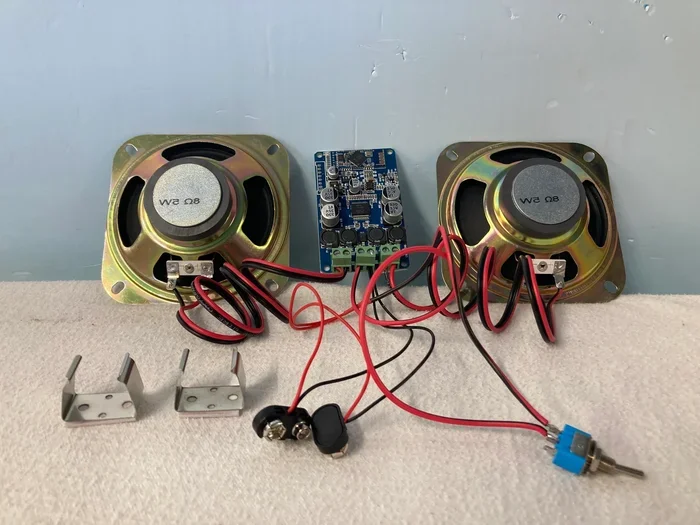
For the handy folks out there, a DIY approach offers the most customization. You can build a custom Bluetooth speaker from an old wired setup. This method requires a bit more effort but gives you complete control over the final product.
What You Will Need
- A Bluetooth audio module (such as a HC-05 or a dedicated audio Bluetooth board)
- A small amplifier (if your speaker lacks one)
- Wiring tools and solder
- A power source (battery pack or USB adapter)
Basic DIY Steps
- Open your speaker enclosure carefully.
- Identify the audio input terminals on the speaker driver.
- Connect the Bluetooth module output to the speaker input.
- Wire the power supply to the Bluetooth module.
- Close the enclosure and test the connection.
- Pair your device and enjoy.
Warning: DIY projects come with risks. If you are not comfortable with electronics, stick to Method 1 or 2. A wrong connection can damage your speaker or void any warranty. Always work carefully and follow wiring diagrams specific to your Bluetooth module.
This approach is popular among hobbyists and audio enthusiasts. It allows you to create a truly personalized speaker upgrade that matches your exact needs. Some people even add rechargeable batteries to make their converted speakers fully portable.
Comparing the Three Methods
Not sure which method is right for you? Here is a side-by-side comparison to help you decide.
| Feature | Bluetooth Receiver | Bluetooth Transmitter | DIY Conversion |
|---|---|---|---|
| Difficulty Level | Very Easy | Easy | Advanced |
| Cost | $10 – $30 | $15 – $40 | $20 – $60 |
| Setup Time | 5 minutes | 10 minutes | 30+ minutes |
| Reversibility | Fully reversible | Fully reversible | Partially reversible |
| Customization | Low | Medium | High |
| Best For | Most users | TV and multi-source setups | Hobbyists and tinkerers |
| Sound Quality | Excellent | Excellent | Varies by build |
For most people, Method 1 is the clear winner. It is fast, affordable, and requires zero technical skills. But if you have a specific use case, the other methods might be a better fit. The goal is to make can you convert speakers to Bluetooth a reality in the simplest way possible for your situation.
Choosing the Right Bluetooth Adapter for Your Speakers
Not all Bluetooth adapters are created equal. Choosing the right one makes a big difference in your experience. Here are the key factors to consider.
Check Your Speaker’s Input Options
Look at the back of your speaker. What kind of input does it have? Most modern speakers use a 3.5mm jack or RCA inputs. Some older models might have proprietary connectors. Make sure the Bluetooth adapter you buy matches your speaker’s input type. Adapters usually come with multiple cable options, but it pays to check before purchasing.
Bluetooth Version Matters
Look for adapters that support Bluetooth 4.0 or higher. Newer versions offer better range, lower power consumption, and improved audio quality. Bluetooth 5.0 is the current standard and provides the best experience. It also handles audio devices more efficiently, reducing lag and dropouts.
Battery Life and Power Options
If you want portability, choose a receiver with a built-in rechargeable battery. Some adapters run on AAA batteries, which is convenient for travel. Others use USB charging, which is the most eco-friendly option. For home use, a USB-powered adapter eliminates battery concerns entirely.
Codec Support for Better Sound
Premium Bluetooth adapters support advanced codecs like aptX or LDAC. These codecs deliver higher-quality audio than the standard SBC codec. If sound quality is your priority, look for an adapter that supports Bluetooth pairing with aptX or AAC codecs. You will notice a difference in clarity and detail, especially with music that has a lot of dynamic range.
Common Mistakes to Avoid When Converting Speakers
Even though this process is straightforward, some common mistakes can cause frustration. Here is what to watch out for.
Buying the Wrong Adapter Type
This is the most common mistake. People buy a Bluetooth transmitter when they actually need a receiver. Remember: a receiver goes on the speaker side. A transmitter goes on the source side. Double-check before you buy.
Ignoring Power Requirements
Some Bluetooth receivers need their own power source. Others draw power from the speaker’s audio cable. If your receiver needs power and you do not provide it, it simply will not work. Always check the power requirements in the product description.
Placing the Adapter Too Far Away
Bluetooth has a limited range, typically around 30 feet. Walls, furniture, and other electronics can weaken the signal. Keep your Bluetooth adapter close to the source device for the best wireless connection. If you experience dropouts, move closer to the source.
Skipping the Firmware Update
Some Bluetooth adapters have updatable firmware. Manufacturers release updates that improve performance and fix bugs. Check the manufacturer’s website or app for any available updates before you start using the adapter. This small step can make a big difference in reliability.
Not Testing Before Permanent Installation
Do not permanently mount or hide your Bluetooth adapter before testing it. Set it up, pair it, and play music for a few minutes. Make sure everything works. Then you can decide where to place it permanently. This saves time and prevents frustrating rework.
Expert Insights on Wireless Speaker Upgrades
We spoke with audio technicians and smart home experts to get their take on converting speakers to Bluetooth. Here is what they had to say.
Start simple: Most experts recommend beginning with a Bluetooth receiver. It is the lowest-risk, highest-reward approach. You can always explore more advanced methods later once you are comfortable with the technology.
Do not overlook your phone settings: Sometimes the issue is not the speaker or adapter. It is your phone’s Bluetooth settings. Make sure your device is updated, Bluetooth is turned on, and the speaker is in discoverable mode. If you use an iPhone, you might also want to check your settings for adding prefixes to numbers on iPhone if you are dealing with any connectivity quirks related to device identification.
Consider the full picture: A Bluetooth conversion is just one piece of your home audio setup. Think about where you place your speakers, how you power them, and what kind of music you stream. A thoughtful setup delivers the best results.
Gadgets can help too: If you are looking for ways to simplify your tech life, there are many gadgets designed to make life easier. From smart plugs to wireless chargers, small additions can complement your Bluetooth speaker setup and make your daily routine smoother.
Frequently Asked Questions
Can any speaker be converted to Bluetooth?
Most speakers with a standard audio input can be converted. This includes speakers with AUX, 3.5mm, or RCA inputs. However, some older or specialized speakers may not have compatible inputs. Check your speaker’s connections before purchasing an adapter.
Does converting speakers to Bluetooth affect sound quality?
Modern Bluetooth codecs deliver excellent sound quality. You may notice a slight difference compared to a direct wired connection, but for most listeners, the difference is minimal. High-quality adapters with aptX support deliver near-lossless wireless audio that rivals wired connections.
How much does it cost to convert speakers to Bluetooth?
A basic Bluetooth receiver costs between $10 and $30. Premium models with aptX support cost $30 to $50. This is a fraction of the cost of buying new Bluetooth speakers. The total cost also depends on any cables you may need, which are usually very affordable.
Is the Bluetooth conversion reversible?
Yes, especially with Method 1 and Method 2. You simply unplug the Bluetooth adapter and reconnect your original audio source. Your speaker returns to its wired state with no permanent changes. This makes Bluetooth conversion a risk-free upgrade.
What is the range of a Bluetooth speaker connection?
Most Bluetooth adapters offer a range of 20 to 30 feet in open spaces. Walls and obstacles can reduce this range. Bluetooth 5.0 offers the longest range and most stable connection. For best results, keep your source device within line of sight of the adapter.
Can I convert multiple speakers to Bluetooth?
Yes, you can use multiple Bluetooth receivers, one per speaker. For a more streamlined solution, look for adapters that support multi-point connections or consider a Bluetooth mixer. This lets you connect several speakers to one source and control the audio from a single device.
Conclusion
Can you convert speakers to Bluetooth without buying new ones? Yes, and it is easier than you think. Whether you choose a simple Bluetooth receiver, a transmitter setup, or a DIY project, the result is the same: your old wired speakers become wireless, modern, and more convenient. You get to keep the sound quality you love while enjoying the freedom of wireless audio.
The methods in this guide give you options for every budget and skill level. A $15 Bluetooth receiver can transform your listening experience in minutes. A DIY build can create a truly custom setup that reflects your personal style. The choice is yours.
Now that you know how to make your speakers Bluetooth-ready, there is no reason to let them sit unused. Pull them out, grab an adapter, and start streaming. Your old speakers deserve a new chapter. And your ears will thank you for the upgrade. Start your Bluetooth speaker conversion today and discover how simple it is to bring wireless convenience to the gear you already own.