Can Sdi Do 4k Here Is How 4K SDI Support Actually Works
So, can SDI do 4K? The short answer is yes. SDI has evolved to fully support 4K video resolution through newer standards like 12G-SDI and dual-link setups. In this guide, you will learn exactly how 4K SDI support works, which cables and equipment you need, and why broadcast professionals still rely on SDI for 4K production.
Can SDI do 4K? If you have been browsing video equipment lately, you have probably seen this question pop up a lot. The answer is a clear yes. SDI, which stands for Serial Digital Interface, has come a long way. It now fully supports 4K video resolution and has become a backbone of professional video production worldwide.
But how does 4K SDI support actually work? What cables do you need? And why do broadcast professionals still choose SDI over other options? This guide breaks it all down in simple terms. You will learn exactly what makes 4K SDI tick and how to set up your own 4K workflow with confidence.
Whether you are a filmmaker, a broadcast engineer, or someone just diving into high-end video production, understanding SDI and 4K is essential. The good news is that it is not as complicated as it sounds. Let us walk through it together.
Key Takeaways
- SDI absolutely supports 4K video: Modern SDI standards like 12G-SDI and dual-link HD-SDI can carry uncompressed 4K signals with ease.
- Bandwidth is the key factor: 4K requires much more bandwidth than 1080p, and SDI standards have been updated to meet those demands.
- 12G-SDI is the go-to for single-cable 4K: It delivers 4K at 60fps over one cable, making it ideal for professional setups.
- SDI offers advantages over HDMI: Longer cable runs, locking connectors, and reliability in broadcast environments make SDI a top choice.
- You need the right equipment: Not every SDI device supports 4K. Always check the SDI standard compatibility before buying.
- Common mistakes can ruin your setup: Using outdated cables, mismatched standards, or wrong converters will cause signal loss.
📑 Table of Contents
What Is SDI and Why Does It Matter for 4K?
SDI stands for Serial Digital Interface. It is a video signal standard that has been around since the 1980s. Over the decades, it has grown and adapted to support higher resolutions. Today, SDI is one of the most trusted ways to transmit uncompressed video signals.
So why does SDI matter for 4K? Because 4K video carries a massive amount of data. A 4K signal at 60 frames per second needs a lot of bandwidth. SDI was designed to handle exactly this kind of challenge. It transmits video digitally without compression, which means you get the highest possible image quality.
Here are some key reasons SDI remains important for 4K production:
- Uncompressed video: SDI sends raw video data without losing quality. This is critical for 4K where every pixel counts.
- Long cable runs: SDI cables can carry signals over much longer distances than HDMI. You can run 4K SDI signals over 100 meters or more with the right cable.
- Locking connectors: BNC connectors lock in place, preventing accidental disconnections during live production.
- Industry standard: Most broadcast equipment, cameras, and switchers support SDI. It is the universal language of professional video.
- Reliability: SDI is built for continuous, 24/7 operation in demanding environments like live studios and outdoor shoots.
When you pair SDI with 4K resolution, you get a powerful combination. It is no wonder that SDI remains the go-to choice for professional 4K video workflows around the world.
How SDI Transmits Video Signals
SDI works by sending digital video data serially. That means it sends one bit at a time over a single cable. The signal includes not just video but also audio and metadata. All of this travels together in one clean stream.
For standard HD video, SDI uses a process called 8b/10b encoding. This helps reduce errors and ensures the signal stays clean. For 4K, the process is similar but requires much higher data rates. Think of it like a highway. More lanes mean more cars can travel at once. SDI standards add more lanes to handle the heavier 4K traffic.
The beauty of SDI is that it keeps things simple. One cable carries everything you need. No extra wires, no complex setups. Just plug it in and the signal flows.
How Does 4K SDI Support Actually Work?
Now let us get into the heart of the matter. How does 4K SDI support actually work? The answer lies in the SDI standards and the bandwidth they provide.
4K video has roughly four times the pixels of 1080p Full HD. That means the data rate is much higher. To move all that data, SDI standards have evolved significantly. Each new generation of SDI brings more bandwidth and better support for higher resolutions.
Here is how different SDI standards handle 4K:
- HD-SDI: This older standard handles up to 1080p. It cannot carry 4K signals on its own.
- 3G-SDI: This standard supports 1080p at 60fps. Still not enough for 4K.
- 6G-SDI: This is the first SDI standard that can handle 4K at 30fps. It doubles the bandwidth of 3G-SDI.
- 12G-SDI: This is the gold standard for 4K. It supports 4K at 60fps over a single cable. This is what most professionals use today.
- Dual-link HD-SDI: Before 12G-SDI existed, some setups used two 3G-SDI cables to carry 4K. This is called dual-link and it still works.
The most important thing to remember is that 12G-SDI is the standard that unlocked true 4K over a single SDI cable. Before 12G-SDI, 4K SDI setups required more cables and more complex routing. Today, 12G-SDI makes it clean and simple.
The Role of Bandwidth in 4K SDI
Bandwidth is the amount of data that can travel through a cable per second. For 4K video, you need a lot of it. Here is a quick look at how bandwidth ties into 4K SDI support:
- 1080p at 60fps: Needs about 3 Gbps of bandwidth. 3G-SDI handles this easily.
- 4K at 30fps: Needs about 6 Gbps. 6G-SDI is the minimum for this.
- 4K at 60fps: Needs about 12 Gbps. 12G-SDI is required for this.
When you hear people talk about 4K SDI support, bandwidth is the big topic. The SDI standard must match or exceed the data rate of the video signal. If it does not, you will get no picture or a degraded signal.
This is why it is so important to check the specs on your equipment. A 3G-SDI switcher cannot handle 4K at 60fps. A 12G-SDI switcher can. Knowing the difference saves a lot of headaches.
SDI Standards and Bandwidth for 4K Video
Understanding SDI standards is key to making 4K work in your setup. Each standard has a specific maximum data rate. Let us break them down so you know exactly what to look for.
SDI Standard Comparison for 4K
Not all SDI is created equal. Here is a simple breakdown of the major SDI standards and what they can do for 4K video:
- HD-SDI (1.485 Gbps): Supports up to 1080i and 1080p at lower frame rates. Cannot carry 4K. Older equipment only.
- 3G-SDI (2.97 Gbps): Supports 1080p at 60fps. Not enough bandwidth for 4K. Still widely used for HD production.
- 6G-SDI (5.94 Gbps): The first standard that can carry 4K. Supports 4K at 30fps. Great for budget 4K setups.
- 12G-SDI (11.88 Gbps): The current top standard. Supports 4K at 60fps over a single cable. This is what you want for serious 4K work.
- 24G-SDI (23.76 Gbps): Supports 4K at 120fps and even 8K at lower frame rates. Still emerging and expensive.
For most 4K production today, 12G-SDI is the sweet spot. It offers the best balance of performance, availability, and cost. If you are building a 4K SDI setup, 12G-SDI equipment should be your priority.
What Is Dual-Link SDI?
Before 12G-SDI became common, professionals used a workaround called dual-link SDI. This involves using two 3G-SDI cables to carry a single 4K signal. One cable carries the even lines of the image, and the other carries the odd lines.
Dual-link works, but it has downsides. You need twice the cables, twice the ports, and more complex routing. It also adds latency and potential points of failure. That is why 12G-SDI was such a game-changer. It brings 4K to a single cable and simplifies everything.
If you are buying equipment today, look for native 12G-SDI support. Avoid dual-link setups unless you are working with older gear that cannot be upgraded.
SDI vs HDMI for 4K Video
One of the most common questions we get is about SDI vs HDMI for 4K. Both can carry 4K signals, but they work very differently. Let us compare them side by side.
SDI for 4K
- Cable length: SDI cables can run 100 meters or more without signal loss. HDMI cables typically max out at 15-30 meters for 4K.
- Connectors: SDI uses BNC connectors that lock in place. HDMI uses a smaller plug that can wiggle loose.
- Professional use: SDI is the standard in broadcast, live events, and studio production. HDMI is more common in consumer and home setups.
- Audio embedding: SDI can embed multiple audio channels directly into the video signal. HDMI handles audio separately in most cases.
- Reliability: SDI is built for 24/7 professional use. HDMI connectors wear out faster with frequent plugging and unplugging.
HDMI for 4K
- Cost: HDMI cables and equipment are generally cheaper than SDI.
- Availability: HDMI is everywhere. Most monitors, TVs, and consumer devices use HDMI.
- Ease of use: HDMI plugs are simple and universal. No special tools needed.
- Short distances: HDMI works great for short runs, like connecting a camera to a monitor on a short tripod.
The bottom line is that SDI wins for professional 4K production. It is more reliable, supports longer cable runs, and is the industry standard for broadcast-grade work. HDMI is fine for consumer use and short setups, but it falls short for serious 4K production.
Best SDI Equipment for 4K Workflows
Building a 4K SDI setup requires the right equipment. Not all SDI gear is created equal, and using the wrong components can ruin your 4K signal. Here is what you need to know.
SDI Cables for 4K
The cable you choose matters a lot for 4K SDI support. Not all cables can handle 12G-SDI data rates. Here are the key things to look for:
- Cable rating: Make sure the cable is rated for 12G-SDI or higher. Using a 3G-SDI cable for 12G-SDI will cause signal degradation.
- Cable length: Longer cables need better shielding. For runs over 30 meters, invest in high-quality 12G-SDI rated cables.
- BNC connectors: Use quality BNC connectors that screw on tightly. Loose connections are a common source of signal problems.
- Cable type: RG-6 coaxial cable is the most common choice for 12G-SDI. RG-59 works for shorter runs but may not be reliable for 4K over long distances.
SDI Switchers and Converters
A good SDI switcher is the heart of any 4K production setup. When choosing a switcher, make sure it supports 12G-SDI input and output. Many affordable switchers only support 3G-SDI or 6G-SDI, which limits you to 4K at 30fps or lower.
SDI converters are also useful. A 12G-SDI to HDMI converter lets you monitor your 4K SDI signal on a standard HDMI display. These converters are handy for field production where you need quick monitoring on the go.
SDI Routers and Distribution Amplifiers
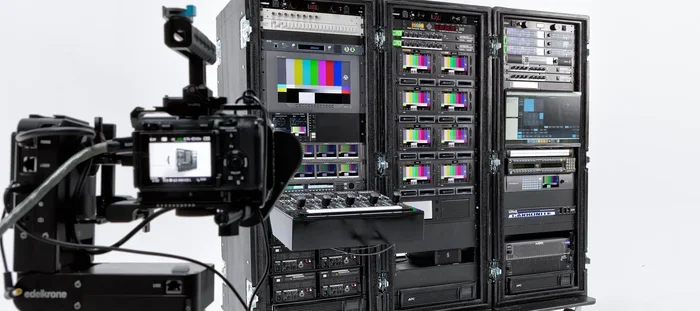
For larger setups, an SDI router lets you route 4K signals to any output you need. Distribution amplifiers split one SDI signal into multiple outputs. Both are essential for multi-camera 4K production.
When shopping for these devices, always check the maximum SDI standard they support. A router rated for 6G-SDI will not pass 12G-SDI 4K signals properly.
Common Mistakes When Using SDI for 4K
Even experienced video professionals make mistakes with 4K SDI setups. Here are the most common ones and how to avoid them.
Using the Wrong Cable Rating
This is the number one mistake. A lot of people buy cheap SDI cables that are only rated for 3G-SDI or even HD-SDI. When they try to push a 12G-SDI 4K signal through them, the signal drops or becomes corrupted. Always check the cable rating and make sure it matches your SDI standard.
Mismatched Equipment Standards
If your camera outputs 12G-SDI but your switcher only supports 6G-SDI, you will have a problem. The signal will not pass through correctly. Always make sure all your equipment supports the same SDI standard. Mixing standards can lead to no signal, dropped frames, or poor image quality.
Ignoring Cable Length Limits
Even the best 12G-SDI cable has a maximum reliable length. For RG-6 cable, this is typically around 100 meters for 12G-SDI. Beyond that, you need a signal repeater or converter. Pushing a 4K SDI signal too far without a repeater will result in a weak or no signal at the other end.
Forgetting About SDI Protocol Versions
SDI has multiple protocol versions. The original SDI protocol was designed for standard definition. Later versions added support for HD and then 4K. Make sure your devices use the same SDI protocol version. A device that only supports SD-SDI or HD-SDI will not work with 4K signals no matter what cable you use.
Expert Tips for 4K SDI Setups
Here are some practical tips from professionals who work with 4K SDI every day.
Always Test Your Full Signal Chain
Before any live production, test every cable, every connection, and every device in your signal chain. A single bad BNC connector can ruin an entire 4K SDI feed. Use a signal generator to verify that the 4K signal is clean from source to display.
Label Your Cables
In a complex 4K SDI setup, cables can get tangled fast. Label every cable at both ends. This saves enormous time during troubleshooting and makes your setup much more professional.
Invest in Quality BNC Connectors
Cheap BNC connectors are a common failure point. They can cause intermittent signal loss that is incredibly frustrating to diagnose. Spend a little extra on quality connectors and your setup will be much more reliable.
Keep Firmware Updated
SDI equipment manufacturers often release firmware updates that improve 4K compatibility and fix bugs. Check for updates regularly and keep your devices current.
Plan for Future Upgrades
SDI standards continue to evolve. 24G-SDI is already here and supports even higher resolutions and frame rates. When buying equipment, choose gear that supports the latest standards. This future-proofs your setup and saves money in the long run.
Final Verdict: Can SDI Do 4K?
So, can SDI do 4K? Absolutely. SDI has fully embraced 4K video and continues to lead the way in professional video transmission. With 12G-SDI, you can carry uncompressed 4K video at 60fps over a single cable with incredible reliability.
The key is using the right equipment. Make sure your cables, cameras, switchers, and monitors all support the same SDI standard. Avoid common mistakes like using under-rated cables or mismatched equipment. And always test your setup before going live.
4K SDI support has made professional video production more accessible than ever. Whether you are shooting a live event, producing a broadcast, or creating cinematic content, SDI gives you the reliability and quality you need. The technology has evolved to meet the demands of modern 4K production, and it continues to improve with each new standard.
If you are serious about 4K video, SDI is the way to go. It is trusted by professionals worldwide, and for good reason. Invest in quality 12G-SDI equipment, follow the tips in this guide, and you will be well on your way to a powerful and reliable 4K SDI setup.
Frequently Asked Questions
Can SDI carry 4K video at 60 frames per second?
Yes, SDI can carry 4K at 60fps, but you need 12G-SDI equipment. Older SDI standards like 3G-SDI or 6G-SDI can only handle lower frame rates for 4K. Always check that your cables, cameras, and switchers support 12G-SDI before expecting 4K at 60fps.
What is the maximum cable length for 4K SDI?
With standard RG-6 coaxial cable, 12G-SDI signals can travel up to about 100 meters without a repeater. For longer runs, you can use signal boosters or converters to maintain a clean 4K SDI signal. The exact distance depends on cable quality and the environment.
Do I need a special SDI cable for 4K?
Yes, you need a cable rated for 12G-SDI or higher. Standard HD-SDI or 3G-SDI cables will not reliably carry a 4K signal. Look for cables that are specifically labeled as 12G-SDI compatible to ensure they can handle the higher data rate.
Is SDI better than HDMI for 4K production?
For professional 4K production, SDI is generally better than HDMI. SDI supports longer cable runs, uses locking connectors, and is the industry standard for broadcast and live production. HDMI is more affordable and widely available, but it is better suited for consumer use and shorter setups.
Can I use an SDI to HDMI converter for 4K?
Yes, you can use a 12G-SDI to HDMI converter to monitor your 4K SDI signal on an HDMI display. Make sure the converter supports 12G-SDI and 4K resolution. Cheaper converters may only support lower resolutions or frame rates, so always check the specs before buying.
What SDI standard should I use for my 4K setup?
For most 4K setups today, 12G-SDI is the recommended standard. It supports 4K at 60fps over a single cable and is widely supported by professional equipment. If you are on a tighter budget, 6G-SDI can handle 4K at 30fps, but 12G-SDI gives you the full 4K experience.
=== CONCLUSION ===
Can SDI do 4K? Yes, and it does it exceptionally well. With the right 12G-SDI equipment, cables, and setup, you can transmit uncompressed 4K video with confidence and reliability. SDI has proven itself as the backbone of professional 4K video production, and it continues to evolve to meet the demands of modern content creation.
Remember the key points from this guide. Use 12G-SDI cables and equipment. Avoid common mistakes like mismatched standards or under-rated cables. Plan for long cable runs and always test your full signal chain. With these steps, your 4K SDI setup will deliver outstanding results every time.
Now that you understand how 4K SDI support actually works, you are ready to build or upgrade your own 4K production setup. The technology is ready. The equipment is available. All you need to do is take the next step and start creating.