Can I Watch Regular TV on a Projector at Home Tonight
Yes, you absolutely can watch regular TV on a projector at home. With the right equipment like an HDMI connection, a TV tuner, or a streaming device, your projector can deliver a big-screen TV experience that rivals any living room setup. Whether you use a cable box, antenna, or smart projector, setting up regular TV on a projector is easier than most people think.
Watching regular TV on a projector is one of the best upgrades you can make to your home entertainment setup. If you have been wondering whether can I watch regular TV on a projector, the short answer is a resounding yes. A projector transforms your living room into a cinematic space where your favorite shows and news programs feel bigger and more immersive. In this guide, we will walk you through everything you need to know about setting up regular TV on a projector at home. From choosing the right equipment to troubleshooting common issues, you will find all the practical advice you need right here.
The idea of using a projector for regular TV might feel intimidating at first. But modern projectors are designed to be user-friendly and versatile. You do not need to be a tech expert to get started. Whether you want to watch cable TV, use an antenna, or stream content through apps, a projector can handle it all. Let us dive into the details and help you get started tonight.
Key Takeaways
- Projectors work great for regular TV: You can connect cable boxes, antennas, and streaming devices to project regular TV content on a big screen.
- HDMI is your best friend: Most modern projectors support HDMI inputs that make connecting TV sources simple and reliable.
- Brightness matters: Choose a projector with enough lumens for daytime TV watching and proper projector placement in your room.
- Audio needs attention: Projectors often have weak built-in speakers, so external audio solutions make a huge difference.
- Smart projectors add convenience: Built-in apps and Wi-Fi let you stream regular TV content without extra devices.
- Setup is straightforward: With basic knowledge, anyone can set up a projector for TV watching in under 30 minutes.
📑 Table of Contents
- What You Need to Watch Regular TV on a Projector
- How to Connect Your Cable Box or TV Tuner to a Projector
- Best Projectors for Watching Regular TV at Home
- Setting Up Your Home Theater for TV Watching
- Common Problems When Watching Regular TV on a Projector
- Projector vs TV: Which Is Better for Regular TV?
- Expert Tips for Getting the Most Out of Your Projector TV Setup
- Conclusion
What You Need to Watch Regular TV on a Projector
Before you start, you need to understand the basic equipment required. Setting up regular TV on a projector does not require a lot of fancy gear. Most people already own the essentials or can pick them up affordably. Here is what you will need to get started.
1. A Compatible Projector
Not all projectors are created equal when it comes to TV watching. You want a projector that supports HDMI input, which is the most common connection for TV sources. Look for a projector with at least 1080p resolution for a clear picture. If you watch TV during the day, consider a model with high brightness measured in lumens. A home theater projector with 3000 lumens or more works well for most living rooms. Some people prefer a smart projector because it has built-in apps and Wi-Fi, which removes the need for extra devices.
2. A TV Source
You need something that outputs TV content. This could be a cable box, a satellite receiver, an antenna, or a streaming device like a Roku or Amazon Fire Stick. Each option connects to the projector through an HDMI cable. If you use an antenna for local channels, make sure your projector or a connected device can decode the signal properly.
3. An HDMI Cable
This is the simplest and most reliable way to connect your TV source to the projector. A good quality HDMI connection carries both video and audio in one cable. Always use a high-speed HDMI cable to support full HD or 4K resolution if your projector and source device support it.
4. External Speakers (Optional but Recommended)
Most projectors have small built-in speakers that sound flat and tinny. For a better experience, connect external speakers or a soundbar. This dramatically improves the audio quality and makes watching regular TV on a projector feel much more immersive.
How to Connect Your Cable Box or TV Tuner to a Projector
Connecting a cable box to a projector is straightforward and takes just a few minutes. This is the most common way people watch regular TV on a projector. Here is a step-by-step guide to help you through the process.
Step-by-Step Connection Process
- Turn off both your projector and your cable box.
- Plug one end of the HDMI cable into the HDMI output port on your cable box.
- Plug the other end into the HDMI input port on your projector.
- Turn on the projector and select the correct HDMI input source using the remote or projector menu.
- Turn on your cable box and follow the on-screen setup instructions.
- Adjust the projector focus and position until the image looks sharp and centered on your screen or wall.
If your projector does not have an HDMI port, you can use an HDMI-to-VGA adapter, though this will only carry video. You will need a separate audio cable for sound. Most modern projectors made in the last five years include at least one HDMI port, so this should not be an issue.
Using an Antenna with a Projector
You can also watch free over-the-air channels on a projector. Connect your antenna to a digital TV tuner box, then link that box to the projector via HDMI. This gives you access to local news, sports, and network shows without a cable subscription. If you also use your phone to cast content or manage your setup, you might need to add prefixes to numbers on iPhone for proper dialing when using certain communication apps alongside your projector setup.
Best Projectors for Watching Regular TV at Home
Choosing the right projector makes all the difference. Here are some key factors to consider when shopping for a projector to watch regular TV.
Resolution
Resolution determines how sharp and detailed the picture looks. For watching TV, 1080p (Full HD) is the sweet spot for most people. It provides a clear and crisp image at a reasonable price. If you want the best quality and have a larger budget, look for 4K projectors. These deliver incredible detail that makes regular TV channels look almost like streaming content.
Brightness (Lumens)
Projector brightness is measured in ANSI lumens. For a room with some ambient light, aim for at least 2500 lumens. If your living room gets a lot of natural light during the day, go for 3500 lumens or higher. A darker room allows you to use a less bright projector and still get a great picture. This is why many people reserve their projector for evening TV watching.
Contrast Ratio
The contrast ratio affects how deep the blacks are and how vibrant the colors appear. A higher contrast ratio means better picture quality. Look for a projector with a contrast ratio of at least 1000:1 for decent performance. Higher-end models offer 10000:1 or more, which makes a noticeable difference in picture depth.
Lamp Life
Projector lamps wear out over time and need replacement. LED projectors last much longer than traditional lamp-based models. If you watch TV regularly, an LED projector saves you money on replacement bulbs over time. A typical projector lamp lasts between 2000 and 5000 hours depending on the model and usage.
| Feature | Budget Option | Mid-Range | Premium |
|---|---|---|---|
| Resolution | 720p | 1080p | 4K |
| Brightness | 2000 lumens | 3000 lumens | 4000+ lumens |
| Contrast Ratio | 1000:1 | 5000:1 | 10000:1+ |
| Lamp Life | 3000 hours | 5000 hours | 20000+ hours (LED) |
| Price Range | $200-$400 | $400-$1000 | $1000-$3000+ |
Setting Up Your Home Theater for TV Watching
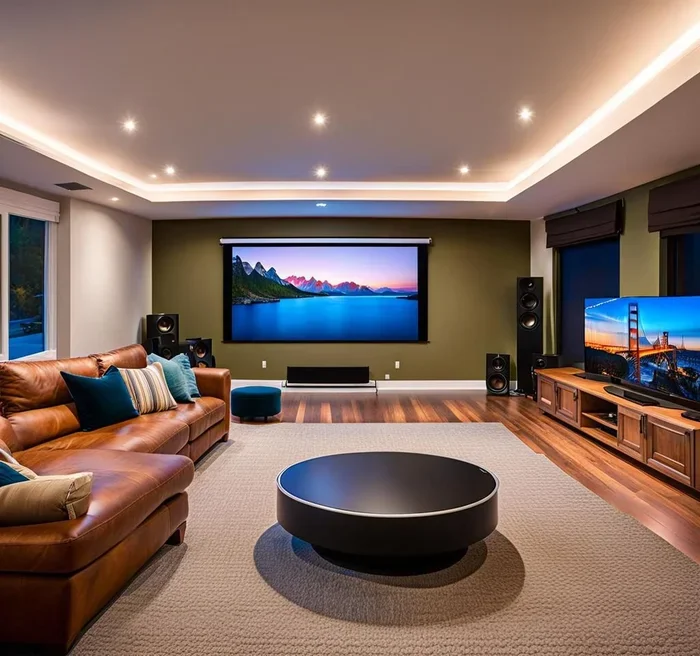
Proper setup makes a huge difference in how enjoyable watching regular TV on a projector really is. A few simple adjustments can turn a basic setup into a premium home theater experience.
Projector Placement
Where you place your projector affects image quality and convenience. Most projectors work best when placed on a stable surface or ceiling mount directly in front of the screen or wall. The distance between the projector and the screen determines the image size. Check your projector manual for the recommended throw distance. If you have limited space, consider a short-throw projector that can produce a large image from a shorter distance.
Screen or Wall?
You can project onto a white wall, but a dedicated projector screen gives you much better results. A projector screen has a special coating that enhances brightness and color accuracy. It also provides a smooth, flat surface that eliminates the texture and imperfections you see on walls. Even a basic pull-down screen makes a noticeable improvement.
Audio Setup
Good audio completes the experience. Projectors typically have small speakers built in, but they are not enough for a satisfying TV watching experience. Here are some options:
- Soundbar: A simple soundbar connects via HDMI or Bluetooth and greatly improves sound quality.
- Bluetooth speakers: Wireless speakers are easy to set up and place anywhere in the room.
- Home theater system: For the best experience, a full surround sound system with a subwoofer delivers cinematic audio.
Consider how you organize your equipment. If you use spreadsheets or documents to track your projector maintenance, lamp hours, or viewing schedules, tools like Microsoft Excel can help you keep everything organized and readable. A simple maintenance log prevents surprises and extends the life of your equipment.
Lighting Control
Ambient light is the enemy of projector picture quality. Close curtains or blinds during TV watching to reduce glare and washout. If you cannot control the lighting, consider a projector with higher brightness or a screen with ambient light rejection technology. Even simple changes like turning off table lamps can make a big difference.
Common Problems When Watching Regular TV on a Projector
Even with a great setup, you may run into some issues. Here are the most common problems and how to fix them quickly.
No Picture or Signal
If the projector shows no image, check that all HDMI cables are securely connected. Make sure the projector is set to the correct input source. Try unplugging and replugging the cable. Sometimes simply switching the input and switching back fixes the issue.
Poor Image Quality
A blurry or distorted image usually means the projector is out of focus. Use the focus ring on the lens to sharpen the picture. If the image looks stretched or squished, adjust the aspect ratio settings on your projector or source device to match your screen.
Dim or Faded Colors
This often happens when the projector lamp is aging. Check the lamp hours in the projector menu. If the lamp has been used for thousands of hours, it may need replacement. Also check the projector brightness settings and make sure they are set to maximum or a high preset mode.
No Sound
If the picture looks great but there is no audio, check that the projector volume is turned up and not muted. If you are using external speakers, verify that they are powered on and connected properly. You may also need to change the audio output setting on your cable box or streaming device to match the projector or speaker setup.
Overheating
Projectors generate heat during use. Make sure the ventilation vents are not blocked by furniture or curtains. Never place a projector in an enclosed cabinet without proper airflow. If the projector shuts off unexpectedly, it is likely overheating and needs more space around it.
Quick Tips for Better TV on Projector
- Always use a high-speed HDMI cable for the best picture and sound.
- Clean the projector lens regularly with a soft microfiber cloth.
- Set the projector brightness to a comfortable level to reduce eye strain during long TV sessions.
- Use a surge protector to safeguard your equipment from power surges.
- Keep the projector firmware updated for the best performance and bug fixes.
Projector vs TV: Which Is Better for Regular TV?
Many people debate whether a projector or a traditional TV is better for watching regular TV. Both have strengths and weaknesses. Here is a quick comparison to help you decide.
| Feature | Projector | TV |
|---|---|---|
| Screen Size | 80-150 inches | 43-85 inches |
| Picture Brightness | Lower in bright rooms | Excellent in any lighting |
| Portability | Easy to move and reposition | Fixed installation |
| Cost for Large Screen | More affordable | Expensive for large sizes |
| Setup Complexity | Moderate | Simple |
| Eye Comfort | Better for long viewing | Good but can cause strain |
| Maintenance | Lamp replacement needed | Minimal |
If you love the feeling of a big screen and watch TV mostly in the evening or with dimmed lights, a projector is hard to beat. The immersive experience of a 100-inch image in your living room is something a TV simply cannot match. However, if you watch TV during the day with lots of natural light, a TV might be the more practical choice. The best option depends on your room, your viewing habits, and your budget.
Expert Tips for Getting the Most Out of Your Projector TV Setup
Experienced home theater enthusiasts know a few tricks that make a big difference. Here are some expert insights to elevate your regular TV watching experience on a projector.
Calibrate Your Projector Settings
Most projectors come with preset picture modes like Standard, Cinema, and Dynamic. The Cinema or Movie mode usually provides the most accurate colors and the best contrast for TV content. Spend a few minutes adjusting brightness, contrast, and color temperature to match your room conditions. This small effort pays off significantly in picture quality.
Use a Universal Remote
When you have multiple devices connected to your projector, switching between them can be annoying. A universal remote or a smart home hub lets you control everything from one device. This simplifies your setup and makes the experience more enjoyable.
Consider a Short-Throw Projector
If your room is small or you do not have much space behind the seating area, a short-throw projector is a great solution. These projectors can produce a large image from just a few feet away. They also reduce shadow interference from people walking in front of the projector beam.
Keep Your Room Dark for Best Results
Even with a bright projector, a darker room always produces a better picture. Consider blackout curtains or dark wall paint behind the projection area. This simple change enhances contrast and makes colors pop on the screen.
Conclusion
The answer to whether can I watch regular TV on a projector is a clear and enthusiastic yes. With the right projector, a simple HDMI connection, and a few adjustments to your setup, you can enjoy your favorite TV shows and channels on a massive screen from the comfort of your couch. The experience of watching regular TV on a projector is genuinely transformative. It brings the cinema feel into your home without the expensive price tag of a massive television.
Whether you use a cable box, an antenna, or a streaming device, the process is straightforward and well within reach of anyone willing to spend a little time setting things up. Start with the basics, experiment with placement and settings, and upgrade your audio as your budget allows. You will be amazed at how much better TV feels on a big projection screen.
So go ahead and set up your projector tonight. Grab some popcorn, dim the lights, and enjoy your regular TV shows the way they were meant to be seen. With the tips and guidance in this article, you have everything you need to succeed.
Frequently Asked Questions
Can I watch cable TV directly on a projector?
Yes, you can watch cable TV directly on a projector by connecting your cable box to the projector using an HDMI cable. Simply plug the cable box output into the projector input, select the correct source, and you are ready to watch. If your projector does not have an HDMI port, you can use an adapter to make the connection work.
Do I need a special projector to watch regular TV?
You do not need a special projector. Any projector with an HDMI input will work for watching regular TV. However, choosing a projector with good brightness, decent resolution, and decent contrast will give you a much better viewing experience. Smart projectors offer added convenience with built-in streaming apps.
Is it better to watch TV on a projector or a TV screen?
It depends on your preferences and room setup. A projector gives you a much larger screen size, which creates a more cinematic feel. A TV is brighter and works better in well-lit rooms. For evening TV watching in a darkened room, a projector usually provides a more immersive experience.
Can I use a projector to watch local broadcast channels?
Yes, you can watch local broadcast channels on a projector by connecting a digital antenna to a TV tuner box, then linking that box to the projector via HDMI. This lets you access free over-the-air channels in high definition without a cable subscription.
Why does my projector look blurry when watching TV?
A blurry image is usually caused by incorrect focus, wrong placement distance, or a mismatched aspect ratio. Adjust the focus ring on the projector lens, make sure the projector is at the recommended distance from the screen, and check that the aspect ratio settings match your content.
Can I use a projector outdoors to watch TV?
You can use a projector outdoors, but it is challenging for regular TV watching. You need a very bright projector, a portable screen, and a power source. Ambient light and weather conditions make outdoor TV watching difficult. It works best for evening events in shaded areas rather than regular daily TV viewing.