Can I Turn Regular Speakers Into Bluetooth Speakers
Yes, you can turn regular speakers into Bluetooth speakers with a few simple methods. Whether you use a Bluetooth receiver, an adapter, or a DIY approach, the process is easier than most people think. This guide covers every option so you can upgrade your old speakers without buying new ones. You will learn about costs, setup steps, and tips to keep your audio quality high. Read on to find the best solution for your setup.
Key Takeaways
- A Bluetooth receiver is the easiest and most affordable way to make any speaker wireless.
- DIY Bluetooth conversion kits let you build a custom wireless speaker from scratch.
- Audio quality may vary depending on the method you choose and your speaker type.
- Bluetooth adapters work with most speaker brands including Sony, JBL, Bose, and more.
- Battery life and range matter when choosing the right Bluetooth solution.
- Older speakers can benefit greatly from a wireless upgrade without replacing them.
📑 Table of Contents
- Can I Turn Regular Speakers Into Bluetooth Speakers?
- Method 1: Using a Bluetooth Receiver
- Method 2: Using a Bluetooth Adapter
- Method 3: DIY Bluetooth Speaker Conversion
- Method 4: Smart Speaker Replacement Modules
- How to Choose the Right Method for Your Speakers
- Step-by-Step Guide to Converting Speakers with a Bluetooth Receiver
- Common Mistakes to Avoid
- Expert Insights on Bluetooth Speaker Conversion
- Key Takeaways
- Frequently Asked Questions
- Conclusion
Can I Turn Regular Speakers Into Bluetooth Speakers?
The short answer is yes. You can absolutely turn regular speakers into Bluetooth speakers. It does not matter if your speakers are old, cheap, or brand new. With the right tools, you can make them wireless in under an hour. This is a great way to breathe new life into speakers you already own.
Many people throw away perfectly good speakers just because they lack Bluetooth. That is a waste of money. Instead, you can add wireless capability with a small device. A Bluetooth receiver or adapter does all the heavy lifting. You plug it in, pair your phone, and enjoy wireless music.
The process is simple. You do not need to be an audio expert. Whether your speakers use an aux input, RCA ports, or a 3.5mm jack, there is a Bluetooth solution for you. This guide will walk you through every option step by step.
Why Make Your Speakers Wireless?
There are many reasons to convert your speakers to Bluetooth. First, it removes the hassle of cables. No more tangled wires running across your room. You can place your speaker anywhere within range.
Second, wireless streaming is convenient. You can play music from your phone, tablet, or laptop instantly. Third, it is cost-effective. Buying a Bluetooth adapter costs a fraction of what a new wireless speaker would cost.
Finally, it is eco-friendly. Reusing what you already have reduces electronic waste. Instead of adding another device to the landfill, you upgrade what works.
Method 1: Using a Bluetooth Receiver
A Bluetooth receiver is the most popular way to add wireless capability to regular speakers. It is a small device that plugs directly into your speaker. The receiver picks up Bluetooth signals from your phone or other device. Then it sends the audio to your speaker through a cable.
These receivers are small and portable. Most are smaller than a deck of cards. You can hide them behind your speaker or inside a shelf. They are also very affordable. You can find a good one for under $20.
How a Bluetooth Receiver Works
The receiver connects to your speaker using an aux cable or RCA connection. It draws power from the speaker itself or from a USB port. Once powered on, it enters pairing mode. You then go to your phone’s Bluetooth settings and connect.
After pairing, every sound from your phone streams wirelessly to the receiver. The receiver converts the Bluetooth signal into an audio signal your speaker can understand. It is a simple process that works reliably.
Top Bluetooth Receivers to Consider
Not all Bluetooth receivers are the same. Some offer better range and sound quality than others. Here are a few popular options:
- TaoTronics Bluetooth 5.0 Receiver – Great range and stable connection.
- 1Mii Bluetooth 5.0 Adapter – Supports aptX and LDAC for high-quality audio.
- Avantree DG40S – Works well with home stereo systems.
- 3.5mm Bluetooth Receiver from Generic Brands – Budget-friendly and easy to use.
Look for a receiver that supports Bluetooth 5.0 or higher. This ensures a stronger connection and better battery life. Also check if it supports codecs like aptX or aptX HD for better sound quality.
Method 2: Using a Bluetooth Adapter
A Bluetooth adapter is similar to a receiver but works a bit differently. Adapters often connect to a USB port or a power source. They then transmit audio to your speaker through an aux cable. This method is common for desktop setups and home audio systems.
Adapters are useful when your speaker does not have a direct input for a receiver. You run a cable from the adapter to your speaker. The adapter handles the Bluetooth connection and sends the audio signal through the wire.
Bluetooth Adapter vs. Bluetooth Receiver
People often confuse these two devices. Here is a quick comparison:
- Bluetooth Receiver: Plugs into the speaker. Receives Bluetooth signal and plays it through the speaker.
- Bluetooth Adapter: Plugs into a source device like a computer. Sends Bluetooth signal to the speaker through a cable.
For most people, a Bluetooth receiver is the better choice. It is simpler to set up and works directly with your speaker. An adapter is better for situations where the speaker lacks a direct input option.
Method 3: DIY Bluetooth Speaker Conversion
Do you like hands-on projects? A DIY Bluetooth conversion might be for you. This method involves buying a Bluetooth module and wiring it into your speaker yourself. It gives you full control over the build and the sound quality.
This approach is more advanced. It requires basic soldering skills and some knowledge of electronics. But the results can be impressive. You can build a custom wireless speaker that sounds exactly how you want it to.
What You Need for a DIY Build
Here is a list of materials you will need:
- Bluetooth audio module – This is the core component. Look for modules that support A2DP profile.
- A speaker driver – Use your existing speaker or buy a new one.
- Amplifier board – Boosts the audio signal for better volume and clarity.
- Battery pack – Makes your speaker portable and wireless.
- Wires and soldering iron – For connecting all the components.
- Enclosure or housing – A box to hold everything together neatly.
There are many online tutorials that walk you through the entire process. Websites like Instructables and YouTube have step-by-step guides. You can follow along even if you are a beginner.
Pros and Cons of DIY Conversion
DIY conversion has its advantages and disadvantages. Let us look at both.
Pros:
- Full customization of the design and sound.
- Lower cost if you already have speaker parts.
- Great learning experience for electronics hobbyists.
- You can create a truly portable wireless speaker.
Cons:
- Requires some technical knowledge and tools.
- Sound quality depends on your build skills.
- Time-consuming compared to plug-and-play options.
- May void warranties on existing speakers.
Method 4: Smart Speaker Replacement Modules
Another option is using a smart speaker replacement module. These are compact devices that fit inside your existing speaker cabinet. They include Bluetooth connectivity, a built-in amplifier, and sometimes even voice assistant support.
These modules are more expensive than simple Bluetooth receivers. But they offer a more integrated and polished result. The sound quality is often better because the module is designed specifically for the speaker.
Popular Smart Speaker Modules
Here are a few popular options on the market:
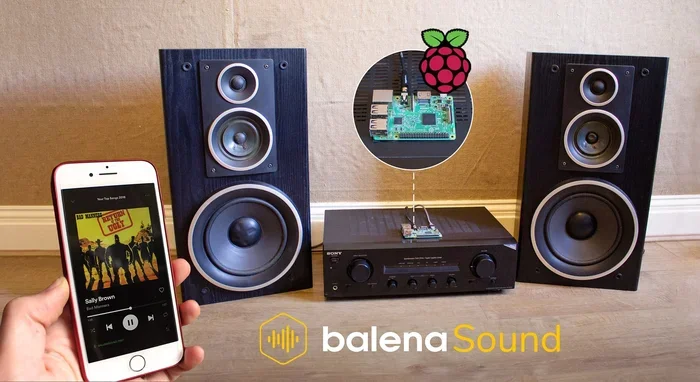
- Raspberry Pi with Bluetooth HAT – A versatile option for tech-savvy users.
- HiFi-Berry DAC+ – High-quality audio output for audiophiles.
- Amazon Echo Dot as a Bluetooth bridge – Use it to send Bluetooth audio to your speakers.
- Google Nest Mini as a transmitter – Similar to the Echo Dot approach.
Using a smart speaker as a Bluetooth bridge is a clever hack. You connect the smart speaker to your regular speaker with a cable. The smart speaker receives Bluetooth audio and plays it through the wired speaker. It is simple and effective.
How to Choose the Right Method for Your Speakers
Not every method works for every speaker. Your choice depends on several factors. Let us break them down so you can make the best decision.
Consider Your Speaker Type
What kind of speakers do you have? If they are desktop computer speakers, a Bluetooth adapter works well. If they are home stereo speakers, a Bluetooth receiver is ideal. For portable or battery-powered speakers, a DIY build might be the best fit.
Think about the input options available. Does your speaker have an aux port? RCA inputs? A 3.5mm jack? The more input options you have, the easier the conversion will be.
Think About Sound Quality
Sound quality is important. You do not want to lose audio fidelity during the conversion. Bluetooth receivers that support aptX or LDAC codecs deliver near-lossless audio. Cheap adapters may compress the audio and reduce quality.
If you are an audiophile, invest in a higher-quality receiver. The difference in sound is noticeable. For casual listening, a basic Bluetooth receiver works just fine.
Budget Considerations
Cost is always a factor. Bluetooth receivers range from $10 to $50. DIY kits cost between $20 and $100 depending on the components. Smart speaker replacement modules can cost $50 to $150.
For most people, a Bluetooth receiver offers the best value. It is cheap, easy to use, and delivers solid results. You get wireless capability without spending a lot of money.
Portability and Battery Life
Do you want your converted speaker to be portable? If so, you need a battery-powered solution. Bluetooth receivers that run on USB power work well with power banks. DIY builds give you full control over battery choice and life.
Keep in mind that Bluetooth streaming uses more power than wired playback. Your speaker’s battery may drain faster. Plan for this when choosing your conversion method.
Step-by-Step Guide to Converting Speakers with a Bluetooth Receiver
Let us walk through the simplest method step by step. This guide uses a Bluetooth receiver and a standard aux-equipped speaker.
- Buy a Bluetooth receiver – Choose one that matches your speaker’s input type.
- Plug the receiver into your speaker – Use an aux cable or RCA cable depending on the input.
- Power on the speaker – The receiver will draw power from the speaker.
- Put the receiver in pairing mode – Usually, you press and hold a button until the LED flashes.
- Open Bluetooth settings on your phone – Search for available devices.
- Select the receiver from the list – Wait for the connection to establish.
- Play music and enjoy – Your speaker is now wireless!
That is it. The entire process takes less than five minutes once you have the equipment. You can unplug the receiver and use it with any speaker that has an aux input.
Common Mistakes to Avoid
While converting speakers is straightforward, some mistakes can cause problems. Here are a few to watch out for.
- Buying the wrong adapter type – Make sure the receiver matches your speaker’s input port.
- Ignoring Bluetooth version – Older Bluetooth versions have shorter range and lower quality.
- Placing the receiver too far from the phone – Bluetooth range is typically 30 feet. Walls and obstacles reduce it.
- Using low-quality cables – Cheap cables can introduce static and reduce sound quality.
- Forgetting to charge the receiver – Some receivers need charging. Check the battery before use.
- Overlooking audio latency – Some Bluetooth connections have a slight delay. This matters for video watching.
Avoiding these mistakes ensures a smooth and enjoyable wireless experience. Take your time during setup and test everything before you settle in.
Expert Insights on Bluetooth Speaker Conversion
Audio engineers and tech experts agree that converting speakers to Bluetooth is worthwhile. According to sound specialists, the quality loss from Bluetooth streaming is minimal for most listeners. Modern codecs like aptX and LDAC deliver excellent audio over wireless connections.
Experts also recommend checking your speaker’s impedance before buying a receiver. Most standard speakers work well with any Bluetooth receiver. But high-end speakers may benefit from a receiver with a dedicated DAC (digital-to-analog converter).
Another tip from professionals is to keep your firmware updated. Bluetooth receivers often receive software updates that improve performance and fix bugs. Check the manufacturer’s website periodically.
Key Takeaways
- A Bluetooth receiver is the easiest and most affordable way to make any speaker wireless.
- DIY Bluetooth conversion kits let you build a custom wireless speaker from scratch.
- Audio quality may vary depending on the method you choose and your speaker type.
- Bluetooth adapters work with most speaker brands including Sony, JBL, Bose, and more.
- Battery life and range matter when choosing the right Bluetooth solution.
- Older speakers can benefit greatly from a wireless upgrade without replacing them.
Frequently Asked Questions
Do I need any special tools to convert my speakers to Bluetooth?
No special tools are needed for most methods. A Bluetooth receiver simply plugs into your speaker using an aux or RCA cable. You only need a screwdriver if you plan a DIY build. For the simplest approach, just plug and play.
Will converting my speakers to Bluetooth affect the sound quality?
The impact on sound quality is minimal with modern Bluetooth receivers. High-quality receivers support codecs like aptX that preserve audio fidelity. Cheap adapters may compress the audio slightly, but most listeners cannot tell the difference.
Can I convert any type of speaker to Bluetooth?
Most speakers can be converted if they have an audio input option. This includes speakers with aux ports, RCA inputs, or 3.5mm jacks. Speakers with only USB or digital inputs may need a different adapter. Check your speaker’s inputs before buying a receiver.
How far can I move away from my speaker once it is Bluetooth-enabled?
Bluetooth range is typically 30 feet in open space. Walls, furniture, and other obstacles can reduce this distance. Bluetooth 5.0 offers better range than older versions. For best results, stay within 20 feet of your speaker.
Is it cheaper to convert speakers or buy new Bluetooth speakers?
Converting is almost always cheaper. A Bluetooth receiver costs between $10 and $50. A good Bluetooth speaker starts at $50 and goes up from there. You save money and get to keep your favorite speakers at the same time.
Can I use the Bluetooth receiver with multiple speakers?
Yes, you can. Simply unplug the receiver from one speaker and plug it into another. Some people use one receiver with multiple speakers in different rooms. Just remember that only one speaker plays at a time unless you use additional equipment.
Conclusion
Turning regular speakers into Bluetooth speakers is one of the best upgrades you can make. It is simple, affordable, and gives your old speakers new life. Whether you choose a Bluetooth receiver, an adapter, or a DIY build, the results are satisfying.
The Bluetooth speaker conversion process does not require technical expertise. Anyone can do it with a few basic steps. You save money, reduce waste, and enjoy wireless audio freedom. Your regular speakers become wireless speakers without the high cost of buying new ones.
Take some time today to explore your options. Check what input ports your speakers have. Pick a method that fits your budget and skill level. In less than an hour, you will be streaming music wirelessly to your favorite speakers. It is a small change that makes a big difference in how you enjoy audio every day.