Can I Connect To Two Bluetooth At The Same Time On My Phone
Yes, you can connect two Bluetooth devices at the same time on most modern phones. This feature, often called Bluetooth multipoint or dual audio, lets you share music, podcasts, and calls across multiple devices. Whether you want to use two wireless earbuds or pair a speaker with your headphones, the setup is simpler than you think. Not all phones support it natively, but workarounds exist. Let us walk you through everything you need to know.
Have you ever wanted to listen to music on your wireless earbuds while also playing the same song through a Bluetooth speaker? Or maybe you want to share audio with a friend during a long road trip. The good news is that connecting two Bluetooth devices at the same time is something most people can do today. It is not magic, and it is not reserved for tech geniuses either.
The truth is that Bluetooth technology has come a long way over the past few years. What used to be a one-to-one connection is now capable of handling multiple wireless devices at once. Your phone, your tablet, your smartwatch, and your headphones can all talk to each other without missing a beat. But how exactly does it work, and can your phone do it? Let us find out together.
Key Takeaways
- Dual Bluetooth is possible: Most newer smartphones support connecting two Bluetooth devices simultaneously.
- Bluetooth multipoint is the key technology: It allows a single device to maintain connections with multiple sources.
- Check your phone first: Not all phones have native dual audio support, so verify your model.
- Workarounds exist for unsupported phones: Bluetooth adapters and third-party apps can help bridge the gap.
- Practical uses are everywhere: From sharing music with a friend to using a speaker and earbuds at the same time.
- Quality may vary: Connecting two devices can sometimes reduce audio quality or increase latency.
📑 Table of Contents
- What Does It Mean to Connect Two Bluetooth Devices?
- Can Your Phone Connect to Two Bluetooth Devices?
- How to Set Up Two Bluetooth Connections on Your Phone
- Common Uses for Dual Bluetooth Connections
- Limitations and Things to Watch Out For
- Workarounds for Phones Without Native Dual Audio
- Expert Tips for the Best Dual Bluetooth Experience
- Frequently Asked Questions
- Final Thoughts
What Does It Mean to Connect Two Bluetooth Devices?
When we talk about connecting two Bluetooth devices, we mean linking your phone to more than one wireless accessory at the same time. This could be two pairs of wireless earbuds, a Bluetooth speaker and a headset, or even a keyboard and a mouse paired to the same phone.
The technical term for this is Bluetooth multipoint or dual audio. It depends on your phone’s operating system and the Bluetooth version it supports. Some phones handle this effortlessly, while others need a little extra help.
How Bluetooth Multipoint Works
Bluetooth multipoint lets a single audio source connect to two different audio output devices. For example, your phone can stream music to both your wireless earbuds and a portable speaker at the same time. The phone manages both connections in the background without you having to switch back and forth.
This technology uses something called the Bluetooth Advanced Audio Distribution Profile (A2DP). It is the profile that handles high-quality audio streaming between devices. When your phone supports dual audio output, it splits the audio signal and sends it to both connected devices simultaneously.
Bluetooth Version Matters
Not all Bluetooth connections are created equal. The Bluetooth version on your phone plays a big role in whether you can connect two devices at once.
- Bluetooth 4.0 and below: Usually limited to one active audio connection at a time.
- Bluetooth 4.2: Some basic multi-device support starts appearing.
- Bluetooth 5.0 and above: Full dual audio and multipoint support on most devices.
If your phone runs Bluetooth 5.0 or newer, you are in great shape. Most modern smartphones released after 2019 come with Bluetooth 5.0 or higher built in. Check your phone settings to confirm.
Can Your Phone Connect to Two Bluetooth Devices?
The short answer is yes for most modern smartphones. But the longer answer depends on your phone brand, operating system, and even the specific model you own. Let us break it down by platform.
iPhone and Apple Devices
Apple introduced Audio Sharing in iOS 13, and it has been a game changer. With Audio Sharing, you can connect two pairs of AirPods or Beats headphones to your iPhone at the same time. You can also share audio with a Bluetooth speaker while keeping your own wireless earbuds connected.
Here is how it works on an iPhone:
- Connect your first pair of Bluetooth headphones as normal.
- Bring your second pair of AirPods or Beats near your iPhone.
- Open the Control Center and tap the Audio Sharing icon.
- Select the second pair of headphones to join the connection.
It is really that simple. You and a friend can listen to the same playlist without passing a single cable. Apple devices handle this beautifully and with very little lag.
Android Phones
Android phones vary widely when it comes to dual Bluetooth support. Some brands have built-in dual audio features, while others rely on third-party solutions.
Samsung, for example, offers a Dual Audio feature in its One UI software. This lets you connect your phone to two Bluetooth speakers or one speaker and one pair of wireless earbuds at the same time. Other brands like Xiaomi and OnePlus have similar features under different names.
Here is a quick comparison of popular Android brands and their dual Bluetooth support:
- Samsung: Built-in Dual Audio feature. Easy to toggle in settings.
- Xiaomi: Supports dual audio on most MIUI and HyperOS devices.
- OnePlus: Offers Bluetooth dual connection on newer models.
- Google Pixel: Limited native support, but third-party apps can help.
- Older Android phones: May need a Bluetooth adapter or app workaround.
If your Android phone does not have native dual audio, do not worry. There are still ways to get it working, which we will cover shortly.
How to Set Up Two Bluetooth Connections on Your Phone
Setting up two simultaneous Bluetooth connections is straightforward once you know where to look. The exact steps vary slightly depending on your phone, but the general process is similar across devices.
Step-by-Step Guide for iPhone
Follow these steps to enable Audio Sharing on your iPhone:
- Make sure both pairs of wireless earbuds or headphones are charged and nearby.
- Connect the first pair to your iPhone through Settings > Bluetooth.
- Start playing audio to confirm the first connection works.
- Bring the second pair of Bluetooth headphones close to your iPhone.
- Open Control Center by swiping down from the top right corner.
- Tap and hold the audio control in the top right corner.
- Tap AirPlay and select the second pair of headphones.
You should now hear the same audio coming from both sets of wireless earbuds. Adjust the volume independently for each device if needed.
Step-by-Step Guide for Android
For Android phones with Dual Audio support:
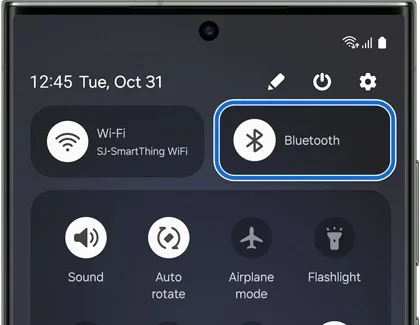
- Go to Settings > Connections > Bluetooth.
- Turn on Bluetooth and connect your first wireless device.
- Play some audio to confirm it is working.
- Tap Dual Audio to turn it on. This option is usually found in Advanced Settings.
- Pair your second Bluetooth device as you normally would.
- Both devices should now receive audio simultaneously.
For Android phones without native dual audio, you can try third-party apps like SoundAbout or Bluetooth Dual Audio. These apps redirect your wireless audio to multiple connected devices. Just be aware that results can vary depending on your phone model.
Common Uses for Dual Bluetooth Connections
Once you know how to connect two Bluetooth devices at the same time, the possibilities open up. Here are some of the most popular and practical ways people use this feature.
Sharing Music with a Friend
Nothing beats sharing good music with someone you care about. With dual Bluetooth audio, you and your friend can each wear a pair of wireless earbuds and listen to the same song at the same time. No need to share a single pair of earbuds or fight over the aux cord anymore.
This is especially great for couples walking together, friends at the gym, or siblings sharing a ride. A pair of wireless earbuds with a shared audio mode makes this experience seamless.
Home Audio Setup
Want to fill your room with sound? Connect your phone to a Bluetooth speaker and a pair of wireless headphones at the same time. You can listen privately while the speaker plays music for everyone in the room.
Some people also use this setup for video calls. They connect a Bluetooth speaker for group audio and wireless earbuds for their own private listening. It works surprisingly well for small gatherings and remote work setups.
Gaming and Entertainment
Gamers can also benefit from dual Bluetooth connections. Connect a wireless headset for chat audio and a Bluetooth speaker for game sounds. This gives you a richer audio experience without any wires getting in the way.
Parents might also appreciate this feature when using gadgets to make life easier for the whole family. Being able to connect multiple wireless devices at once means less fighting over who gets to use the speaker. You can check out our guide on 10 gadgets to make mom’s life easier for more ideas on tech tools that simplify daily routines.
Work and Productivity
Remote workers can pair a Bluetooth speaker with their wireless earbuds for flexible audio. Take calls through your earbuds while playing background music through a speaker. It keeps you connected and productive throughout the day.
Some professionals also connect a Bluetooth keyboard and mouse to their phone for a more desktop-like experience. This kind of multi-device connectivity turns your phone into a powerful productivity tool.
Limitations and Things to Watch Out For
Before you dive headfirst into dual Bluetooth connections, there are a few limitations you should know about. Understanding these helps you set realistic expectations and avoid frustration.
Audio Quality May Decrease
When your phone splits its Bluetooth signal between two devices, the audio quality can take a hit. Both devices share the same bandwidth, which means each one gets a smaller slice of the audio data. You might notice slightly lower sound quality or a tiny bit of latency.
This is especially true with older Bluetooth versions or cheaper wireless earbuds. If you are an audiophile who demands perfect sound, you might want to stick with a single high-quality connection most of the time.
Battery Drain Increases
Running two Bluetooth connections at the same time uses more power than a single connection. Your phone battery will drain faster, and the connected wireless devices will also use more juice. If you are on the go and do not have a portable charger, keep this in mind.
To conserve battery, disconnect the Bluetooth device you are not actively using. Simple habits like this go a long way in extending your phone’s battery life.
Compatibility Issues
Not every Bluetooth device plays nicely with dual audio. Some older wireless speakers or headphones do not support multipoint connections. And even if they do, the experience may not be as smooth as you hope.
Always check the specifications of your Bluetooth devices before trying to set up a dual connection. Look for terms like “multipoint”, “dual connection”, or “Bluetooth 5.0+” in the product description.
Connection Stability
Managing two Bluetooth connections can sometimes lead to connection drops or audio cutting out. This is more common when the devices are far apart or when there are many wireless signals competing for space in the same area.
If you experience frequent disconnections, try moving closer to both Bluetooth devices. Also, make sure your phone’s Bluetooth firmware is up to date. Sometimes a simple software update fixes connectivity issues right away.
Workarounds for Phones Without Native Dual Audio
Not every phone supports dual Bluetooth out of the box. But that does not mean you are stuck. There are several workarounds that can help you connect two wireless devices simultaneously.
Use a Bluetooth Adapter
A Bluetooth adapter is a small dongle that plugs into your phone or connects wirelessly. It acts as a bridge between your phone and a second Bluetooth device. Some adapters support multipoint connections, which means they can handle two audio outputs at once.
Look for adapters that support Bluetooth 5.0 or higher for the best performance. Popular options include the 1Mii Bluetooth 5.0 adapter and the Avantree Oasis. These devices are affordable and work with most wireless speakers and headphones.
Try Third-Party Apps
Several third-party apps on the Google Play Store can help you enable dual Bluetooth audio on unsupported phones. Apps like SoundAbout let you route audio output to different Bluetooth devices independently.
These apps are not always perfect, and they may not work on every phone model. But they are worth trying if you do not want to buy extra hardware. Just download a reputable app, read the reviews, and follow the setup instructions carefully.
Use a Bluetooth Receiver
A Bluetooth receiver is similar to an adapter but is designed to add Bluetooth capability to non-Bluetooth devices. You can plug a receiver into your Bluetooth speaker or headphones to extend the wireless range and improve connection stability.
This is a great option if you have a favorite pair of wired headphones or a speaker that does not have built-in Bluetooth. The receiver transforms them into wireless devices that can connect to your phone alongside another Bluetooth accessory.
Expert Tips for the Best Dual Bluetooth Experience
Want to get the most out of your dual Bluetooth setup? Here are some expert tips that make a real difference.
- Keep both devices close: Stay within Bluetooth range (about 30 feet) of both connected devices for the best experience.
- Update your software: Always keep your phone’s operating system and Bluetooth firmware up to date.
- Use devices from the same brand: Same-brand earbuds and speakers tend to pair more smoothly with dual audio.
- Turn off unused connections: Disconnect Bluetooth devices you are not actively using to save battery and reduce interference.
- Reset when needed: If connection issues arise, reset both Bluetooth devices and try pairing again from scratch.
- Check for interference: Wi-Fi routers, microwaves, and other wireless devices can interfere with Bluetooth signals. Keep your devices away from these sources.
These small steps can dramatically improve your wireless audio experience. Most people skip them and then wonder why their Bluetooth connection is not working properly. A little preparation goes a long way.
For more tech tips and gadget recommendations that make everyday life simpler, explore our collection of helpful articles on gadgets that simplify life. Whether you are looking for wireless earbuds with the best multipoint support or a Bluetooth speaker that delivers rich sound, there is always something new to discover.
Frequently Asked Questions
Can I connect two Bluetooth headphones to my phone at the same time?
Yes, you can connect two pairs of Bluetooth headphones to your phone simultaneously if your phone supports dual audio or Audio Sharing. iPhones use Audio Sharing, while many Android phones have a Dual Audio setting built in. Check your phone settings to confirm support.
Does connecting two Bluetooth devices reduce audio quality?
Slightly, yes. When your phone splits the Bluetooth signal between two devices, each device receives less bandwidth. This can result in a small drop in audio quality or a tiny bit of latency. Using Bluetooth 5.0 or newer devices minimizes this effect significantly.
Can I connect a Bluetooth speaker and wireless earbuds at the same time?
Absolutely. Connecting a Bluetooth speaker and a pair of wireless earbuds simultaneously is one of the most common uses of dual Bluetooth. You can listen through your earbuds privately while the speaker fills the room with sound. Most modern phones support this setup natively.
What Bluetooth version do I need for dual audio?
Bluetooth 5.0 or higher is recommended for the best dual audio experience. While some phones with Bluetooth 4.2 can manage two connections, Bluetooth 5.0 provides better range, faster data transfer, and more stable multi-device connections. Check your phone’s Bluetooth specifications in the settings menu.
Can I use dual Bluetooth on any phone?
Not every phone supports dual Bluetooth natively. Newer smartphones from Apple, Samsung, and other major brands typically do. Older or budget phones may not have this feature built in. In those cases, you can use Bluetooth adapters or third-party apps as workarounds to connect two wireless devices at once.
How do I disconnect one Bluetooth device without turning off both?
Go to Settings > Bluetooth on your phone. Find the device you want to disconnect and tap the settings icon next to it. Select Disconnect or Unpair. This removes only the selected device while keeping the other Bluetooth connection active and intact.
Final Thoughts
Connecting two Bluetooth devices at the same time on your phone is not just possible, it is increasingly easy. Whether you use an iPhone with Audio Sharing or an Android phone with Dual Audio, the technology is designed to make your life more convenient. You can share music, boost your productivity, and enjoy a richer wireless audio experience with just a few taps.
Remember that Bluetooth multipoint works best with newer phones and Bluetooth 5.0 devices. Keep your software updated, stay within range, and choose compatible wireless devices for the smoothest experience. And if your phone does not support dual audio natively, do not worry. Bluetooth adapters and apps can fill the gap.
The world of wireless connectivity keeps evolving, and the ability to connect multiple Bluetooth devices simultaneously is just the beginning. Embrace the technology, experiment with different setups, and enjoy the freedom that comes with truly wireless audio. Your phone is more powerful than you think, and with the right knowledge, you can unlock its full potential today.