Can You Use Someone Elses Xfinity Router At Your House
Yes, you can use someone else’s Xfinity router at your house, but there are a few important steps you need to follow. You will need to activate it on your own Xfinity account, update the network settings, and possibly reset the device first. This guide walks you through everything you need to know to make it work safely and smoothly.
Can you use someone else’s Xfinity router at your house? The short answer is yes. But the full answer involves a few important steps, some checks, and a little patience. Whether you picked up a used router from a friend, bought one online, or inherited it from a previous tenant, you can get it working on your Xfinity internet service. This guide covers everything you need to know. We will walk you through setup, activation, common problems, and expert tips to make the process easy.
Using a secondhand Xfinity router can save you money. Xfinity charges a monthly rental fee for their equipment, and that fee adds up over time. By reusing a router, you skip that cost. But there are catches. The router must be compatible with your plan, linked to your account, and properly configured. Let us dive into all the details so you can do this the right way.
Key Takeaways
- It is possible: You can use a secondhand Xfinity router if you activate it on your own account.
- Activation is required: The router must be linked to your Xfinity account and service plan.
- Reset first: Always factory reset a used router before setting it up in your home.
- Check compatibility: Make sure the router model works with your Xfinity internet plan.
- Return rules apply: If you were renting equipment, returning someone else’s router could cause issues.
- Security matters: Change default passwords and update settings for a safe network.
📑 Table of Contents
- What Is an Xfinity Router and How Does It Work?
- Can You Use Someone Else’s Xfinity Router At Your House?
- How to Set Up a Used Xfinity Router
- Common Issues When Using a Secondhand Xfinity Router
- Xfinity Router vs. Buying Your Own Equipment
- When You Should Return Xfinity Equipment Instead
- Expert Tips for Getting the Most From a Secondhand Xfinity Router
- Final Thoughts
What Is an Xfinity Router and How Does It Work?
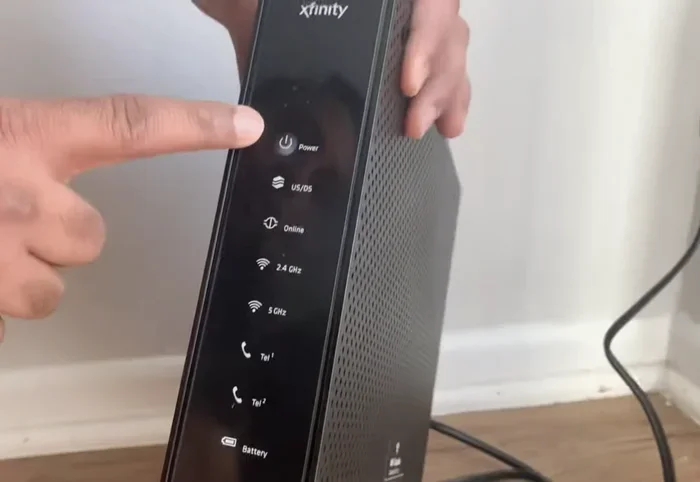
An Xfinity router is the device Xfinity provides to customers for WiFi access. It connects to your cable internet line and broadcasts a wireless signal throughout your home. Most modern Xfinity routers are actually modem-router combos. This means they handle both the internet connection and the WiFi broadcast in one box.
Xfinity calls their newer combo devices xFi gateways. These gateways do a lot more than older models. They include built-in WiFi hotspots, parental controls, and easy management through the xFi app. The router talks to Xfinity’s network using specific network settings and a unique MAC address. That is why you cannot just plug in any Xfinity router and expect it to work.
How Xfinity Routers Connect to Your Account
Every Xfinity router is tied to a specific account. When you activate a router, it registers with Xfinity’s system. The router sends its MAC address to the network, and Xfinity links it to your service. This is why a router from another household will not work right away. You need to reactivate it under your name and account.
The Xfinity activation process is straightforward. You can do it online or by calling customer service. During activation, Xfinity checks that the router model is approved for your internet plan. Some older models may not work with newer plans. Always double-check before you start.
Can You Use Someone Else’s Xfinity Router At Your House?
Can you use someone else’s Xfinity router at your house? Yes, you can. But you need to follow the right steps. A router that worked in someone else’s home will not automatically work in yours. You need to reset it, activate it on your account, and configure it for your network.
Here are the main things to keep in mind before you try:
- The router must be an Xfinity-approved model. Not all routers work with Xfinity’s cable network. Check the model number online before you try to activate it.
- You need an active Xfinity internet plan. The router alone does not give you internet. You must have an Xfinity service subscription.
- The router must be activated on your account. This links the device to your service and your address.
- You may need to return rental equipment. If you are currently renting an Xfinity router, using a secondhand one might affect your rental agreement.
Compatibility Check: Is Your Router Model Supported?
Not every Xfinity router works with every plan. Xfinity updates its approved equipment list from time to time. Before you try to activate a used router, look up the model number on the Xfinity website. You can also call Xfinity customer service and ask them directly. They will tell you if the model is compatible with your plan.
Common Xfinity router models include the xFi Wireless Gateway, the xFi Advanced Gateway, and the XB6, XB7, and XB8 series. These are all widely supported. Older models like the DPC3008 or TG862G may have limited support on newer plans. Always verify before you invest time in setup.
What Happens If You Try to Use a Non-Compatible Router?
If you try to activate a router that is not on Xfinity’s approved list, the activation will fail. The router might connect to the cable line but will not get an internet signal. Xfinity’s system checks the device during activation and blocks unsupported models. This is a security and compatibility measure. So always confirm compatibility first.
How to Set Up a Used Xfinity Router
Setting up a secondhand Xfinity router is not hard, but it does require a few specific steps. Follow this process carefully to avoid problems. Here is what you need to do.
Step 1: Factory Reset the Router
Before anything else, you need to factory reset the router. This wipes out all the previous owner’s settings. It clears the old account links, WiFi passwords, and network configurations. A factory reset gives you a clean slate to work with.
To factory reset most Xfinity routers, find the small reset button on the back of the device. Use a paperclip to press and hold it for about 10 to 15 seconds. The lights on the router will blink and then restart. This process is called a router reset, and it is essential when using secondhand equipment.
Step 2: Connect the Router to Your Cable Line
After the reset, connect the router to your cable outlet. Use the same coaxial cable that was connected to your old router or modem. Plug one end into the wall outlet and the other into the router’s input port. Then plug in the power cord and wait for the lights to stabilize.
If you are using a separate modem and router setup, connect the modem first. Let the modem fully boot up before connecting the router to the modem with an Ethernet cable. This ensures a proper cable internet connection chain.
Step 3: Activate the Router on Your Xfinity Account
Now it is time to activate the router. Go to the Xfinity website and sign in to your account. Navigate to the equipment or devices section. Follow the prompts to add a new device. You will need the router’s MAC address, which is printed on a sticker on the bottom or back of the device.
You can also activate by calling Xfinity customer service. Have the MAC address ready. The representative will walk you through the activation process. Once activated, the router will link to your account and your home address.
Step 4: Configure Your Network Settings
After activation, log into the router’s admin panel to configure your network settings. You can usually access this by typing 10.0.0.1 or 192.168.1.1 into your browser. Use the default admin credentials printed on the router, then change them right away.
Set up your WiFi name and password. Choose a strong password to keep your network secure. You can also enable bridge mode if you are using a separate modem. Bridge mode turns the router into a pure WiFi broadcaster, which can improve performance in some setups.
Step 5: Download the xFi App and Manage Your Network
The Xfinity xFi app is a great tool for managing your network. It lets you see all connected devices, set parental controls, and run speed tests. Download the app on your phone and sign in with your Xfinity account. The app will detect your new router and guide you through any remaining setup steps.
You can also use the app to add xFi pods if you need to extend your WiFi coverage. These small devices plug into outlets around your home and boost the signal to dead zones. They work seamlessly with Xfinity routers and are a great addition to any home network.
Common Issues When Using a Secondhand Xfinity Router
Even when you follow all the steps, you might run into some issues. Here are the most common problems and how to fix them.
The Router Will Not Activate
If the router does not activate, check a few things first. Make sure the model is compatible with your Xfinity plan. Verify that the MAC address is entered correctly during activation. Also confirm that your Xfinity internet service is active and working. Sometimes a simple router reset and retry solves the problem.
Slow Internet Speeds After Setup
Slow speeds can happen for several reasons. The router might be an older model that does not support your plan’s speed tier. Placement matters too. Keep the router in a central, open location away from walls and electronics. If speeds are still slow, try changing the WiFi channel in the admin panel. Interference from neighbors’ networks can slow you down.
WiFi Keeps Disconnecting
If your WiFi drops frequently, the router’s firmware might need updating. Log into the admin panel and check for firmware updates. Install any available updates and restart the router. Also make sure the router is not overheating. Place it in a well-ventilated area and do not stack other devices on top of it.
The Router Shows as Unauthorized on Your Account
This happens when the router is still linked to a previous account. A factory reset should fix this. If it does not, contact Xfinity customer service and explain the situation. They can remove the old account link and help you reactivate the router under your name.
Xfinity Router vs. Buying Your Own Equipment
Using a secondhand Xfinity router is one option. But you might also consider buying your own compatible router. Let us compare the two approaches so you can decide what works best for you.
| Factor | Used Xfinity Router | Own Compatible Router |
|---|---|---|
| Cost | Free or low cost | $80 to $200 upfront |
| Compatibility | Must be Xfinity-approved model | Must be DOCSIS 3.1 compatible |
| Activation | Must activate on Xfinity account | No Xfinity activation needed |
| Support | Xfinity support for router issues | Manufacturer support only |
| Monthly Savings | Saves rental fee | Saves rental fee |
| Features | Depends on model | You choose the features |
Buying your own router gives you more control. You are not tied to Xfinity’s equipment cycle. You can upgrade whenever you want. But using a secondhand Xfinity router is a great low-risk option. It costs almost nothing and works seamlessly with Xfinity’s system.
Which Option Saves More Money?
Xfinity charges about $14 to $25 per month for router rental. Over a year, that adds up to $168 to $300. Even a $150 own router pays for itself in about six months. Using a free secondhand router saves you the most money in the short term. But buying your own gives you long-term flexibility.
When You Should Return Xfinity Equipment Instead
There are times when using a secondhand router is not the right move. If you are currently renting Xfinity equipment, returning it is usually the better choice. Here is when you should stick with returning Xfinity equipment:
- You are ending your Xfinity service. Return all rental equipment to avoid extra charges.
- The secondhand router is an older model. Older routers may not support modern internet speeds or security standards.
- You need advanced features. Newer Xfinity equipment or your own router may offer better performance, mesh WiFi, and security features.
- You are unsure about compatibility. If you cannot confirm the router works with your plan, it is safer to use Xfinity’s equipment or buy a new compatible router.
Returning Xfinity equipment is easy. You can drop it off at an Xfinity store or mail it back using the provided label. Always keep your return receipt as proof. This protects you from future billing disputes.
Expert Tips for Getting the Most From a Secondhand Xfinity Router
Want to make sure your used router works its best? Follow these expert tips to get great performance and keep your network secure.
Update the Firmware Right Away
Older routers may be running outdated firmware. This can cause security vulnerabilities and performance issues. After activation, log into the admin panel and check for updates. Install the latest firmware and restart the router. This is one of the most important steps you can take.
Change the Default Admin Password
Every router comes with a default admin password. Hackers know these passwords. Change them immediately to something strong and unique. Use a mix of letters, numbers, and symbols. This protects your network settings from unauthorized access.
Position the Router Strategically
Router placement affects your WiFi coverage a lot. Place the router in a central location in your home. Keep it elevated and away from metal objects, microwaves, and thick walls. Good placement can make a big difference in speed and reliability.
Use a WiFi Analyzer App
WiFi congestion is a real problem in many neighborhoods. Download a free WiFi analyzer app on your phone. It shows you which channels are least crowded. Then switch your router to a less busy channel for better performance.
Consider Adding an xFi Pod for Better Coverage
If your router does not reach every room, an xFi pod can help. These small devices plug into wall outlets and extend your WiFi signal. They are easy to set up and work great with Xfinity routers. Place one in a room where the signal is weak and enjoy better coverage throughout your home.
Final Thoughts
Can you use someone else’s Xfinity router at your house? Absolutely. With the right steps, a used Xfinity router can work perfectly on your network. The key is to factory reset it first, confirm compatibility, activate it on your account, and configure your settings properly. This approach can save you money on rental fees and get you online quickly.
Just remember to keep your network secure. Change default passwords, update firmware, and monitor connected devices. If you run into issues, Xfinity customer service is always available to help. Whether you use a secondhand router or buy your own equipment, the goal is the same: a fast, reliable, and secure home network. Take your time, follow the steps, and enjoy your WiFi.
Frequently Asked Questions
Can I use a friend’s Xfinity router if they no longer need it?
Yes, you can. You will need to factory reset the router first, then activate it on your own Xfinity account. Make sure the router model is compatible with your internet plan before you start. Xfinity customer service can help confirm compatibility if you are unsure.
Will using a secondhand Xfinity router void my warranty?
Using a secondhand Xfinity router does not void your Xfinity service warranty. However, if you are renting equipment from Xfinity, using a personal or secondhand router may change your rental agreement. Check your account terms or contact Xfinity to clarify your options.
How do I find the MAC address on my Xfinity router?
The MAC address is printed on a sticker on the bottom or back of the router. It is a string of numbers and letters, usually formatted with colons or dashes. You will need this address during the activation process on the Xfinity website or when speaking with customer service.
Can I use a secondhand Xfinity router with any internet provider?
No, Xfinity routers are designed to work with Xfinity’s cable network only. They will not work with other internet providers like AT&T, Verizon, or DSL services. If you switch providers, you will need a router compatible with that provider’s technology.
What should I do if the used router still shows the previous owner’s WiFi name?
A factory reset should clear all previous settings, including the WiFi name. If the reset does not work, log into the router’s admin panel and manually change the WiFi name and password. This also ensures your network is secure and not using the previous owner’s credentials.
Is it better to buy a new router instead of using a secondhand Xfinity router?
A new router gives you the latest features, better security, and a warranty. But a secondhand Xfinity router is a great budget option if you want a seamless setup with Xfinity service. The best choice depends on your budget, needs, and how long you plan to stay with Xfinity.