Can A Phone Detect A Hidden Spy Camera In Your Home
Your phone can absolutely help you find hidden spy cameras in your home. With the right apps, settings, and simple techniques, you can scan for covert surveillance devices in minutes. This guide walks you through every method, from infrared detection to WiFi scanning, so you can take back your privacy and feel safe again.
Have you ever walked into a rental room and felt a strange sense of unease? Maybe you noticed a smoke detector in an odd spot. Or a clock on the nightstand that just doesn’t look right. These feelings aren’t paranoia. They might be your gut telling you something is off.
Hidden spy cameras are more common than most people think. They show up in Airbnb rentals, hotel rooms, bathrooms, and even offices. The good news is that your phone can help you detect these hidden devices. You don’t need expensive equipment or a professional investigator. In this guide, we’ll show you exactly how to use your phone to find a hidden spy camera in your home.
Whether you’re staying somewhere new or just want to protect your own space, this article covers everything you need to know. We’ll break down the science behind detection, share the best apps, and give you step-by-step instructions you can follow right now.
Key Takeaways
- Phone cameras can detect infrared light: Many spy cameras use IR LEDs that your phone can spot by turning off the lights.
- Free and paid apps exist: Apps like Hidden Camera Detector and Glint Finder can help you locate hidden devices quickly.
- WiFi scanning reveals wireless cameras: Your phone can find spy cameras that connect to your network.
- Physical inspection matters: Apps alone aren’t enough. You should also look for unusual objects and reflections.
- Magnetic sensors help detect magnetic components: Some phones can pick up on the magnets inside hidden cameras.
- Act fast if you find one: Document the device, don’t touch it, and contact authorities if needed.
📑 Table of Contents
- How Hidden Spy Cameras Actually Work
- Ways Your Phone Can Detect Spy Cameras
- Best Phone Apps For Spy Camera Detection
- Step-By-Step: How To Scan Your Home For Spy Cameras
- What To Do If You Find A Hidden Spy Camera
- Common Myths About Spy Camera Detection
- Expert Insights On Home Privacy Protection
- How To Prevent Hidden Cameras In Your Home
- Comparing Detection Methods At A Glance
- Final Thoughts
How Hidden Spy Cameras Actually Work
Before you learn how to detect spy cameras, it helps to understand what you’re looking for. Hidden cameras come in all shapes and sizes. Some are tiny pinhole cameras hidden inside everyday objects. Others are built into devices you’d never suspect.
Types Of Hidden Spy Cameras
Spy cameras fall into a few common categories. Knowing these helps you scan smarter:
- Pinhole cameras: These are tiny cameras hidden behind a small hole in an object. They can fit inside smoke detectors, picture frames, or even plush toys.
- WiFi-enabled cameras: These connect to your wireless network and stream footage to a remote device. They need a signal to work.
- Battery-powered cameras: These run on small rechargeable or replaceable batteries. They don’t need to be plugged in, making them easy to hide.
- Infrared cameras: These use IR LEDs to capture video in the dark. They’re common in cheap spy gadgets.
- Wired cameras: These connect directly to a recording device or monitor through a cable.
Why Spy Cameras Use Infrared Technology
Many hidden cameras use infrared (IR) light to see in the dark. IR light is invisible to the human eye. But your phone camera can often pick it up. This is because phone cameras have sensors that detect light beyond what our eyes can see. That’s the key to one of the simplest detection methods we’ll cover below.
Ways Your Phone Can Detect Spy Cameras
Your phone is a surprisingly powerful tool for finding hidden surveillance devices. It has a camera, a WiFi radio, and sometimes magnetic sensors. Each of these can help you spot a spy camera. Let’s walk through the main methods.
Method 1: Use Your Phone Camera To Find IR Light
This is the most popular and easiest method. Here’s how it works:
- Turn off all the lights in the room.
- Open your phone’s camera app. Use the front-facing camera if possible.
- Slowly scan the room. Look for small purple or white dots of light.
- Those dots are IR LEDs. They’re coming from a hidden camera.
Some phone cameras have built-in IR filters that block this light. If you don’t see anything with the back camera, try the front camera. The front camera usually doesn’t have an IR filter, so it picks up infrared light more easily.
Method 2: Scan For WiFi Networks
Many hidden spy cameras connect to WiFi to send footage to the owner. You can use your phone to scan for unfamiliar devices on your network.
Go to your WiFi settings and look at the list of connected devices. If you see a device you don’t recognize, it could be a spy camera. Look for names that include words like “camera,” “cam,” or “IP camera.”
For a deeper scan, you can download a network scanner app. These apps show every device connected to your WiFi, along with its IP address and manufacturer. This makes it much easier to spot something suspicious.
Method 3: Use Your Phone’s Magnetic Sensor
Some phones have a magnetometer. This is the same sensor that powers your compass app. Hidden cameras often contain small magnets for their lenses or internal components.
To use this method:
- Open your compass app or a magnetic sensor app.
- Move your phone slowly around objects in the room.
- If the compass reading spikes near a certain object, there might be a electronic device hidden inside it.
This method isn’t perfect. Some phones have weak sensors. And metal objects can interfere with the reading. But it’s a useful tool to have in your toolkit.
Method 4: Look For Camera Lens Reflections
Sometimes the simplest method works best. Shine your phone’s flashlight at objects around the room. Look closely at any shiny surfaces. A camera lens will reflect the light back, even if the camera itself is well hidden.
Move the light slowly across mirrors, glass frames, and dark objects. You’re looking for a tiny glint that gives away the lens.
Best Phone Apps For Spy Camera Detection
Apps make the detection process faster and more reliable. Here are some of the best options available right now.
Hidden Camera Detector Apps
Several apps are designed specifically to find hidden cameras. Here’s a quick look at the top choices:
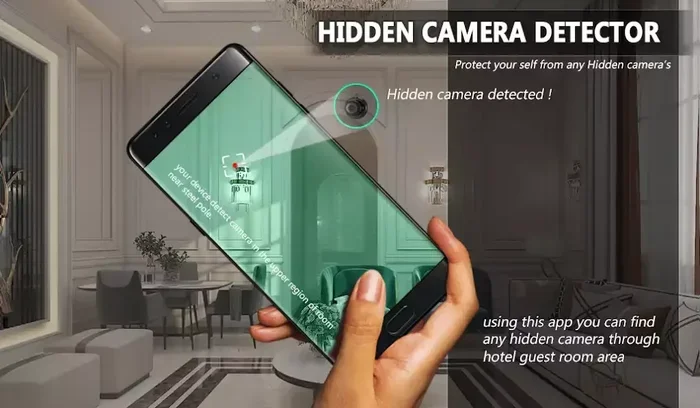
- Hidden Camera Detector (Android/iOS): This app uses your phone’s magnetometer and camera to scan for hidden devices. It’s simple to use and gives clear results.
- Glint Finder (Android): This app detects camera lens reflections using your flashlight and camera. It highlights potential spy cameras on your screen.
- Fing (iOS/Android): Primarily a network scanner, but excellent for finding WiFi-connected spy cameras on your network.
- iSpy (Android): A more advanced tool that scans for RF (radio frequency) signals from wireless cameras.
What To Look For In A Detection App
Not all detection apps are created equal. When choosing one, look for these features:
- Ease of use. The app should be simple enough for anyone to use.
- Multiple detection methods. The best apps combine camera scanning, WiFi scanning, and magnetic detection.
- Regular updates. Spy camera technology changes. The app should keep up.
- Good reviews. Check user feedback before downloading.
Step-By-Step: How To Scan Your Home For Spy Cameras
Now that you know the methods and tools, let’s put it all together. Here’s a practical walkthrough you can follow the next time you want to check a room.
Step 1: Prepare The Room
Start by removing personal items that might trigger false positives. Your TV remote, wireless charger, and Bluetooth speaker all emit signals. They can confuse some detection methods. Move these to another room if possible.
Step 2: Do A Visual Inspection
Before you turn on any apps, just look around. Check these common hiding spots:
- Smoke detectors on the ceiling
- Bookshelves and picture frames
- USB chargers and power strips
- Stuffed animals and decorative items
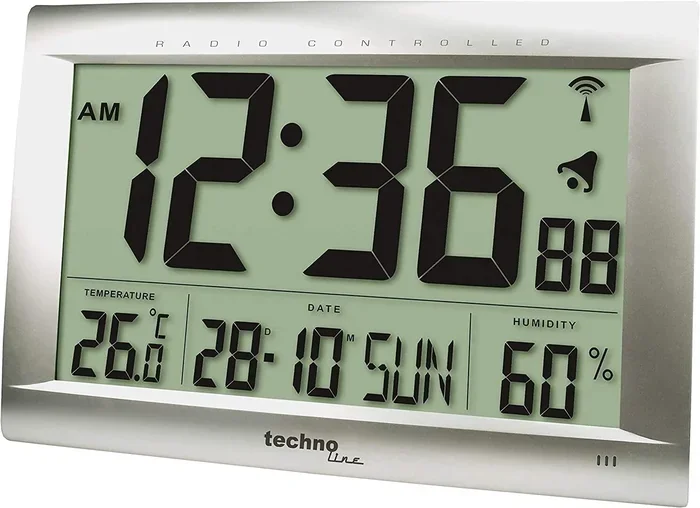
- Clocks, especially ones near beds or seating areas
- Air fresheners and plants
Look for anything that seems out of place. A new smoke detector in a room that never had one? That’s suspicious. A stuffed animal positioned in a strange way? Worth a closer look.
Step 3: Scan With IR Detection
Turn off the lights. Use your phone’s front camera to scan the room. Look for any glowing dots. Move slowly and methodically from one corner to another. Pay special attention to areas where you’d expect a camera to be.
Step 4: Scan The WiFi Network
Open your WiFi settings or a network scanner app. Check for any unknown devices. Write down the names and cross-reference them online. Many spy cameras use generic brand names that you can identify with a quick search.
Step 5: Use Magnetic Detection
Run your phone’s magnetic sensor near objects you’re suspicious of. A spike in the reading could mean there’s an electronic device hidden inside.
Step 6: Flashlight Reflection Check
Finally, use your phone’s flashlight to check for lens reflections. Shine the light at different angles across reflective surfaces. A tiny dot of reflected light could be a camera lens.
Quick Tip: No single method is 100% reliable on its own. The best approach is to combine all of these steps. Using multiple methods together gives you the best chance of finding any hidden device.
What To Do If You Find A Hidden Spy Camera
Finding a spy camera is a stressful experience. But it’s important to stay calm and handle the situation correctly. Here’s exactly what you should do.
Don’t Touch Or Disturb The Device
Leave the camera where it is. Touching it could destroy evidence. It could also trigger a recording or alert the person who placed it.
Document Everything
Take photos and videos of the device in place. Note the exact location. Write down the date and time you found it. This evidence will be important if you decide to take legal action.
Contact The Authorities
In most places, placing a hidden camera without consent is illegal. Call your local police or non-emergency line and report what you found. Provide them with the documentation you gathered.
Secure Your Space
After documenting the device, you can safely remove it or cover the lens with tape. Change your WiFi password if the camera was connected to your network. This prevents the owner from accessing it remotely.
Consider Professional Help
If you’re staying in a rental property, contact the landlord or property manager. If it’s your own home, consider hiring a professional counter-surveillance sweep. These experts use advanced equipment to find cameras and listening devices you might have missed.
Common Myths About Spy Camera Detection
There’s a lot of misinformation out there about finding hidden cameras. Let’s clear up some of the most common myths.
Myth 1: All Spy Cameras Glow In The Dark
This is not true. Many modern spy cameras use IR LEDs that are invisible even to phone cameras. Some cameras have no IR LEDs at all. They rely on ambient light or external lighting to capture footage.
Myth 2: Phone Apps Can Find All Hidden Cameras
Phone apps are helpful tools, but they’re not magic. They can detect certain types of cameras, especially WiFi and RF cameras. But they can’t find wired cameras or cameras that don’t emit any signal. That’s why physical inspection remains so important.
Myth 3: Only Cheap Hotels Have Spy Cameras
While budget accommodations do see more cases, spy cameras can show up anywhere. Even upscale hotels, vacation rentals, and private homes are not immune. Vigilance is important no matter where you are.
Myth 4: You Need Expensive Equipment To Detect Spy Cameras
You don’t need a $500 device to find hidden cameras. Your phone, combined with the methods in this article, is more than enough for most situations. Professional tools are helpful for thorough sweeps, but they’re not necessary for everyday checks.
Expert Insights On Home Privacy Protection
We spoke with privacy and security experts to get their top tips for staying safe. Here’s what they had to say:
“The best defense is awareness,” says a cybersecurity consultant with over 10 years of experience. “People don’t think about hidden cameras because it feels unlikely. But once you know what to look for, it becomes second nature.”
Another expert recommends making privacy scanning a habit. “Whenever you enter a new space, take 60 seconds to do a quick scan. Look for unusual objects. Check the WiFi network. It takes almost no time, but it gives you real peace of mind.”
These professionals also emphasize that electromagnetic detection tools are improving rapidly. Newer phones with better sensors can pick up weaker signals from hidden devices. But they still stress that no single method replaces a thorough physical inspection.
How To Prevent Hidden Cameras In Your Home
Detection is only half the battle. Prevention is just as important. Here are some practical steps you can take to reduce the risk of finding a spy camera in your own home.
- Cover your WiFi router’s admin panel. Change default passwords and enable encryption.
- Use a WiFi jammer if needed. In some areas, it’s legal to use a signal jammer to block wireless devices. Check your local laws first.
- Install a privacy cover on your laptop camera. This is a simple habit that protects you from webcam spying.
- Be cautious with smart home devices. Only buy from reputable brands. Cheap no-name smart devices may have security flaws.
- Regularly scan your home. Make it a monthly routine to check common hiding spots.
- Use a signal blocker bag. These bags block all wireless signals. You can store sensitive devices inside them when not in use.
Comparing Detection Methods At A Glance
| Method | What It Detects | Difficulty | Reliability |
|---|---|---|---|
| IR Camera Scan | Infrared cameras with IR LEDs | Easy | Good for IR cameras only |
| WiFi Network Scan | Wireless cameras on your network | Easy | Good for WiFi cameras |
| Magnetic Sensor Scan | Cameras with magnetic components | Medium | Moderate |
| Flashlight Reflection | Camera lenses | Easy | Good for visible lenses |
| RF Detector Apps | Radio frequency signals from wireless cameras | Medium | Good for RF cameras |
| Professional Equipment | All types of hidden devices | Hard | Very high |
As you can see, no single method catches everything. That’s why combining multiple approaches gives you the best results. The more methods you use, the more confident you can be that your space is truly free of hidden devices.
Final Thoughts
Your phone is one of the most powerful tools you have for detecting hidden spy cameras. With the right knowledge and a few free apps, you can protect your privacy and your family’s safety. The methods in this article are simple, effective, and easy to follow.
Remember, detecting spy cameras with your phone works best when you combine digital scanning with physical inspection. Don’t rely on just one method. Take the time to look around, scan your network, and check for infrared light. It might feel like overkill, but it’s better to be safe than sorry.
Privacy is a fundamental right. Don’t let hidden cameras violate that right in your own home. Stay vigilant, stay informed, and use the tools you already have. Your phone is more powerful than you think when it comes to keeping your space safe and secure.
Now that you know how to find a hidden spy camera, share this guide with friends and family. The more people who know about these detection methods, the harder it becomes for anyone to spy in secret.
Frequently Asked Questions
Can any phone detect a hidden spy camera?
Most modern smartphones can detect hidden cameras to some degree. Both Android and iPhone models have cameras that can pick up infrared light, WiFi scanning features, and magnetic sensors. However, older or budget phones may have weaker sensors and fewer detection capabilities.
How accurate are phone apps at finding spy cameras?
Phone apps are helpful but not 100% accurate. They work well for WiFi-connected cameras and cameras with infrared LEDs. However, they may miss wired cameras or cameras without any electronic signals. For the best results, use apps alongside physical inspection methods.
Can a hidden camera work even if it’s not connected to WiFi?
Yes. Many hidden cameras record to an SD card or internal storage instead of streaming over WiFi. These cameras won’t show up on a network scan, which is why physical inspection methods like infrared scanning and flashlight reflection are so important.
Is it legal to use a spy camera detector app?
Yes, using detection apps is legal in most countries. You have every right to scan your own property for hidden surveillance devices. However, using such apps to spy on someone else’s private property or in private areas like bathrooms is illegal.
What should I do if I find a spy camera in my rental?
First, document the device with photos and videos. Do not touch or remove it. Contact your landlord immediately and file a report with local police. Hidden cameras in rental properties are illegal in most jurisdictions, and you may be entitled to compensation or a full refund.
How often should I scan my home for hidden cameras?
It’s a good idea to do a quick scan whenever you move into a new home or rental. For your permanent residence, a thorough monthly check is sufficient. If you have guests you’re unsure about, consider scanning before and after they visit.