Are Wireless Earbuds Compatible With All Phones Today
Are Wireless Earbuds Compatible With All Phones? The short answer is yes, but there are important details to know. Bluetooth technology makes it possible to connect most earbuds to almost any modern phone, yet not every connection delivers the same experience. Different phones support different Bluetooth versions, audio codecs, and features that affect performance. In this guide, we break down everything you need to know about wireless audio compatibility, from pairing to troubleshooting.
Are Wireless Earbuds Compatible With All Phones? The short answer is yes, but there are some important details you should know before you buy. Bluetooth technology has made it possible to connect almost any pair of wireless earbuds to almost any phone, yet not every connection delivers the same experience. Different phones support different Bluetooth versions, audio codecs, and features that can affect how your earbuds perform. In this article, we will walk you through everything you need to know about earphone compatibility and help you make the best choice for your device.
Whether you use an iPhone, an Android phone, or something else entirely, understanding how wireless earbuds connect to your device will save you time, money, and frustration. We will cover Bluetooth connectivity, audio quality, pairing tips, and common issues so you can enjoy your wireless audio without any headaches.
So, are wireless earbuds compatible with all phones? Let us find out together.
Key Takeaways
- Universal Bluetooth Standard: Most wireless earbuds use Bluetooth, which works with nearly all modern phones.
- Bluetooth Version Matters: Newer versions offer better range, battery life, and audio quality than older ones.
- Audio Codecs Differ by Phone: iPhones and Androids support different codecs, which affects sound quality.
- Companion Apps Help: Many earbuds need a phone app to unlock all features and settings.
- Multipoint Connection Is a Bonus: Some earbuds can connect to two devices at once for seamless switching.
- Firmware Updates Improve Compatibility: Keeping your earbuds updated ensures the best performance.
- Older Phones May Have Limitations: Phones with older Bluetooth versions may not support the latest features.
📑 Table of Contents
How Wireless Earbuds Connect to Phones
The Role of Bluetooth Technology
Almost all wireless earbuds use Bluetooth to connect to phones. Bluetooth is a short-range wireless technology that lets devices talk to each other without cables. It has been around for many years and is built into nearly every modern smartphone. When you pair your earbuds with your phone, they create a Bluetooth connection that transmits audio in real time.
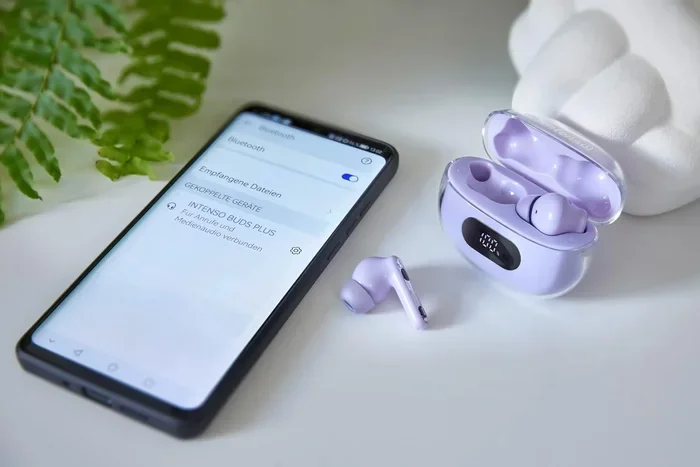
The connection process is simple. You put your earbuds in pairing mode, go to your phone’s Bluetooth settings, and select your earbuds from the list. Once paired, they remember each other and reconnect automatically in the future. This is why smartphone pairing has become so easy over the years.
But here is the thing. Just because two devices can connect does not mean they will work perfectly together. The quality of your experience depends on several factors, including the Bluetooth version, the audio codec, and the phone’s software. Let us look at each of these in detail.
Understanding Bluetooth Pairing
Bluetooth pairing is the process of linking two devices for the first time. Your earbuds and phone exchange special codes to create a trusted connection. After that, they recognize each other instantly when you turn them on.
Sometimes pairing does not go smoothly. You might see error messages or your earbuds might not show up in the list. This is more common with older phones or when you are trying to connect to a new device. A quick reset of both devices usually fixes the problem.
Quick Tip: If your earbuds will not pair, turn off Bluetooth on your phone, wait ten seconds, and turn it back on. Then try again. This simple step solves most pairing issues.
Bluetooth Versions and Why They Matter
The Bluetooth version on your phone plays a big role in how well your wireless earbuds work. Each new version brings improvements in speed, range, battery efficiency, and audio quality. Here is a quick look at how different versions compare.
Bluetooth 5.0 and Newer Versions
Bluetooth 5.0 was a major leap forward. It doubled the speed and range compared to older versions. This means your wireless audio streams more smoothly and you can move farther from your phone without losing the connection. Most phones made after 2019 support Bluetooth 5.0 or newer.
Bluetooth 5.2 and 5.3 brought even more improvements. They introduced features like LE Audio and LC3 codec, which promise better sound quality and lower power use. If your phone supports these newer versions, you get the full benefit of modern wireless earbuds.
Older Phones and Compatibility
What if your phone has an older Bluetooth version? The good news is that your wireless earbuds will still connect. Basic functions like music playback and hands-free calling will work fine. However, you might miss out on advanced features like high-resolution audio codecs or longer battery life.
For example, if your phone only supports Bluetooth 4.2, your earbuds will still play music. But the Bluetooth range might be shorter, and the audio quality might not be as good. It is always best to check your phone’s Bluetooth version before buying new earbuds.
Audio Codecs: The Secret to Great Sound
One of the most important things to understand about earphone compatibility is audio codecs. An audio codec is a technology that compresses and decompresses audio signals. Your phone and your earbuds both need to support the same codec for the best sound quality.
What Are Audio Codecs
Think of an audio codec like a language. If your phone speaks one language and your earbuds speak another, they can still communicate, but the translation might not be perfect. The same idea applies to audio codecs. When both devices support the same codec, the sound quality is better and there is less audio latency.
Audio latency is the delay between when you hear something and when it reaches your ears. Low latency is important for watching videos or playing games. If the audio lags behind the video, it can be very annoying.
AAC vs aptX vs SBC
There are several common audio codecs. Here is a quick comparison of the most important ones.
| Codec | Best For | Supported By | Sound Quality |
|---|---|---|---|
| SBC | Basic connectivity | All devices | Standard |
| AAC | Apple devices | iPhones, iPads, some Androids | Good |
| aptX | Android devices | Most Android phones | High |
| aptX HD | High-res audio | Select Android phones | Excellent |
| LDAC | Sony devices | Select Android phones | Very High |
The most important thing to know is that iPhones use the AAC codec, while many Android phones support aptX or LDAC. This means your wireless earbuds might sound better on one phone than another, even if both can connect to them.
Expert Insight: If you are an iPhone user, look for earbuds that support AAC. If you use an Android phone, earbuds with aptX or aptX HD support will give you the best sound quality. This is one of the most overlooked factors in earphone compatibility.
Phone Brands and Compatibility
Not all phones are created equal when it comes to wireless earbuds. Different brands and operating systems handle Bluetooth connections in their own way. Let us look at how the major phone brands affect compatibility.
iPhone Compatibility
If you use an iPhone, you are in for a smooth experience with most wireless earbuds. Apple devices support the AAC codec, which delivers solid sound quality. iPhones also make pairing incredibly easy thanks to the H1 and W1 chips used in Apple’s own AirPods.
That said, iPhones do not support aptX or LDAC. If you buy earbuds that only support those codecs, you will still get sound, but it will use the AAC or SBC codec instead. This means the full potential of those earbuds might not be reached when paired with an iPhone.
Android Compatibility
Android phones offer more flexibility when it comes to audio codecs. Most modern Android phones support SBC, AAC, and aptX. Some flagship phones also support aptX HD or LDAC. This means you can get higher quality audio from your wireless earbuds if your phone supports it.
Samsung phones are a great example. They support a wide range of codecs and often include features like multipoint connection, which lets your earbuds connect to two devices at the same time. This is a huge convenience if you switch between your phone and laptop often.
Windows Phone and Other Devices
Windows phones are no longer in production, but many people still use them. Wireless earbuds generally work with Windows phones through Bluetooth. However, the experience might not be as smooth as with iPhones or Androids. Some features like companion apps or firmware updates might not be available.
Other devices like tablets, laptops, and smart TVs also support Bluetooth. Your wireless earbuds can connect to all of these devices. This versatility is one of the biggest advantages of going wireless.
Common Issues and How to Fix Them
Even when wireless earbuds are compatible with your phone, you might run into problems. Here are the most common issues and how to solve them.
Earbuds Won’t Connect
This is the most common problem. Your earbuds might not show up in your phone’s Bluetooth list for several reasons. Maybe they are not in pairing mode. Maybe they are already connected to another device. Or maybe there is a software glitch.
Here is what to do:
- Make sure your earbuds are in pairing mode. Check the manual for instructions.
- Turn Bluetooth off and on again on your phone.
- Restart both your earbuds and your phone.
- Forget the earbuds from your phone’s Bluetooth list and pair them again.
Audio Keeps Cutting Out
If your audio keeps cutting out, the Bluetooth range might be the problem. Most Bluetooth devices work well within 30 feet. Walls, furniture, and other electronics can weaken the signal.
Try moving closer to your phone. If the problem persists, check if other devices are causing interference. Microwaves, Wi-Fi routers, and other Bluetooth devices can all disrupt the connection.
One Earbud Not Working
Sometimes only one earbud works. This can happen if the earbuds are not balanced correctly or if one has a low battery. Try resetting your earbuds by placing them in the charging case and holding the button for ten seconds.
Common Mistake: Many people skip the reset step and assume the earbuds are broken. A simple reset often fixes connection issues. Always try this before contacting customer support.
Tips for Getting the Best Wireless Experience
Want to get the most out of your wireless earbuds? Here are some practical tips that make a big difference.
Keep Your Firmware Updated
Most modern earbuds receive firmware updates through a companion app. These updates can improve Bluetooth connectivity, fix bugs, and add new features. Always keep your earbuds updated for the best performance.
Check the app store on your phone for the companion app that matches your earbuds brand. Open the app regularly and look for update notifications.
Use the Companion App
Many wireless earbuds come with a companion app. These apps let you customize your listening experience. You can adjust the equalizer, set up noise cancellation, and manage hands-free calling settings.
The app also lets you check the firmware version and battery status of each left and right earbud. This is very helpful for troubleshooting and maintenance.
Manage Your Bluetooth Settings
Your phone’s Bluetooth settings can affect how well your earbuds work. Here are a few things to keep in mind:
- Turn off Bluetooth for devices you are not using.
- Keep your phone’s software up to date.
- Disable battery optimization for your earbuds app if audio cuts out.
- Clear the Bluetooth cache if you experience connection problems.
Quick Tips for Better Battery Life
Your wireless earbuds battery life depends on how you use them. Here are some easy ways to get more listening time:
- Turn off noise cancellation when you do not need it.
- Lower the volume when possible.
- Store your earbuds in the charging case when not in use.
- Enable wireless charging if your earbuds support it.
- Disable multipoint connection if you are only using one device.
Expert Insight: Battery life is one of the most important factors in earphone compatibility with your daily routine. If you use your earbuds for long periods, look for models that offer at least six hours of playback on a single charge.
The Future of Wireless Earbud Compatibility
The world of wireless audio is always changing. New standards and technologies are making earphone compatibility better every year. LE Audio is one of the most exciting developments. It promises lower power use, better sound quality, and the ability to connect multiple devices at once.
True wireless stereo technology continues to improve. This means the left and right earbud communicate with each other more efficiently, reducing audio latency and improving the listening experience. As Bluetooth versions continue to evolve, we can expect even smoother and more reliable connections.
Another exciting trend is the rise of spatial audio and head tracking. These features create an immersive listening experience that makes you feel like you are in the studio with the artist. Not all phones support these features yet, but support is growing fast.
When shopping for new wireless earbuds, look for models that support the latest Bluetooth standards and codecs. This future-proofs your purchase and ensures you get the best experience for years to come.
Conclusion
So, are wireless earbuds compatible with all phones? Yes, for the most part. The universal nature of Bluetooth connectivity means your wireless earbuds can connect to almost any modern phone. However, the full experience depends on factors like Bluetooth version, audio codec support, and phone features.
By understanding how earphone compatibility works, you can make a smarter buying decision. Check your phone’s Bluetooth version, look for earbuds that support the right audio codecs, and use companion apps to unlock all features. With the right setup, your wireless audio experience will be seamless and enjoyable.
Take the time to research before you buy. Your ears will thank you. And remember, the best wireless earbuds are the ones that work perfectly with your phone and fit your lifestyle.
Frequently Asked Questions
Can I use any wireless earbuds with any phone?
Yes, most wireless earbuds can connect to any phone that supports Bluetooth. However, the features and sound quality may vary depending on the phone’s Bluetooth version and supported audio codecs. Basic functions like music playback and calls will work on almost all devices.
Why do my wireless earbuds sound different on different phones?
This happens because different phones support different audio codecs. For example, iPhones use AAC while many Android phones support aptX. If your earbuds support a codec your phone does not, the audio will default to a standard codec like SBC, which may sound less detailed.
Do wireless earbuds work with older phones?
Yes, wireless earbuds can work with older phones as long as they have Bluetooth capability. However, older phones with Bluetooth versions below 4.0 may not support the latest features like high-resolution audio codecs or longer range. The connection will still work for basic audio playback and calls.
What is multipoint connection in wireless earbuds?
Multipoint connection allows your earbuds to connect to two devices at the same time. For example, you can be connected to your phone and your laptop simultaneously. When a call comes in on your phone, the earbuds switch automatically. Not all wireless earbuds support this feature, so check before you buy.
How do I update the firmware on my wireless earbuds?
Most earbuds use a companion app for firmware updates. Download the app from your phone’s app store, pair your earbuds, and look for a firmware update section. Keeping your earbuds updated improves Bluetooth connectivity and adds new features over time.
Can wireless earbuds connect to tablets and laptops too?
Yes, any device with Bluetooth can connect to wireless earbuds. This includes tablets, laptops, smart TVs, and even gaming consoles. The connection process is the same as with a phone. Just put your earbuds in pairing mode and select them from the device’s Bluetooth settings.
=== KEY TAKEAWAYS ===
Key Takeaways
- Universal Bluetooth Standard: Most wireless earbuds use Bluetooth, which works with nearly all modern phones.
- Bluetooth Version Matters: Newer versions offer better range, battery life, and audio quality than older ones.
- Audio Codecs Differ by Phone: iPhones and Androids support different codecs, which affects sound quality.
- Companion Apps Help: Many earbuds need a phone app to unlock all features and settings.
- Multipoint Connection Is a Bonus: Some earbuds can connect to two devices at once for seamless switching.
- Firmware Updates Improve Compatibility: Keeping your earbuds updated ensures the best performance.
- Older Phones May Have Limitations: Phones with older Bluetooth versions may not support the latest features.