Does Jbl Flip 5 Have Radio and What You Need to Know
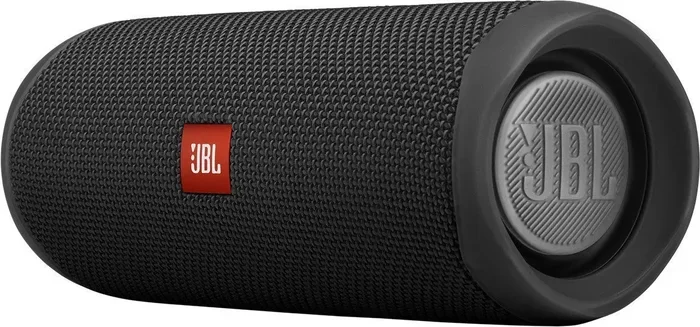
The JBL Flip 5 is a popular portable Bluetooth speaker, but it does not have a built-in FM radio tuner. You can still enjoy wireless audio, speakerphone calls, and powerful sound. If you need a radio feature, you may want to explore other JBL models or external options.
Key Takeaways
- No Built-In Radio: The JBL Flip 5 does not include an FM or AM radio tuner, which surprises many buyers.
- Strong Bluetooth Connectivity: It pairs easily with phones and devices for wireless streaming up to 33 feet away.
- Impressive Battery Life: You get up to 12 hours of playtime on a single charge.
- Waterproof Design: The Flip 5 carries an IP67 rating, making it safe for pools, beaches, and showers.
- JBL PartyBoost: You can pair two Flip 5 speakers together for stereo sound or louder volume.
- No Aux Input: Unlike older models, the Flip 5 relies solely on Bluetooth for audio input.
- Great for Portable Use: Its compact size and durable build make it ideal for outdoor adventures.
📑 Table of Contents
- Does Jbl Flip 5 Have Radio? The Short Answer
- What the JBL Flip 5 Does Offer
- Why the JBL Flip 5 Does Not Include a Radio
- How to Get Radio Functionality with a JBL Flip 5
- JBL Flip 5 vs. Other Speakers with Radio
- What People Also Ask About the JBL Flip 5
- Quick Tips for Getting the Most Out of Your JBL Flip 5
- Common Mistakes People Make with the JBL Flip 5
- Expert Insights on the JBL Flip 5
- Final Verdict: Does Jbl Flip 5 Have Radio?
Does Jbl Flip 5 Have Radio? The Short Answer
If you are asking does Jbl Flip 5 have radio, the short answer is no. The JBL Flip 5 does not come with a built-in FM or AM radio tuner. This catches a lot of people off guard. Many portable speakers from other brands include radio features. But JBL chose to focus on Bluetooth streaming for the Flip 5.
This does not mean the speaker is lacking. The Flip 5 is still one of the best portable Bluetooth speakers on the market. It delivers loud, clear sound. It lasts all day on a single charge. And it can handle water, dust, and drops without a problem. If radio is a must-have for you, there are workarounds we will cover later in this guide.
Before we dive deeper, let us look at what the Flip 5 actually offers. Understanding its full feature set helps you decide if it is the right speaker for your needs.
What the JBL Flip 5 Does Offer
The JBL Flip 5 is packed with features that make it a standout portable speaker. Let us break down what you get.
Bluetooth 4.2 Connectivity
The Flip 5 uses Bluetooth 4.2 to connect to your devices. This version is stable and reliable. It supports a wireless range of up to 33 feet. You can leave your phone in your bag and still stream music without interruptions. If you have ever asked does Jbl pair with iPhone, the answer is yes. The Flip 5 works seamlessly with iPhones, Androids, and tablets alike.
Pairing is simple. Just press the Bluetooth button on the speaker. Your device will find it instantly. No complicated setup is needed. This makes the Flip 5 great for people who want a quick and easy connection.
Powerful Sound Output
JBL built the Flip 5 with a 52mm driver inside. This driver produces rich bass and clear highs. The speaker reaches up to 80 decibels, which is plenty loud for outdoor gatherings. You can fill a small park or a backyard with music easily.
The sound profile is balanced. It is not overly bass-heavy like some competitors. The mids stay clear, so vocals sound natural. The highs are crisp without being harsh. This makes the Flip 5 a great all-around speaker for any music genre.
Battery Life and Charging
JBL claims the Flip 5 delivers up to 12 hours of playtime. In real-world use, you can expect around 10 to 11 hours at moderate volume. If you crank the volume to maximum, expect closer to 7 or 8 hours. The built-in rechargeable battery uses a USB-C cable for charging. This is a big improvement over the Micro-USB port on the Flip 4.
Charging takes about 2.5 hours from empty to full. You can also use the speaker while it charges. This is handy if you are in a rush and need a quick boost.
Waterproof and Durable Build
The Flip 5 carries an IP67 rating. This means it is fully dustproof and waterproof up to 1 meter for 30 minutes. You can take it to the beach, by the pool, or even in the shower. It will handle splashes, rain, and accidental drops into water with ease.
The fabric exterior is soft to the touch. It resists stains and scratches. The rubberized bottom provides a stable base. You can place it on rough surfaces without worrying about damage. If you are curious about how well JBL speakers handle water, check out can I put my JBL Clip 4 in water for more details on JBL’s waterproofing.
Why the JBL Flip 5 Does Not Include a Radio
You might wonder why JBL left out a radio feature. There are a few reasons behind this decision.
Focus on Bluetooth Streaming
JBL designed the Flip 5 as a pure streaming device. Most people today stream music from apps like Spotify, Apple Music, and YouTube. Bluetooth streaming is now the primary way people listen to music on portable speakers. By removing the radio tuner, JBL could focus on optimizing the Bluetooth experience.
This also keeps the speaker’s design clean and simple. Fewer components mean fewer points of failure. The Flip 5 stays compact and lightweight because of this design choice.
Cost and Manufacturing Considerations
Adding a radio tuner increases the cost of manufacturing. JBL keeps the Flip 5 in an affordable price range by skipping this feature. The savings get passed on to the consumer. Most buyers prefer a lower price and better Bluetooth performance over a radio they rarely use.
Market Demand
JBL likely based this decision on consumer demand. Surveys show that most portable speaker users prefer streaming over radio. The demand for FM radio in portable speakers has declined over the years. JBL followed what the market wants.
How to Get Radio Functionality with a JBL Flip 5
Just because the Flip 5 lacks a built-in radio does not mean you are stuck. There are several ways to add radio functionality to your setup.
Use Your Phone as a Radio
Most smartphones now have FM radio apps built in. You can download a free radio app from your app store. Then stream the radio audio through the Flip 5 via Bluetooth. This gives you access to live FM and AM stations through your speaker.
This method works well, but it does use your phone’s data or battery. If you are worried about battery drain, keep your phone plugged in while streaming.
Buy a Separate Portable Radio
If you want a dedicated radio, consider buying a small portable radio. Many compact radios cost under $20. You can place the radio next to the Flip 5. Or you can use the radio’s speaker output and connect it to the Flip 5 if it has an audio out option.
Some people like having a separate radio for emergencies. Radio broadcasts often stay on air during power outages and disasters. A small portable radio is a smart addition to any emergency kit.
Explore Other JBL Models with Radio
If a built-in radio is important to you, look at other JBL speaker models. Some JBL speakers do include FM radio tuners. The JBL Charge series and certain older models may offer this feature. Do some research before buying to find a JBL speaker that matches all your needs.
JBL Flip 5 vs. Other Speakers with Radio
Let us compare the Flip 5 to some popular portable speakers that do include radio features. This comparison helps you decide which speaker fits your needs best.
| Feature | JBL Flip 5 | JBL Charge 4 | Sony SRS-XB23 |
|---|---|---|---|
| Built-In Radio | No | No | No |
| Bluetooth Version | 4.2 | 4.2 | 5.0 |
| Battery Life | 12 hours | 20 hours | 12 hours |
| Waterproof Rating | IP67 | IPX7 | IP67 |
| Price Range | $90-$110 | $130-$150 | $80-$100 |
| PartyBoost | Yes | Yes | Yes |
| Aux Input | No | Yes | No |
As you can see, most modern portable Bluetooth speakers do not include built-in radio. This is an industry trend. Brands are focusing on wireless streaming and battery life instead. If radio is a dealbreaker, you may need to look at older models or non-Bluetooth speakers.
What People Also Ask About the JBL Flip 5
There are many questions people search for about the Flip 5. Let us answer some of the most common ones.
Can You Use the JBL Flip 5 as a Speakerphone?
Yes, the Flip 5 has a built-in microphone. You can answer phone calls through the speaker. The sound quality on calls is clear and loud. This makes it handy for conference calls or when your phone is across the room. Just press the phone icon button on the speaker to toggle speakerphone mode.
Can You Connect Multiple JBL Flip 5 Speakers Together?
Absolutely. JBL introduced PartyBoost with the Flip 5. You can pair two Flip 5 speakers wirelessly for stereo sound. Or you can connect more PartyBoost-compatible JBL speakers for a bigger sound setup. This is perfect for outdoor parties and gatherings. Just press the PartyBoost button on both speakers and they will link automatically.
Is the JBL Flip 5 Worth Buying?
For most people, yes. The Flip 5 offers excellent sound quality, a long-lasting battery, and a durable waterproof build. It is one of the best values in the portable speaker market. The lack of a radio and aux input are the main drawbacks. But for casual listening and outdoor use, it is hard to beat.
Quick Tips for Getting the Most Out of Your JBL Flip 5
- Keep firmware updated: JBL releases updates that improve Bluetooth stability and sound quality. Use the JBL Portable app to check for updates.
- Use PartyBoost wisely: Only pair speakers of the same model for the best stereo experience.
- Charge fully before first use: Let the battery charge to 100% before your first listening session.
- Clean the speaker regularly: Wipe it down after beach or pool use to remove salt and chlorine residue.
- Store in a cool, dry place: Extreme heat can damage the battery over time.
Common Mistakes People Make with the JBL Flip 5
Avoid these common mistakes to get the best experience from your speaker.
- Expecting a radio feature: Many buyers assume the Flip 5 has a radio because other speakers do. Check the specs before purchasing.
- Using it in saltwater without rinsing: While the Flip 5 is waterproof, salt water can corrode the ports over time. Rinse it with fresh water after ocean use.
- Charging with a low-quality cable: Always use a good-quality USB-C cable. Cheap cables can cause slow charging or connection issues.
- Leaving it in a hot car: Heat destroys lithium-ion batteries. Never leave the Flip 5 in a hot vehicle.
Expert Insights on the JBL Flip 5
Audio engineers and tech reviewers generally praise the Flip 5 for its sound quality and portability. The speaker earns high marks for its balanced audio profile and robust build quality. Reviewers note that the lack of an aux input is a step backward from the Flip 4. But most agree that the Bluetooth-only approach keeps the speaker sleek and modern.
When it comes to radio, most experts do not consider it a missing feature. They point out that streaming services offer more variety and convenience than traditional radio. However, for listeners who prefer live broadcasts, sports commentary, or emergency alerts, the absence of a radio tuner is a real limitation.
If you are someone who values both streaming and radio, you might want to consider can I put a Bluetooth radio in my car as an alternative solution. Car Bluetooth radios often include FM tuners and can double as a speaker system for your vehicle.
Final Verdict: Does Jbl Flip 5 Have Radio?
To answer does Jbl Flip 5 have radio one final time: no, it does not. The JBL Flip 5 is a fantastic Bluetooth speaker that excels at wireless audio streaming. It delivers powerful sound, lasts all day, and survives water and dust. But it does not include an FM or AM radio tuner.
If you need radio functionality, you can use your phone as a bridge. Download a radio app and stream through the Flip 5. Or look at other JBL models that may include a radio feature. The Flip 5 is still one of the best portable speakers you can buy. Just go in knowing what it does and does not offer.
For more information on JBL products and their features, explore our other guides. If you have been wondering about connectivity options, check out our article on does JBL pair with iPhone for a deeper look at JBL’s Bluetooth capabilities across devices.
The JBL Flip 5 remains a top choice for music lovers on the go. Its combination of sound quality, durability, and portability is hard to match. Whether you are at the beach, on a hike, or hosting a backyard barbecue, the Flip 5 has you covered. Just remember to bring your phone for streaming, and you will be ready to go.
Frequently Asked Questions
Can I use the JBL Flip 5 without a phone?
The Flip 5 requires a Bluetooth source to play audio. You cannot use it standalone without a connected device. However, you can pair it with a tablet, laptop, or any Bluetooth-enabled device for wireless playback.
Does the JBL Flip 5 have a built-in FM radio?
No, the JBL Flip 5 does not have a built-in FM or AM radio tuner. It relies entirely on Bluetooth streaming for audio input. If you want radio, you will need to use a phone app or a separate radio device.
How far can the JBL Flip 5 connect via Bluetooth?
The Flip 5 supports a Bluetooth range of up to 33 feet in open space. Walls and obstacles can reduce this distance. For the best experience, keep your phone within 30 feet of the speaker.
Is the JBL Flip 5 waterproof enough for the shower?
Yes, the Flip 5 has an IP67 rating, which makes it safe for shower use. It can handle full submersion in water up to 1 meter deep for 30 minutes. However, hot steam and high-pressure water may damage the speaker over time.
Can I connect two JBL Flip 5 speakers for stereo sound?
Yes, you can use the PartyBoost feature to pair two Flip 5 speakers. Press the PartyBoost button on both speakers, and they will connect wirelessly. This creates a stereo effect or simply doubles the volume for larger spaces.
What should I do if my JBL Flip 5 won’t connect to Bluetooth?
First, make sure Bluetooth is turned on your device. Then, reset the speaker by holding the volume up and Bluetooth buttons together for 5 seconds. This clears old pairings and often fixes connection issues. You can also check our guide on does JBL pair with iPhone for additional troubleshooting tips.