Can Bluetooth Cameras Work Without Wi Fi Heres The Answer
Yes, Bluetooth cameras can work without Wi-Fi. These devices use Bluetooth technology to connect directly to your phone or tablet, allowing you to capture and store footage locally. You do not need an internet connection for basic recording, streaming, or transferring files to your device.
Have you ever wondered if your Bluetooth camera can still do its job without a Wi-Fi connection? The short answer is yes. Bluetooth cameras are designed to work independently from wireless internet networks. You can record, save, and transfer files using just the Bluetooth link between your camera and your phone. But there is much more to understand about how these devices really work when the Wi-Fi goes down.
In this guide, we will walk you through everything you need to know about Bluetooth cameras without Wi-Fi. You will learn how they store footage, what their limits are, and when you should consider adding Wi-Fi to the mix. Whether you are looking for a simple home surveillance setup or a portable camera for travel, this article has you covered.
Key Takeaways
- Bluetooth cameras operate independently: They do not require Wi-Fi to record, save, or transfer photos and videos to your phone.
- Local storage is the norm: Most Bluetooth cameras use SD cards or internal memory to store footage without needing cloud services.
- Range is limited: Bluetooth typically works within 30 feet, so proximity matters for live streaming and remote control.
- Wi-Fi unlocks extra features: Cloud uploads, remote viewing, and smart alerts work best with a Wi-Fi connection.
- Privacy is improved: Without Wi-Fi, your footage stays on your device and is less exposed to external access.
- Battery life can be longer: Disabling Wi-Fi on a dual-mode camera saves power and extends recording time.
- Setup is simple: Pairing a Bluetooth camera takes seconds and does not require a router or network configuration.
📑 Table of Contents
- What Is a Bluetooth Camera and How Does It Work
- Can Bluetooth Cameras Record Without Wi-Fi
- How Bluetooth Cameras Store Footage Offline
- Bluetooth vs. Wi-Fi Cameras: Key Differences
- Common Uses for Bluetooth Cameras Without Wi-Fi
- Limitations of Using Bluetooth Cameras Without Wi-Fi
- Tips for Getting the Most Out of Your Bluetooth Camera Without Wi-Fi
- When Should You Choose a Wi-Fi Camera Instead
- Conclusion
What Is a Bluetooth Camera and How Does It Work
A Bluetooth camera is a wireless device that uses Bluetooth technology to connect to your smartphone, tablet, or computer. Instead of relying on a Wi-Fi network, it creates a direct peer-to-peer connection with your device. This means the camera and your phone talk to each other through short-range radio signals.
Here is how the basic process works:
- You power on the camera and put it in pairing mode.
- Your phone detects the camera through its Bluetooth settings.
- Once paired, the two devices exchange data over a short-range wireless signal.
- You can use a companion app to control the camera, view a live preview, and transfer files.
The beauty of this setup is its simplicity. You do not need to configure a router, set up a network password, or worry about signal interference from other devices on the same network. Bluetooth pairing is fast and straightforward, which makes these cameras ideal for quick, on-the-go use.
It is worth noting that some cameras support both Bluetooth and Wi-Fi. In those cases, Bluetooth handles the initial connection and control, while Wi-Fi takes over for high-speed data transfer or live streaming. This dual-mode design gives you flexibility depending on your needs.
How Bluetooth Range Affects Camera Performance
Bluetooth has a limited range compared to Wi-Fi. Most Bluetooth cameras work within 30 feet of your phone. Some Class 1 Bluetooth devices can reach up to 300 feet, but those are rare in consumer cameras. If you move too far away, the connection drops, and live streaming or remote control stops working.
This limited range is actually a good thing in many situations. It means your camera stays close to you, reducing the chance of unauthorized access. However, if you want to place a camera far from your phone, you may need to rely on Wi-Fi or use a different setup entirely.
Can Bluetooth Cameras Record Without Wi-Fi
Absolutely. Bluetooth cameras can record without Wi-Fi in most cases. The recording process happens on the camera itself, using its internal memory or an SD card. The Bluetooth connection is mainly used for control and file transfer, not for the actual recording process.
Here is what happens when you record without Wi-Fi:
- The camera captures video or photos using its built-in sensor.
- The footage is saved directly to the camera’s local storage.
- You can later transfer the files to your phone over Bluetooth once you are back in range.
This makes Bluetooth cameras great for situations where internet access is limited or unavailable. Think about hiking in the woods, traveling abroad without a local data plan, or setting up a quick monitoring point in a remote area. The camera keeps working regardless of your internet status.
However, there is one important caveat. Some smart cameras require an initial Wi-Fi setup to activate certain features. If you buy a camera that is heavily dependent on cloud services, you may not be able to use it fully without Wi-Fi. Always check the product specifications before purchasing.
What About Live Streaming Without Wi-Fi
Live streaming over Bluetooth alone is not common. Bluetooth does not have the bandwidth to handle real-time video transmission at a smooth frame rate. If you want to stream live footage to your phone, Wi-Fi is usually required. Some cameras use a combination of Bluetooth for control and a direct Wi-Fi hotspot from the camera itself to enable live viewing.
If live streaming is important to you, look for cameras that create their own Wi-Fi hotspot. This way, you do not need an external router, but you still get the speed needed for smooth video playback.
How Bluetooth Cameras Store Footage Offline
When there is no Wi-Fi, your camera needs a place to save its footage. Most Bluetooth cameras come with one or more of the following storage options:
- Internal memory: Some cameras have built-in storage, typically ranging from 8GB to 64GB. This is enough for several hours of standard-definition video.
- MicroSD card slot: The most common storage option. You can insert a card with up to 256GB or more, giving you plenty of space for extended recording sessions.
- Cloud storage: This requires Wi-Fi. Without an internet connection, cloud saving is not possible.
For offline use, internal memory and SD cards are your best friends. They store your footage locally and keep it safe even when you are completely off the grid. Local storage also means you have full control over your files. No one else has access to them unless you physically hand over the card or device.
One thing to keep in mind is storage management. Without Wi-Fi, you cannot automatically back up your files to the cloud. You will need to transfer them manually to your phone or computer before the storage fills up. Make it a habit to review and transfer files regularly.
Best Storage Practices for Offline Bluetooth Cameras
To get the most out of your Bluetooth camera without Wi-Fi, follow these simple tips:
- Use a high-speed SD card rated for video recording to avoid lag or dropped frames.
- Format the SD card in the camera regularly to prevent file corruption.
- Keep backup cards on hand if you plan to record for long periods.
- Label your cards with dates so you can easily organize your footage later.
- Transfer files to your phone or laptop as soon as possible to free up space.
Bluetooth vs. Wi-Fi Cameras: Key Differences
Not all wireless cameras are the same. Understanding the difference between Bluetooth cameras and Wi-Fi cameras helps you choose the right one for your needs.
| Feature | Bluetooth Camera | Wi-Fi Camera |
|---|---|---|
| Connection Type | Direct device-to-device pairing | Connects to a wireless router |
| Range | Up to 30 feet (typical) | Up to 150 feet or more |
| Setup Complexity | Simple and fast | Requires network configuration |
| Live Streaming | Limited or not supported | Full HD streaming supported |
| Power Consumption | Lower | Higher |
| Internet Required | No | Yes, for most features |
| Remote Access | Only when paired nearby | From anywhere with internet |
| Price | Generally lower | Can be higher |
As you can see, Bluetooth cameras shine in simplicity and portability. They are perfect for quick setups and situations where you do not want to deal with network configuration. Wi-Fi cameras, on the other hand, offer more features and longer range, but they depend on a working internet connection.
Some cameras blend both technologies. These hybrid models let you use Bluetooth for close-range control and Wi-Fi for remote access. This gives you the best of both worlds, but it also means more complexity and potentially higher battery usage.
Common Uses for Bluetooth Cameras Without Wi-Fi
Bluetooth cameras without Wi-Fi are surprisingly versatile. Here are some real-world scenarios where they shine:
1. Home Security Without Internet
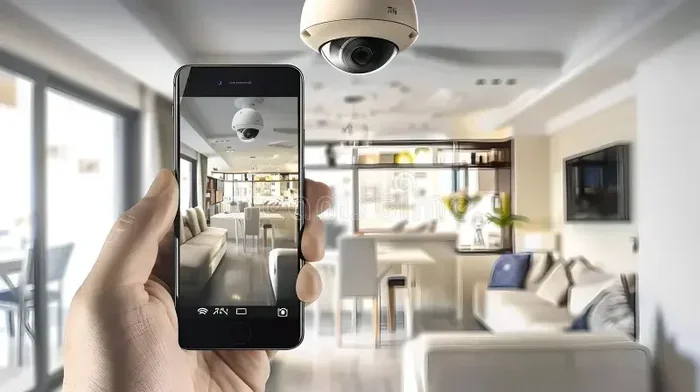
Not everyone has reliable internet at home. A Bluetooth camera can still serve as a useful security tool. You can place it in a room, pair it with your phone, and check the live feed when you are within range. The footage stays on the SD card, so you can review it later.
If you are concerned about home surveillance privacy, a Bluetooth-only camera adds an extra layer of security. Since it does not connect to the internet, there is no risk of remote hacking through your network. Your footage stays local and private.
2. Travel and Adventure Recording
When you are hiking, camping, or exploring areas without Wi-Fi, a Bluetooth camera is a lifesaver. You can capture moments and transfer them to your phone when you return to connectivity. The compact size of many Bluetooth cameras makes them easy to carry on any adventure.
Just remember that the Bluetooth range limits how far you can be from your phone while still controlling the camera. Keep your phone in your pocket or nearby bag to maintain the connection.
3. Baby or Pet Monitoring
A Bluetooth camera placed in a nursery or pet area can give you peace of mind. You can check in on your little one or furry friend from another room using your phone. Since the camera does not need Wi-Fi, you do not have to worry about network drops or lag during critical moments.
However, if you want to check in from outside the house, you will need Wi-Fi or a different type of camera system designed for remote monitoring.
4. Quick Action Shots and Content Creation
Content creators and vloggers often use Bluetooth cameras as secondary or backup devices. The fast pairing process means you can start recording in seconds. Without relying on Wi-Fi, you avoid the delays and buffering that can ruin a spontaneous shot.
Many creators also use a Bluetooth connection to trigger their camera remotely while the camera itself handles the recording. This setup works beautifully for timelapse photography, group photos, or hands-free recording sessions.
Limitations of Using Bluetooth Cameras Without Wi-Fi
While Bluetooth cameras work well without Wi-Fi, they are not without limitations. Understanding these drawbacks helps you set realistic expectations.
Limited File Transfer Speed
Bluetooth is slower than Wi-Fi for transferring large video files. A 1GB video file might take several minutes to transfer over Bluetooth. If you need to move files quickly, Wi-Fi is the better option. Some cameras support Wi-Fi Direct, which is faster than standard Bluetooth and does not require a router.
No Remote Access
Without Wi-Fi, you cannot access your camera from a distance. You must be within Bluetooth range to control it or view the footage. This is fine for close-proximity use but a dealbreaker if you need to monitor a location remotely.
No Cloud Backups
Cloud backup requires an internet connection. Without Wi-Fi, your footage exists only on the camera’s storage. If the camera is lost, stolen, or damaged, your files could be gone forever. Always transfer important footage to a safe location as soon as possible.
Fewer Smart Features
Many smart camera features depend on Wi-Fi. Motion detection alerts, two-way audio, and AI-based object recognition typically require an internet connection to process data. A Bluetooth-only camera may still detect motion and save the footage, but it cannot send you a notification unless you are within range.
Shorter Effective Range for Control
The 30-foot Bluetooth range means you cannot control the camera from another floor of your house or from across a large property. For broader coverage, you would need a Wi-Fi-enabled camera or a mesh network setup.
Tips for Getting the Most Out of Your Bluetooth Camera Without Wi-Fi
Want to maximize your Bluetooth camera’s performance without Wi-Fi? Follow these practical tips:
- Keep your phone close: Stay within 30 feet of the camera for a stable connection during control and transfer.
- Use a high-quality SD card: A Class 10 or UHS-I card ensures smooth recording and fast file transfers over Bluetooth.
- Turn off Wi-Fi on your phone: If your phone has Wi-Fi enabled, it may try to connect to a network instead of staying paired with the camera. Disabling Wi-Fi can improve Bluetooth stability.
- Keep the camera charged: Bluetooth and recording both drain battery. Carry a portable charger for long sessions.
- Update the companion app: App updates often fix bugs and improve Bluetooth connectivity.
- Reduce interference: Keep the camera away from other Bluetooth devices, microwaves, and thick walls that can weaken the signal.
These simple steps can make a big difference in your experience. A well-maintained Bluetooth camera without Wi-Fi can still deliver reliable, high-quality results.
Privacy Considerations for Bluetooth Cameras
One advantage of using a Bluetooth camera without Wi-Fi is enhanced privacy. Since your footage never leaves your device over the internet, there is less chance of it being intercepted or accessed by unauthorized parties. This is especially important if you are using cameras in private spaces like bathrooms, bedrooms, or offices.
However, you should still practice good security habits. Use strong passwords on your camera and phone, keep your Bluetooth pairing private, and do not leave your camera unattended in public places. If you ever want to check on your home remotely, be aware that someone can track from Wi-Fi if your network is not properly secured. Keeping your camera off the Wi-Fi network eliminates this risk entirely.
For those concerned about hidden cameras in the home, it is also worth noting that Bluetooth cameras are typically visible and intentional. They are not the type of covert devices that raise legal and ethical concerns. If you want to learn more about camera privacy in the home, you might find it helpful to read about can I put cameras in my house without my spouse knowing to understand the legal and ethical boundaries of home surveillance.
When Should You Choose a Wi-Fi Camera Instead
Bluetooth cameras are great, but they are not the right choice for every situation. Here are times when a Wi-Fi camera makes more sense:
- You need to monitor your home from anywhere in the world.
- You want instant push notifications when motion is detected.
- You rely on cloud storage for backup and peace of mind.
- You need to stream live video over long distances.
- You want to integrate your camera with smart home ecosystems like Alexa or Google Home.
In these cases, the convenience and features of a Wi-Fi camera outweigh the benefits of going offline. Many modern cameras offer both Bluetooth and Wi-Fi, giving you the flexibility to switch between modes based on your needs.
If you are shopping for a camera and want to understand how Wi-Fi modules work in different scenarios, you might also explore whether a Wi-Fi module can work without an antenna to better understand the hardware behind wireless connectivity.
Conclusion
The answer to whether Bluetooth cameras work without Wi-Fi is a clear yes. These devices are built to function independently, using Bluetooth for control and local storage for saving your footage. You do not need an internet connection to record, view, or transfer files. They are simple, private, and reliable tools for a wide range of use cases.
That said, Wi-Fi opens up a world of extra features like remote access, cloud backup, and live streaming. If those features matter to you, consider a dual-mode camera that supports both Bluetooth and Wi-Fi. This way, you get the best of both worlds.
Whether you are a traveler, a content creator, or someone looking for a simple home monitoring solution, a Bluetooth camera without Wi-Fi can get the job done. Just understand its limits, plan your storage, and enjoy the freedom of wireless recording without being tied to an internet connection.
Take the time to choose the right camera for your needs, follow the tips in this guide, and you will be capturing great footage no matter where your adventures take you.
Frequently Asked Questions
Can I use a Bluetooth camera without any internet connection at all?
Yes, you can. Bluetooth cameras do not need the internet to record, save, or transfer files. They use Bluetooth to connect directly to your phone and store footage on an SD card or internal memory. You only need Wi-Fi if you want features like cloud backup or remote viewing.
How far can I be from my Bluetooth camera without losing connection?
Most Bluetooth cameras work within 30 feet of your phone. Some devices with Class 1 Bluetooth can reach farther, but this is rare in consumer cameras. If you move beyond the range, the connection drops and you lose control until you come back within range.
Can I stream live video from a Bluetooth camera without Wi-Fi?
Live streaming over Bluetooth alone is not practical because Bluetooth does not have enough bandwidth for smooth video. If you need live streaming, look for cameras that create their own Wi-Fi hotspot or use Wi-Fi Direct for a faster connection.
Do Bluetooth cameras save money compared to Wi-Fi cameras?
Generally, yes. Bluetooth cameras tend to be less expensive because they have simpler hardware and do not require Wi-Fi module support. They also do not need a subscription for cloud storage since they rely on local storage like SD cards.
Is my footage safe without Wi-Fi on a Bluetooth camera?
Your footage is safer from remote hacking when there is no Wi-Fi connection. Since the data stays local on your camera or SD card, it cannot be accessed over the internet. However, you should still protect your device physically and transfer files to a secure location regularly.
Can I pair a Bluetooth camera with any smartphone?
Most Bluetooth cameras work with both Android and iPhone devices. As long as your phone supports Bluetooth and has the companion app installed, you should be able to pair and control the camera. Check the manufacturer’s specifications for compatibility details before buying.