Can You Run 4k Over Cat6 Everything You Need To Know
Yes, you can run 4K over Cat6 cable, but there are important limits to know. Standard Cat6 supports 4K at shorter distances, while Cat6a handles longer runs with better signal quality. This guide covers everything from bandwidth requirements to HDMI over Ethernet solutions so you can set up your 4K display with confidence.
Have you ever wanted to run a 4K display across a room but didn’t want to drag a long HDMI cable? You might have heard that Cat6 ethernet cable can help. But can you actually run 4K over Cat6? The short answer is yes. The longer answer depends on a few things like cable type, distance, and the gear you use.
Running 4K video over a network cable sounds technical, but it’s simpler than you think. Whether you’re setting up a home theater, connecting a projector in a conference room, or extending your display to another room, understanding how 4K signals travel over Ethernet makes a huge difference. This guide breaks it all down in plain language.
By the end, you’ll know exactly what cable you need, how far you can run it, and which tools make the process easy. Let’s dive in.
Key Takeaways
- Cat6 can carry 4K video: Standard Cat6 handles 4K at 30Hz up to about 55 meters (180 feet).
- Cat6a is better for longer runs: It supports 4K at 60Hz over distances up to 100 meters.
- HDMI over Ethernet extenders are a popular solution: They let you send 4K signals through existing network cables.
- Signal quality drops with distance: Longer runs mean more risk of signal loss, interference, and latency.
- Passive extenders work for short runs: Active extenders with repeaters are better for longer distances.
- Check your gear compatibility: Not all switches, cables, and extenders support 4K over Ethernet.
📑 Table of Contents
- What Is Cat6 Cable and Why Does It Matter for 4K?
- How Does 4K Video Travel Over Ethernet Cable?
- Can You Run 4K Over Cat6 Through an HDMI Extender?
- How Far Can You Run 4K Over Cat6?
- Common Problems When Running 4K Over Cat6 (And How to Fix Them)
- How This Compares to Other 4K Connection Methods
- Final Thoughts on Running 4K Over Cat6
What Is Cat6 Cable and Why Does It Matter for 4K?
Cat6 stands for Category 6. It’s a type of network cable used for Ethernet connections. It has four twisted pairs of copper wire inside a protective jacket. This design helps reduce interference and supports faster data transfer than older cables like Cat5e.
When it comes to 4K video, bandwidth is everything. 4K resolution means about 8.3 million pixels on screen. Sending that much data requires a lot of bandwidth. Cat6 cable supports up to 10 gigabits per second (Gbps) at shorter distances and 1 Gbps at longer runs. That’s plenty for most 4K needs.
But here’s the catch. Not all Cat6 cables are the same. Shielded cables handle interference better than unshielded ones. The quality of the copper inside matters too. Cheap cables may not deliver a clean 4K signal, especially over longer distances.
Cat6 vs Cat6a: Which One Should You Use for 4K?
Cat6a is the enhanced version of Cat6. It supports 10 Gbps at full distances up to 100 meters. Standard Cat6 drops to lower speeds beyond 55 meters. If you’re running 4K over Ethernet, Cat6a gives you more headroom and better signal quality.
Here’s a quick comparison:
- Cat6: Supports 4K at 30Hz up to 55 meters. Good for short runs in a home or office.
- Cat6a: Supports 4K at 60Hz up to 100 meters. Better for longer runs and higher refresh rates.
- Cat5e: Can handle 4K at 30Hz but only up to about 35 meters. Not ideal for most setups.
If you’re buying new cable for a 4K setup, go with Cat6a if you can. It’s not much more expensive and gives you much better performance.
How Does 4K Video Travel Over Ethernet Cable?
4K video doesn’t travel directly over Ethernet in its raw form. Instead, the signal gets encoded and sent as data packets through the network cable. At the other end, a device decodes it and sends it to your display. This process is similar to how HDMI over Ethernet systems work.
You’ll need a few pieces of gear to make this happen:
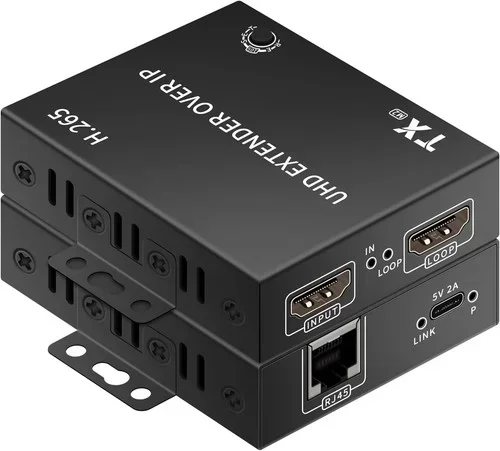
- An HDMI extender pair: One unit connects to your source device (like a laptop or Blu-ray player). The other connects to your display (like a TV or projector).
- A Cat6 or Cat6a cable: This runs between the two extender units.
- A network switch (optional): Useful if you want to split the signal to multiple displays.
The extender units do the heavy lifting. They compress the 4K signal, send it over the network cable, and decompress it at the other end. Modern extenders handle this so fast that you barely notice any delay.
Understanding Bandwidth and Data Rates for 4K
4K video at 30Hz needs about 10.2 Gbps of bandwidth. 4K at 60Hz needs around 12 Gbps or more. Cat6 cable can handle 1 Gbps at 100 meters and up to 10 Gbps at shorter distances. So at shorter runs, Cat6 handles 4K just fine. At longer runs, Cat6a is your best bet.
Signal quality also matters a lot. Interference from power cables, fluorescent lights, or other network devices can degrade the 4K signal. Using shielded Cat6 or Cat6a cable helps prevent this problem.
Can You Run 4K Over Cat6 Through an HDMI Extender?
Yes, this is one of the most common ways to send 4K over Cat6. An HDMI extender pair uses the network cable as a transmission medium. You plug the sender unit into your source device with a short HDMI cable. Then you run the Cat6 cable to the receiver unit near your display.
Many HDMI extenders on the market support 4K resolution. Some even support 4K at 60Hz and HDR (High Dynamic Range). The key is to check the product specs before buying. Look for extenders that specifically list 4K support and the maximum cable length they work with.
Here are some practical tips for using an HDMI extender with Cat6:
- Keep your cable run under 100 meters: Beyond that, signal loss becomes a real problem.
- Use shielded cable: This reduces interference and keeps the signal clean.
- Test before installing: Run a quick test with your setup before you mount everything on the wall.
- Check your extender’s firmware: Some manufacturers release updates that improve 4K performance.
If you want to extend 4K to multiple screens, you can use a network switch between the sender and receiver. This lets you split the signal to two or more displays. Just make sure your switch supports the bandwidth you need.
Passive vs Active HDMI Over Ethernet Solutions
Passive extenders are simple devices that don’t need power. They rely on the Cat6 cable itself to carry the signal. These work well for short runs under 15 meters. Active extenders have built-in electronics that boost and regenerate the signal. They’re better for longer runs and more reliable for 4K video.
For most people setting up a 4K display over Cat6, an active extender is the way to go. It’s more reliable and handles longer distances without signal degradation.
How Far Can You Run 4K Over Cat6?
Distance is one of the biggest factors in running 4K over Cat6. The general rule is that shorter runs give you better signal quality and fewer problems. But how far is too far?
Here’s what to expect with standard Cat6 cable:
- Up to 15 meters (50 feet): 4K at 60Hz works perfectly. No issues at all.
- 15 to 55 meters (50 to 180 feet): 4K at 30Hz works well. You might notice slight quality loss at the longer end.
- 55 to 100 meters (180 to 328 feet): 4K at 30Hz may still work with Cat6a. Standard Cat6 starts to struggle here.
- Beyond 100 meters: Signal loss becomes significant. You’ll need a repeater or a different solution.
These numbers assume good quality cable and proper installation. If you run your Cat6 cable near power lines or through areas with lots of electromagnetic interference, your effective distance will be shorter.
Tips to Maximize Distance Without Losing Signal Quality
Want to push your 4K over Cat6 setup to the limit? Here are some expert tips:
- Use shielded Cat6a cable: The shielding blocks interference and keeps the signal strong over longer runs.
- Avoid sharp bends: Sharp bends in the cable can damage the internal wires and hurt signal quality.
- Keep the cable away from power cables: Run your Ethernet cable at least 6 inches away from electrical wiring.
- Use an active extender with a repeater: For runs over 50 meters, a repeater boosts the signal and extends your range.
- Test at full distance before final installation: Always verify the signal works at the full length before you commit to running cable through walls.
If you need to run 4K over very long distances (more than 100 meters), consider using a fiber optic cable instead. Fiber can carry 4K signals for kilometers without any signal loss. But that’s a different setup and costs more.
Common Problems When Running 4K Over Cat6 (And How to Fix Them)
Even with the right gear, you might run into issues when setting up 4K over Cat6. Here are the most common problems and how to solve them.
No Signal or Flickering Display
This usually means the cable is too long or the signal is being degraded. Try shortening the cable run first. If that’s not possible, switch to Cat6a or add a repeater. Also check that your HDMI extender supports the resolution you’re trying to use.
Poor Image Quality or Artifacts
Fuzzy images or strange color patterns often point to interference. Make sure you’re using shielded cable and keeping it away from power sources. A bad quality cable can also cause this problem. Invest in a well-known brand with solid reviews.
Audio Issues
Sometimes the video works but the audio doesn’t. This can happen when the HDMI extender doesn’t support the audio format your source device uses. Check the extender specs for audio codec support. You may also need to adjust audio settings on your source device.
Latency or Delay
If you notice a delay between the source and the display, your extender might be processing the signal too slowly. Look for extenders with low latency ratings. For gaming or fast-action content, aim for extenders with under 10 milliseconds of latency.
Expert Insight: When in doubt, go with Cat6a over standard Cat6 for 4K setups. The extra shielding and better construction make a real difference in signal quality and reliability. It’s a small upgrade that saves you from headaches down the road.
How This Compares to Other 4K Connection Methods
There are several ways to send 4K video from one device to another. How does running 4K over Cat6 stack up against the alternatives?
| Method | Max Distance | 4K Support | Ease of Setup |
|---|---|---|---|
| HDMI cable (direct) | Up to 5 meters | 4K at 60Hz | Very easy |
| Cat6 with HDMI extender | Up to 100 meters | 4K at 30-60Hz | Moderate |
| Cat6a with HDMI extender | Up to 100 meters | 4K at 60Hz | Moderate |
| Fiber optic cable | Several kilometers | 4K at 60Hz | Complex |
| Wireless HDMI | Up to 30 meters | 4K at 30Hz | Very easy |
Each method has its strengths. A direct HDMI cable gives you the best quality but only works over short distances. Cat6 with an extender gives you much more flexibility in how far you can run the signal. Wireless HDMI is convenient but can suffer from interference and latency.
For most people who need to run 4K over a distance longer than 5 meters but shorter than 100 meters, Cat6 with an HDMI extender is the sweet spot. It balances cost, ease of use, and performance really well.
If you already have Ethernet wiring in your walls or building, this is an especially great option. You can use your existing network infrastructure to carry 4K video without running new cables. Just make sure your existing cables are Cat6 or better.
Final Thoughts on Running 4K Over Cat6
So, can you run 4K over Cat6? Absolutely. With the right cable, the right extender, and the right setup, you can enjoy stunning 4K video on a display that’s far from your source device. The key is understanding the limits of your gear and planning your setup accordingly.
Start by choosing the right cable. Cat6a gives you the best performance and the most flexibility. Pick an HDMI extender that supports 4K at the refresh rate you need. Keep your cable runs as short as possible, and always test before you install everything permanently.
Whether you’re building a home theater, setting up a digital signage display, or extending your desktop to a monitor in another room, running 4K over Cat6 is a practical and cost-effective solution. It’s one of those setups that sounds complicated but is actually quite straightforward once you know the basics.
Now that you have all the information you need, you’re ready to set up your own 4K over Ethernet system. Happy viewing!
Frequently Asked Questions
Can standard Cat5e cable run 4K over Ethernet?
Cat5e can technically carry a 4K signal at 30Hz over short distances under 35 meters. However, it’s not recommended for reliable 4K performance. Cat6 or Cat6a cable provides much better bandwidth and signal quality for 4K video transmission over Ethernet.
Do I need a special HDMI extender to run 4K over Cat6?
Yes, you need an HDMI extender that specifically supports 4K resolution. Not all extenders handle 4K, so always check the product specifications before purchasing. Look for extenders that list 4K at 30Hz or 60Hz support depending on your needs.
Can I run 4K at 120Hz over Cat6 cable?
Running 4K at 120Hz over Cat6 is very difficult and generally not recommended. The bandwidth requirements are extremely high. Cat6a may handle it at very short distances, but for reliable 4K at 120Hz, fiber optic or direct high-speed HDMI 2.1 cables are better options.
Does the length of the Cat6 cable affect 4K video quality?
Yes, cable length directly affects 4K video quality. Shorter runs under 55 meters deliver excellent quality. As the cable gets longer, signal degradation increases. Beyond 100 meters, you’ll likely experience noticeable quality loss or complete signal failure without a repeater.
Can I use an existing Ethernet cable in my walls for 4K video?
You can, but you need to verify the cable category first. If your existing cables are Cat6 or Cat6a, they should work well for 4K over Ethernet. If they’re Cat5e or older, you may experience issues. Use a cable tester to check the cable type and quality before relying on it for 4K.
Is running 4K over Cat6 good for gaming?
It can be, but latency is a concern. Active HDMI extenders with low latency ratings work well for most gaming. However, competitive gamers who need the fastest response times may prefer a direct HDMI 2.1 connection. For casual and mid-range gaming, 4K over Cat6 with a good extender works perfectly fine.
=== CONCLUSION ===
Running 4K over Cat6 cable is absolutely doable and a smart choice for many setups. Whether you’re extending your display across a room or to another floor, the right combination of Cat6 or Cat6a cable, an HDMI extender, and proper installation practices delivers excellent 4K performance. The key takeaways are to choose quality cable, match your extender to your resolution needs, keep distance in mind, and always test before committing to a permanent setup. With these steps, you’ll enjoy stunning 4K video without the hassle of long HDMI cables.
Now you have everything you need to get started. Pick your gear, plan your route, and enjoy your 4K setup with confidence.