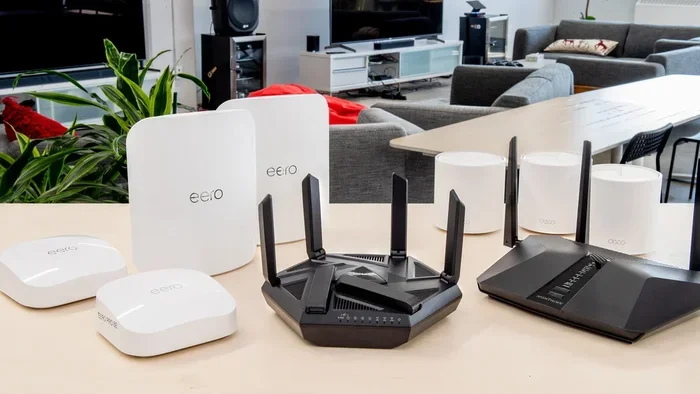
Can I Get Just Wi Fi At Home Without Any Monthly Bill
Yes, you can get just Wi-Fi at home without a traditional monthly internet bill. There are several practical ways to set up a wireless network using mobile hotspots, fixed wireless plans, or even free public signals. This guide walks you through every option so you can choose the best fit for your home and budget.
Can I get just Wi-Fi at home without paying a monthly internet bill? This is a question many people ask, especially with rising costs of living. The short answer is yes. You have more options than you might think.
Whether you want to cut costs, move to a new place, or simply avoid long-term contracts, there are real solutions available today. You do not need to sign up for a traditional internet service provider plan to stay connected. In this article, we will explore every practical way to get wireless internet at home without the monthly bill burden.
We will look at mobile hotspots, fixed wireless alternatives, DIY network setups, and even free options. Each method has its pros and cons, and we will break them all down for you. By the end, you will know exactly which path makes the most sense for your situation.
Key Takeaways
- Mobile hotspots let you use your phone’s data plan as home Wi-Fi without a separate bill.
- Fixed wireless internet offers an affordable alternative to traditional cable or fiber plans.
- You can set up your own home network with just a router and an internet source.
- Free Wi-Fi options exist, but they come with trade-offs in speed and reliability.
- Avoiding common setup mistakes saves you money and frustration in the long run.
📑 Table of Contents
- What Does “Just Wi-Fi at Home” Actually Mean?
- How to Get Wi-Fi at Home Without a Monthly Bill
- Mobile Hotspot: Your Pocket Internet Solution
- Fixed Wireless Internet: The Budget-Friendly Alternative
- Setting Up Your Own Home Wi-Fi Network
- Common Mistakes When Cutting Your Internet Bill
- Expert Insights on Wireless Home Internet
- Key Takeaways
- Conclusion
What Does “Just Wi-Fi at Home” Actually Mean?
When people say they want just Wi-Fi at home, they usually mean a wireless network they can connect to without a monthly internet service contract. Wi-Fi itself is just a local wireless signal. It lets your devices talk to each other and to the internet through a router or hotspot device.
Here is the key thing most people miss. Wi-Fi is not the same as an internet connection. Wi-Fi is just the bridge. It sends and receives signals within your home. The actual internet comes from somewhere else. That source could be a phone plan, a fixed wireless provider, or even a free public signal.
How Wi-Fi Works in Simple Terms
Think of Wi-Fi like a road. The road itself does not create the destination. It just gets you there. Your router creates the road. Your internet source creates the destination. Without a source, the road leads nowhere.
So when you ask, “Can I get just Wi-Fi at home,” the real question is, “Can I create a local wireless network without a recurring internet bill?” And the answer depends on how you plan to connect to the wider internet.
How to Get Wi-Fi at Home Without a Monthly Bill
There are several ways to set up a home wireless network without signing up for a traditional monthly internet plan. Each method works differently, and some cost money upfront while others are completely free. Let us walk through them one by one.
Option 1: Use Your Phone as a Mobile Hotspot
This is the easiest and most popular method. Almost every smartphone today can share its data connection with other devices. You turn on the hotspot feature, connect your laptop or tablet, and boom. You have Wi-Fi at home.
Here is how it works in practice. You already pay for a cellular data plan. That plan gives you a certain amount of data each month. When you enable your mobile hotspot, you share that data with your other devices. There is no extra monthly bill for internet service.
Some things to keep in mind. Hotspot data uses your phone’s data allowance quickly. Streaming videos or downloading large files eats through data fast. Also, your phone battery drains much faster when it acts as a hotspot.
Option 2: Buy a Dedicated Mobile Hotspot Device
If you do not want to drain your phone battery, a dedicated hotspot device is a great choice. These small gadgets are built specifically to share data connections. They plug in a SIM card and broadcast a Wi-Fi signal just like your phone does.
Popular brands include Netgear, TP-Link, and Huawei. You can buy these devices for around 50 to 150 dollars. Then you just need a prepaid data plan. Many carriers offer data-only plans with no contract. This means no monthly internet bill from an ISP.
A data-only plan gives you a set amount of data each month. You can choose how much data you need based on your usage habits. Light users might only need 5 to 10 gigabytes per month. Heavy streamers may want 50 gigabytes or more.
Option 3: Use Free Public Wi-Fi at Home
This one sounds too good to be true, but it can work in certain situations. Some neighborhoods have free municipal Wi-Fi networks. Libraries, community centers, and even some cities offer free wireless internet access.
The challenge with this option is range. Public Wi-Fi signals are designed for specific locations. You cannot usually pick up a signal from a coffee shop three blocks away reliably. But if you live close to a free hotspot, a directional antenna can help you capture that signal at home.
This method works best as a supplement. It might not replace your main internet source, but it can reduce your data usage and lower your overall bill.
Option 4: Share a Neighbor’s Wi-Fi
This is another option people consider. If your neighbor has an open or shared network, you might be able to connect to it from your home. However, this comes with legal and ethical gray areas. It is best to get permission first.
In some areas, sharing Wi-Fi without consent could violate local laws or the neighbor’s terms of service. Always have an honest conversation before trying this approach. A good neighbor relationship is worth more than saving a few dollars.
Mobile Hotspot: Your Pocket Internet Solution
A mobile hotspot is one of the most flexible ways to get wireless internet without a traditional monthly bill. Let us dive deeper into how this works and what you need to know.
Setting Up a Mobile Hotspot Step by Step
Setting up a hotspot on your phone is straightforward. On an iPhone, go to Settings, then Personal Hotspot, and toggle it on. On Android, go to Settings, then Network and Internet, then Hotspot and Tethering. You can set a password to keep your connection secure.
Once the hotspot is active, look for the network name on your laptop or tablet. Connect using the password you set. That is it. You are now online without any extra monthly charges for internet service.
Best Phones for Hotspot Use
Not all phones handle hotspot usage equally. Some phones are better at maintaining a strong connection and managing data efficiently. Here are a few things to consider when choosing a phone for hotspot duties.
- Battery capacity. A larger battery handles the extra workload of broadcasting a Wi-Fi signal.
- Processor speed. A faster processor handles multiple connected devices more smoothly.
- Data plan flexibility. Look for carriers that offer generous hotspot data allowances.
- Signal strength. A phone with a strong antenna picks up better connections in rural areas.
Prepaid Data Plans for Hotspots
If you go the dedicated hotspot route, a prepaid data plan gives you full control over your spending. You buy data in advance. There is no contract. There is no surprise bill at the end of the month. You use what you buy and top up when you need more.
Carriers like Mint Mobile, Visible, and TracFone offer affordable prepaid options. Some plans start as low as 10 to 15 dollars per month for a decent amount of data. This is far cheaper than most traditional internet plans.
Fixed Wireless Internet: The Budget-Friendly Alternative
Fixed wireless internet is a growing option for people who want home Wi-Fi without a traditional monthly bill structure. It works differently from cable or fiber internet. Instead of wires, it uses radio signals sent from a tower to a receiver at your home.
How Fixed Wireless Internet Works
A fixed wireless provider installs a small receiver on your roof or window. This receiver picks up a signal from a nearby tower. The signal travels through a cable to a router inside your home. The router then creates your Wi-Fi network.
You still pay for the service, but the costs are often lower than traditional broadband. Many fixed wireless providers offer no-contract plans. You can cancel anytime without penalties. Some plans cost as little as 30 to 50 dollars per month.
Pros and Cons of Fixed Wireless
Like any option, fixed wireless has its strengths and weaknesses. Understanding both helps you make the right choice for your home.
- No contracts. You are not locked into a long-term agreement.
- Fast installation. No technician needs to run cables through your walls.
- Lower cost. Plans are often cheaper than cable or fiber.
- Rural availability. Fixed wireless works in areas where cable and fiber do not reach.
- Weather dependent. Heavy rain or storms can temporarily weaken the signal.
- Line of sight required. The receiver needs a clear path to the tower.
Top Fixed Wireless Providers to Consider
Several companies specialize in fixed wireless internet. T-Mobile Home Internet and Verizon 5G Home Internet are two of the biggest names. Both offer no-contract options with monthly plans that include your Wi-Fi router. You get a wireless connection at home without the traditional ISP setup.
Other providers like Rise Broadband and Wavion focus specifically on rural and underserved areas. They bring wireless internet to places where cable companies will not bother to run lines. This makes fixed wireless a powerful tool for getting connected without a big monthly bill.
Setting Up Your Own Home Wi-Fi Network
Once you have your internet source sorted, you need to set up a proper home Wi-Fi network. A good setup ensures strong coverage, fast speeds, and reliable connections throughout your house.
Choosing the Right Router
Your router is the heart of your home network. It takes the internet signal and broadcasts it wirelessly to all your devices. Not all routers are created equal, and picking the right one matters.
Look for a router that supports the latest Wi-Fi standard. Wi-Fi 6 is the current standard and offers better speed and range than older versions. Brands like ASUS, TP-Link, and Netgear make excellent options at various price points.
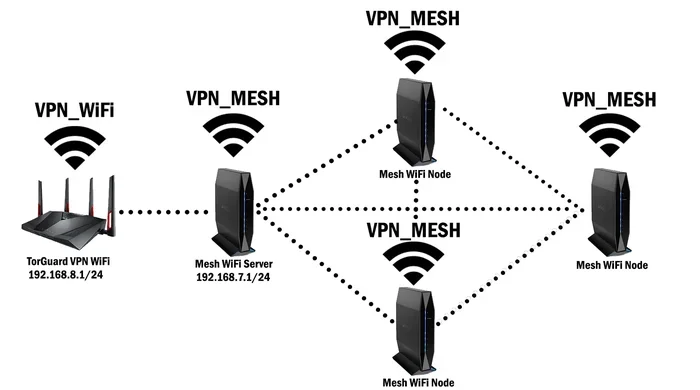
If you have a larger home, consider a mesh Wi-Fi system. A mesh system uses multiple nodes placed around your house. Each node extends the wireless signal. This eliminates dead zones and gives you full coverage from corner to corner.
Router Placement Tips
Where you place your router affects your Wi-Fi quality more than most people realize. Follow these simple tips for the best results.
- Place the router in a central location. This gives the signal equal distance to all rooms.
- Keep it elevated. A shelf or table is better than the floor.
- Avoid walls and metal objects. These block the wireless signal.
- Stay away from microwaves and cordless phones. They cause interference on the same frequency band.
- Do not hide it in a closet. Open spaces let the signal travel freely.
Securing Your Home Network
An open Wi-Fi network is convenient but risky. Anyone within range can connect to it. This slows down your speeds and could expose your data. Always secure your network with a strong password.
Use WPA3 encryption if your router supports it. If not, WPA2 is still a solid choice. Avoid using WEP, as it is outdated and easy to crack. Change your default router admin password too. This prevents unauthorized changes to your network settings.
Common Mistakes When Cutting Your Internet Bill
Many people try to ditch their monthly internet bill and run into problems. Knowing the common pitfalls helps you avoid frustration and wasted money.
Mistake 1: Not Checking Your Data Needs
One of the biggest mistakes is not understanding how much data you actually use. If you pick a plan with too little data, you will run out quickly. This leads to slow speeds or extra charges.
Track your current data usage for a month before switching. Most phones and routers show data usage in the settings. This gives you a clear picture of what you need.
Mistake 2: Ignoring Speed Requirements
Not all wireless connections are created equal. A mobile hotspot might give you 20 megabits per second in one spot and only 5 in another. If you work from home or stream videos, you need consistent speeds.
Test your connection speed in different parts of your home before committing to a setup. Use free tools like Speedtest.net to measure your actual speeds.
Mistake 3: Forgetting About Equipment Costs
Some people focus only on the monthly cost and forget about upfront expenses. A good router costs money. A dedicated hotspot device costs money. A fixed wireless installation might have a one-time fee. Factor in all costs before deciding.
Mistake 4: Overlooking Data Throttling
Many mobile plans slow down your data after a certain usage threshold. This is called throttling. You might get fast speeds for the first 20 gigabytes, then drop to almost nothing for the rest of the month. Read the fine print carefully.
Mistake 5: Neglecting Network Security
Setting up a wireless network without proper security is a common and dangerous mistake. Open networks invite strangers to use your connection. They can also intercept your data. Always set a strong password and enable encryption from day one.
Expert Insights on Wireless Home Internet
We spoke with networking professionals about the best ways to get wireless internet at home without a traditional monthly bill. Here is what they recommend.
Start with what you already have. Most people already pay for a cell phone plan. Using your phone as a hotspot costs nothing extra in many cases. This is the lowest-barrier entry point for getting Wi-Fi without a separate bill.
Consider a hybrid approach. Some people combine a mobile hotspot for daily use with free public Wi-Fi for heavy downloads. This strategy balances cost and convenience. It also reduces strain on your data plan.
Invest in quality equipment once. A good router or hotspot device might cost more upfront but saves money over time. Cheap equipment often fails faster and performs worse. Spending a little more upfront pays off in the long run.
Monitor your usage regularly. Check your data consumption weekly. This helps you spot unusual usage and adjust your plan before you get hit with overage charges.
Key Takeaways
- Mobile hotspots are the simplest way to get just Wi-Fi at home without a separate monthly bill.
- Dedicated hotspot devices offer better performance and battery life than using your phone.
- Fixed wireless internet provides a reliable home connection with no contract and lower costs.
- Setting up your own network requires a good router, smart placement, and strong security.
- Avoiding common mistakes like ignoring data limits and throttling saves you money and frustration.
- A hybrid approach combining multiple options gives you the best balance of cost and performance.
Conclusion
Getting just Wi-Fi at home without a monthly bill is absolutely possible. You have many paths to choose from. Mobile hotspots let you use your existing phone plan as your internet source. Fixed wireless providers offer affordable home connections with no contracts. You can even set up a free network using public signals if you live in the right area.
The key is understanding your needs. How much data do you use? What speeds do you require? How much are you willing to spend upfront? Answer these questions honestly, and the right solution will become clear.
Do not let high internet bills hold you back. The technology exists today to keep you connected on your own terms. Whether you choose a mobile hotspot, a fixed wireless plan, or a DIY network setup, you can enjoy wireless internet at home without the burden of a traditional monthly bill. Start exploring your options today and take control of your internet costs.
Frequently Asked Questions
Can I really get Wi-Fi at home with no monthly bill at all?
It is possible but rare. You can use your phone’s hotspot with an existing data plan, which costs nothing extra if you already pay for cellular service. Free public Wi-Fi or sharing a neighbor’s network are other no-bill options, but they are not always reliable or available.
How much data do I need for home Wi-Fi without a traditional internet plan?
Light users who browse and email need about 5 to 10 gigabytes per month. Streaming video or working from home requires 20 to 50 gigabytes or more. Check your current usage in your phone settings to get an accurate picture of your needs.
Is a mobile hotspot as fast as regular home internet?
It can be, but it depends on your cellular signal strength and the carrier’s network. In areas with strong 4G or 5G coverage, hotspots can deliver speeds comparable to cable internet. In rural or weak-signal areas, speeds may be slower and less consistent.
What is the cheapest way to get Wi-Fi at home without a monthly ISP bill?
Using your existing phone plan as a hotspot is usually the cheapest option. Many carriers include hotspot data in their plans for no extra charge. Dedicated hotspot devices with prepaid data plans start around 10 to 15 dollars per month, which is still less than most traditional internet plans.
Can I use a Wi-Fi router without any internet service provider?
Yes, you can set up a router to create a local wireless network without an ISP. However, without an internet source, the network will only let your devices communicate with each other. You will not have access to the internet unless you connect the router to a data source like a hotspot or fixed wireless receiver.
Are there any risks to using free public Wi-Fi at home?
Yes, there are some risks. Public networks are often less secure, which means your data could be exposed to others on the same network. Always use a VPN when connecting to public Wi-Fi. Also, relying on a signal outside your home means you have no control over uptime or reliability.