Quick Answer Do All Lenovo Laptops Use The Same Charger
No, do all Lenovo laptops use the same charger? The short answer is no. Different Lenovo models need specific Lenovo power adapters based on their series, shape, and power needs. You must match the voltage, amperage, and charging port to keep your laptop safe and working right.
Key Takeaways
- Not universal: Lenovo makes different chargers for different laptop lines like ThinkPad and IdeaPad.
- Check the tip: The physical shape of the charging port varies across models.
- Match the numbers: Always match voltage and amperage to avoid damaging your battery.
- USB-C is changing things: Newer Lenovo laptops often use USB-C charging instead of traditional tips.
- Third-party risks: Using a third-party charger can void your warranty or harm your device.
- Check your label: The easiest way to find your adapter wattage is to look at the bottom of your laptop.
📑 Table of Contents
The Truth About Lenovo Charger Compatibility
Do all Lenovo laptops use the same charger? This is a question many people ask every day. The short answer is no. The long answer is a bit more detailed. Lenovo makes many different laptop models. Each model has unique power needs. You cannot use just any charger and expect it to work safely.
Think about it like shoes. You would not wear sandals to a hike. Similarly, you need the right charger for your specific laptop. A Lenovo power adapter is built to fit a certain laptop charger type. It also matches the power requirements of the device. Using the wrong one can cause big problems. Your laptop might not turn on. Or worse, it could damage the internal parts. You might even void your warranty if you use the wrong one.
Some Lenovo laptops use round tips. Others use flat USB-C ports. The adapter wattage also changes from model to model. This guide will help you understand why charger compatibility matters. We will look at how Lenovo laptop models differ. You will learn how to pick the right power delivery for your machine. We will also talk about voltage and amperage. These are the key numbers you need to know before you buy a new charger.
Let us start with the basic truth. Not all Lenovo chargers are the same. Even if they look similar on the outside, the inside specs can be totally different. You need to pay attention to the details. This protects your laptop battery and keeps your device running smoothly. When you buy a new laptop, the charger usually comes in the box. But what happens when you lose it? Or what if you need a spare for the office? You must know what to look for. Buying the wrong Lenovo original charger wastes your money. It can also be dangerous. We will walk you through everything you need to know. By the end, you will feel confident about your laptop charger type choices.
Many users wonder if a universal charger will work. The truth is that universal chargers exist. They come with different tips. You can swap the tip to fit your laptop. But this does not mean they are safe. A universal tip might not fit snugly. A loose connection can spark. It can also interrupt the power delivery. This harms your laptop battery health over time. It is always better to use the charger made for your exact model. If you must use a universal charger, make sure the voltage and amperage match perfectly. Never guess. Always check the numbers first before you plug anything in.
The shape of the connector is just as important as the power numbers. A Lenovo charger has a specific plug shape. This shape is designed for a specific laptop series. If you force the wrong plug into the port, you can break the pins. Broken pins mean a dead charging port. You would then need to repair the laptop. This costs a lot of money and time. So, always take a moment to look at the plug shape. It saves you a lot of stress later on. Do not rush this step. Take your time to get it right.
Another thing to keep in mind is the cable length. Some chargers come with short cables. Others have long cables. A short cable might be fine if you sit at a desk all day. But if you move around a lot, you need a longer cable. You can buy replacement cables separately. Just make sure they match the charger type. Using the wrong cable can also lead to charging issues. Always check the cable specs along with the brick. A good cable lasts a long time and handles the power safely.
How Lenovo Chargers Are Different
Lenovo makes several laptop lines. Each line has its own design rules. The ThinkPad series is one popular line. It is famous for durability and business use. The IdeaPad series is another line. It is popular for home use and students. These lines use different physical connectors. They also need different amounts of power. Understanding these differences is key to finding the right Lenovo power adapter. Not every charger fits every laptop.
ThinkPad vs IdeaPad Chargers
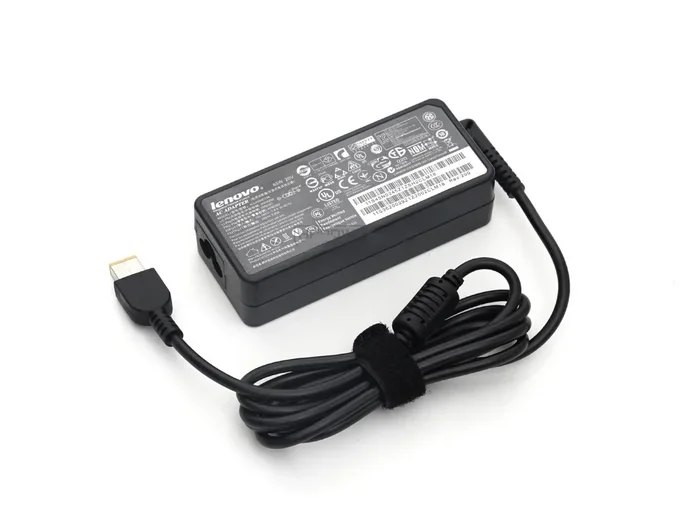
ThinkPad laptops are built for business users. They often need more power to run all day long. A typical ThinkPad uses a larger barrel charger. The tip is usually a specific size. It has a unique diameter that fits the ThinkPort socket perfectly. IdeaPad laptops are more for everyday use. They sometimes use smaller tips or even USB-C charging. You cannot swap a ThinkPad charger with an IdeaPad charger easily. The shapes just do not match. If you try to force a tip, you can break the charging port on your laptop. This is a very common mistake that new users make.
Here are some quick points to remember about these different lines:
- ThinkPad Chargers: Usually have a larger barrel tip. They provide steady power for heavy workloads and long meetings.
- IdeaPad Chargers: Often smaller or use USB-C. They are great for light tasks, browsing, and watching videos.
- Yoga Series: These use thin profiles. They rely heavily on USB-C power delivery to stay slim and light.
- Legion Series: Gaming laptops need high wattage. They use chunky adapters to handle the heavy graphics load.
Each series has its own laptop power tip. You must match the tip to the laptop. Do not assume that because both are Lenovo, they will work together. The Lenovo laptop model dictates the charger type. Always check your specific model number before you buy a replacement. You can find the model number on the bottom of the laptop. It is also on the box it came in.
USB-C vs Barrel Connectors
Older Lenovo models use a barrel connector. This is the round tip you plug into the side of the laptop. It is a very reliable design. It has been around for many years. Newer models use USB-C charging. This is the same port you use for your phone. USB-C chargers are much more convenient. You can use one charger for many devices. But you still must check the voltage and amperage. A USB-C charger might fit, but it might not give enough power. If the charger does not provide enough wattage, the laptop will charge slowly. It might even drain while you use it. You want the laptop to charge while you work. So, check the power ratings carefully. A 65 watt USB-C charger is usually good for most thin laptops. But a gaming laptop might need 120 watts or more.
Understanding Voltage and Amperage
When you look at a Lenovo power adapter, you see numbers printed on the label. These numbers are very important. They tell you how much power the charger gives. The two main numbers are voltage and amperage. You must understand these to ensure charger compatibility. Without the right numbers, your laptop will not work properly. It might not turn on at all.
What These Numbers Mean
Voltage is the pressure of the electricity. Amperage is the flow of the electricity. Think of a water hose. Voltage is like the water pressure. Amperage is like the width of the hose. Your laptop needs a specific pressure to work right. If the voltage is too high, you can fry your laptop. This is a very real danger. It can burn out the motherboard. You would lose everything on your hard drive. If the amperage is too low, the charger will overheat. It might also fail to charge your battery. Always match the voltage exactly. You can use a charger with equal or higher amperage. But never change the voltage. The voltage number must stay the same. It is the most important number to match.
For example, if your laptop needs 20 volts and 3.25 amps, you need a 65 watt charger. If you use a 45 watt charger, it might not work well. The laptop might run slow. It might not charge at all while you are using it. This is why checking the adapter wattage is so important before you buy. Look at the sticker on your laptop. Write down the numbers. Keep them in your phone. You will need them when you shop for a new charger. It is also helpful to take a photo of the sticker. That way, you always have the info handy.
Matching the Power Tip
The physical tip of the charger is the laptop power tip. It connects to the laptop socket. Even if the voltage is right, a wrong tip will not fit. Some tips have different pin sizes. Others have different shapes. You must buy a charger that has the exact same tip as your laptop needs. A loose tip can cause arcing. Arcing is when electricity jumps the gap. This can damage the charging port on your laptop. Always double check the tip size before you plug it in. A good fit is snug and secure. There should be no wobble or play in the connection. If the tip feels loose, it is not the right one.
Can You Use a Different Lenovo Charger?
Sometimes you might want to use a different charger. Maybe you lost yours. Or maybe you want a spare for your desk. The question is, can you use another Lenovo charger? The answer depends on what you have. You need to check a few things first. Safety should always come first. Do not take shortcuts with electricity.
Original vs Third-Party Options
Using a Lenovo original charger is always the safest choice. It is made specifically for your laptop. It meets all the safety standards set by the company. A third-party charger might work too. But it comes with risks. Third-party chargers might not have the right safety chips. These chips protect your laptop from power surges. Without them, a sudden spike in electricity can destroy your motherboard. You might lose all your files in a second. It is just not worth the risk.
Some people buy cheap chargers online. They want to save a few dollars. But a cheap charger can cost you a lot in the long run. It might ruin your laptop battery. You might even need to buy a whole new laptop. Spending a little more on a quality charger is always smart. It keeps your device safe. It also gives you peace of mind. You will not have to worry about fires or shorts. Always buy from a reputable seller. Check the reviews before you click buy.
Risks of Mismatching
What happens if you use the wrong charger? You might damage your laptop battery health. The battery might swell up. A swollen battery is a fire hazard. It should never be used. The battery could also stop charging completely. In rare cases, a bad charger can cause a short circuit. This can melt the plastic around the charging port. You should never take chances with charger compatibility. Always check the label on your laptop first. A few minutes of checking can save you a lot of money and headaches. A little care goes a long way.
You should also watch for warning signs. If your laptop gets very hot while charging, stop. If the charger smells like burning, unplug it right away. These are signs of a bad match. You might be using the wrong power delivery unit. Find the correct one as soon as possible. Safety is the most important thing.
How to Find the Right Charger for Your Laptop
Finding the right charger does not have to be hard. You just need to know where to look. There are a few easy steps you can follow. You do not need to be a tech expert. Anyone can do this with a few simple checks. We will walk you through the process step by step. It is easier than you think.
Check the Label on Your Laptop
Turn your laptop over. Look for a white sticker. This sticker has all the specs you need. It tells you the adapter wattage. It also shows the voltage and amperage. Write these numbers down before you shop. You can also find this information on the bottom of the Lenovo power adapter itself. The label on the brick has the same numbers. Match these numbers when you buy a new one. If the sticker is worn off, look up your model online. The website will have the exact specs for your unit. You can also check the manual that came with the laptop.
Using Lenovo Support Tools
You can also use the Lenovo support website. Enter your laptop serial number. The site will show the exact Lenovo laptop model specs. It will tell you which power delivery unit you need. This is the most foolproof way to find a match. You can also call Lenovo support. They can help you find the right part. They have access to all the specs for every model. They know exactly what works with what. Do not guess. Let the experts guide you to the right Lenovo charger for your needs. They are always happy to help.
You can also check the Lenovo Vantage app. This app is pre-installed on many laptops. It tells you the exact model and specs. It can even suggest the right charger for your needs. This is a very handy tool. You do not need to remember the model number. The app does the work for you. Just open it and look for the power section. It will show you the Lenovo power adapter requirements. This is the easiest way to find the right fit.
Final Thoughts on Lenovo Power Adapters
So, do all Lenovo laptops use the same charger? Now you know the answer. They do not. Each laptop needs its own specific charger. You must match the shape, the voltage, and the amperage. Taking the time to do this right saves you money. It also keeps your laptop safe from harm. A little knowledge goes a long way when it comes to Lenovo charger compatibility. You now know more than most people about this topic.
Always check your laptop label before buying a new charger. Choose Lenovo original chargers when you can. If you use a third-party charger, double-check the specs. A little care goes a long way. Your laptop will thank you for it. Keep your device charged and ready to go. Happy computing and stay safe!
Remember, your laptop is a big investment. Protect it with the right charger. Do not let a cheap or wrong charger ruin your day. Take the extra few minutes to do it right. Your future self will thank you. Now you are ready to find the perfect charger for your machine. Go ahead and check those numbers. You have got this!
Frequently Asked Questions
What happens if I use the wrong Lenovo charger?
Using the wrong charger can damage your laptop. It might not charge at all. It could also harm your laptop battery health over time.
Can I use a USB-C charger for my Lenovo laptop?
Yes, if your laptop has a USB-C port. You must check the power delivery requirements. Make sure the charger provides enough wattage.
How do I know which Lenovo charger I need?
Look at the label on your laptop or the charger brick. Check the voltage and amperage numbers. Match these exactly when buying a new one.
Are Lenovo ThinkPad chargers the same as IdeaPad chargers?
No, they are usually different. ThinkPads often use a larger barrel charger. IdeaPads might use smaller tips or USB-C charging.
Is it safe to use a third-party charger?
It can be safe if the specs match perfectly. However, a third-party charger might lack safety chips. Always buy from a reputable brand to stay safe.
Do all Lenovo laptops use USB-C for charging?
No, not all of them. Older models use a round barrel connector. Newer thin models often use USB-C. Check your specific Lenovo laptop model to be sure.