How Accurate Are Wi Fi Scales For Tracking Body Weight
WiFi scales provide a convenient way to track body weight and health metrics, but their accuracy depends on sensor quality, calibration, and network stability. Most smart scales use reliable load cell technology, yet external factors like placement, surface type, and app sync can influence your readings. Understanding these variables helps you get the most precise data for your fitness journey.
This is a comprehensive guide about How Accurate Are Wi Fi Scales.
Key Takeaways
- WiFi scales are generally accurate: Most quality smart scales use precision load cells that deliver readings within 0.2 to 0.5 pounds of a medical-grade scale.
- Placement matters a lot: Hard, flat surfaces like tile or hardwood give the most consistent and accurate weight measurements.
- Calibration is essential: Regular calibration ensures your WiFi scale maintains its accuracy over time and across different users.
- Network stability affects data sync: A weak WiFi connection can delay or disrupt the sync of your weight data to the app.
- WiFi scales offer more than weight: They track body fat, muscle mass, bone density, and hydration levels using bioelectrical impedance analysis.
- Consistency beats perfection: Weighing yourself at the same time and place daily gives you better trend data than chasing a single perfect number.
- Price does not always equal accuracy: Mid-range WiFi scales often perform just as well as premium models for basic weight tracking.
[FEATURED_IMAGE_PLACEHOLDER]
What Is a WiFi Scale and How Does It Work?
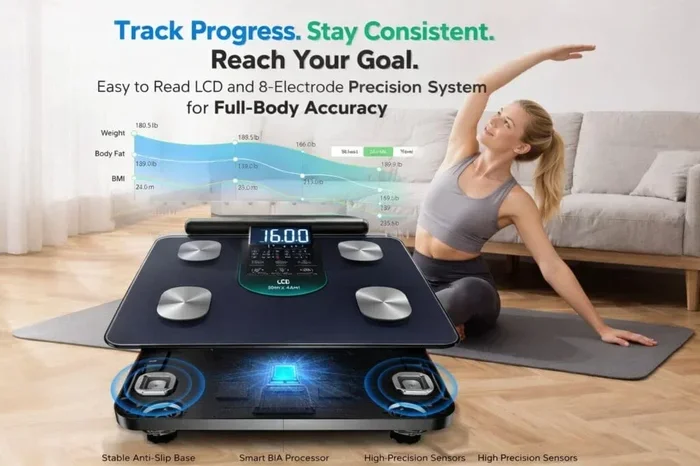
A WiFi scale is a smart weighing device that connects to your home wireless network to sync weight and body composition data to a mobile app or cloud platform. Unlike traditional analog or basic digital scales, WiFi scales send your readings automatically, so you do not need to manually log your weight every morning.
Under the hood, most WiFi scales rely on a technology called load cells. These are tiny sensors embedded in the scale’s platform that detect the force of your body weight and convert it into an electrical signal. That signal gets processed by a small chip inside the scale, which then displays the number on the screen and, if connected, sends it to your phone.
Many WiFi scales also use a feature called bioelectrical impedance analysis (BIA). This works by sending a tiny, harmless electrical current through your body from the scale’s foot pads. Based on how quickly the current travels through different tissues, the scale estimates your body fat percentage, muscle mass, bone density, and hydration level. The WiFi connectivity allows all of this data to reach your fitness app instantly.
The beauty of a smart body weight scale is the automation. Once you step on, it recognizes your profile (usually through weight and past data), records the measurement, and uploads it to the cloud. You can check your trends on your phone, tablet, or computer without ever touching the scale again.
How Do WiFi Scales Connect to Your Network
Setting up a WiFi scale usually involves downloading the manufacturer’s app, creating an account, and following the on-screen prompts to connect the scale to your home wireless network. Most scales support the 2.4GHz band, which is standard in most households. Some newer models also support 5GHz networks, though this is less common.
If your WiFi network does not have a password, the setup process is even simpler. You can connect to WiFi without a password in open network environments, though this is rare in most homes. For most users, the scale will prompt you to enter your WiFi credentials through the app, and then it will remember them for future connections.
In situations where your home WiFi signal is weak in the bathroom or wherever you keep your scale, you might consider using your phone as a bridge. You can get WiFi from your phone by turning on a mobile hotspot, allowing the scale to connect to your phone’s network instead of your home router. This is a handy workaround for users with spotty WiFi coverage.
How Accurate Are WiFi Scales Compared to Traditional Scales
The big question most people ask is: how accurate are WiFi scales really? The short answer is that most reputable WiFi scales are quite accurate for body weight, typically within 0.2 to 0.5 pounds of a high-quality mechanical or digital scale. However, accuracy varies depending on the brand, price point, and technology used.
Medical-grade scales, like those found in clinics, are calibrated to extremely strict standards and are considered the gold standard for weight measurement. Consumer WiFi scales are not held to the same standard, but the best ones come surprisingly close. Brands like Withings, Garmin, Fitbit, and Eufy use quality sensors that deliver reliable and consistent readings.
Where WiFi scales sometimes fall short is in body composition measurements. The BIA technology that estimates body fat, muscle mass, and hydration is inherently less precise than weight measurement. Factors like hydration levels, food intake, and skin moisture can all skew the body fat percentage reading by several percentage points. So while your weight reading is likely very accurate, your body fat number should be treated as an estimate rather than a clinical measurement.
Compared to traditional digital scales, WiFi scales do not sacrifice accuracy for smart features. The weighing mechanism is the same in both types of devices. The difference is that a WiFi scale adds the convenience of automatic tracking, trend analysis, and data sharing. You are not paying for less accuracy; you are paying for a better weight tracking experience.
What the Research Says About WiFi Scale Accuracy
Several independent studies have tested the accuracy of smart scales against medical-grade equipment. The results generally show that WiFi scales measure body weight with a margin of error around 0.1 to 0.3 pounds under controlled conditions. However, body composition readings showed wider variations, with body fat estimates sometimes differing by 3 to 5 percent fromDEXA scan results, which are considered the most accurate body composition tool available.
This means that if you are using a WiFi scale primarily to track your body weight trends, you can feel confident in the data. If you are relying on it for precise body fat percentages, you should look at it as a general guide rather than an exact measurement.
Factors That Affect WiFi Scale Accuracy
Several factors can influence how accurate your WiFi scale reads your weight. Understanding these variables helps you set realistic expectations and improve your measurement consistency.
Surface Type and Placement
The surface you place your scale on matters more than most people realize. WiFi scales give the most accurate readings on hard, flat surfaces like tile, hardwood, or concrete. Soft surfaces like carpet, rugs, or thick mats can absorb some of the force and lead to inconsistent or slightly off readings.
Always place your scale on a level surface. If the floor is uneven, the scale may tip slightly, which affects the load cell readings. Some WiFi scales come with a leveling bubble or a built-in calibration feature that adjusts for minor surface imperfections.
Calibration and Maintenance
Like any measuring device, WiFi scales need regular calibration to maintain accuracy. Most scales auto-calibrate when you turn them on or step on them, but periodic manual calibration is a good practice. This usually involves using the scale’s companion app to trigger a calibration routine or placing a known weight on the platform.
Over time, load cells can drift, especially in older or heavily used scales. If you notice your readings becoming inconsistent, a recalibration or a reset may be in order. Keeping your scale on a stable surface and avoiding drops or impacts also extends its accuracy lifespan.
User Profile and Recognition
Most WiFi scales can recognize multiple users based on their unique weight profile. However, if two people in your household have very similar weights, the scale might mix up their data. This leads to inaccurate trend tracking for both users. To avoid this, make sure each user has a distinct profile in the app, and always step on the scale barefoot for the best recognition.
Network Connectivity and Sync
While network connectivity does not affect the actual weight measurement on the scale’s display, it does affect how quickly and reliably your data reaches your app. If your WiFi signal is weak in the room where your scale sits, the sync might fail or delay. This does not change the accuracy of the reading itself, but it can disrupt your tracking data.
Having a stable home WiFi connection is important for consistent data logging. If you struggle with WiFi coverage in your bathroom or bedroom, consider setting up a WiFi extender or using the mobile hotspot method to ensure your scale always connects successfully.
Tips for Getting the Most Accurate Readings From Your WiFi Scale
Getting the best accuracy from your WiFi scale is not complicated. A few simple habits make a big difference in the consistency and reliability of your readings.
- Weigh yourself at the same time every day. Morning readings, right after using the bathroom and before eating or drinking, are the most consistent. Your body weight fluctuates throughout the day based on food, water, and activity.
- Always place the scale on a hard, flat surface. Avoid carpet, rugs, and uneven flooring. A tile or hardwood floor gives the most reliable results.
- Step on barefoot and stand still. Shoes, socks, and thick clothing can add weight and interfere with the BIA sensors. Stand centered on the platform and wait for the reading to stabilize.
- Calibrate your scale regularly. Check the manufacturer’s instructions for calibration steps. Most apps have a built-in calibration tool that takes just a few minutes.
- Keep your scale away from drafts and heat sources. Extreme temperatures and air currents can affect the sensors and lead to slightly off readings.
- Update your scale’s firmware. Manufacturers often release software updates that improve accuracy and fix bugs. Check the app periodically for firmware updates.
Quick Tip: If you want to compare your WiFi scale against a known reference, place a dumbbell or a bag of flour with a known weight on the scale. If the reading matches, your scale is calibrated correctly. This simple test takes seconds and gives you peace of mind.
WiFi Scales vs Bluetooth Scales: Which Is More Accurate
When shopping for a smart scale, you will often see both WiFi and Bluetooth models. The weighing accuracy between the two is essentially the same, since both use the same load cell technology. The difference lies in how they send your data to your phone or cloud.
A WiFi scale connects directly to your home wireless network and syncs data automatically in the background. You do not need to open any app or stand near your phone. The scale simply sends the data as soon as you step off, provided your WiFi network is active and within range.
A Bluetooth scale requires your phone to be within Bluetooth range (usually about 30 feet) for the data to transfer. You need to open the app and initiate the sync manually. This means if you forget to sync, your data might not get recorded.
For accuracy of the weight measurement itself, there is no difference between WiFi and Bluetooth scales. The advantage of WiFi is convenience and automatic background syncing. The advantage of Bluetooth is that it does not rely on your home WiFi network, which can be useful if you have spotty internet or if you want to take your scale on the go.
Some users wonder if they can use their phone’s mobile data to connect a Bluetooth scale. The answer is no, Bluetooth scales connect directly to your phone, not through the internet. But if you are in a location without WiFi and want automatic cloud syncing, a WiFi scale paired with mobile hotspot WiFi can be a great solution.
Which Should You Choose
If you want the most seamless and hands-free experience, go with a WiFi scale. It works in the background without any manual intervention. If you travel frequently or have weak WiFi at home, a Bluetooth scale might be the better fit. Some scales support both WiFi and Bluetooth, giving you the best of both worlds.
Are WiFi Scales Worth the Investment
Whether a WiFi scale is worth it depends on your goals and how seriously you take tracking your health metrics. For casual users who just want to know their weight once a week, a basic digital scale works fine. But if you are serious about tracking trends, monitoring progress, or managing a fitness or weight loss plan, a WiFi scale adds real value.
The automatic data logging is the biggest selling point. Without it, you would need to write down your weight every time or manually enter it into a fitness app. Over weeks and months, this adds up to a lot of effort. A WiFi scale removes that friction entirely.
The additional body composition features are a nice bonus, even if they are not perfectly precise. Seeing trends in your body fat percentage, muscle mass, and hydration over time can provide useful insights that a simple weight number alone cannot offer.
Price is another consideration. WiFi scales range from around $20 for budget models to over $150 for premium options. The good news is that accuracy does not always scale with price. Many mid-range WiFi scales ($40 to $70) offer excellent weight measurement accuracy and solid app experiences. You do not need to spend a fortune to get reliable body weight tracking.
One thing to keep in mind is that most WiFi scales require a compatible smartphone and a compatible operating system. Before purchasing, check that the scale works with your phone and that the app is available for your device. Also, make sure your home WiFi setup supports the scale’s connectivity requirements.
Final Thoughts on WiFi Scale Accuracy
WiFi scales are accurate tools for tracking body weight and can provide valuable insights into your health and fitness journey. While they are not medical-grade instruments, the best consumer models deliver reliable and consistent weight readings. The key to getting the most out of your WiFi scale is consistency in how and where you weigh yourself, regular calibration, and a stable network connection.
By understanding the factors that affect accuracy and following the tips in this guide, you can trust your WiFi scale to give you meaningful data over time. The numbers may not be perfect down to the decimal, but the trends they reveal are incredibly useful for anyone serious about their health.
Frequently Asked Questions
How accurate are WiFi scales for body weight?
Most quality WiFi scales measure body weight within 0.2 to 0.5 pounds of a medical-grade scale. For tracking weight trends over time, this level of accuracy is more than sufficient. The readings are consistent and reliable as long as you use the scale on a hard, flat surface and follow proper weighing habits.
Can a WiFi scale be wrong about body fat percentage?
Yes, body fat readings from WiFi scales can be off by several percentage points. This is because the bioelectrical impedance technology is affected by hydration levels, food intake, skin moisture, and body temperature. Treat body fat readings as general estimates rather than clinical measurements, and focus on tracking trends over time instead of single readings.
Do WiFi scales need a password to connect to the internet?
Most WiFi scales connect to a password-protected home network. However, if your network is open or does not require a password, the scale can connect without one. You can also use a mobile hotspot from your phone to provide a WiFi connection for your scale if your home network is unstable or unavailable.
Why does my WiFi scale give different readings each time?
Inconsistent readings usually come from an uneven surface, stepping on at different times of day, or wearing different clothing. Other causes include a weak WiFi signal that disrupts the auto-calibration process or a scale that needs recalibration. Weigh yourself at the same time daily on a hard floor for the most consistent results.
Is WiFi or Bluetooth better for scale data syncing?
WiFi scales sync automatically in the background without needing your phone nearby. Bluetooth scales require your phone to be within range and the app to be open. For accuracy of the weight measurement itself, both are the same. WiFi is more convenient for daily use, while Bluetooth works better for travel or areas with weak WiFi coverage.
How often should I calibrate my WiFi scale?
Most manufacturers recommend calibrating your WiFi scale every few months or whenever you move it to a new location. Some scales auto-calibrate each time you turn them on. If you notice inconsistent readings, perform a manual calibration using the manufacturer’s app or by placing a known weight on the platform and comparing the result.
=== CONCLUSION ===
WiFi scales are a reliable and convenient way to track your body weight and monitor your health over time. Their accuracy for weight measurement is impressive, with most quality models delivering results within a fraction of a pound of medical-grade equipment. The body composition features add extra value, even if they are estimates rather than precise clinical measurements.
The factors that matter most for getting accurate readings are simple: place your scale on a hard, flat surface, weigh yourself at the same time each day, keep the device calibrated, and ensure a stable WiFi connection for seamless data syncing. By following these habits, your WiFi scale becomes a powerful tool for understanding your body and tracking your fitness progress.
Whether you are just starting your health journey or you are a seasoned fitness enthusiast, a WiFi scale takes the guesswork out of daily weight tracking. The automatic syncing, trend analysis, and multi-user support make it easier than ever to stay consistent and motivated. Invest in a quality scale, use it correctly, and trust the trends it reveals. Your future self will thank you for the data.