Does A Wifi Booster Actually Work Or Is It Worth Your While
A wifi booster can genuinely improve your wireless signal and extend wifi coverage across your home. However, results depend on your setup, router placement, and the type of booster you choose. This guide explains exactly how they work, what to expect, and when a better alternative might be the smarter choice.
Key Takeaways
- Wifi boosters do work but they have limits based on your existing internet plan and router quality.
- Placement matters a lot — a poorly positioned booster can actually slow your network.
- Mesh systems often outperform traditional boosters for larger homes.
- Not all boosters are equal — single-band and dual-band models behave very differently.
- A booster won’t increase your internet speed — it only extends the reach of what your router provides.
- Wired extenders offer the most stable connection but require extra setup effort.
📑 Table of Contents
Does A Wifi Booster Actually Work?
If you have spots in your home where the wireless signal drops to nothing, you are not alone. Dead zones in bedrooms, bathrooms, and backyards plague millions of households every single day. A wifi booster sounds like the perfect fix. But does it really work?
The short answer is yes. A wifi booster does work to extend your wireless range and fill in those annoying dead spots. But the longer answer is more nuanced. A booster will not magically transform a slow internet plan into a lightning-fast connection. It also will not fix a poorly placed router. Understanding what a booster can and cannot do is the first step toward making it work for you.
In this guide, we will walk through exactly how wifi boosters function, when they are worth buying, and what alternatives you should consider. By the end, you will know precisely whether a wifi booster is the right solution for your home network.
How A Wifi Booster Works
A wifi booster captures the existing wireless signal from your router, amplifies it, and rebroadcasts it to a wider area. Think of it like a megaphone for your router’s signal. The booster receives the wireless signal on one side and transmits a stronger version on the other side.
Most boosters work on a simple principle. They connect to your existing broadband connection wirelessly, then create a new extended network. Some models create a separate network name, while others merge with your existing network seamlessly. The technology behind this is straightforward, but the results can vary quite a bit depending on your setup.
There are three main types of boosters you will encounter:
- Wifi repeaters — These rebroadcast your existing signal. They are the most affordable option but can cut your bandwidth in half.
- Wifi extenders — These connect to your router through a wired or powerline connection, preserving more of your internet speed.
- Mesh nodes — These are part of a full mesh network system that blankets your home in consistent coverage.
Each type serves the same core purpose: extending wifi coverage. But they do so in very different ways. Your choice depends on your home size, your budget, and how much speed you need.
When A Wifi Booster Is Worth It
Not every home needs a wifi booster. But there are clear situations where one makes a real difference. Here are the most common scenarios where a booster delivers genuine value.
Your router is far from your workspace. If you work from a home office on the opposite side of your house from the router, you likely experience weak signal and frequent connection drops. A wifi booster placed halfway between the router and your workspace can restore strong, reliable coverage.
Your home has thick walls or multiple floors. Concrete, brick, and metal significantly weaken wireless signals. Older homes with thick plaster walls are especially tough on wireless range. A booster helps push the signal through these barriers.
You have a large property. Homes over 2,000 square feet often struggle with full coverage from a single router. A booster or a mesh system fills in the gaps and ensures every room gets a strong wireless signal.
Your family streams and games simultaneously. Multiple devices competing for bandwidth can overwhelm a single router. A booster helps distribute the load and reduces network congestion in high-traffic areas of your home.
You cannot run ethernet cables. In some homes, running cables through walls is not practical. A wireless booster offers an easy, non-invasive way to improve coverage without any drilling or wiring.
When A Wifi Booster Is NOT Worth It
On the flip side, there are situations where a wifi booster will not solve your problem. Knowing these will save you money and frustration.
Your internet plan is slow. A booster cannot create speed that does not exist. If your broadband connection is slow to begin with, a booster will only extend that slow speed to a wider area. It will not make it faster.
Your router is outdated. Older routers using wifi 4 or wifi 5 standards may not benefit from a booster at all. Upgrading to a modern router often delivers better results than adding a booster to an old one.
You have a small apartment. If your home is under 800 square feet and your router sits in the center, you probably do not need a booster at all. The signal likely covers the entire space already.
You have a serious interference problem. Microwaves, baby monitors, and neighboring networks can all interfere with your wireless signal. A booster will amplify the interference along with the signal. In these cases, switching to a less congested channel or using a wired connection works better.
Quick Tip: Before buying any booster, try moving your router to a central, elevated location. This free fix solves wifi coverage problems for many households without spending a dime.
Types Of Wifi Boosters Compared
Not all wifi boosters are created equal. Understanding the differences helps you pick the right one for your needs. Here is a detailed comparison of the most popular options.
Wifi Repeaters
A wifi repeater is the most basic type of booster. It sits between your router and the area with weak signal, rebroadcasting the signal to extend wireless range. Repeaters are affordable and easy to set up. You plug them into a wall outlet, press a button, and they start working.
However, repeaters come with a significant downside. Because they receive and retransmit the same signal, they typically cut your available bandwidth in half. This means your internet speed drops in the area covered by the repeater. For basic browsing and email, this is fine. For streaming 4K video or online gaming, it can be a serious problem.
Wifi Extenders
A wifi extender connects to your router through a wired connection or powerline adapter. This preserves more of your bandwidth because the extended signal does not have to travel back through the wireless connection. Extenders offer more stable and faster performance than repeaters.
The trade-off is setup complexity. Wired extenders require running an ethernet cable from your router to the extender location. Powerline extenders use your home’s electrical wiring instead, which is easier but still requires a bit of planning.
If you want reliable network performance in a specific room, an extender is often the better choice. They are also a great option if you already have ethernet ports available in your walls.
Mesh Wifi Systems
A mesh network is the most advanced solution for whole-home wifi coverage. Instead of a single router and one booster, a mesh system uses multiple nodes placed around your home. Each node communicates with the others to create a seamless, unified network.
Mesh systems are the most expensive option, but they deliver the best results. They provide consistent signal strength throughout your home, automatically switch your devices to the strongest node, and do not suffer the speed loss that repeaters do. Many modern mesh systems also support dual band or even tri-band frequencies, which significantly boosts wireless performance.
| Feature | Wifi Repeater | Wifi Extender | Mesh System |
|---|---|---|---|
| Price Range | $20 – $50 | $40 – $100 | $100 – $400+ |
| Setup Difficulty | Very Easy | Moderate | Easy |
| Speed Loss | High (up to 50%) | Low | Minimal |
| Best For | Small spaces, budget | Single room, stable needs | Large homes, full coverage |
| Seamless Roaming | No | Sometimes | Yes |
| Wifi Coverage | Moderate | Good | Excellent |
Single Band vs. Dual Band Boosters
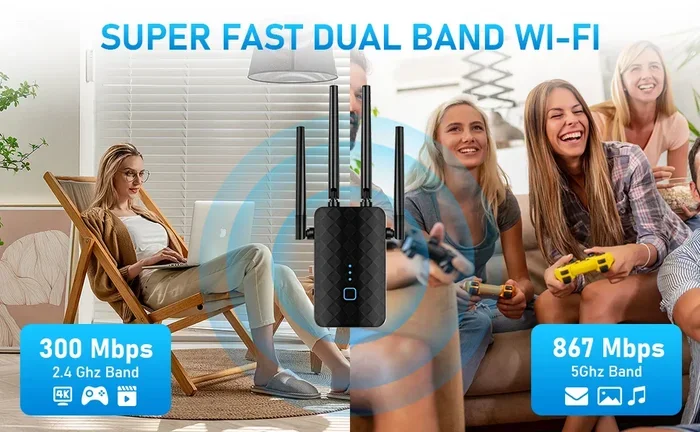
When shopping for a wifi booster, you will see both single-band and dual-band models. A single-band booster operates on the 2.4GHz frequency only. It has a longer range but slower speeds. A dual-band booster uses both 2.4GHz and 5GHz frequencies, offering faster speeds but a slightly shorter range.
For most households, a dual band booster is the better choice. The 5GHz band handles streaming, gaming, and video calls with ease. The 2.4GHz band reaches further and works well for smart home devices and basic browsing.
How To Get The Most From Your Wifi Booster
Buying a booster is only half the battle. Proper setup and placement make or break the results. Follow these tips to get the most from your wifi booster and ensure your home network performs at its best.
Placement Is Everything
Where you put your booster determines everything. The golden rule is to place it halfway between your router and the area with weak signal. If you place it too close to the router, it will not extend coverage to the dead zone. Place it too far, and it will not receive a strong enough signal to rebroadcast.
Also, keep your booster away from thick walls, metal objects, and appliances that cause interference. A booster sitting behind a microwave or inside a closet will perform poorly. Elevate it on a shelf or table for the best signal strength.
Update Your Firmware
Just like your router, your booster needs regular firmware updates. These updates fix bugs, improve security, and sometimes even boost network performance. Check the manufacturer’s app or web interface every few months to make sure your booster is running the latest software.
Optimize Your Router First
Before adding a booster, make sure your router is performing at its best. Change the channel to avoid network congestion from neighboring networks. Update the router firmware. Ensure the router firmware is current. If your router is more than five years old, consider upgrading before investing in a booster.
Sometimes, simply changing your router’s channel or moving it to a better location eliminates the need for a booster entirely. It is worth trying these free fixes first.
Consider Your Internet Speed
Your booster can only work with the speed your broadband connection provides. If you pay for 100 Mbps internet, a booster cannot give you 200 Mbps. Know your plan’s speed and set realistic expectations. A booster extends coverage, not speed.
Common Mistakes People Make With Wifi Boosters
Even with the best intentions, many people make mistakes that reduce the effectiveness of their wifi booster. Avoid these common pitfalls to get the best results.
- Placing the booster in a dead zone. The booster needs a decent signal from your router to work with. Placing it where the signal is already weak defeats the purpose.
- Expecting faster internet. A booster extends range. It does not increase your internet speed. If your plan is slow, a booster will not fix that.
- Ignoring interference. Other wireless devices, walls, and even fish tanks can weaken your wireless signal. Position your booster away from these obstacles.
- Buying the cheapest model. Budget boosters often have poor range and slow speeds. Spending a little more on a quality model pays off in the long run.
- Not using a wired connection when possible. If you can run an ethernet cable, do it. Wired boosters always outperform wireless ones in terms of network performance.
- Overlooking alternatives. Sometimes extending your network with an ethernet cable is a more reliable solution than a wireless booster. A wired backhaul gives you the full speed of your connection without any wireless loss.
Expert Insight: Many users find that a mesh wifi system replaces the need for a traditional booster entirely. Mesh nodes communicate with each other intelligently, creating a single, strong network across your entire home. If you have a home larger than 1,500 square feet, a mesh system is often the better investment.
Wifi Booster vs. Alternatives
A wifi booster is not your only option for better coverage. Let us look at the alternatives and how they compare.
Upgrade Your Router
A modern router with wifi 6 or wifi 6E technology can cover more square footage than older models. If your current router is several years old, upgrading might solve your coverage issues without adding extra hardware. Newer routers also handle multiple devices better, which is critical for busy households.
Use A Hotspot Instead
In some situations, using a mobile hotspot from your phone can be a practical alternative. If you only need better coverage in one specific area temporarily, a hotspot works well. You can also explore options like using a hotspot instead of traditional wifi for more permanent solutions in certain setups.
Powerline Adapters
Powerline adapters send your internet signal through your home’s existing electrical wiring. They are a great middle ground between wireless boosters and ethernet cables. You plug one adapter near your router and another in the room that needs coverage. No drilling, no cables running along baseboards.
Powerline adapters work best when both outlets are on the same electrical circuit. They also deliver more consistent speeds than wireless repeaters. For home offices or gaming setups where stability matters, powerline adapters are an excellent choice.
Run An Ethernet Cable
This is the most reliable option for network performance. Nothing beats a direct wired connection for speed and stability. If you can run a cable from your router to the weak spot, do it. You will get the full speed of your broadband connection with zero wireless interference.
Flat ethernet cables are thin and easy to run along baseboards or under doors. They are barely visible and deliver the best possible performance. For a home office or gaming setup, this is always the gold standard.
Final Verdict: Is A Wifi Booster Worth It?
So, does a wifi booster actually work? Yes, absolutely. A well-placed wifi booster can eliminate dead zones, extend your wireless range, and improve wifi coverage throughout your home. It is a practical, affordable solution for many households.
But a booster is not a magic fix. It works best when your internet plan is reasonably fast, your router is modern, and you place the booster in the right spot. If your setup has fundamental issues, a booster will only extend those problems rather than solve them.
For most people with medium-sized homes and moderate coverage issues, a wifi booster is absolutely worth the investment. For larger homes or more demanding setups, a mesh system or a wired solution delivers better long-term results.
The key is to diagnose your specific problem first. Identify where the signal drops, check your router placement, and understand your internet speed. Then choose the right tool for the job. Whether that is a simple repeater, a wired extender, or a full mesh system, the right solution will transform your home network experience.
Take action today. Test your signal in every room, find the weak spots, and pick the solution that fits your home and budget. A better-connected home is just a smart decision away.
Frequently Asked Questions
Can a wifi booster increase my internet speed?
No, a wifi booster cannot increase your internet speed. It only extends the range of your existing signal. Your speed is determined by your internet plan and router. A booster helps deliver that existing speed to areas where the signal was previously weak or nonexistent.
How many wifi boosters do I need for my home?
It depends on your home size and layout. For small to medium homes, one booster usually suffices. Larger homes over 2,000 square feet may need two or more boosters, or a full mesh network system. Test your wifi coverage first to determine where the dead zones are.
Is a wifi booster the same as a wifi extender?
They are similar but not identical. A wifi booster is a general term that includes repeaters and extenders. A repeater rebroadcasts the wireless signal wirelessly, while an extender typically uses a wired or powerline connection. Extenders usually preserve more of your internet speed than repeaters.
Will a wifi booster work with any router?
Most wifi boosters work with any standard router, regardless of brand. They are designed to be compatible with all broadband connections. However, for the best performance, make sure your booster supports the same wifi standard as your router (such as wifi 5 or wifi 6).
Can I use a wifi booster outdoors?
Some weather-resistant boosters are designed for outdoor use. Standard indoor boosters are not built to handle rain, humidity, or extreme temperatures. If you need coverage in your backyard or garage, look for a model rated for outdoor use or consider a wired extender with an outdoor access point.
What is the difference between a wifi booster and a mesh system?
A wifi booster extends your existing router’s signal to one additional area. A mesh system replaces your router and uses multiple nodes to create a seamless, whole-home network. Mesh systems are more expensive but offer better network performance, smoother roaming, and easier management through a single app.