Do Wifi Pods Need To Be Plugged In For Best Results
Wifi pods do need to be plugged in to work properly, as most models rely on a constant power source to maintain strong wireless coverage throughout your home. Without being plugged into a power outlet, these devices cannot boost your wifi signal or extend wireless coverage to those hard-to-reach areas.
Wifi pods have become one of the most popular ways to fix weak signals and dead zones in homes today. These small devices promise to boost your connection and spread internet to every corner of your house. But here is the question that trips up a lot of people: do wifi pods need to be plugged in to work?
The short answer is yes. Almost every wifi pod on the market today needs to be plugged into a wall outlet to deliver the best results. Without a constant power supply, these devices simply cannot function. They are not battery-powered like your phone or laptop. They are designed to sit in one spot and keep working around the clock.
In this article, we will walk through everything you need to know about powering your wifi pods. We will cover why they need electricity, what happens if you unplug them, and how to get the most out of your setup. Whether you are setting up a new mesh wifi system or trying to improve an existing one, this guide has you covered.
Key Takeaways
- Wifi pods require a power outlet to function and deliver extended wireless coverage across your home.
- Plugging in your wifi pods correctly ensures optimal broadband speed and strong wifi performance in every room.
- Placement matters just as much as power — even a plugged-in pod can underperform if positioned poorly.
- Some wifi pods include battery backups, but they still need periodic charging to maintain network coverage.
- Unplugged wifi pods will not work, and removing power mid-use can disrupt your entire home network.
- Using a surge protector is a smart way to keep your plug-in wifi devices safe from electrical damage.
📑 Table of Contents
- What Are Wifi Pods And How Do They Work
- Do Wifi Pods Need To Be Plugged In
- When You Should Plug In Your Wifi Pods
- Can You Use Wifi Pods Without Power
- Best Placement Tips For Plugged-In Wifi Pods
- Common Mistakes People Make With Wifi Pods
- Expert Insights On Wifi Pod Power And Performance
- Key Takeaways
What Are Wifi Pods And How Do They Work
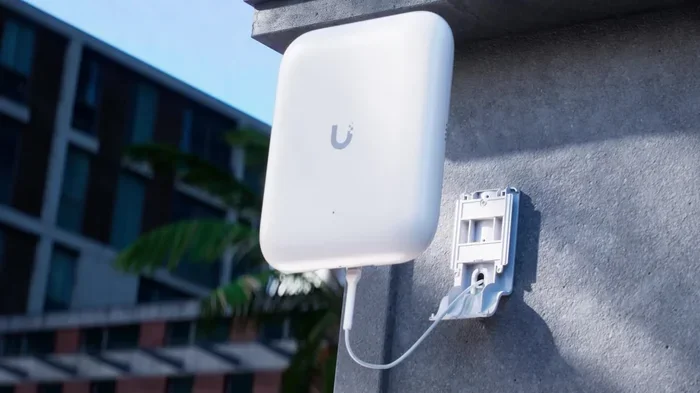
Wifi pods are small wireless devices that work alongside your main router to expand your home network. They are sometimes called range extenders, wifi extenders, or mesh nodes. The main job of a wifi pod is to grab the signal from your wireless router and rebroadcast it to areas where the signal is weak or missing.
Most modern wifi pods use a mesh network system. This means they talk to each other and your router to create one seamless network. You do not have to switch between different network names as you walk around your house. The pod handles the handoff automatically.
How Wifi Pods Connect To Your Network
When you set up a wifi pod, it connects to your main router either through a wireless backhaul or, in some cases, through an ethernet cable. The pod then creates a new broadcast zone. This new zone carries the same network name and password as your main router.
The pod needs a constant flow of data from the router. To receive and send that data, it needs power. This is the fundamental reason why wifi pods need to be plugged in. Without electricity, the pod cannot receive signals, process them, or send them out again.
Types Of Wifi Pods Available
Not all wifi pods are the same. Here are the most common types you will find on the market:
- Standard mesh pods — These are the most common type. They need to be plugged into a wall outlet at all times.
- Plug-in wifi extenders — These plug directly into a wall socket and often have a pass-through outlet so you do not lose access to that socket.
- Desktop-style pods — These sit on a flat surface and use a power cord to connect to an outlet.
- Battery-powered pods — These are rare but do exist. They still need to be charged regularly to maintain network coverage.
No matter which type you choose, the rule is the same. A wifi pod without power is a wifi pod that does nothing.
Do Wifi Pods Need To Be Plugged In
This is the big question, and the answer is pretty straightforward. Yes, wifi pods need to be plugged in. They are not portable devices you can pick up and move around freely. They are stationary devices that need a power outlet nearby to operate.
Let us break this down further. A wifi pod has several components inside it. There is a radio antenna to send and receive wireless signals. There is a processor to handle data. And there is a power supply to keep everything running. Without that power supply, none of the other parts can do their job.
What Happens When You Unplug A Wifi Pod
If you unplug a wifi pod, it immediately stops working. The area it was covering will lose its extended wireless coverage. Devices in that area will either drop off the network or try to connect back to the main router, which may be too far away for a strong signal.
Here are some things that happen when a wifi pod loses power:
- The pod disappears from your network entirely.
- Devices in the pod’s coverage area lose their connection.
- Your mesh network has to reconfigure itself to account for the missing node.
- Any devices that were connected to the pod may experience a brief internet outage.
The good news is that when you plug the pod back in, it usually reconnects automatically. You do not have to set it up again from scratch. But during the time it is unplugged, you lose the wifi coverage it was providing.
Why Plugging In Matters For Best Results
Simply plugging in a wifi pod is not enough. How you plug it in matters too. Using a cheap power strip or a damaged outlet can affect performance. The pod needs a stable, consistent power source to maintain strong wifi performance.
Here are some tips to make sure your power setup is working for you:
- Plug the pod directly into a wall outlet when possible.
- Avoid using extension cords that are too long or damaged.
- Do not plug the pod into a outlet shared with high-power devices like microwaves or refrigerators.
- Use a surge protector to shield the pod from electrical spikes.
If you are wondering whether you can use a wifi range extender without plugging it in, the answer is the same. Almost all extenders and pods need constant power. The few battery-powered models exist, but they still need to be charged.
When You Should Plug In Your Wifi Pods
Timing matters when it comes to plugging in your wifi pods. You should not just plug them in anywhere and forget about them. There is a right way and a wrong way to power up your devices.
During Initial Setup
The best time to plug in a wifi pod is during the initial setup process. Most mesh systems walk you through the setup using a phone app. The app will tell you when to plug in each pod and where to place it for the best signal.
Follow the app’s instructions carefully. If you plug in the pod too far from the router during setup, it may not connect properly. Once you get the setup right, you can move the pod to its final location.
After A Power Outage
If your power goes out, your wifi pods will turn off. When the power comes back, they should turn back on automatically. However, sometimes they do not reconnect properly. In that case, you may need to unplug the pod, wait a few seconds, and plug it back in.
This is a common issue that many people run into. A quick power cycle usually fixes it. Just give the pod a minute or two to reconnect to your home network after the power returns.
When Moving A Pod To A New Location
If you decide to move a wifi pod to a different room, unplug it first. Move it to the new location. Then plug it in and wait for it to reconnect. The mesh network will recognize the pod in its new position and adjust accordingly.
Remember that the pod still needs to be within range of the router or another pod. Moving it too far away from the network backbone will cause connection issues, even if it is plugged in.
Can You Use Wifi Pods Without Power
The honest answer is no. You cannot use wifi pods without power. They are not designed to run on batteries. They are designed to be plug-in wifi devices that work continuously as long as they have electricity.
There are a few exceptions worth mentioning. Some newer mesh systems include battery backup units. These can keep a pod running for a short time during a power outage. But even these battery backups need to be recharged using a power outlet eventually.
If you are looking for a portable wifi solution, a wifi pod is not the right choice. You might want to consider a mobile hotspot or a wifi stick for your PC instead. These devices are designed to be portable and battery-powered.
Portable Alternatives To Wifi Pods
If you need wifi on the go or in a place where you cannot plug in a pod, here are some alternatives:
- Mobile hotspots — These devices create a wifi network using a cellular data connection. They run on built-in batteries.
- Portable routers — These are small routers that can run on battery power for several hours.
- USB wifi adapters — If you need wifi on a laptop, a USB adapter can connect you to a nearby network without needing a pod.
But for a permanent home setup, a plugged-in wifi pod remains the best option for consistent internet coverage.
Best Placement Tips For Plugged-In Wifi Pods
Now that you know the pod needs to be plugged in, the next question is where to put it. Placement is just as important as having it powered on. A poorly placed pod will waste electricity and still give you weak signals.
The Golden Rule Of Pod Placement
The best place for a wifi pod is halfway between your router and the area with weak signal. It should not be too close to the router, and it should not be at the very edge of the dead zone. It needs to receive a strong signal from the router and then push that signal further.
Think of it like a relay race. The router starts the signal, the pod catches it, and then passes it along to the far end of your house. If the pod is too far from the router, it cannot catch the signal properly. If it is too close, it does not need to extend anything.
Where Not To Place Your Wifi Pod
There are several places where you should avoid putting a plugged-in wifi pod:
- Inside cabinets or closets — The walls and doors block the signal.
- Near metal objects — Metal interferes with wireless signals.
- On the floor — Signals travel better when the pod is at chest or head height.
- Near water sources — Water absorbs wifi signals and weakens them.
- Next to thick walls — Concrete and brick block signals badly.
Instead, place the pod in an open area at a moderate height. A bookshelf, a desk, or a side table works well. The goal is to let the signal spread out freely in all directions.
Testing Your Pod Placement
After plugging in your pod and placing it, run an internet speed test in the area it is supposed to cover. Walk around your home and check the signal strength in different rooms. If the signal is still weak in some spots, try moving the pod slightly and testing again.
Many mesh systems come with apps that show you a heat map of your home’s coverage. Use this tool to find the sweet spot for each pod. A little trial and error goes a long way toward achieving the best wireless coverage.
Common Mistakes People Make With Wifi Pods
Even when people plug in their wifi pods correctly, they still make mistakes that hurt performance. Here are the most common ones to avoid.
Plugging The Pod Into A Damaged Outlet
A damaged outlet can cause intermittent power issues. Your pod might work fine one minute and lose connection the next. If you notice your pod keeps dropping off the network, check the outlet it is plugged into. Try a different outlet in the same room and see if the problem goes away.
Using Too Many Pods
More pods does not always mean better coverage. If you plug in too many pods too close together, they can interfere with each other. This actually slows down your broadband speed instead of improving it. The general rule is to space pods about 30 to 40 feet apart for the best results.
Ignoring Firmware Updates
Wifi pod manufacturers release firmware updates that improve performance and fix bugs. If you never update your pod’s firmware, you might be missing out on better wifi signal strength and faster speeds. Most mesh apps will notify you when an update is available. Always install these updates when prompted.
Hiding The Pod Behind Furniture
It is tempting to tuck a wifi pod behind a couch or inside a drawer to keep it out of sight. But doing this blocks the signal and reduces coverage. Keep your pod out in the open where it can broadcast freely.
Not Connecting Pods To Ethernet When Possible
If you have an ethernet cable running to the pod’s location, use it. A wired backhaul connection is faster and more stable than a wireless one. This is especially important if you are using the pod for streaming movies or online gaming. If you want to learn more about extending your wifi, check out our guide on can I extend wifi with ethernet cable for helpful tips.
Expert Insights On Wifi Pod Power And Performance
Networking experts agree that power stability is one of the most overlooked factors in wifi pod performance. A pod plugged into a reliable outlet will consistently outperform one connected to a flimsy power strip or an overloaded circuit.
Many experts also recommend plugging pods into outlets on different electrical circuits. This reduces interference and ensures each pod gets clean, stable power. If your home has older wiring, consider having an electrician check your outlets before setting up your mesh system.
Another expert tip is to avoid plugging wifi pods into the same power strip as high-draw devices. Things like gaming consoles, televisions, and space heaters can cause electrical noise that interferes with the pod’s wireless signal. Keep your pod on its own outlet or a dedicated surge protector.
Key Takeaways
- Wifi pods require a power outlet to function and deliver extended wireless coverage across your home.
- Plugging in your wifi pods correctly ensures optimal broadband speed and strong wifi performance in every room.
- Placement matters just as much as power — even a plugged-in pod can underperform if positioned poorly.
- Some wifi pods include battery backups, but they still need periodic charging to maintain network coverage.
- Unplugged wifi pods will not work, and removing power mid-use can disrupt your entire home network.
- Using a surge protector is a smart way to keep your plug-in wifi devices safe from electrical damage.
The bottom line is simple. If you want the best results from your wifi pods, keep them plugged in. They are not designed to run without power. A plugged-in pod gives you the stable, consistent wifi coverage you need for streaming, browsing, gaming, and working from home.
Take the time to find the right outlet, place the pod in the best spot, and keep it powered on. Your home network will thank you with faster speeds and fewer dead zones. And if you ever need to expand your setup, remember that you can add mesh wifi to an existing router to keep your coverage growing as your needs change.
A well-powered wifi pod setup is one of the easiest and most affordable ways to improve your home internet. So plug in your pods, test your coverage, and enjoy a stronger, more reliable connection in every room of your house.
Frequently Asked Questions
Can a wifi pod run on batteries instead of being plugged in?
Most wifi pods cannot run on batteries. They are designed to be plug-in devices that need constant power. A few rare models include battery backups, but even those need regular charging to work properly.
What happens if my wifi pod loses power during the night?
If your pod loses power, it will stop broadcasting wifi in its coverage area. Devices connected to it may temporarily lose internet access. Once power returns, the pod should reconnect automatically within a few minutes.
Can I use a power strip to plug in my wifi pod?
Yes, you can use a power strip, but make sure it is a quality surge protector. Avoid plugging the pod into the same strip as high-power devices that could cause electrical interference.
How many wifi pods do I need for my home?
This depends on the size of your home and your router’s range. A small apartment may need just one pod, while a large house might need three or more. Space them about 30 to 40 feet apart for the best results.
Do wifi pods use a lot of electricity?
No, wifi pods use very little electricity. They are low-power devices that cost pennies per day to run. You can leave them plugged in 24/7 without worrying about your energy bill.
Should I turn off my wifi pods when I am not home?
There is no need to turn off your wifi pods. They use minimal power and leaving them on ensures your home network is always ready when you return. Turning them off and on repeatedly can actually cause connectivity issues.