Do Smart Locks Also Have A Key And What You Need To Know
Most smart locks do come with a traditional key backup, but not all of them do. Understanding how smart locks work and whether they include a physical key is essential before you buy. This guide covers keyless entry options, key backup features, and everything you need to know about smart lock security.
Do smart locks also have a key? It is a question many homeowners ask before making a purchase. The short answer is yes, most smart locks do come with a traditional key backup. But the full story is more interesting than that. Smart locks have changed the way we think about home security and door access. They blend modern technology with familiar mechanics to give you more control over who enters your home.
In this article, we will explore everything you need to know about smart locks and their key features. We will look at how they work, whether they include physical keys, and what to consider before buying one. Whether you are upgrading your current lock or building a new smart home setup, this guide has you covered.
## What Is a Smart Lock?
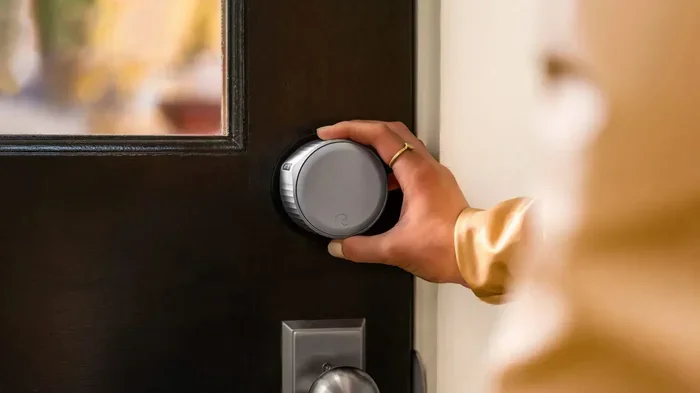
A smart lock is an electronic locking device that replaces or works alongside your traditional lock. It connects to your phone, tablet, or smart home system through Bluetooth, Wi-Fi, or a dedicated app. This connection lets you lock and unlock your door remotely.
Most smart locks use a keyless entry system. Instead of turning a physical key, you can use a code on a keypad, a fingerprint scan, or even your phone. Some models also support key fob access, which works like a small remote control.
### How Do Smart Locks Work?
Smart locks use a lock mechanism similar to traditional deadbolts. The difference is the electronic component. When you enter a code or use your fingerprint, the motor inside the lock turns the bolt. This happens without needing a physical key.
The lock connects to your device through wireless technology. Bluetooth is common for short-range access. Wi-Fi allows remote control from anywhere. Some locks also work with voice assistants like Alexa or Google Home.
## Do Smart Locks Come With a Physical Key?
This is the big question. And the answer depends on the model you choose. Most smart locks on the market today do include a physical key backup. But some fully keyless models do not.
### Why Do Smart Locks Include Keys?
Manufacturers include physical keys for a few important reasons. First, technology can fail. If the lock battery dies or the electronic system glitches, a traditional key ensures you can still get inside. Second, not everyone in the household may feel comfortable with digital access. A key gives a simple backup option.
Third, emergency situations sometimes require a physical key. Firefighters, paramedics, or locksmiths may need quick access. Having a key backup makes these situations easier to handle.
### Key Backup Options to Look For
When shopping for a smart lock, look for these key backup features:
- External key cylinder: A traditional key slot on the outside of the lock.
- Internal thumbturn: A manual turn button on the inside for quick locking.
- Emergency power backup: Some locks let you charge them with a 9V battery in case the main battery dies.
- Spare key storage: Certain models let you store a hidden physical key nearby.
## Types of Smart Locks
Not all smart locks are the same. They come in different styles, each with its own strengths. Let us break down the most common types.
### Keypad Smart Locks
Keypad locks let you enter a numeric code to unlock the door. You can set codes for family members, guests, or service providers. This is one of the most popular keyless entry options.
Keypad locks are easy to use and do not require a phone. You just type in the code. Many models also support app control and remote access.
### Fingerprint Smart Locks
Fingerprint locks use a thumbprint scanner to identify authorized users. They are fast, secure, and very convenient. You do not need to remember a code or carry a key fob.
These locks are great for families because you can store multiple fingerprints. Each family member gets their own access without sharing codes.
### Bluetooth Smart Locks
Bluetooth locks connect directly to your phone. You do not need to enter a code or use a fingerprint. The lock detects your phone and unlocks automatically when you approach.
These locks are very convenient for daily use. They are also secure because Bluetooth has a limited range. Someone far away cannot access your lock.
### Wi-Fi Smart Locks
Wi-Fi locks connect to your home network. This lets you control the lock from anywhere using an app. You can lock or unlock your door while at work or on vacation.
Wi-Fi locks often work with smart home ecosystems. They can integrate with cameras, lights, and other devices. This makes them a strong choice for a full smart home setup.
## Smart Locks vs Traditional Locks
How do smart locks compare to traditional locks? Here is a simple comparison to help you decide.
| Feature | Smart Lock | Traditional Lock |
|—|—|—|
| Access Method | Code, fingerprint, phone, key fob, key | Physical key only |
| Remote Access | Yes, via app | No |
| Key Backup | Usually yes | Always yes |
| Battery Required | Yes | No |
| Installation Difficulty | Easy to moderate | Easy |
| Cost | Higher upfront | Lower upfront |
| Security Level | High (encryption + backup) | Moderate to high |
| Guest Access | Easy, temporary codes | Requires copying a key |
As you can see, smart locks offer more flexibility and convenience. Traditional locks are simpler and do not depend on batteries. Many people choose a smart lock because of the balance between modern features and reliable backup options.
## Do All Smart Locks Have Keys?
Not all smart locks include a physical key. Some brands make fully keyless models that only support digital access. These locks rely entirely on codes, fingerprints, or phone connectivity.
### The Pros of Keyless Smart Locks
Keyless locks remove the need for physical keys entirely. You never worry about losing a key or getting locked out. They also offer better access control. You can grant or revoke entry remotely.
Keyless locks are also harder to pick. Without a keyhole, traditional lock-picking methods do not work. This adds an extra layer of home security.
### The Cons of Keyless Smart Locks
The biggest risk with a keyless lock is power failure. If the battery dies and you do not have a backup, you could be locked out. You also depend on technology working properly. Software glitches or connectivity issues can sometimes cause problems.
Some people also feel uncomfortable with fully digital access. They prefer the reliability of a physical key. This is a valid concern and worth considering before buying.
## Security Features of Smart Locks
Security is the main reason people invest in smart locks. Most modern smart locks come with strong security features. Let us look at what to expect.
### Encryption and Data Protection
Good smart locks use encryption to protect your data. This means your access codes, fingerprints, and app connections are kept private. Look for locks that use AES encryption, which is the same standard used by banks.
Some smart lock brands also offer two-factor authentication. This adds an extra step to verify your identity before unlocking the door.
### Auto-Lock and Auto-Unlock
Many smart locks have auto-lock features. The door locks itself after you walk away. This removes the risk of forgetting to lock up. Auto-unlock uses your phone’s location to unlock the door as you approach.
These features are convenient and improve security. You do not need to remember to lock the door every time.
### Access Logs and Alerts
Smart locks keep a log of every entry and exit. You can see who accessed the door and when. This is very useful for families, rental properties, and businesses.
Some locks also send real-time alerts to your phone. You get notified whenever someone enters or tries to enter. This gives you peace of mind even when you are away from home.
## Installing a Smart Lock
One of the best things about smart locks is how easy they are to install. Most models fit standard door locks and do not require professional help.
### What You Need for Installation
You will need a basic screwdriver and about 15 to 30 minutes of time. Most smart locks come with detailed instructions and all the hardware you need. Some brands also offer video tutorials to guide you through the process.
Before you start, check your door specifications. Make sure your door has the right thickness and a standard lock bore. Most smart locks fit doors with a 2-1/8 inch or 2-3/8 inch bore.
### Can You Install a Smart Lock Yourself?
Yes, in most cases you can. The process is similar to replacing a traditional lock. You remove the old lock, insert the new smart lock, and secure it with screws. The app walks you through pairing and setup.
If you are not comfortable with DIY projects, you can always hire a locksmith. Many locksmiths are experienced with smart lock installation and can set it up quickly.
## Battery Life and Maintenance
Smart locks need power to work. Most run on batteries that last between 6 and 12 months. The exact lifespan depends on how often you use the lock and which features you use most.
### How to Extend Battery Life
Here are some simple tips to make your smart lock battery last longer:
- Use alkaline batteries instead of rechargeable ones for longer life.
- Turn off features you do not use, like auto-unlock.
- Keep your lock’s firmware updated for better power efficiency.
- Check the battery level in the app regularly.
- Set low-battery alerts so you know when to replace them.
### What Happens When the Battery Dies?
Most smart locks have a low-battery warning. The app notifies you when the battery is running low. Some locks also beep or flash a light to alert you.
If the battery does die, most smart locks have an emergency power option. You can use a 9V battery or an external power bank to temporarily power the lock. This lets you unlock the door and replace the main batteries.
## Common Mistakes to Avoid
Even with a great smart lock, there are some common mistakes to watch out for.
- Skipping the key backup: Always keep a physical key or emergency power source available.
- Ignoring firmware updates: Updates fix security vulnerabilities and improve performance.
- Using weak access codes: Choose codes that are hard to guess and change them regularly.
- Not checking compatibility: Make sure the lock fits your door before you buy.
- Forgetting to set up guest access: Take advantage of temporary codes for visitors and service providers.
## Expert Insights
Smart lock technology has come a long way in just a few years. The best models today offer a seamless blend of convenience and security. Experts recommend choosing a lock that fits your lifestyle. If you travel often, a Wi-Fi lock with remote access is a great choice. If you want simplicity, a Bluetooth lock with a keypad backup works well.
One thing experts always emphasize is the importance of a key backup. Even the most advanced smart lock can face technical issues. Having a traditional key or emergency power option ensures you are never locked out.
## Final Thoughts
So, do smart locks also have a key? The answer is yes, most of them do. Smart locks offer incredible convenience with keyless entry, remote access, and advanced security features. At the same time, they provide the comfort of a physical key backup when you need it.
Whether you choose a keypad lock, a fingerprint lock, or a fully connected Wi-Fi model, there is a smart lock for every home. The key is to pick one that matches your needs, budget, and comfort level with technology.
Take your time, compare options, and choose a lock that makes your home safer and smarter. A good smart lock is an investment in both convenience and peace of mind.
Key Takeaways
- Most smart locks include a key backup: Many models come with a traditional key for emergencies.
- Keyless entry is the main appeal: Smart locks let you unlock your door with a phone, keypad, or fingerprint.
- Not all smart locks have keys: Some models are fully keyless and rely only on digital access.
- Battery life matters: Smart locks need power, so keep an eye on battery levels.
- Installation is usually simple: Most smart locks fit standard door locks and are easy to install.
- Security varies by model: Look for locks with strong encryption and backup access options.
Frequently Asked Questions
Do all smart locks come with a physical key?
Most smart locks do include a physical key backup, but not all of them. Fully keyless models rely only on digital access like codes or fingerprints. Always check the product details before buying.
Can I use a smart lock without a phone?
Yes, many smart locks work with keypads or fingerprint scanners that do not require a phone. You can set up access codes for anyone and lock or unlock the door without ever using an app.
How long do smart lock batteries last?
Most smart lock batteries last between 6 and 12 months depending on usage. Models with Wi-Fi or frequent app use may drain faster. Look for locks with low-battery alerts so you never get caught off guard.
Are smart locks secure against hacking?
Good smart locks use strong encryption like AES to protect your data. They also offer features like two-factor authentication and auto-lock. While no system is completely hack-proof, reputable brands invest heavily in security to keep your home safe.
Can I install a smart lock myself?
Yes, most smart locks are designed for easy DIY installation. They fit standard door locks and come with clear instructions. All you need is a screwdriver and about 15 to 30 minutes of time.
What happens if my smart lock stops working?
Most smart locks have emergency options like a 9V battery backup or a physical key slot. You can also contact the manufacturer for support. Keeping your lock updated and batteries fresh helps prevent unexpected issues.