Do Dlp Projectors Have Filters And Why They Matter
Do DLP projectors have filters? Yes, they do, and those DLP projector filters play a vital role in keeping your image sharp and your device running cool. Without proper projector maintenance, dust buildup can hurt image quality and shorten your projector lifespan. This guide walks you through everything you need to know about DLP projector filters, from types and cleaning to replacement schedules.
DLP projectors have become a staple in home theaters, classrooms, and boardrooms. They deliver bright, crisp images using tiny mirrors and a color wheel to create stunning visuals. But behind the impressive picture lies a component many users overlook: the DLP projector filter.
If you own a DLP projector or are thinking about buying one, understanding how filters work can save you money and headaches. Do DLP projectors have filters? Absolutely, and they matter more than most people realize. In this guide, we will break down everything you need to know about DLP projector filters, why they are essential, and how to keep your projector running at its best.
Whether you use your projector for movie nights or weekly presentations, this article covers it all. We will explore the different types of filters, how to clean them, what happens when you skip maintenance, and much more. By the end, you will have a clear picture of how to protect your investment.
Key Takeaways
- DLP projectors do have filters: They use dust filters to protect the internal optical engine from particles.
- Filters directly impact image quality: A clogged filter reduces brightness and can cause color shifts.
- Multiple filter types exist: Standard mesh filters, HEPA filters, and fine-particle filters serve different needs.
- Regular cleaning extends projector life: Simple maintenance tasks can add years to your DLP projector’s lifespan.
- Replacement schedules matter: Most filters need cleaning every few months and replacement annually.
- Neglecting filters causes overheating: This leads to shutdowns, color degradation, and costly repairs.
📑 Table of Contents
- What Are DLP Projectors and How Do They Work?
- Do DLP Projectors Have Filters?
- Types of Filters in DLP Projectors
- Why Filters Matter for Your DLP Projector
- How to Clean and Maintain Your DLP Projector Filter
- Common Mistakes with DLP Projector Filters
- When to Replace Your DLP Projector Filter
- Final Thoughts
What Are DLP Projectors and How Do They Work?
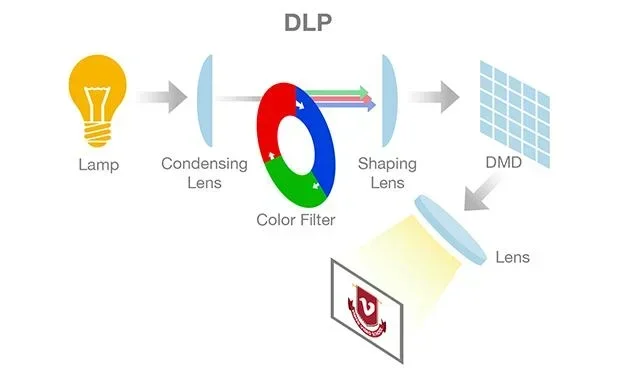
DLP stands for Digital Light Processing. This technology uses a chip covered in microscopic mirrors. Each mirror reflects light to create a pixel on your screen. A color wheel spins rapidly to produce red, green, and blue hues. Together, these elements build the images you see.
The optical engine inside a DLP projector is sensitive. Dust and debris can interfere with the light path. That is where the DLP projector filter comes in. It sits at the air intake and catches particles before they reach the internal components. Think of it as a shield for your projector’s most delicate parts.
Many people focus on brightness and resolution when choosing a projector. But the projector filter plays an equally important role in long-term performance. A clean filter ensures smooth airflow, which keeps the optical engine cool and functioning properly.
Do DLP Projectors Have Filters?
The short answer is yes. Do DLP projectors have filters? Every DLP projector comes with some form of dust filter. The type and quality of the filter vary by model and manufacturer. Some projectors use simple mesh screens, while others feature advanced HEPA filters that trap even the smallest particles.
Why Every DLP Projector Needs a Filter
The internal components of a DLP projector generate heat. The lamp or LED light source pushes air through the unit to keep temperatures stable. Without a filter, that air carries dust directly onto the color wheel, the optical engine, and the lens. Over time, this dust buildup causes real problems.
Here is what happens when dust enters your projector unchecked:
- Reduced brightness: Dust on the lens and optical elements dims your image.
- Color distortion: Particles on the color wheel create splotches or uneven coloring.
- Overheating: Blocked airflow forces the cooling system to work harder.
- Shortened lamp life: Excess heat from poor ventilation wears out the lamp faster.
- Permanent damage: In severe cases, dust causes irreversible harm to the micro-mirrors on the DLP chip.
The DLP projector filter prevents all of these issues. It is a small, often overlooked part that has a huge impact on your projector’s health.
Where Is the Filter Located?
Most DLP projectors have the filter near the air intake vent, usually on the side or bottom of the unit. Some models have a removable filter panel that slides out easily. Others require you to unscrew a small cover. Check your projector’s manual to find the exact location.
If you have trouble locating it, look for a grille or mesh-covered area. That is almost always where the projector filter sits. Keeping this area clear of obstructions is key to proper airflow.
Types of Filters in DLP Projectors
Not all DLP projector filters are the same. Manufacturers use different filter designs depending on the projector’s price point and intended use. Understanding these types helps you choose the right maintenance approach.
Standard Mesh Filters
Standard mesh filters are the most common type. They look like a simple screen made of fine woven material. These filters catch larger dust particles and lint. They are easy to remove and clean with a soft brush or compressed air.
Most entry-level and mid-range DLP projectors use standard mesh filters. They do a decent job but may not block very fine particles. If you use your projector in a dusty environment, you might need to clean this type of filter more often.
HEPA Filters
HEPA stands for High-Efficiency Particulate Air. These filters trap particles as small as 0.3 microns. They are the gold standard for projector maintenance. High-end DLP projectors, especially those used in clean rooms or medical settings, often feature HEPA filters.
HEPA filters are not always washable. Many need to be replaced periodically rather than cleaned. They cost more than standard mesh filters, but they offer superior protection for your optical engine.
Fine-Particle Filters
Some DLP projectors use a combination of a mesh pre-filter and a fine-particle secondary filter. The pre-filter catches larger debris, while the secondary filter traps finer particles. This two-stage setup provides excellent protection without requiring frequent replacements.
If your projector has this type of system, make sure to clean or replace both layers. Skipping the fine-particle filter can still lead to dust buildup on the color wheel and micro-mirrors.
Washable vs. Replaceable Filters
One important distinction is whether your filter is washable or replaceable. Washable filters save money over time but require regular maintenance. Replaceable filters are convenient but add ongoing costs. Check your projector’s documentation to determine which type you have.
| Filter Type | Washable? | Lifespan | Best For |
|---|---|---|---|
| Standard Mesh | Yes | 6-12 months | Home use, low-dust environments |
| HEPA | No | 12-24 months | High-dust areas, clean rooms |
| Fine-Particle Combo | Pre-filter only | 12 months | Heavy use, professional settings |
Why Filters Matter for Your DLP Projector
The DLP projector filter might seem like a minor detail, but its importance cannot be overstated. Let us look at the specific reasons why filters matter so much for your projector’s performance and longevity.
Protecting Image Quality
Dust on the lens or optical engine directly affects your image. You may notice faded colors, dark spots, or a general loss of sharpness. These issues degrade your viewing experience, whether you are watching a movie or presenting slides.
A clean DLP projector filter keeps dust out of the optical path. This preserves the vibrant colors and crisp details that make DLP projectors so popular. If you have ever wondered why your projector image looks dull, a clogged filter might be the culprit.
Preventing Overheating
Projectors generate significant heat during operation. The cooling fan pulls air through the unit, and the filter catches dust before it enters. When the filter becomes clogged, airflow decreases. This causes internal temperatures to rise.
Overheating leads to several problems. The projector may shut off unexpectedly during use. The lamp may degrade faster, reducing its lamp life. In worst-case scenarios, sustained overheating damages the DLP chip permanently. Regular filter maintenance prevents all of these issues.
Extending Projector Lifespan
A well-maintained DLP projector can last for thousands of hours of use. The filter plays a central role in this longevity. By keeping internal components clean, the filter reduces wear and tear on the fan, lamp, and optical engine.
Think of the filter as an insurance policy for your projector. A few minutes of cleaning every few months can add years to your device’s life. This is especially true for expensive home theater projectors where replacement costs are significant.
Saving Money on Repairs
Replacing a DLP projector filter costs very little compared to repairing or replacing the entire unit. A clogged filter can lead to overheating, which damages the lamp and color wheel. Those repairs can be expensive. Simple filter maintenance is one of the most cost-effective things you can do for your projector.
Many people ignore the filter until problems appear. By that point, the damage may already be done. Proactive maintenance is always cheaper than reactive repairs.
How to Clean and Maintain Your DLP Projector Filter
Proper projector maintenance is straightforward. With a few simple tools and a regular schedule, you can keep your DLP projector filter in excellent condition. Here is a step-by-step guide.
Step 1: Turn Off and Unplug the Projector
Always power down your projector and let it cool for at least 30 minutes. Working on a hot projector can cause burns and may damage sensitive components. Unplug the power cord to ensure safety.
Step 2: Locate the Filter
Find the filter compartment, usually near the air intake vent. Refer to your projector’s manual if needed. Some models have a slide-out tray, while others require removing a screw-on panel.
Step 3: Remove the Filter
Carefully take out the filter. For washable filters, hold it over a trash can or sink. For replaceable filters, set the old filter aside and have the new one ready.
Step 4: Clean the Filter
Use a soft brush to gently remove loose dust. For washable filters, rinse with lukewarm water. Do not use soap or harsh chemicals. Let the filter dry completely before reinstalling it. Never put a wet filter back into the projector.
If you prefer a quick clean, a can of compressed air works well for mesh filters. Blow from the clean side to the dirty side to push dust out.
Step 5: Reinstall and Test
Once the filter is completely dry, slide it back into place. Make sure it sits snugly without gaps. Plug in the projector and power it on. Check that the fan runs smoothly and the image looks clear.
Quick Tips for Filter Maintenance
- Clean your filter every 2-3 months in normal home environments.
- Clean monthly if you use the projector frequently or in a dusty room.
- Keep the projector in a ventilated area away from carpets and curtains.
- Use a vacuum with a soft brush attachment around the projector vents.
- Set a calendar reminder so you never forget maintenance.
For those who use their projector alongside other devices, keeping your workspace tidy helps too. If you use a wireless charger nearby, make sure it does not block the projector’s vents. Similarly, if you connect a laptop for presentations, ensure cables do not restrict airflow around the projector.
Common Mistakes with DLP Projector Filters
Even well-meaning projector owners make mistakes when it comes to filter care. Avoiding these common errors keeps your DLP projector filter working effectively for years.
Skipping Regular Cleaning
The most common mistake is simply forgetting to clean the filter. Many users do not even know their projector has a removable filter. Set a schedule and stick to it. A few minutes of effort prevents major problems down the road.
Using Harsh Cleaning Materials
Never use soap, alcohol, or abrasive materials on your projector filter. These can damage the mesh or filter medium. Stick to water for washable filters and soft brushes for dry cleaning. If you are unsure, consult your projector’s manual for approved cleaning methods.
Installing the Filter Incorrectly
It sounds simple, but installing the filter backwards or loosely can cause problems. Air bypasses the filter and dust enters the projector unfiltered. Always double-check that the filter sits flush in its compartment and faces the correct direction.
Ignoring Warning Signs
Many DLP projectors have filter replacement indicators. If your projector displays a warning, do not ignore it. Other signs of a clogged filter include unusual fan noise, reduced brightness, and unexpected shutdowns. Address these symptoms promptly.
Using the Wrong Replacement Filter
Not all filters fit all projectors. Using a generic or incorrectly sized filter reduces effectiveness. Always purchase the manufacturer-recommended replacement filter for your specific model. Check the model number on your projector or in its manual.
When to Replace Your DLP Projector Filter
Cleaning extends the life of your filter, but eventually, replacement becomes necessary. Most DLP projector filters should be replaced every 12 to 18 months with regular use. If you notice that cleaning no longer restores proper airflow, it is time for a new filter.
Signs that your filter needs replacement include:
- The projector filter indicator light stays on after cleaning.
- You notice a significant drop in image brightness.
- The projector runs hotter than usual during operation.
- The fan sounds louder or works harder than normal.
- Visible dust appears on the lens even after cleaning the filter.
Replacement filters are typically affordable and easy to find. Check the manufacturer’s website or authorized retailers. Keeping a spare filter on hand ensures you never have to wait when it is time for a swap.
For users who connect external devices to their projector, such as a laptop or streaming stick, maintaining the projector itself is just one part of the setup. If you use a MacBook for presentations, you might also want to check whether your device has the software you need. Understanding your full setup helps you troubleshoot issues more effectively.
Final Thoughts
Do DLP projectors have filters? Yes, and they are one of the most important yet overlooked components of your projector. The DLP projector filter protects the optical engine, maintains image quality, prevents overheating, and extends the life of your device.
Taking care of your filter is simple and rewarding. A few minutes of cleaning every few months saves you from costly repairs and keeps your projector performing at its best. Whether you are a casual movie watcher or a frequent presenter, this small maintenance task makes a big difference.
Now that you understand how DLP projector filters work and why they matter, you can take confident steps to protect your equipment. Make filter maintenance part of your regular routine, and your projector will reward you with bright, clear images for years to come.
Frequently Asked Questions
How often should I clean my DLP projector filter?
In a typical home environment, clean your DLP projector filter every 2 to 3 months. If you use the projector frequently or in a dusty room, clean it monthly. Regular cleaning prevents buildup and keeps airflow unrestricted.
Can I wash my DLP projector filter?
It depends on the filter type. Standard mesh filters are usually washable with water. Let them dry completely before reinstalling. HEPA filters are typically not washable and should be replaced instead. Check your projector’s manual for specific guidance.
What happens if I don’t clean my DLP projector filter?
A neglected filter becomes clogged with dust. This reduces airflow, causing the projector to overheat. Overheating leads to dimmer images, color distortion, shorter lamp life, and in severe cases, permanent damage to the optical engine or DLP chip.
Where can I buy a replacement DLP projector filter?
Replacement filters are available from the manufacturer’s website, electronics retailers, and online marketplaces. Always match the filter to your specific projector model number. Using the wrong filter can reduce effectiveness and potentially cause damage.
Do all DLP projectors have removable filters?
Most DLP projectors feature removable filters, but some budget models may have sealed internal filters that cannot be cleaned or replaced by the user. Check your projector’s specifications and manual. If the filter is not user-accessible, consider having it serviced professionally.
Can a dirty filter damage my DLP projector?
Yes, a dirty filter restricts airflow and causes overheating. Prolonged overheating can damage the lamp, color wheel, and internal electronics. In extreme cases, it can destroy the DLP chip. Regular filter maintenance is one of the easiest ways to prevent this damage.
=== CONCLUSION ===
Do DLP projectors have filters? They absolutely do, and these filters are essential for maintaining image quality, preventing overheating, and extending your projector’s life. From standard mesh filters to advanced HEPA options, each type serves a critical role in protecting your optical engine and color wheel.
Simple maintenance habits like regular cleaning and timely replacement go a long way. You do not need special tools or technical expertise to care for your DLP projector filter. Just a few minutes of attention every few months keeps everything running smoothly.
Take charge of your projector’s health today. Check your filter, clean it if needed, and set a reminder for your next maintenance session. Your projector will deliver bright, beautiful images for many years to come.