Can I Use Windex On My Laptop Screen Safe Tips Inside
Can I use Windex on my laptop screen? The answer is a firm no. Windex contains ammonia and harsh chemicals that can strip the anti-glare coating and damage your LCD or LED display. Instead, learn safe cleaning methods using distilled water, microfiber cloths, and ammonia-free cleaners to keep your screen streak-free and pristine.
Key Takeaways
- Never use Windex on a laptop screen: Ammonia and solvents in Windex can permanently damage anti-glare coatings and display panels.
- Use distilled water and a microfiber cloth: This is the safest, cheapest, and most effective way to clean your screen daily.
- Choose ammonia-free screen cleaners: Commercial cleaners labeled safe for LCD and LED screens provide a professional-level clean without risk.
- Never spray liquid directly on the screen: Always apply cleaner to the cloth first to prevent moisture from seeping into the edges.
- Avoid paper towels and rough fabrics: They can scratch the delicate surface of your laptop display.
- Clean regularly with a light touch: Weekly dusting and gentle wiping prevent buildup and extend the life of your screen.
📑 Table of Contents
- Can I Use Windex On My Laptop Screen? Here’s the Truth
- Why Windex Is Dangerous for Laptop Screens
- Safe Alternatives for Cleaning Your Laptop Screen
- Step-by-Step Guide to Cleaning Your Laptop Screen Safely
- Common Mistakes and Expert Tips for Laptop Screen Care
- Final Verdict: Can You Use Windex on Your Laptop Screen?
Can I Use Windex On My Laptop Screen? Here’s the Truth
Many people ask the same question: Can I use Windex on my laptop screen? It’s a simple question, but the answer is more important than you think. The truth is, using Windex on your laptop screen is risky. Windex is a glass cleaner, and your laptop screen is not glass. It has special coatings and delicate layers that can be ruined by harsh chemicals. In this guide, I’ll show you exactly why Windex is dangerous. You’ll also learn the safe cleaning methods that will keep your display looking new for years.
Your laptop screen is a精密 piece of technology. It has an anti-glare coating, an LCD or LED panel, and sensitive pixels. Spraying the wrong cleaner can cause permanent damage. Streaks, cloudiness, and even dead pixels can result. That’s why laptop screen cleaning needs the right approach. I’ll walk you through exactly how to clean safely. You’ll never need to worry about ruining your screen again. Let’s dive into the facts and keep your display pristine.
Why Windex Is Dangerous for Laptop Screens
The Harsh Chemicals in Windex
Windex is designed for home windows. It contains ammonia, which is a strong solvent. Ammonia cuts through grease and grime on glass. But laptop screens are not made of glass. They have plastic or glass substrates with special coatings. Ammonia eats away at these coatings over time. It can strip the anti-glare layer completely. Once that coating is gone, you can’t get it back. Your screen may look washed out or overly reflective. Other chemicals in Windex include surfactants and solvents. These can seep into the edges of the screen. They might damage the internal display panel. That’s a costly repair you want to avoid.
Damage to the Anti-Glare Coating
The anti-glare coating is what makes your screen easy to look at in bright light. It reduces reflections and eye strain. Windex dissolves this coating. You might not notice the damage right away. But over time, your screen will develop a hazy film. That film is hard to remove. It can build up with each cleaning. Eventually, the screen looks dull and cloudy. Some people think they need to replace the whole laptop. In reality, the damage was caused by a simple cleaning mistake. This is why laptop screen cleaning must be done with care.
Long-Term Effects on LCD and LED Panels
Modern laptops use LCD or LED panels. These panels have liquid crystals and delicate electrodes. Harsh chemicals can corrode these components. They can also cause pixels to die. Dead pixels show up as black or colored dots on your screen. A few dead pixels might not bother you at first. But they can spread if the damage continues. Using Windex regularly accelerates this process. Your screen will lose clarity and color accuracy. The cost of repairing or replacing a damaged panel is high. It’s far better to use safe cleaning methods from the start.
Safe Alternatives for Cleaning Your Laptop Screen
Distilled Water and a Microfiber Cloth
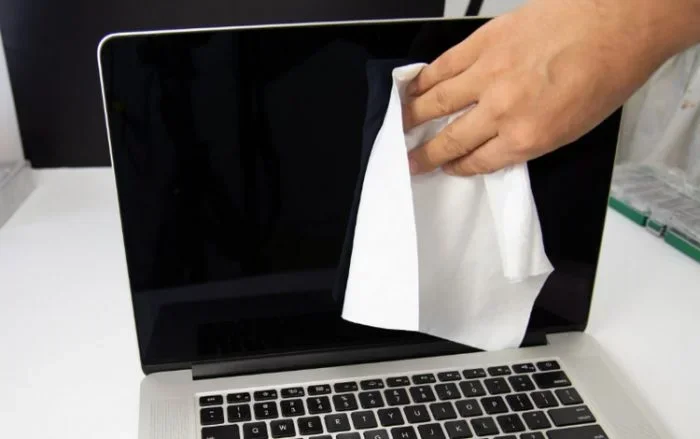
The simplest safe cleaning solution is distilled water and a microfiber cloth. Distilled water has no minerals. It won’t leave spots or residue. A microfiber cloth is soft and lint-free. It won’t scratch your screen. Dampen the cloth slightly, not soaking wet. Gently wipe the screen in circular motions. This removes dust and fingerprints safely. You can do this every few days to keep your screen clean. This method is free and works for most daily grime.
Commercial Screen Cleaners
Many brands make screen cleaners that are ammonia-free. Look for a cleaner labeled safe for LCD and LED screens. These cleaners are designed for displays. They evaporate quickly and leave no residue. You can spray them onto the microfiber cloth, never directly on the screen. This is a great safe cleaning solution for regular maintenance. Brands like Whoosh! and Screen Clean are popular choices. They are affordable and easy to find online or in stores.
DIY Vinegar Spray
You can make your own cleaning spray at home. Mix equal parts distilled water and white vinegar. Vinegar is gentle and natural. It cuts through grime without harming coatings. Put the mixture in a clean spray bottle. Spray it onto the cloth, not the screen. This DIY option is cheap and effective. It’s a favorite among laptop care experts. Just avoid using apple cider vinegar or any vinegar with additives. Stick to plain white distilled vinegar for the best results.
Comparison Table: Cleaning Solutions for Laptop Screens
| Cleaning Method | Safety for Screen | Cost | Best For |
|---|---|---|---|
| Windex | Dangerous – damages coatings | Low | Windows and glass only |
| Distilled Water + Microfiber | Very safe | Free | Daily dust and light smudges |
| Commercial Screen Cleaner | Safe if ammonia-free | Medium | Regular deep cleaning |
| DIY Vinegar Spray | Safe for most screens | Very low | Stubborn grime and grease |
Step-by-Step Guide to Cleaning Your Laptop Screen Safely
Preparation
Before you start, turn off your laptop. A dark screen makes it easier to see dirt and streaks. Unplug the power cord. Use a dry microfiber cloth first. Gently wipe away loose dust and crumbs. This prevents you from rubbing dirt into the screen. Never use paper towels or rough fabrics. They can scratch the surface. If your laptop has a keyboard, clean the keys too. A soft brush helps remove debris from between the keys. Preparation is the first step in safe laptop screen cleaning.
The Cleaning Process
Now apply your safe cleaning solution. If you’re using a store-bought cleaner, spray it onto the cloth. If you’re using distilled water, dampen the cloth lightly. Wipe the screen gently. Use straight lines or circular motions. Don’t press hard. Let the cleaner do the work. If you’re using the DIY vinegar spray, apply it to the cloth first. Dry any excess moisture with a clean, dry part of the cloth. Your screen will be clean and streak-free. Repeat this process once a week for best results.
Quick Tips for Stubborn Smudges
Sometimes you’ll encounter a stubborn smudge. Don’t scrub aggressively. That can damage the screen. Instead, apply a little more cleaning solution to the cloth. Let it sit for a few seconds. The grime will dissolve. Then wipe gently again. For oily fingerprints, a tiny bit of mild dish soap mixed with distilled water works well. Rinse the cloth thoroughly and wipe dry. Always use a separate dry cloth to buff the screen at the end. These quick tips keep your laptop care routine simple and safe.
Common Mistakes and Expert Tips for Laptop Screen Care
Common Mistakes People Make When Cleaning Screens
Using paper towels is one of the biggest mistakes. Paper towels are abrasive. They contain wood fibers that can scratch your screen. Regular cloths may have loose threads or rough textures. Always use a microfiber cloth. It’s specifically designed for delicate surfaces. If you don’t have one, a soft cotton T-shirt can work in a pinch. But microfiber is best for laptop screen cleaning. Another mistake is spraying cleaner directly on the screen. Liquid can seep into the bezel and reach the electronics. It might cause short circuits or water damage. Always spray the cleaner onto the cloth first. Never use household glass cleaners like Windex. They are too harsh for displays. Finally, avoid using too much pressure. Pressing hard won’t clean better. It can damage the pixels or the LCD layer.
Expert Insights for Long-Lasting Screen Health
Experts recommend a regular maintenance routine. Wipe your screen once a week with a dry microfiber cloth. This removes dust before it builds up. If you use your laptop near food, clean it more often. Crumbs and grease can attract dust. A quick wipe takes seconds and prevents deep cleaning later. Also, keep your laptop away from direct sunlight. UV rays can fade the screen over time. Don’t place drinks near your laptop. Spills can cause major damage. Avoid touching the screen with your fingers. Oils from your skin can leave smudges. If you must touch the screen, use a clean, dry cloth afterward. These laptop care habits make a big difference.
When to Seek Professional Help
If your screen is already damaged, stop cleaning it yourself. Signs of damage include persistent cloudiness, dead pixels, or discoloration. A professional can assess whether the coating is ruined. They may recommend a screen replacement if needed. Trying to fix deep damage with home remedies can make it worse. Always consult a certified technician for serious issues. They have the right tools and parts. Prevention is always cheaper than repair. Use safe cleaning methods to avoid ever needing professional help.
Final Verdict: Can You Use Windex on Your Laptop Screen?
So, can I use Windex on my laptop screen? The answer is a clear no. Windex is too harsh for the delicate coatings on your display. It can cause permanent damage that no repair can fix. Stick to safe alternatives like distilled water, microfiber cloths, and ammonia-free screen cleaners. Your laptop screen will stay bright and clear for years. Follow these simple steps, and your laptop screen cleaning routine will be safe and effective.
Remember, a little care goes a long way. Treat your laptop screen with the respect it deserves. Use the right tools and techniques. You’ll enjoy a pristine display every time you open your laptop. Share these tips with friends who might be using Windex on their screens. Help them protect their investment too. Your laptop is a valuable tool. Keep it clean the safe way.
Frequently Asked Questions
What happens if I accidentally use Windex on my laptop screen?
If you accidentally use Windex, wipe it off immediately with a dry microfiber cloth. Rinse the cloth with distilled water and gently wipe the screen again. The damage may not be instant, but repeated use will harm the anti-glare coating. Monitor your screen for any haze or discoloration over the next few days.
Is it safe to use hand sanitizer to clean a laptop screen?
No, hand sanitizer is not safe. It often contains alcohol and other chemicals that can damage screen coatings. Stick to distilled water, microfiber cloths, or ammonia-free screen cleaners. These are the only safe cleaning solutions for your display.
Can I use baby wipes on my laptop screen?
Baby wipes may seem gentle, but they often contain moisturizers and chemicals that leave a residue. They can also be too wet. Use a dry or slightly damp microfiber cloth instead. This is the safest and most effective way to clean your screen.
How often should I clean my laptop screen?
Wipe your screen once a week with a dry microfiber cloth. If you use your laptop in a dusty environment or near food, clean it more often. Regular dusting prevents buildup and keeps your laptop screen cleaning routine simple.
Are there any screen cleaners I should avoid?
Avoid any cleaner containing ammonia, alcohol, or acetone. These ingredients are too harsh for LCD and LED screens. Always check the label for “ammonia-free” and “safe for screens.” When in doubt, use distilled water and a microfiber cloth.
Can I use a regular household glass cleaner instead of Windex?
Most household glass cleaners have similar harsh chemicals to Windex. They are not designed for laptop screens. Use only cleaners specifically made for electronic displays. A DIY vinegar and water spray is a safe and effective alternative.