Can I Use Baby Wipes On My Laptop Screen Without Damage
Many people wonder whether they can use baby wipes on their laptop screen without causing damage. The short answer is that it depends on the type of baby wipes and the kind of screen you have. Baby wipes containing alcohol or harsh chemicals can harm your laptop display. However, there are safe cleaning methods and gentle cleaning alternatives that work perfectly. This guide covers everything you need to know about laptop screen cleaning and how to keep your device looking brand new.
Key Takeaways
- Baby wipes vary in safety: Unscented, alcohol-free baby wipes are generally safer than scented or alcohol-based ones for electronics cleaning.
- Harsh chemicals cause damage: Alcohol, ammonia, and abrasive ingredients in some wipes can strip anti-glare coatings on laptop screens.
- Microfiber cloths are best: A dry microfiber cloth is the safest and most effective way to clean your laptop display daily.
- Distilled water works well: Mixing distilled water with a microfiber cloth gives you a gentle cleaning solution for stubborn smudges.
- Screen protectors add defense: Applying a screen protector can shield your laptop display from grime and reduce cleaning frequency.
- Less is more: Using fewer products and gentler techniques is always better for long-term laptop care and maintenance.
📑 Table of Contents
- Can I Use Baby Wipes On My Laptop Screen Without Damage?
- Why Cleaning Your Laptop Screen Matters
- Are Baby Wipes Safe for Laptop Screens?
- Better Alternatives to Baby Wipes for Screen Cleaning
- How to Clean Your Laptop Screen Properly
- Common Mistakes When Cleaning Laptop Screens
- Expert Insights on Laptop Screen Care
- Keeping Your Laptop Screen Clean Long-Term
- Conclusion
Can I Use Baby Wipes On My Laptop Screen Without Damage?
You are sitting at your desk, staring at your laptop screen covered in smudges, fingerprints, and dust. You reach for a pack of baby wipes and think, “This should work, right?” Well, not so fast. The answer to whether you can use baby wipes on your laptop screen is more complicated than you might expect.
Your laptop display is one of the most delicate parts of your computer. It has special coatings that protect against glare, fingerprints, and scratches. Using the wrong cleaning method can strip these coatings and cause permanent damage. In this article, we will break down everything you need to know about cleaning your laptop screen safely.
We will look at what baby wipes are made of, why some can harm your display, and what you should use instead. By the end, you will feel confident about laptop screen cleaning and keeping your device in top shape. Let us get into it.
Why Cleaning Your Laptop Screen Matters
Over time, your laptop screen collects a lot of grime. Every time you touch the keyboard or tap the display, you transfer oils and dirt. Dust settles on the screen throughout the day. If you ignore the buildup, it can affect your viewing experience and even your health.
The Impact of a Dirty Screen
A dirty screen makes it harder to read text and see images clearly. You may find yourself squinting or adjusting the brightness more often. This leads to eye strain and fatigue during long work sessions. Here are some common problems caused by a grimy laptop display:
- Reduced visibility: Smudges and fingerprints block light and make the screen look dull.
- Eye discomfort: Dirt on the screen forces your eyes to work harder, causing headaches and strain.
- Bacteria buildup: Your screen harbors germs from your hands, food, and environment. Regular cleaning reduces bacteria.
- Long-term damage: Grime can scratch the surface or degrade protective coatings over time.
Keeping your screen clean is not just about aesthetics. It is about protecting your investment and your well-being. Laptop maintenance includes regular screen care as a key step.
How Often Should You Clean Your Screen?
For most users, cleaning the laptop display once or twice a week is enough. If you eat at your desk or work in a dusty environment, you may need to clean it more often. The key is to use the right method every time.
Are Baby Wipes Safe for Laptop Screens?
This is the big question, and the answer is not a simple yes or no. It depends entirely on the ingredients in the baby wipes you are using. Not all baby wipes are created equal, and what works for a baby’s skin might not be safe for your laptop display.
What Are Baby Wipes Made Of?
Most baby wipes contain a mix of water, mild surfactants, preservatives, and fragrances. Some brands add alcohol or other harsh chemicals. Here is a quick look at common ingredients:
- Water: The base of most wipes. Generally safe in moderation.
- Surfactants: Cleaning agents that lift dirt. Some are gentle, others are harsh.
- Alcohol (isopropyl): Found in some wipes. Dangerous for screen coatings.
- Fragrances: Added scent. These can leave residue on displays.
- Preservatives: Chemicals that prevent bacterial growth. May harm anti-glare layers.
If your baby wipes list alcohol as an ingredient, put them down and step away from your laptop. Alcohol-based wipes are one of the fastest ways to damage your screen.
The Risk of Screen Damage
Modern laptop screens have thin, specialized coatings. These include anti-glare, anti-fingerprint, and anti-scratch layers. Harsh chemicals eat away at these layers over time. Here is what can happen if you use the wrong wipes:
- Coating erosion: The protective layers wear off, leaving the screen exposed.
- Discoloration: Certain chemicals cause spots or patches on the display.
- Sticky residue: Wipes with fragrances can leave a film that attracts more dust.
- Micro-scratches: The fabric in some wipes is too rough for delicate screens.
So, can you use baby wipes on your laptop screen without damage? Only if the wipes are completely alcohol-free, fragrance-free, and very gentle. Even then, you should proceed with caution.
Unscented vs. Scented Baby Wipes
Unscented baby wipes are typically safer for electronics. Scented wipes contain additional chemicals for fragrance that can leave residue. If you absolutely must use baby wipes, choose an unscented and alcohol-free variety. But honestly, there are much better options available for screen cleaner purposes.
Better Alternatives to Baby Wipes for Screen Cleaning
Why risk it when there are safer and more effective ways to clean your laptop screen? Let us look at the best alternatives that provide a gentle cleaning experience without any risk of damage.
The Microfiber Cloth Method
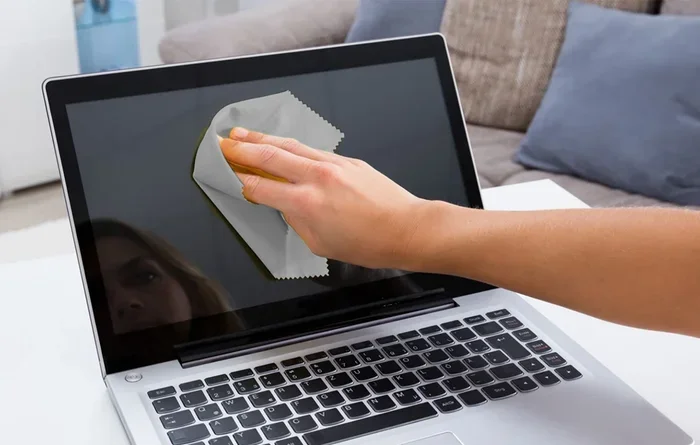
A microfiber cloth is the gold standard for laptop screen cleaning. It is soft, non-abrasive, and designed to pick up oils and dust without scratching. You can buy one for just a few dollars at most electronics or office supply stores.
Here is how to use it:
- Power off your laptop and unplug it.
- Use a dry microfiber cloth for light dust and smudges.
- Gently wipe the screen in circular motions.
- For stubborn spots, lightly dampen the cloth with distilled water.
- Wipe again and dry any excess moisture with the dry side of the cloth.
This method works for daily cleaning and is completely safe. Most screen cleaning experts recommend this as the go-to approach.
Distilled Water Solution
For tougher grime, mix a small amount of distilled water with your microfiber cloth. Do not spray liquid directly onto the screen. Instead, dampen the cloth lightly and wipe the display. Distilled water is pure and free of minerals that could leave spots.
This is one of the safest safe cleaning methods for your laptop. It works especially well on fingerprint removal and oil smudges.
Commercial Screen Cleaners
If you want a product designed specifically for screens, look for a screen cleaner made for electronics. These products are formulated to be safe on coated displays. Here is a comparison of popular options:
| Cleaning Method | Safety Rating | Effectiveness | Cost |
|---|---|---|---|
| Microfiber Cloth (Dry) | Very Safe | Good for dust and light smudges | Low |
| Microfiber Cloth + Distilled Water | Very Safe | Great for oils and fingerprints | Low |
| Commercial Screen Cleaner | Safe | Excellent for all grime types | Medium |
| Alcohol-Free Baby Wipes | Moderately Safe | Decent for quick cleaning | Low |
| Alcohol-Based Wipes | Not Safe | Good cleaning but damages coatings | Low |
As you can see, the safest options are also the most affordable. There is no need to take risks with your expensive laptop display.
Anti-Static Screen Cleaning Wipes
If you like the convenience of wipes, consider anti-static wipes designed specifically for electronics. These are different from baby wipes. They are made with ultra-soft, non-woven material and contain no alcohol or harsh chemicals. They are a great middle ground between a cloth and a spray cleaner.
How to Clean Your Laptop Screen Properly
Now that you know what tools to use, let us walk through a complete laptop screen cleaning routine. Follow these steps for a streak-free, safe clean every time.
Step-by-Step Guide
- Turn off your laptop: This makes it easier to see smudges and prevents accidental clicks.
- Gather your supplies: Get a microfiber cloth and distilled water (or a commercial screen cleaner).
- Dust the screen: Use the dry cloth to remove loose dust and particles. Wipe gently.
- Dampen the cloth: Lightly moisten the cloth with distilled water or cleaner. Do not soak it.
- Wipe in circular motions: Start from the top and work your way down. Use gentle pressure.
- Dry the screen: Use the dry side of the cloth to remove any remaining moisture.
- Inspect your work: Check for any missed spots and repeat if needed.
Quick Tips for Best Results
Keep these handy tips in mind for a perfect clean every time:
- Never spray liquid directly on the screen. Always apply it to the cloth first.
- Avoid paper towels and tissues. They are too rough and can cause micro-scratches.
- Do not use window cleaners. Products like Windex contain ammonia that harms screen coatings.
- Wash your microfiber cloth regularly. A dirty cloth just re-deposits grime on your screen.
- Clean in a well-lit area. You will spot smudges and streaks more easily.
- Be gentle. Excessive pressure can damage the display, especially on thin laptops.
Cleaning Different Types of Screens
Not all laptop screens are the same. Here is a quick breakdown:
- Standard LCD screens: These are the most common. They respond well to microfiber and distilled water.
- Anti-glare screens: These have a special coating. Be extra gentle and avoid any alcohol-based products.
- Retina and OLED displays: These high-end screens are more resilient but still benefit from gentle cleaning methods.
- Matte screens: The textured surface can trap more grime. Use a slightly dampened cloth and do not press too hard.
Regardless of the screen type, the principle remains the same: gentle cleaning is always the way to go.
Common Mistakes When Cleaning Laptop Screens
A lot of people make mistakes when cleaning their displays. These errors can cause damage that cannot be undone. Let us look at the most common screen damage risks and how to avoid them.
Mistake 1: Using Household Cleaners
Many people grab household cleaners like glass spray or all-purpose wipes. These contain chemicals that are terrible for laptop screens. Ammonia, alcohol, and bleach can strip protective coatings in just a few uses. Stick to products made for electronics.
Mistake 2: Using Rough Materials
Paper towels, napkins, and even some clothing fabrics are too abrasive for screens. They leave tiny scratches that accumulate over time. Always reach for a microfiber cloth or a dedicated electronics cleaning wipe.
Mistake 3: Applying Too Much Pressure
Laptop screens are thin and delicate. Pressing too hard while cleaning can damage the pixels and the underlying layers. Let the cloth do the work. Use light, gentle strokes for the best results.
Mistake 4: Cleaning With the Screen On
Cleaning a powered-on screen makes it difficult to see what you have cleaned. The light from the display can also make it harder to identify smudges. Always power off your laptop before cleaning. This also reduces the risk of moisture entering the device.
Mistake 5: Letting Liquid Drip Into the Edges
If you spray liquid near the edges of the screen, it can seep into the frame and reach internal components. This can cause serious hardware problems. Always dampen your cloth away from the screen and wipe with minimal moisture.
Expert Insights on Laptop Screen Care
We asked tech professionals about their go-to methods for laptop care and screen maintenance. Here is what they had to say:
Tip from a repair technician: “I see damaged screens every week. Most of the time, the owner was using the wrong cleaning product. A microfiber cloth and distilled water can handle 95% of cleaning needs. There is no need for fancy or harsh products.”
Tip from a software developer: “I work long hours and my screen collects fingerprints fast. I keep a small microfiber cloth in my laptop bag and wipe it down every day. It takes 30 seconds and keeps the display looking new.”
Tip from a screen manufacturer representative: “The coatings on modern displays are advanced but still vulnerable. Avoid anything with alcohol, ammonia, or abrasive particles. When in doubt, less is more. A dry microfiber cloth is your safest bet.”
How a Screen Protector Can Help
One of the best investments you can make for your laptop is a screen protector. It acts as a barrier between your display and the outside world. Here is why it helps:
- Protects coatings: The protector absorbs wear instead of your actual screen.
- Reduces fingerprints: Many protectors have oleophobic coatings that repel oils.
- Easier to clean: A protector can be removed and cleaned separately.
- Shields from scratches: It absorbs contact with keys, bags, and other surfaces.
Pair a screen protector with regular microfiber cleaning, and your laptop display will stay in great shape for years.
Keeping Your Laptop Screen Clean Long-Term
Cleaning is one part of the equation. Preventing buildup is the other. Here are some habits that make laptop maintenance easier and less frequent:
- Wash your hands before using the laptop. This reduces oil transfer onto the screen.
- Keep food and drinks away from your workspace. Crumbs and spills contribute to grime.
- Store your laptop in a clean bag. Dust and debris from bags transfer to the screen.
- Use a keyboard cover. It prevents particles from migrating to the display area.
- Clean your desk regularly. A clean workspace means a cleaner laptop.
- Consider a laptop sleeve. It protects the screen during transport and reduces dust exposure.
These small habits add up. They keep your display screen cleaner and reduce the need for deep cleaning sessions. Think of it as daily maintenance rather than occasional heavy-duty work.
The Role of Screen Cleaning Frequency
How often you clean depends on your environment. Office workers may need to clean weekly. People who work outdoors or in workshops might need to clean daily. Listen to your screen. If it looks dull or feels sticky, it is time for a clean.
Remember, the goal is not just a clean screen. The goal is a well-maintained laptop that performs well and lasts longer. Proper screen care is a small but important part of overall device upkeep.
Conclusion
So, can you use baby wipes on your laptop screen without damage? The answer depends on the type of wipes you have. Alcohol-free, fragrance-free baby wipes can work in a pinch, but they are not the ideal choice. The safest and most effective method is a simple microfiber cloth, optionally dampened with distilled water or a dedicated screen cleaner.
Avoid harsh chemicals, rough materials, and common cleaning mistakes that lead to screen damage. Your laptop display deserves gentle, thoughtful care. With the right tools and habits, you can keep it spotless for years to come.
Take a few minutes today to clean your laptop screen the right way. Grab your microfiber cloth, power off your device, and give it the care it deserves. Your eyes and your wallet will thank you.
Frequently Asked Questions
Can I use baby wipes on my laptop screen if they are unscented?
Unscented baby wipes are safer than scented ones, but you still need to check for alcohol. If the wipes are completely alcohol-free and fragrance-free, they can work for a quick clean. However, a microfiber cloth remains the better and safer option for regular cleaning.
What happens if I use a wet wipe with alcohol on my screen?
Alcohol-based wipes can quickly erode the anti-glare and anti-fingerprint coatings on your laptop display. Over time, this causes permanent discoloration, sticky residue, and loss of protection. Avoid any cleaning product that lists alcohol as an ingredient.
Is distilled water safe for cleaning a laptop screen?
Yes, distilled water is one of the safest cleaning solutions for laptop screens. It is free of minerals and chemicals that could leave spots or cause damage. Apply it to a microfiber cloth, never directly on the screen, and wipe gently.
Can I use a screen protector and still clean my laptop display?
Absolutely. A screen protector actually makes cleaning easier. It shields the original display from most grime and oils. You can wipe the protector with a microfiber cloth and replace it when it gets worn. This approach simplifies laptop care and extends the life of your screen.
How do I remove stubborn fingerprints without a commercial cleaner?
Dampen a microfiber cloth lightly with distilled water and wipe the affected area in gentle circular motions. For tough fingerprints, let the damp cloth sit on the spot for a few seconds before wiping. This softens the oil and makes removal much easier without any harsh chemicals.
Are anti-static wipes better than baby wipes for electronics?
Yes, anti-static wipes designed for electronics are far superior to baby wipes for screen cleaning. They are formulated without alcohol or abrasive ingredients and are made to lift dust and oils safely. They are a great investment if you clean your electronics frequently.
=== CONCLUSION ===
Final Thoughts on Laptop Screen Cleaning
Keeping your laptop screen clean does not have to be complicated or risky. The most important takeaway is to avoid harsh products like alcohol-based baby wipes and household cleaners. Instead, stick with a soft microfiber cloth and distilled water for safe, effective laptop screen cleaning.
Your laptop is a significant investment, and the display is one of the most used and most vulnerable parts. By following the methods in this guide, you can prevent screen damage, reduce eye strain, and enjoy a crystal-clear display every day. Practice gentle cleaning, clean regularly, and consider a screen protector for added defense.
Start simple. Pick up a microfiber cloth, power down your laptop, and give it a proper clean today. You will be amazed at how much better your screen looks and feels. Laptop maintenance is easy when you know the right way.