How Can I Get Wi Fi Without Internet Service At Home
Getting Wi-Fi without internet service is possible and easier than most people think. You can use your phone as a mobile hotspot, set up a local wireless router, or explore portable hotspot devices that create a wireless network without a traditional internet plan. This guide walks you through every practical method so you can stay connected on your own terms.
Key Takeaways
- Phone hotspots work great: You can turn your smartphone into a Wi-Fi hotspot and share cellular data with other devices at home.
- A router without internet still works locally: A wireless router can create a local network for file sharing, streaming, and smart home devices even without an ISP.
- Portable hotspot devices are a solid alternative: Devices like mobile Wi-Fi hotspots use cellular data to give you wireless internet without a home broadband plan.
- Offline Wi-Fi has real uses: Even without the internet, a local area network lets you stream media, mirror screens, and connect smart devices.
- Check your data limits: If you use cellular data as your main connection, keep an eye on your plan to avoid overage charges.
📑 Table of Contents
- How Can I Get Wi-Fi Without Internet Service At Home?
- What Does It Mean to Get Wi-Fi Without Internet Service?
- Methods to Get Wi-Fi Without Internet Service
- What You Need to Get Started
- Common Mistakes to Avoid
- Expert Tips for the Best Wi-Fi Without Internet Experience
- Comparing Your Options for Wi-Fi Without Internet
- Final Thoughts
How Can I Get Wi-Fi Without Internet Service At Home?
Have you ever wondered if you can have Wi-Fi at home without paying for an internet service plan? The short answer is yes. You can set up a wireless network in your home even without a traditional internet connection. Whether you want to save money, live off-grid, or just need a local network for your devices, there are several ways to make it work.
Many people assume that Wi-Fi automatically means internet access. But Wi-Fi is really just a way for devices to talk to each other wirelessly. The internet is a separate thing. You can have one without the other. This guide will show you exactly how to set up Wi-Fi without internet service using methods that are simple, affordable, and practical.
In this article, you will learn about different ways to create a wireless network at home, what equipment you need, and the pros and cons of each approach. By the end, you will know exactly which option fits your situation best.
What Does It Mean to Get Wi-Fi Without Internet Service?
When we talk about Wi-Fi without internet service, we mean setting up a wireless network that lets your devices connect to each other without accessing the wider internet. Think of it like having a private local network inside your home. Your phone, tablet, laptop, and smart devices can all communicate with each other through this network.
A wireless router creates a local area network (LAN). This network can do a lot of things even without an internet service provider (ISP). You can stream files from a media server, mirror your phone screen to a TV, use smart home devices locally, and even play multiplayer games on the same network.
The key difference is that your devices will not be able to browse the web, use apps that need online data, or stream content from the internet. But for many everyday tasks, a local wireless network is more than enough.
Why Would You Want Wi-Fi Without Internet?
There are several reasons people choose no ISP Wi-Fi setups. Some want to cut costs and avoid monthly broadband bills. Others live in rural areas where broadband alternatives are limited or too expensive. Some people prefer to stay off-grid or reduce their screen time by removing easy access to the open internet.
Another common reason is privacy. Without an internet connection, your wireless network is much harder to hack from the outside. Your data stays local and never leaves your home. This appeals to people who are serious about digital security and want more control over their connected devices.
Methods to Get Wi-Fi Without Internet Service
There are several practical ways to set up Wi-Fi without internet service at home. Each method has its own advantages and limitations. Let us walk through them one by one so you can pick the best option for your needs.
Method 1: Use Your Phone as a Mobile Hotspot
One of the easiest ways to get Wi-Fi without a traditional internet plan is to use your phone as a mobile hotspot. Almost every modern smartphone has a built-in hotspot or tethering feature. This turns your phone into a wireless router that shares your cellular data with other devices.
Here is how it works. You activate the hotspot setting on your phone. Other devices like laptops, tablets, and smart TVs can then scan for and connect to your phone’s Wi-Fi network. Your phone uses its cellular data plan to provide internet access to those connected devices.
If you want to learn more about using your phone this way, check out our guide on Can I Get Wi Fi From My Phone for step-by-step instructions.
Pros:
- No extra equipment needed
- Works almost anywhere with cellular coverage
- Easy to set up in minutes
- Great for temporary or occasional use
Cons:
- Drains your phone battery quickly
- Uses up your cellular data fast
- Speeds can be slow depending on your signal
- Not ideal for long-term daily use
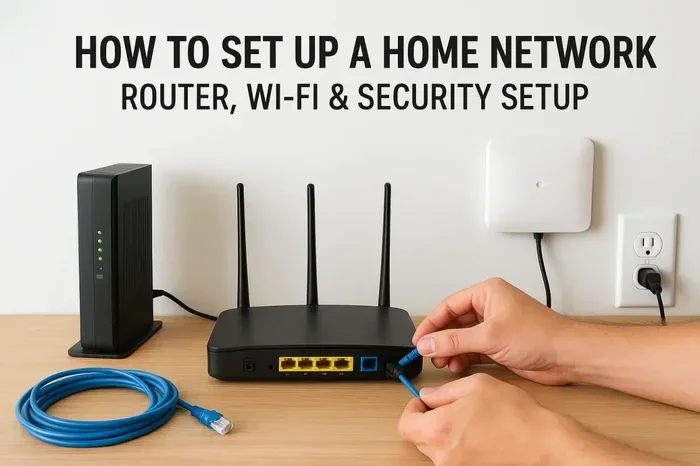
Method 2: Set Up a Wireless Router Without an ISP
You can buy a wireless router and set it up without subscribing to an internet service provider. The router will create a local Wi-Fi network that your devices can connect to. However, without an ISP, this network will not have access to the internet.
So what can you do with a router that has no internet? Quite a lot, actually. You can:
- Share files between devices on the same local network
- Stream media from a USB drive or network-attached storage (NAS)
- Use smart home devices that work offline
- Mirror your phone or laptop screen to a TV
- Play local multiplayer games
If you are exploring home Wi-Fi options without a full internet plan, you might also want to read about Can I Get Just Wi Fi At Home for more ideas on setting up a standalone wireless network.
Pros:
- Creates a stable and reliable local network
- Better range than a phone hotspot
- Supports many connected devices
- No monthly internet bill
Cons:
- No access to the internet or online services
- Some smart devices may not work fully offline
- Requires purchasing a router upfront
Method 3: Use a Portable Wi-Fi Hotspot Device
A portable hotspot device is a small gadget that connects to a cellular network and broadcasts a Wi-Fi signal. It is similar to using your phone as a hotspot, but it is a dedicated device designed for this purpose. These devices are also called mobile Wi-Fi hotspots or MiFi devices.
You insert a SIM card into the device, and it connects to a cellular network just like your phone. It then creates a Wi-Fi network that other devices can join. Popular brands include Skyroam, GlocalMe, and Netgear Nighthawk.
These devices are especially useful if you need a wireless connection for multiple devices and do not want to drain your phone battery. They also tend to have better range and battery life than a phone hotspot.
If you are curious about whether a hotspot can replace traditional internet, our article on Can I Get A Hotspot Instead Of Wi Fi covers this in more detail.
Pros:
- Dedicated device means better performance
- Does not drain your phone battery
- Portable and easy to carry
- Can support multiple devices at once
Cons:
- Requires a separate cellular data plan
- Monthly costs can add up
- Coverage depends on cellular signal strength
- Extra device to buy and maintain
Method 4: Create an Offline Wi-Fi Network with a Raspberry Pi or Old Router
If you are tech-savvy and want a free or low-cost option, you can repurpose an old router or a Raspberry Pi to create an offline Wi-Fi network. This is a great way to build a local area network without spending money on an internet plan.
An old router can be flashed with open-source firmware like DD-WRT or OpenWrt. This gives you full control over your wireless network settings. A Raspberry Pi can be set up as a Wi-Fi access point that serves local content like media files, weather data, or even a personal wiki.
This method takes a bit more technical know-how, but there are plenty of online tutorials that walk you through the process step by step. It is a fun project for anyone who enjoys tinkering with technology.
Pros:
- Very low cost or free
- Full control over your network
- Great learning experience
- Customizable to your exact needs
Cons:
- Requires some technical skills
- May not be as user-friendly for beginners
- Limited support compared to commercial routers
What You Need to Get Started
Before you set up Wi-Fi without internet service, you need a few things. The exact equipment depends on which method you choose, but here is a general list of what you will need.
For a phone hotspot setup:
- A smartphone with a cellular data plan
- Devices you want to connect (laptop, tablet, etc.)
For a standalone router setup:
- A wireless router (any modern router will work)
- A power source for the router
- Devices that support Wi-Fi connection
For a portable hotspot device:
- A mobile hotspot device (MiFi or similar)
- A SIM card with a data plan
- Devices you want to connect
For an offline network with Raspberry Pi or old router:
- A Raspberry Pi or old router
- A power supply
- An SD card or storage for the device
- Basic technical knowledge or willingness to learn
If you are new to networking and want to understand the basics, our article on Can I Add Wi Fi To My Pc can help you get comfortable with Wi-Fi setup concepts before you dive in.
Common Mistakes to Avoid
Setting up Wi-Fi without internet service comes with its own set of pitfalls. Here are some common mistakes people make and how to avoid them.
Mistake 1: Forgetting about data limits. If you are using a phone hotspot or portable device, your cellular data plan has a limit. Streaming video or downloading large files can eat through your data quickly. Always monitor your usage to avoid surprise charges.
Mistake 2: Placing the router in a bad location. Even without internet, your wireless signal needs a clear path to reach your devices. Place your router in a central, elevated spot away from thick walls and metal objects for the best wireless connection.
Mistake 3: Not securing your network. Just because you do not have internet does not mean your network is safe. Always set a strong password on your Wi-Fi network to prevent unauthorized access. Use WPA3 or WPA2 encryption for the best security.
Mistake 4: Expecting internet-dependent features to work. Smart home devices, streaming services, and cloud apps all need internet to function. If you set up offline Wi-Fi, do not expect these features to work. Check that your devices can operate locally before you commit.
Mistake 5: Ignoring firmware updates. Even a standalone router needs updates to stay secure and perform well. Check for router firmware updates regularly, especially if you are running custom firmware.
Expert Tips for the Best Wi-Fi Without Internet Experience
Want to get the most out of your local wireless network? Here are some expert tips that make a big difference.
Tip 1: Use a Wi-Fi range extender. If your signal does not reach every room, a Wi-Fi range extender can boost the coverage. This is especially helpful in larger homes or buildings with thick walls.
Tip 2: Set up a media server. With a local area network, you can store movies, music, and photos on a network-attached storage device. Then stream that content to any device on your network. This gives you a lot of entertainment without needing the internet.
Tip 3: Use a mesh network for better coverage. A mesh Wi-Fi system uses multiple nodes to spread your wireless signal evenly throughout your home. Even without internet, a mesh setup ensures every corner of your house has a strong wireless connection.
Tip 4: Keep a log of your setup. Write down your network name, password, and router settings. This saves you time if you ever need to troubleshoot or reset your Wi-Fi setup. It is a small step that pays off big.
Tip 5: Consider a dual-band router. A router that supports both 2.4 GHz and 5 GHz bands gives you more flexibility. The 2.4 GHz band has longer range, while the 5 GHz band offers faster speeds for devices that are close to the router.
Comparing Your Options for Wi-Fi Without Internet
Not sure which method is right for you? Here is a quick comparison of the main options for setting up Wi-Fi without internet service at home.
| Method | Cost | Ease of Setup | Internet Access | Best For |
|---|---|---|---|---|
| Phone Hotspot | Free (uses existing data) | Very Easy | Yes (via cellular) | Temporary or occasional use |
| Standalone Router | $30-$150 one-time | Easy | No (local only) | Local file sharing and smart home |
| Portable Hotspot Device | $50-$200 + monthly data | Easy | Yes (via cellular) | Multiple devices, on-the-go use |
| Raspberry Pi / Old Router | Free-$35 | Moderate | No (local only) | Tech enthusiasts and DIYers |
As you can see, each method has its place. If you just need a quick connection for a few devices, a phone hotspot works well. If you want a permanent local network for smart home devices and file sharing, a standalone router is the way to go. For the best of both worlds, consider combining a portable hotspot device with a standalone router.
Remember, having Wi-Fi without internet service is not about being disconnected. It is about choosing how and when you connect. With the right setup, you can enjoy a wireless network that fits your lifestyle and budget.
Final Thoughts
Setting up Wi-Fi without internet service at home is a smart move for anyone who wants more control over their connectivity. Whether you use your phone as a mobile hotspot, set up a standalone wireless router, or invest in a portable hotspot device, the options are plentiful and accessible.
The beauty of a local wireless network is that it works for you on your terms. You get the convenience of wireless connectivity without being tied to a monthly internet bill. You also gain more privacy and security since your data stays within your home.
Start with the method that makes the most sense for your situation. Try it out, see how it works, and adjust as needed. With a little experimentation, you will have a fully functional Wi-Fi network that serves your needs perfectly, even without a traditional internet service.
Frequently Asked Questions
Can I have Wi-Fi at home without paying for internet?
Yes, you can set up a wireless router without an internet service provider. This creates a local network where your devices can connect to each other. You will not have access to the internet, but you can still share files, stream local media, and use offline smart home features.
Is a phone hotspot the same as having Wi-Fi at home?
A phone hotspot creates a Wi-Fi network using your cellular data. It works similarly to a home Wi-Fi setup, but it is temporary and uses your phone’s data plan. It is great for quick access but not ideal as a permanent home solution due to battery drain and data limits.
Can I use smart home devices without internet?
Some smart home devices work offline on a local Wi-Fi network. Devices like smart plugs, local speakers, and certain cameras can operate without internet access. However, features like voice control and remote access usually require an internet connection.
Do I need a special router to create a Wi-Fi network without internet?
No, any standard wireless router will work. You simply plug it in, configure it, and it will broadcast a Wi-Fi signal. You do not need to connect it to an ISP for it to create a local network. Just keep in mind that without an internet connection, you will not have access to online services.
How can I stream content on Wi-Fi without internet?
You can set up a local media server on your network. Store your movies, music, and shows on a NAS device or a USB-connected hard drive. Then stream that content to any device on your local area network. This gives you a full entertainment experience without needing the internet.
Is Wi-Fi without internet safe?
Yes, a local Wi-Fi network without internet is actually quite secure. Since your network does not connect to the outside world, there is very little risk of outside attacks. Just make sure to set a strong password and enable WPA2 or WPA3 encryption on your router for the best protection.