Does Airtel Support Wifi Calling Outside India Yes or No
Yes, Airtel does support WiFi calling outside India, but only on certain plans and in select countries. You need an active Airtel postpaid or prepaid connection with international roaming enabled. WiFi calling lets you make calls over a wireless network instead of cell towers, which saves money and works even with weak signals. Keep reading to learn the full setup process, supported countries, and common issues.
Traveling abroad with an Airtel SIM can feel risky when you need to stay connected. You do not want to burn through your data or pay crazy roaming fees just to call home. WiFi calling is one of the best solutions for this problem, but only if your carrier supports it in the country you are visiting.
So, does Airtel support WiFi calling outside India? The short answer is yes. But there are some important conditions, setup steps, and limitations you need to know. This guide covers everything you need to make Airtel WiFi calling work abroad without any headaches.
Whether you are a frequent traveler or planning a one-off trip, understanding how international WiFi calling works with Airtel will save you time, money, and frustration. Let us dive right in.
Key Takeaways
- Airtel supports WiFi calling outside India on postpaid and some prepaid plans with international roaming activated.
- WiFi calling works over any wireless network, so you do not need a strong cell signal to make calls abroad.
- Not all countries are supported, so you must check the Airtel roaming list before traveling.
- Enabling WiFi calling is simple through phone settings or the Airtel Thanks app.
- Common issues include network compatibility and incorrect settings, which are easy to fix.
- Using WiFi calling abroad can save significant roaming charges compared to regular international calls.
- Airtel customer care can help troubleshoot any WiFi calling problems while overseas.
📑 Table of Contents
- What Is WiFi Calling and How Does It Work?
- Does Airtel Support WiFi Calling Outside India?
- How to Enable WiFi Calling on Airtel for International Use
- Airtel WiFi Calling: Supported Countries and Limitations
- Common Problems and Troubleshooting Tips
- Expert Tips for Using Airtel WiFi Calling Abroad
- Conclusion
What Is WiFi Calling and How Does It Work?
WiFi calling is a feature that lets you make phone calls using a wireless internet connection instead of traditional cell towers. When you make a call over WiFi, your voice data travels through the internet to reach the other person. This means you can make calls even in areas where cell signal is weak or completely unavailable.
Here is how it works in simple terms. Your phone connects to a WiFi network, just like it does when you browse the web. When you place a call, the phone converts your voice into small data packets. These packets travel through the WiFi network and reach the recipient through the internet. On the other end, the data converts back into voice.
This technology is also known as VoWiFi (Voice over WiFi) or VoLTE (Voice over LTE) in some cases. Both serve a similar purpose, which is delivering voice calls over data networks instead of traditional cellular infrastructure.
Why WiFi Calling Matters for International Travelers
When you travel abroad, your phone connects to local cell towers through roaming agreements. This works, but it often comes with high charges. International roaming fees can add up fast, especially if you make several calls or use data regularly.
WiFi calling bypasses this problem entirely. You connect to any available WiFi network, such as hotel WiFi, a cafe, or even a public hotspot. Your calls go through the internet, and you avoid most roaming charges. This makes WiFi calling abroad one of the smartest tools for staying connected while traveling.
However, not all carriers support WiFi calling in every country. And even if they do, you may need to meet specific requirements. That is exactly where Airtel stands today.
Does Airtel Support WiFi Calling Outside India?
The answer is yes, but with some important caveats. Airtel does offer WiFi calling support for users traveling outside India, but this feature is not available on all plans and not in every country.
Airtel WiFi calling works on both postpaid and prepaid connections, but you must have international roaming activated on your line before you leave India. Without roaming enabled, your phone will not be able to use WiFi calling in a foreign network, even if you are connected to WiFi.
Which Airtel Plans Support WiFi Calling Abroad?
Not all Airtel plans are created equal when it comes to international WiFi calling. Here is a quick breakdown.
- Airtel Postpaid Plans: Most postpaid plans include international roaming by default or as an add-on. WiFi calling is generally supported on these plans in countries where Airtel has roaming partnerships.
- Airtel Prepaid Plans: Some prepaid plans support international roaming, but WiFi calling may not be available on all of them. You need to check your specific plan details.
- Airtel Black and Premium Plans: These higher-tier plans often include extensive roaming benefits, and WiFi calling abroad is usually fully supported.
If you are unsure about your plan, you can always call Airtel customer care or check the Airtel Thanks app. The app provides a clear overview of your roaming benefits and whether WiFi calling is enabled for your line.
Also, if you are looking for a reliable WiFi setup in your home or office before you travel, you might want to check if you can add mesh WiFi to your existing router for better coverage. Strong home WiFi ensures your phone syncs and updates properly before you head out.
How Airtel WiFi Calling Compares to Regular Roaming
Let us compare the two approaches so you can understand the real value of WiFi calling.
| Feature | Airtel WiFi Calling Abroad | Regular International Roaming |
|---|---|---|
| Connection Method | Uses WiFi network | Uses local cell towers |
| Call Charges | Much lower or included in plan | Often expensive per-minute rates |
| Signal Dependency | Needs WiFi, not cell signal | Needs cell tower coverage |
| Data Usage | Uses data for call quality | Uses minimal data |
| Setup Required | Must enable in settings | Works automatically |
| Availability | Only in supported countries | Wider coverage globally |
As you can see, WiFi calling is a cost-effective alternative to regular roaming, especially for voice calls. However, it does depend on having a stable WiFi connection, which may not always be available.
How to Enable WiFi Calling on Airtel for International Use
Setting up WiFi calling on your Airtel line is straightforward, but you need to follow the right steps. Here is a complete guide to get it working before you travel.
Step 1: Activate International Roaming
Before anything else, make sure international roaming is active on your Airtel connection. You can do this through the Airtel Thanks app or by calling customer care. Some plans have roaming enabled by default, while others require a manual activation.
Once roaming is active, your phone will be able to connect to partner networks abroad. This is the foundation that makes WiFi calling work outside India.
Step 2: Check WiFi Calling Compatibility
Not all phones support WiFi calling. Your device must be compatible with the feature. Most modern smartphones from brands like Samsung, Apple, Xiaomi, OnePlus, and Google Pixel support WiFi calling out of the box.
To check if your phone supports it, go to your phone settings and look for the WiFi calling option. On Android phones, this is usually under Settings > Connections > WiFi Calling. On iPhones, it is under Settings > Phone > WiFi Calling.
If you are having trouble connecting to WiFi in the first place, you might find it helpful to learn how to connect to WiFi without a WiFi adapter, since some older devices or setups can have connectivity hurdles.
Step 3: Enable WiFi Calling in Phone Settings
Once you confirm compatibility, turn on WiFi calling in your phone settings. Here is how.
- Open the Settings app on your phone.
- Go to the Network or Connections section.
- Find the WiFi Calling option.
- Toggle it on.
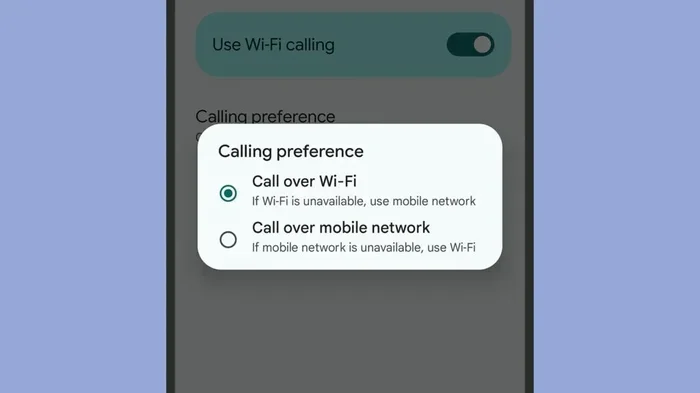
- Select your preferred calling mode (WiFi preferred or Cellular preferred).
After enabling, make a test call while connected to WiFi to confirm everything works. If the call goes through over WiFi, you are all set.
Step 4: Update Your Airtel SIM and Profile
Sometimes, your Airtel SIM needs an update to support international WiFi calling. You can do this by dialing a specific USSD code or through the Airtel Thanks app. Keeping your SIM profile updated ensures that the network recognizes your line as eligible for WiFi calling abroad.
It is also a good idea to restart your phone after making any changes. This refreshes all network settings and applies the new configuration properly.
Airtel WiFi Calling: Supported Countries and Limitations
Airtel has roaming partnerships in many countries, but WiFi calling is not available everywhere. The feature depends on local network regulations, Airtel agreements with partner carriers, and the specific technology infrastructure in each country.
Countries Where Airtel WiFi Calling Works
Airtel WiFi calling is supported in a range of countries, including but not limited to the United States, the United Kingdom, Canada, Australia, Singapore, the UAE, and several European nations. The list changes over time as Airtel signs new roaming agreements.
Before traveling, always check the latest list of supported countries on the Airtel website or by contacting customer care. This ensures you do not arrive at your destination only to find that WiFi calling is not available there.
Countries Where WiFi Calling May Not Work
Some countries have restrictions on WiFi calling due to local telecom regulations. In these places, even if you have an Airtel line with roaming enabled, WiFi calling may not function. Always verify before you travel.
Also, some countries may have limited WiFi infrastructure in rural areas, which can make WiFi calling unreliable even if the feature is technically supported. Always have a backup plan for communication.
For a broader look at WiFi solutions, you might also want to explore whether you can use a TV antenna for WiFi in areas where traditional WiFi signals are weak. It is an unconventional but sometimes effective workaround.
What to Do If WiFi Calling Is Not Available in Your Destination
If Airtel WiFi calling is not supported in the country you are visiting, you still have options. You can use apps like WhatsApp, Skype, or Google Meet to make calls over WiFi. These apps use internet-based calling, which works similarly to WiFi calling but does not depend on carrier support.
Another option is to buy your own WiFi box or portable hotspot for your trip. This gives you a dedicated WiFi connection that works reliably, and you can use it for calls, browsing, and streaming without worrying about public WiFi security.
Common Problems and Troubleshooting Tips
Even when everything is set up correctly, you may run into issues with Airtel WiFi calling abroad. Here are the most common problems and how to fix them.
WiFi Calling Keeps Turning Off Automatically
This is a common issue, especially when your phone switches between WiFi and mobile data. Some phones disable WiFi calling automatically when they detect a strong cell signal, even abroad. To fix this, go to your WiFi calling settings and set the mode to WiFi preferred. This forces your phone to use WiFi for calls whenever it is available.
Calls Drop Frequently on WiFi
Unstable WiFi is the number one cause of dropped calls. If the WiFi signal is weak or the network is congested, your call quality will suffer. To avoid this, always connect to a strong and stable WiFi network. Avoid making important calls on public WiFi if the signal is weak.
WiFi Calling Option Is Grayed Out
If the WiFi calling option is grayed out or unavailable, it usually means your plan does not support it or your SIM is not roaming-enabled. Contact Airtel customer care to confirm your plan details and request the necessary activation.
Phone Does Not Recognize WiFi Calling Abroad
Sometimes, your phone may not show the WiFi calling option at all when you are abroad. This can happen if your phone firmware is outdated or if your SIM profile needs a refresh. Try updating your phone software and restarting with WiFi connected.
Wrong Country Code or Number Format
When calling India from abroad using WiFi calling, make sure you dial the correct country code, which is +91, followed by the local number. Using the wrong format can cause calls to fail, even if WiFi calling itself is working fine.
For more tips on managing your WiFi network effectively, you can also check out extending WiFi with an Ethernet cable, which can help stabilize your connection at home before you travel.
Expert Tips for Using Airtel WiFi Calling Abroad
Drawing from real-world experience and carrier insights, here are some expert tips that make a big difference.
Always Test Before You Travel
Do not wait until you are at the airport to test WiFi calling. Set it up at home, make a test call, and confirm it works. This way, you know exactly what to expect when you arrive at your destination.
Keep Your Airtel Number Active
Some users let their Airtel line go inactive while traveling. This can disable roaming and WiFi calling features. Keep your line active with at least a minimal recharge if needed.
Use Airplane Mode with WiFi Enabled
A smart trick many travelers use is turning on Airplane Mode and then enabling WiFi manually. This forces your phone to use WiFi for all connectivity, including calls. It prevents your phone from searching for cell towers and draining your battery.
Monitor Your Data Usage
WiFi calling does use data, even if it is over WiFi. Keep an eye on your usage, especially if you are connected to a metered WiFi network. A typical voice call uses about 1 MB per minute, so it is quite efficient.
Download the Airtel Thanks App
The Airtel Thanks app is your best friend for managing your connection abroad. You can check roaming status, enable features, and even contact customer support directly from the app. It is available for both Android and iOS devices.
Conclusion
Does Airtel support WiFi calling outside India? Yes, it does, on supported plans and in eligible countries. The feature works well for travelers who want to stay connected without paying steep roaming charges. You just need to activate international roaming, enable WiFi calling on your phone, and make sure you are in a supported country.
While there are some limitations, such as country-specific availability and device compatibility, the benefits far outweigh the drawbacks. WiFi calling with Airtel is a reliable, cost-effective way to make calls while traveling internationally.
Before your next trip, take a few minutes to set everything up. Check your plan, update your SIM profile, and test the feature at home. With the right preparation, you will stay connected no matter where in the world your travels take you.
And remember, if you run into any issues, Airtel customer care is always available to help you get things working smoothly. Safe travels and happy calling.