Do You Get Unlimited Wifi With Xfinity Internet Plans
Xfinity internet plans do not offer truly unlimited WiFi data. Most plans include a data cap, typically 1.2 TB per month, with options to buy extra data. However, Xfinity WiFi hotspot access remains unlimited for Xfinity internet subscribers, giving you extra connectivity on the go.
This is a comprehensive guide about Do You Get Unlimited Wifi With Xfinity.
Key Takeaways
- Data Caps Exist: Most Xfinity plans include a 1.2 TB monthly data cap, not unlimited data.
- Hotspot Access Is Unlimited: Xfinity WiFi hotspots are available to all internet subscribers at no extra charge.
- Extra Data Options: You can purchase additional data or upgrade to a plan with no cap.
- Xfinity xFi Helps Manage Usage: The xFi platform lets you monitor and control data consumption.
- No Throttling After Cap: Xfinity does not slow your speed after hitting the data cap, but charges overage fees.
- Mesh WiFi Expands Coverage: Adding mesh nodes can improve your home WiFi experience.
[FEATURED_IMAGE_PLACEHOLDER]
Do You Get Unlimited WiFi With Xfinity Internet Plans?
Many people sign up for Xfinity internet plans hoping for unlimited WiFi. The short answer is: it depends on what you mean by unlimited. Xfinity gives you unlimited access to WiFi hotspots, but your home data has a cap. Understanding how this works helps you pick the right plan and avoid surprise charges.
Xfinity is one of the largest internet service providers in the United States. Millions of households rely on Xfinity for their home internet service. But with that reliance comes questions about data limits, speed, and what you actually get each month. This guide breaks it all down in plain language.
How Xfinity Data Plans Work
Xfinity internet plans come with a set amount of data each month. This is called a data cap. Most plans include 1.2 terabytes of data. That is a lot, but it can run out if you have many people streaming, gaming, or working from home.
Here is how the data system works:
- Monthly Data Cap: You get 1.2 TB per month on most plans.
- Overage Charges: If you go over, Xfinity charges $10 for every 50 GB of extra data.
- No Speed Throttling: Xfinity does not slow your internet after you hit the cap. You just pay more.
- Data Tracking: You can monitor your usage through the Xfinity xFi app or online portal.
So, do you get unlimited WiFi? Not exactly for your home data. But you do get unlimited access to Xfinity WiFi hotspots, which we will cover next.
What Counts Toward Your Data Cap?
Almost everything you do online uses data. Here are common activities and roughly how much data they use per hour:
- HD Streaming: About 3 GB per hour on Netflix or YouTube.
- 4K Streaming: Around 7 GB per hour.
- Video Calls: About 1.5 GB per hour on Zoom or Teams.
- Online Gaming: Roughly 0.5 GB per hour, but downloads can be huge.
- Social Media Scrolling: Around 0.1 GB per hour.
If your household streams a lot of 4K content or has multiple people working remotely, that 1.2 TB can disappear fast. This is why understanding your usage matters so much.
Unlimited WiFi Hotspot Access With Xfinity
While your home data has a cap, Xfinity offers something great: unlimited WiFi hotspot access. Every Xfinity internet subscriber gets free access to millions of Xfinity WiFi hotspots across the country. This is a huge perk for people who travel or work outside the home.
Here is what you need to know about Xfinity WiFi hotspots:
- No Extra Cost: Hotspot access comes included with your internet plan.
- No Data Cap on Hotspots: The data you use at hotspots does not count toward your 1.2 TB home cap.
- Millions of Locations: Xfinity hotspots are in cafes, airports, parks, and apartment buildings.
- Easy to Connect: Just open your WiFi settings, find an Xfinity hotspot, and sign in with your Xfinity username and password.
This means you can stay connected almost anywhere without worrying about using up your home data. It is one of the best features of being an Xfinity customer.
How to Find Xfinity WiFi Hotspots
Finding a hotspot is easy. You can use the Xfinity xFi app, which shows a map of nearby hotspots. You can also visit the Xfinity website and use their hotspot locator tool. Many Xfinity WiFi routers also broadcast a separate hotspot network that other Xfinity customers can connect to.
If you are at home and your neighbor has Xfinity internet, you might see their hotspot network. You can connect to it using your own Xfinity credentials. This is a great way to extend your WiFi reach without buying extra equipment.
Xfinity xFi: Managing Your WiFi and Data
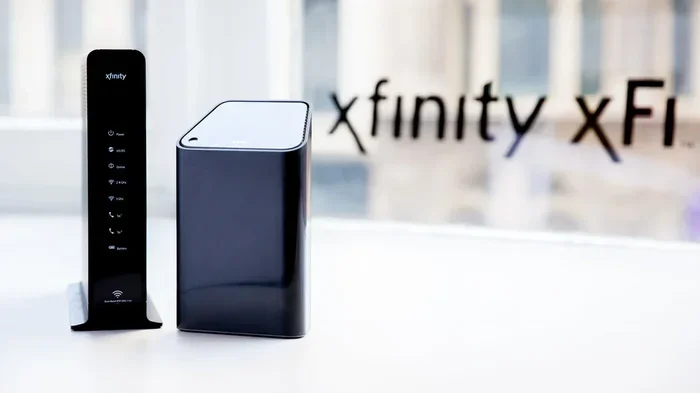
Xfinity offers a tool called xFi that helps you manage your home network. It works with the Xfinity xFi Gateway, which is the modem and router combo Xfinity provides. The xFi platform gives you powerful controls over your WiFi experience.
With xFi, you can:
- Track Data Usage: See exactly how much data each device uses.
- Pause Devices: Temporarily disconnect devices from the internet.
- Set Parental Controls: Block content or set time limits for kids.
- Restart Your Gateway: Do it remotely from the app.
- View Connected Devices: See every device on your network at a glance.
The xFi app is free for all Xfinity internet customers. It makes managing your home WiFi network simple, even if you are not very tech-savvy.
Can You Use Your Own Router With Xfinity?
Yes, you can. Xfinity allows you to change out your router with Spectrum or use your own compatible router instead of the xFi Gateway. This can be a great option if you want better WiFi coverage or more advanced features.
Some popular third-party routers work well with Xfinity. Just make sure the router is compatible with Xfinity’s network. You may need to put your Xfinity modem into bridge mode when using your own router. This lets the modem handle the internet connection while your router manages the WiFi.
Xfinity Internet Plans and Speeds
Xfinity offers several internet speed tiers. The plan you choose affects how much data you use and how many devices can connect at once. Here is a quick look at the main options:
| Plan | Speed | Data Cap | Good For |
|---|---|---|---|
| Performance Starter | 50 Mbps | 1.2 TB | Light usage, 1-2 people |
| Performance Pro | 100 Mbps | 1.2 TB | Medium households |
| Blast! | 400 Mbps | 1.2 TB | Heavy streaming families |
| Gigabit | 1,000 Mbps | 1.2 TB | Power users and large households |
| Gigabit Extra | 1,200 Mbps | 1.2 TB | Multiple 4K streams and gamers |
All Xfinity plans include the same 1.2 TB data cap. The main difference is speed. Faster speeds mean more devices can connect without slowdowns. If you have a large family or many smart home devices, a higher-speed plan makes a big difference.
What If You Need More Data?
If you regularly hit your data cap, Xfinity offers a few solutions:
- Buy Extra Data: You can add 50 GB blocks for $10 each. You can buy up to unlimited extra data each month.
- Xfinity Prepaid: This plan offers a smaller data allowance but with no contract. It is a good option for light users.
- Xfinity Flex: This is a streaming-focused plan with 50 GB of data per month. It works best for people who mainly stream on one device.
None of these plans offer truly unlimited home data. But the extra data option gives you flexibility if you occasionally go over.
Tips to Reduce Your WiFi Data Usage
If you find yourself running out of data each month, try these tips to stretch your usage further:
- Lower Streaming Quality: Switch from 4K to HD or standard definition on Netflix and YouTube. This alone can save hundreds of gigabytes per month.
- Use WiFi Hotspots: Connect to Xfinity hotspots or free public WiFi whenever possible. This keeps your home data untouched.
- Set Data Alerts: Use the xFi app to set warnings when you reach 80% or 90% of your cap.
- Download Instead of Stream: Download movies and shows over WiFi at home instead of streaming them on the go.
- Pause Automatic Updates: Set your devices to update only when connected to WiFi, and do it during off-peak hours.
- Limit Background Data: Some apps use data even when you are not actively using them. Check your phone and computer settings to restrict background data.
These small changes can add up to significant savings. Many Xfinity customers find they can comfortably stay within their 1.2 TB cap with just a few adjustments.
Common Mistakes Xfinity Customers Make
Here are some mistakes that lead to surprise data overages:
- Ignoring Data Alerts: Xfinity sends notifications when you are close to your cap. Ignoring them leads to extra charges.
- Not Using Hotspots: Many customers do not realize they can use Xfinity hotspots for free. This wastes an opportunity to save data.
- Leaving Devices on 4K: 4K streaming uses way more data than HD. Switching to HD can cut your usage significantly.
- Forgetting About Guest Devices: Visitors connecting to your WiFi use your data too. Keep an eye on connected devices through xFi.
- Assuming No Cap Means No Limits: Some customers think Xfinity has no data cap at all. Always check your specific plan details.
Avoiding these mistakes keeps your bill predictable and your WiFi experience smooth.
How Xfinity Compares to Other Providers
Xfinity is not the only internet provider with data caps. Here is how Xfinity compares to a few other options:
- AT&T: AT&T fiber plans have no data cap. AT&T fixed wireless has a 1 TB cap.
- Spectrum: Spectrum does not enforce a hard data cap, though they may temporarily slow speeds during heavy usage.
- Verizon Fios: Fios plans generally have no data cap on fiber connections.
- T-Mobile Home Internet: T-Mobile offers unlimited data on most plans, with potential deprioritization during congestion.
If unlimited data is a top priority for you, it is worth comparing Xfinity to these alternatives. You can also explore whether Xfinity can add mesh WiFi to existing router setups to improve coverage without switching providers.
Frequently Asked Questions
Does Xfinity have unlimited WiFi data?
Xfinity does not offer unlimited home WiFi data on most plans. The standard data cap is 1.2 TB per month. However, Xfinity WiFi hotspot access is unlimited and does not count toward your home data cap.
What happens when I exceed my Xfinity data cap?
Xfinity charges $10 for every 50 GB of extra data you use. You can also purchase additional data in larger blocks. Your internet speed does not get slowed down after hitting the cap.
Can I get unlimited data with Xfinity?
Not directly. Xfinity does not offer a traditional unlimited home data plan. However, you can buy unlimited extra data each month for an additional fee. Some Xfinity plans like Xfinity Prepaid and Xfinity Flex have smaller data allowances.
Is Xfinity WiFi hotspot access really unlimited?
Yes. Xfinity provides unlimited access to its WiFi hotspot network for all internet subscribers. The data you use at hotspots does not count toward your home data cap. This is a great way to save your home data for when you are at home.
How can I check my Xfinity data usage?
You can check your data usage through the Xfinity xFi app or by logging into your account on the Xfinity website. The app shows real-time usage and sends alerts when you are approaching your cap.
Does Xfinity throttle internet speed after the data cap?
No. Xfinity does not throttle your internet speed after you exceed the data cap. Instead, they charge overage fees for the extra data you use. This is different from some providers that slow down speeds after a cap is reached.
Final Thoughts
So, do you get unlimited WiFi with Xfinity? The answer is nuanced. Your home WiFi data is capped at 1.2 TB per month, but your access to Xfinity WiFi hotspots is truly unlimited. For most households, the 1.2 TB cap is more than enough, especially if you manage your usage wisely.
Xfinity offers solid tools like xFi to help you stay on top of your data. You can always buy extra data if you need it. And if unlimited home data is a must-have, it is worth looking at competitors like AT&T Fiber or T-Mobile Home Internet.
Understanding your plan details makes all the difference. With the right approach, you can enjoy fast, reliable Xfinity WiFi without worrying about surprise charges. Xfinity internet plans give you a lot of value, and knowing how the data system works puts you in control.
Frequently Asked Questions
What is Do You Get Unlimited Wifi With Xfinity?
Do You Get Unlimited Wifi With Xfinity is an important topic with many practical applications.