Do Wifi Signal Boosters Actually Work Here Is the Truth
Wi-Fi signal boosters can genuinely improve your wireless coverage, but only if you pick the right type and place it correctly. Many boosters fail because people buy the wrong model or put it in the wrong spot. This guide reveals the honest truth about whether Wi-Fi signal boosters actually deliver results and how to make them work for you.
Have you ever walked into a room and suddenly lost your Wi-Fi connection? Maybe you were streaming a movie and the screen froze right at the worst moment. Or perhaps you tried to work from the bedroom and the signal dropped completely. These frustrating moments happen to millions of people every day. That is why many folks turn to Wi-Fi signal boosters for help.
The big question is simple: do Wi-Fi signal boosters actually work? The answer is more complicated than a yes or no. Some boosters genuinely improve your wireless coverage. Others do almost nothing. And some can even slow down your connection. In this article, we will explore the truth about Wi-Fi signal boosters. You will learn how they work, when they help, and when they do not. By the end, you will know exactly whether a booster is right for your home.
Let us be honest upfront. Not every product on the market lives up to its promises. But that does not mean all Wi-Fi signal boosters are a waste of money. It just means you need to understand what you are buying. This guide will give you that knowledge. We will cover everything from basic signal strength to advanced mesh systems. You will walk away with real, actionable advice.
Key Takeaways
- Wi-Fi boosters do work: They amplify and redistribute your existing wireless signal to cover more area.
- Placement matters most: A poorly placed booster won’t fix dead zones no matter how good it is.
- Not all boosters are equal: Wi-Fi extenders, repeaters, and mesh systems work differently.
- They won’t increase your internet speed: A booster can only spread the speed your ISP provides.
- Mesh networks are often better: For whole-home coverage, mesh systems outperform traditional boosters.
- Check your setup first: Before buying a booster, try repositioning your router or using an Ethernet cable.
📑 Table of Contents
- What Is a Wi-Fi Signal Booster?
- How Do Wi-Fi Signal Boosters Work?
- Do Wi-Fi Signal Boosters Actually Work?
- Wi-Fi Booster vs. Other Solutions
- How to Make Your Wi-Fi Booster Work Better
- Common Mistakes People Make With Wi-Fi Boosters
- Expert Insights on Wi-Fi Boosters
- Are Wi-Fi Signal Boosters Worth the Money?
- Final Thoughts
What Is a Wi-Fi Signal Booster?
A Wi-Fi signal booster is a device that takes your existing wireless signal and amplifies it. Think of it like a megaphone for your router. The booster receives the signal from your router and then sends it out again with more power. This helps reach areas of your home where the signal is weak or missing.
There are three main types of Wi-Fi boosters you will encounter:
- Wi-Fi repeaters: These pick up your existing signal and rebroadcast it. They are the most basic type of booster.
- Wi-Fi extenders: These connect to your router and extend the wireless range. They usually create a new network name.
- Mesh Wi-Fi systems: These use multiple nodes placed around your home to create seamless wireless coverage.
Each type works differently. But they all share the same goal: improving your network coverage. Understanding these differences is key to choosing the right solution.
How Do Wi-Fi Signal Boosters Work?
A Wi-Fi signal booster works by receiving the signal from your router, amplifying it, and then transmitting the stronger signal to areas with poor coverage. The process sounds simple, but there is more to it than that.
The Signal Reception Phase
First, the booster listens to your router. It picks up the wireless signal that your router sends out. The quality of this reception matters a lot. If the booster is too far from the router, it may not pick up a strong enough signal to amplify. This is the first reason many boosters fail to deliver results.
The Amplification Phase
Next, the booster boosts the signal. It takes the weak signal it received and makes it stronger. This is where the magic happens. The booster increases the signal strength so it can travel farther. But here is an important detail: a booster cannot create more bandwidth. It can only spread the bandwidth you already have.
The Signal Transmission Phase
Finally, the booster sends out the amplified signal. This new, stronger signal reaches areas that were previously dead zones. Your phone, laptop, or smart home devices can now connect in those spots. The result is better wireless coverage throughout your home.
However, there is a catch. Most traditional boosters cut the available bandwidth in half. This happens because the booster uses the same radio to receive and send data. So while your signal reaches farther, it may be slower. This is a trade-off you should understand before buying.
Do Wi-Fi Signal Boosters Actually Work?
This is the question everyone wants answered. And the honest truth is that Wi-Fi signal boosters do work, but with important limitations. They are not magic boxes that will transform your internet speed overnight. They are tools that solve specific problems when used correctly.
When Boosters Really Do Work
Wi-Fi boosters shine in certain situations. Here are times when they genuinely help:
- Large homes: If you have a house bigger than 2,000 square feet, one router may not cover every room. A booster helps fill in the gaps.
- Dead zones: Rooms with thick walls, basements, or attics often lose signal. A booster can bring connectivity back to these areas.
- Multi-story homes: Signal often struggles to travel between floors. A booster on the second floor can restore the wireless signal where it was weak.
- Older routers: If your router is outdated, a booster can help extend its reach while you save up for a newer model.
In these scenarios, a Wi-Fi signal booster provides real, noticeable improvement. Users report better streaming, faster browsing, and fewer dropped connections.
When Boosters Do Not Work Well
There are also times when a booster will not help much:
- Slow internet plans: If your ISP provides slow speeds, a booster cannot fix that. You need a faster plan from your provider.
- Poor router placement: If your router sits in a closet or behind furniture, no booster will fully solve the problem. Move the router first.
- Signal interference: Microwaves, baby monitors, and even heavy wind can interfere with wireless signals. A booster does not remove these obstacles.
- Too many devices: If dozens of devices share one connection, a booster alone will not solve congestion. You may need a mesh network instead.
Understanding these limitations is crucial. A booster is not a cure-all for every Wi-Fi problem. It works best as part of a broader strategy to improve your home network.
Wi-Fi Booster vs. Other Solutions
Not sure if a Wi-Fi signal booster is the right choice? Let us compare it with other popular options. This will help you decide what works best for your situation.
| Solution | Pros | Cons | Best For |
|---|---|---|---|
| Wi-Fi Booster/Repeater | Affordable, easy to set up | Halves bandwidth, adds latency | Small dead zones |
| Wi-Fi Extender | Extends range, affordable | Separate network name, slower speeds | Medium-sized homes |
| Mesh Wi-Fi System | Seamless coverage, fast roaming | More expensive, complex setup | Large homes, heavy usage |
| Ethernet Cable | Fastest, most reliable | Requires wiring, less flexible | Fixed devices like PCs and consoles |
| Powerline Adapter | Uses existing wiring, stable | Depends on electrical wiring quality | Rooms far from router |
As you can see, each solution has strengths. A Wi-Fi signal booster is often the most affordable entry point. But for serious coverage problems, you might want to add mesh Wi-Fi to your existing router instead. Mesh systems create a single, unified network across your entire home. They are especially helpful if you have a large house with many connected devices.
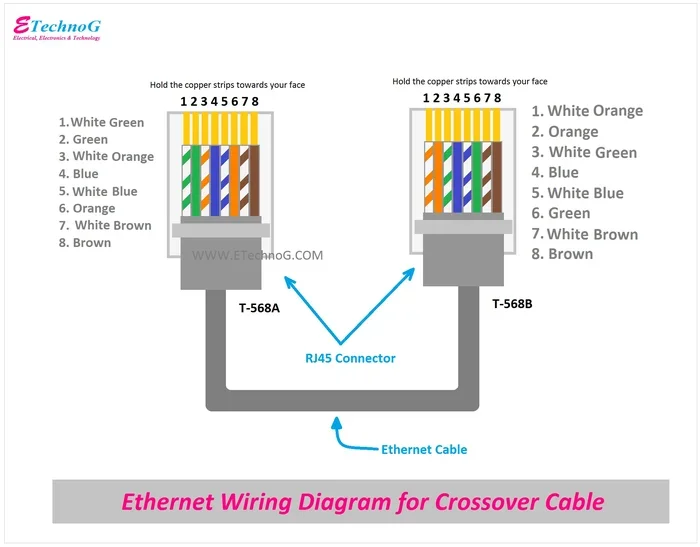
Another option worth considering is extending your connection with an Ethernet cable. This provides the most stable and fastest connection possible. It is ideal for devices that need consistent speed, like gaming consoles or desktop computers. While it is less flexible than a wireless booster, the reliability is hard to beat.
How to Make Your Wi-Fi Booster Work Better
If you decide to buy a Wi-Fi signal booster, placement and setup make all the difference. Here are practical tips to get the best results.
Place the Booster in the Right Spot
This is the single most important factor. Do not place your booster in a dead zone. Instead, put it halfway between your router and the weak area. The booster needs a strong signal from the router to amplify. If it sits too far away, it will boost a weak signal and deliver poor results.
Keep It Away from Obstacles
Thick walls, metal objects, and large appliances can block wireless signals. Place your booster in an open area, preferably on a shelf or table. Avoid putting it on the floor or inside cabinets. The goal is to give it a clear path to both the router and the area you want to cover.
Update Your Firmware
Most modern boosters receive firmware updates. These updates improve performance and fix bugs. Check your booster’s app or admin panel regularly. Keeping your device updated ensures it runs at peak efficiency.
Reduce Signal Interference
Other wireless devices can interfere with your booster. Baby monitors, cordless phones, and even microwave ovens cause interference. Try to keep your booster away from these devices. Also, switch your router to a less crowded channel if possible. This reduces competition for the same wireless frequencies.
Consider Your Internet Speed
A booster cannot make your internet faster than what your provider gives you. If you have a 10 Mbps plan, a booster will not turn it into 100 Mbps. But it can make sure that 10 Mbps reaches every corner of your home. Know your plan speed and set realistic expectations.
Common Mistakes People Make With Wi-Fi Boosters
Many people buy a Wi-Fi signal booster and expect instant miracles. When it does not work perfectly, they get frustrated. Here are the most common mistakes to avoid.
- Buying the cheapest option: Cheap boosters often lack the hardware to deliver real improvements. Spend a little more for a reputable brand.
- Placing it too far from the router: The booster needs a strong input signal to give a strong output signal. Think of it like a relay race.
- Expecting faster speeds: A booster extends coverage, not speed. Do not expect it to improve your broadband speed from your ISP.
- Ignoring your router: If your router is outdated, a booster will just extend a weak signal. Consider upgrading your router first.
- Overlooking security: Some cheap boosters have weak security features. Make sure your booster supports WPA3 encryption to protect your home network.
Avoiding these mistakes will save you money and frustration. Take the time to set up your booster correctly, and you will see real benefits.
Expert Insights on Wi-Fi Boosters
Networking experts agree that Wi-Fi signal boosters have their place, but they are not always the best solution. Here is what industry professionals recommend.
Start with your router. Many experts say you should optimize your existing setup before buying any booster. Move your router to a central location. Elevate it off the floor. Keep it away from walls and metal objects. Sometimes these simple changes eliminate the need for a booster entirely.
Consider a mesh system for large homes. For homes over 2,500 square feet, most experts recommend a mesh network over a traditional booster. Mesh systems use multiple nodes that work together seamlessly. They create a single network name throughout your home. Users can roam from room to room without losing connection. You can even use Google Mesh wirelessly to create a whole-home network without running cables.
Check for interference from other devices. Experts also point out that household appliances can weaken your wireless signal. Cordless phones, baby monitors, and even neighboring Wi-Fi networks compete for the same frequencies. A dual-band or tri-band booster can help reduce this interference by using less crowded frequency bands.
Do not forget about your internet plan. Before spending money on a booster, check your internet speed. Run a speed test to see what you are actually getting from your provider. If your speed is already slow, a booster will not fix the underlying problem. You may need to upgrade your plan or call your ISP to troubleshoot.
Are Wi-Fi Signal Boosters Worth the Money?
The final verdict depends on your situation. For many households, a Wi-Fi signal booster is absolutely worth it. They are affordable, easy to install, and solve real coverage problems. A basic booster costs between $20 and $60, making it a low-risk investment.
However, if you have a large home or many connected devices, you may want to invest in a mesh system instead. Mesh networks provide superior performance and a better user experience. They are more expensive, but they deliver results that traditional boosters cannot match.
Also consider whether you can extend your Wi-Fi with an Ethernet cable for the most reliable connection. For devices that stay in one place, a wired connection always beats a wireless booster in speed and stability.
Before you buy anything, try these free steps first. Move your router to a better location. Restart it regularly. Update its firmware. These simple actions can often improve your signal without spending a dime.
Final Thoughts
So, do Wi-Fi signal boosters actually work? Yes, they do. But they work best when you understand what they can and cannot do. A booster will not magically give you faster internet from your provider. But it will extend your wireless coverage to areas that previously had no signal. It will eliminate dead zones and let you stream, browse, and work from any room in your home.
The key is to set realistic expectations. Choose the right type of booster for your needs. Place it correctly. And maintain your setup over time. With the right approach, a Wi-Fi signal booster can be a simple, affordable solution to one of the most common home network problems.
Remember, every home is different. What works for one family may not work for another. Test your setup, try different placements, and do not be afraid to explore alternatives like mesh systems or wired connections. The goal is a strong, reliable connection everywhere you need it. And with the right tools and knowledge, you can absolutely achieve that.
Frequently Asked Questions
Can a Wi-Fi booster improve my internet speed?
A booster extends your coverage area, but it does not increase the speed your ISP provides. It can help maintain a more consistent connection in weak signal areas, which may improve your real-world speeds in those spots. However, some traditional boosters actually reduce speeds because they share bandwidth between receiving and transmitting data.
How far should a Wi-Fi booster be from my router?
Place the booster about halfway between your router and the area with weak signal. It needs to receive a strong signal from the router in order to amplify it effectively. If you place it too far away, it will boost a weak signal and deliver poor performance to the far end of your home.
Is a Wi-Fi booster the same as a Wi-Fi extender?
They are similar but not exactly the same. A booster amplifies the existing signal and rebroadcasts it. An extender connects to your router and creates a new network that extends your range. Both aim to improve wireless coverage, but they work slightly differently in how they handle the signal.
Will a Wi-Fi booster work with any router?
Most boosters work with any standard Wi-Fi router regardless of brand. However, you get the best results when the booster supports the same Wi-Fi standard as your router, such as Wi-Fi 5 or Wi-Fi 6. Always check compatibility before purchasing to ensure the booster can communicate properly with your existing equipment.
Can I use a Wi-Fi booster outdoors?
Standard indoor boosters are not designed for outdoor use. Weather, temperature changes, and moisture can damage them. If you need outdoor coverage, look for weather-resistant outdoor access points or mesh systems designed for exterior use. These devices are built to handle the elements while extending your wireless signal to patios, garages, and yards.
Do mesh Wi-Fi systems replace the need for a booster?
Mesh systems are often a better alternative to traditional boosters. They create a seamless network with multiple nodes that work together. Unlike a booster, mesh systems do not cut your bandwidth in half. They provide faster, more consistent coverage throughout your home. For many users, a mesh system eliminates the need for a separate booster altogether.
=== CONCLUSION ===
Wi-Fi signal boosters do work, but only when you choose the right product and set it up correctly. They are excellent tools for extending coverage to dead zones and weak areas in your home. However, they are not a cure for slow internet speeds or poor router placement. Start by optimizing your existing setup. Then consider a booster if you still have coverage gaps. For larger homes, a mesh system might be an even better investment. Whatever you choose, understanding your options puts you in control of your home network. Use the tips in this guide to make the best decision for your space and your needs.