Do I Need A New Router Or Modem For Better Internet
Slow internet, dead zones, or frequent dropouts? You might need a new router or modem. This guide helps you figure out which device is causing the problem, when to replace it, and how to choose the right upgrade for your home network and internet plan.
Slow loading pages. Buffering videos. Wi-Fi that drops the second you walk into another room. If any of this sounds familiar, you have probably wondered whether you need a new router or modem. The answer is not always obvious, and many people end up spending money on the wrong device.
Do I need a new router or modem for better internet? That depends on what is actually causing the problem. Sometimes it is the modem. Sometimes it is the router. And sometimes, neither needs replacing. This guide walks you through every sign, every option, and every decision point so you can fix your connection with confidence.
Let us break it down. By the end, you will know exactly which device is holding you back and what to buy instead.
Key Takeaways
- Modem vs. Router: Your modem connects to the internet; your router distributes the signal to your devices.
- Age Matters: Equipment older than 4-5 years often struggles with modern speeds and device loads.
- Check Your ISP: Some internet providers lease modems, and renting may limit your speed potential.
- Wi-Fi Dead Zones? A router upgrade or mesh system can dramatically improve network coverage.
- Try Before You Buy: Firmware updates, repositioning, and resets can sometimes solve issues without new hardware.
- Match Equipment to Your Plan: Buying a modem or router that exceeds your internet plan wastes money.
- Combo Units Save Space: A modem-router combo simplifies setup but may limit future upgrades.
📑 Table of Contents
- Understanding The Difference Between A Modem And A Router
- How To Know If Your Modem Needs Replacing
- How To Know If Your Router Needs Upgrading
- Modem Vs Router: Comparison And When To Replace Which
- How To Choose The Right New Equipment For Your Home
- Quick Tips To Improve Your Setup Before Buying New Gear
- Common Mistakes People Make When Upgrading Equipment
- Conclusion: Do I Need A New Router Or Modem For Better Internet
Understanding The Difference Between A Modem And A Router
Before you decide what to replace, you need to understand what each device does. Many people confuse the two, and that confusion leads to buying the wrong equipment.
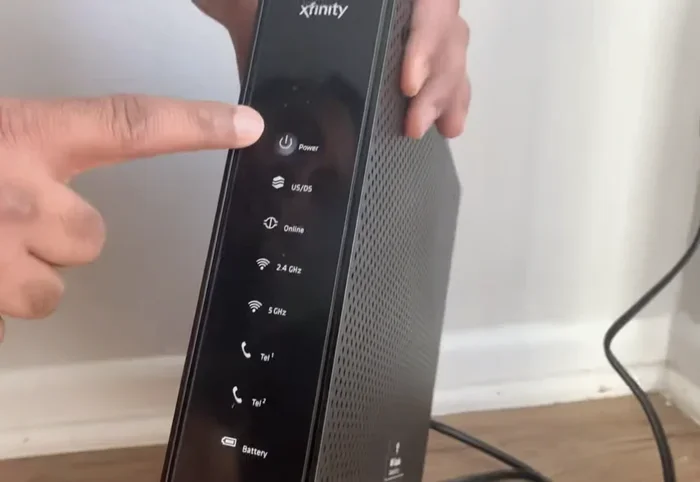
Your modem is the bridge between your home and your internet service provider, or ISP. It takes the signal from your cable, fiber, or phone line and turns it into data your home network can use. Think of it as the front door to the internet.
Your router takes that data and shares it with all your devices. It creates the Wi-Fi network you connect your phone, laptop, and smart TV to. It also manages traffic so multiple devices can use the internet at the same time without crashing into each other.
Some people have a modem router combo, which is a single box that does both jobs. Others have separate devices. Both setups work fine, but separate devices give you more flexibility when upgrading.
Here is a simple way to remember it: the modem brings the internet to your home. The router spreads it around your home. If one part fails, your entire network suffers.
How To Know If Your Modem Needs Replacing
A failing modem can cause all kinds of frustrating problems. But how do you tell if your modem is the real culprit? Let us look at the clearest signs.
Check Your Equipment Age
The average modem lasts about 4 to 5 years. If your modem is older than that, it may not support the speeds your internet plan offers. Technology moves fast, and older modems simply cannot keep up with modern bandwidth demands.
Check the label on your modem for the model number. Then search online to see when it was released. If it is more than 5 years old, that alone might be reason enough to consider a modem replacement.
Look For Frequent Connectivity Issues
Do you find yourself unplugging your modem and plugging it back in every few days? That is a red flag. A healthy modem should run for weeks or months without needing a reset.
Other warning signs include:
- Frequent disconnections throughout the day
- Slow internet speed test results even after restarting
- Error lights that stay solid or blink randomly
- Difficulty establishing a connection after a power outage
If you notice these patterns, your modem may be failing. Before you buy a new one, call your ISP and ask them to run a line test from their end. Sometimes the problem is on their side, not yours.
Slow Speeds That Do Not Match Your Plan
You pay for a certain speed, right? Run an internet speed test on a device connected directly to your modem using an Ethernet cable. If the results are well below what your plan promises, the modem might be the bottleneck.
For example, if you pay for 200 Mbps but your speed test shows 40 Mbps, something is wrong. A modem router combo unit from years ago may not handle those speeds anymore. Upgrading to a newer gateway device can restore the speeds you are paying for.
Expert Insight: Many people rent modems from their ISP for a monthly fee. Those rental units are often outdated. Buying your own compatible modem can save you money over time and improve your network performance significantly.
How To Know If Your Router Needs Upgrading
Sometimes your modem is fine, but your wireless router cannot keep up. Modern homes have more connected devices than ever, and older routers were never built for this load.
Weak Wi-Fi Signal In Other Rooms
If your Wi-Fi works great in the living room but drops to nothing in the bedroom, your router might not have enough range. This is one of the most common reasons people ask, do I need a new router or modem.
Older single-band routers operate on the 2.4 GHz frequency, which penetrates walls reasonably well but offers slower speeds. Newer dual-band routers add a 5 GHz band that delivers faster internet speed but has shorter range. A wireless router upgrade can solve coverage problems in many cases.
Too Many Devices For Your Router
Think about how many devices connect to your Wi-Fi. Smartphones, laptops, tablets, smart TVs, smart speakers, security cameras, gaming consoles, and smart home gadgets all compete for bandwidth.
If you have more than 10 to 15 devices, an older router will struggle. It cannot manage the traffic efficiently, leading to slow network performance for everyone. A modern router with better processing power and more antennas handles multiple devices much better.
Missing Modern Features Like Dual-Band
Newer routers come with features that older ones simply do not have. Dual-band and even tri-band routers let you spread devices across different frequencies, reducing congestion. MU-MIMO technology allows your router to talk to multiple devices at the same time instead of one at a time.
If your router does not support WPA3 security, it is time to upgrade for safety reasons. WPA3 is the latest wireless encryption standard and protects your home network from modern threats.
Gaming Latency And Streaming Quality Problems
Are online games lagging even with a strong signal? Does your streaming quality drop during peak hours? Your router might not have the right Quality of Service (QoS) features to prioritize traffic for gaming or video streaming.
Modern routers with built-in QoS let you assign priority to specific devices or activities. This means your gaming console gets the bandwidth it needs, even when someone else is watching a 4K movie.
Modem Vs Router: Comparison And When To Replace Which
Not sure if you need a modem, a router, or both? Use this comparison to figure out what is going wrong and what to do about it.
| Issue | Likely Culprit | Solution |
|---|---|---|
| No internet at all | Modem | Restart modem, contact ISP, replace if old |
| Slow speeds on all devices | Modem or internet plan | Run speed test, upgrade modem, check plan |
| Wi-Fi drops in certain rooms | Router | Reposition router, upgrade to better model |
| Devices cannot connect to Wi-Fi | Router | Update firmware, reset router, upgrade |
| Slow speeds only on Wi-Fi, fast on Ethernet | Router | Upgrade to dual-band or mesh system |
| Frequent disconnections | Modem or ISP line | Check modem age, run line test, replace |
| Too many devices, poor performance | Router | Upgrade to high-performance router |
Use this table as a starting point. If your problem matches a row, the solution column gives you a direction. But remember, sometimes the issue is a combination of both a weak modem and an outdated router.
How To Choose The Right New Equipment For Your Home
Once you decide you need new gear, the next step is choosing the right equipment. The market is full of options, and picking the wrong one wastes money and frustration.
Match Your Equipment To Your Internet Plan
Before you buy anything, check what speed your internet plan actually offers. If you pay for 100 Mbps, you do not need a premium gaming router designed for gigabit speeds. Match your equipment to your actual needs.
For most households, a solid dual-band router handles everyday browsing, streaming, and video calls with ease. If you have a faster plan or many devices, consider a tri-band model or a mesh network system.
Consider A Modem Router Combo
A modem router combo saves space and simplifies setup. You plug in one box and you are online. These units work well for small apartments or homes with light internet use.
The downside? If one part fails, you lose both modem and router. You also cannot upgrade one without replacing the other. For most people, separate devices offer better long-term value.
Mesh Systems For Larger Homes
If your home is larger than 2,000 square feet or has multiple floors, a single router may not provide enough network coverage. A mesh network system uses multiple nodes placed around your home to create one seamless Wi-Fi network.
Popular mesh systems from brands like Google Nest, Eero, and TP-Link Deco are easy to set up and manage through a phone app. They are especially helpful for homes with thick walls, basements, or home offices in far rooms.
Quick Tips Before You Buy:
- Check compatibility with your ISP before purchasing a modem
- Look for DOCSIS 3.1 or higher if you have cable internet
- Prioritize Wi-Fi 6 routers for better speed and device handling
- Read reviews from trusted sources before making a decision
- Consider your budget but also your long-term needs
Quick Tips To Improve Your Setup Before Buying New Gear
Before you spend money on new equipment, try these free or low-cost fixes. You might solve the problem without buying anything at all.
- Restart your modem and router. Unplug both for 30 seconds, then plug the modem in first, wait two minutes, then plug in the router. This fixes many temporary issues.
- Update your firmware. Log into your router settings and check for a firmware update. Manufacturers release updates that fix bugs and improve performance.
- Reposition your router. Place it in a central, elevated location away from walls and electronics. Avoid hiding it in a closet or behind furniture.
- Change your Wi-Fi channel. Neighboring networks can cause interference. Switching to a less crowded channel can improve your Wi-Fi signal strength.
- Reduce connected devices. Disconnect devices you are not using. Fewer devices means more bandwidth for the ones that matter.
- Use an Ethernet connection. For devices that need stable speeds, plug them directly into the router with an Ethernet cable. This removes Wi-Fi variability from the equation.
If none of these steps help, it is time to seriously consider new equipment. At that point, you know the problem is not a simple fix.
Common Mistakes People Make When Upgrading Equipment
Even with the best intentions, people make mistakes when upgrading their networking gear. Avoid these common pitfalls.
Buying the most expensive router you can find. A top-of-the-line gaming router is overkill if you only browse the web and watch Netflix. Match your purchase to your actual usage.
Ignoring ISP compatibility. Not every modem works with every internet provider. Before buying a modem, check your ISP’s approved device list. Using an incompatible modem means you will not get online no matter what.
Forgetting about your internet plan. If you have a 50 Mbps plan, a $300 router will not make your internet faster. The bottleneck is your plan, not your router. Consider upgrading your internet plan before buying new hardware.
Skipping the setup process. New equipment often performs better after a proper setup. Take the time to configure your settings, update firmware, and set up a strong password. A rushed setup leads to poor connectivity issues down the road.
Not considering future needs. If you plan to add smart home devices or work from home permanently, invest in equipment that can handle growth. A mesh network system is a great choice for future-proofing your home.
Expert Insight: The best time to upgrade is when your current equipment is no longer supported by the manufacturer. Unsupported devices stop receiving security patches, which leaves your home network vulnerable. Check your device’s support page and compare the end-of-life date to today’s date.
Conclusion: Do I Need A New Router Or Modem For Better Internet
So, do you need a new router or modem for better internet? The answer comes down to understanding your specific problem and matching it to the right device.
If you have no internet or frequent disconnections, start with your modem. If your Wi-Fi is weak, slow, or cannot handle your device load, focus on your router. And if your equipment is more than five years old, an upgrade to modern hardware will almost certainly improve your internet speed and network performance.
Before you buy anything, try the free fixes first. Restart your devices, update firmware, and reposition your router. If those steps do not work, it is time to invest in new equipment that fits your home and your needs.
Take action today. Run a speed test, check your equipment age, and make a plan. Better internet is closer than you think, and the right router upgrade or modem replacement can transform your online experience.
Frequently Asked Questions
How do I know if I need a new router or a new modem?
If your internet speed test shows slow results even when connected directly to the modem with an Ethernet cable, the modem is likely the problem. If wired speeds are fine but Wi-Fi is weak or inconsistent, the router needs attention. Use this simple test to pinpoint which device is causing the issue.
Can I buy my own modem instead of renting from my ISP?
Yes, in most cases you can. Buying your own modem saves money over time and often gives you faster speeds and better reliability. Check your ISP’s approved modem list to ensure compatibility before making a purchase.
How often should I replace my router and modem?
Modems typically last 4 to 5 years, while routers last about 3 to 5 years. If you experience frequent issues or notice slow speeds, consider replacing the affected device rather than waiting for a complete failure.
Will a new router improve my internet speed?
A new router will improve Wi-Fi speeds and coverage, but it will not make your internet plan faster. If your plan offers 100 Mbps, a new router will deliver that speed more reliably over Wi-Fi, but it cannot exceed the speed your ISP provides.
What is a mesh Wi-Fi system and do I need one?
A mesh system uses multiple units placed around your home to create a single, strong Wi-Fi network. You need one if your home is larger than 2,000 square feet, has multiple floors, or has areas with weak Wi-Fi coverage that a single router cannot reach.
Is Wi-Fi 6 worth the upgrade?
Yes, Wi-Fi 6 offers faster speeds, better handling of multiple devices, and improved battery life for connected gadgets. If you are buying a new router and your devices support it, Wi-Fi 6 is the current best standard for home networking and will keep your setup future-ready for years to come.