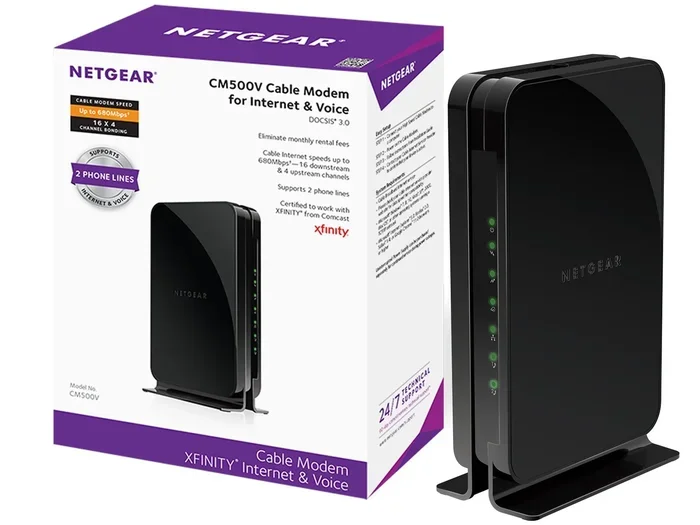
Do I Have To Return Xfinity Prepaid Modem Or Keep It
You may or may not have to return your Xfinity prepaid modem depending on your account type and agreement terms. If you bought the device outright, you can keep it. If it was rented or part of a promotional deal, you will likely need to send it back. Understanding Xfinity equipment policy saves you from extra charges and headaches.
So, you have an Xfinity prepaid modem sitting on your shelf. Maybe you are switching providers, or maybe you just want to know if that box is yours to keep. The question is simple: do I have to return Xfinity prepaid modem? But the answer is not always straightforward.
Whether you bought the device or rented it changes everything. Xfinity has specific rules about equipment ownership, returns, and fees. This guide walks you through every scenario so you know exactly what to do. No guesswork. No surprises on your bill.
We will cover Xfinity equipment policy, how to check your account type, what happens if you do not return the device, and much more. By the end, you will have a clear answer for your situation. Let us get into it.
Key Takeaways
- Ownership matters: If you purchased the modem, you can keep it. If it was rented, you must return it.
- Check your agreement: Your Xfinity account terms determine whether the device is yours or Comcast’s property.
- Return fees exist: Failing to return rented equipment can result in charges up to $200 or more.
- Self-install return kits: Xfinity provides prepaid return labels and packaging for easy equipment returns.
- Upgrade options: You can upgrade your Xfinity prepaid modem without returning the old one in some cases.
- Customer service help: Contacting Xfinity directly clarifies your specific return obligations.
📑 Table of Contents
- What Is an Xfinity Prepaid Modem?
- Do I Have to Return Xfinity Prepaid Modem?
- How to Check Your Xfinity Equipment Status
- What Happens If You Do Not Return the Modem?
- How to Return Your Xfinity Prepaid Modem
- Can You Upgrade Your Xfinity Prepaid Modem?
- Common Mistakes People Make With Xfinity Modems
- Expert Tips for Handling Xfinity Prepaid Modem Returns
- Key Takeaways
- Conclusion
What Is an Xfinity Prepaid Modem?
How Xfinity Prepaid Internet Works
Xfinity prepaid internet lets you pay month by month without a long-term contract. You get a gateway device that connects your home to the Xfinity network. This device is often called an Xfinity modem, router, or gateway.
The prepaid modem acts as both a modem and a router. It takes the signal from Xfinity and turns it into Wi-Fi you can use at home. Some people call it a prepaid internet equipment kit because it comes ready to use right out of the box.
With Xfinity prepaid, you do not need a credit check. You do not need a contract. You just pay for the service and the equipment. But here is the big question: who owns the device you are using?
Rented vs. Purchased Equipment
This is the key distinction. When you get an Xfinity prepaid modem, it might be rented or purchased. Here is how to tell the difference:
- Rented equipment: You pay a monthly fee to use the device. It belongs to Comcast. You must return it when you stop service.
- Purchased equipment: You paid a one-time fee to own the device. It is yours forever. No need to return it.
- Promotional equipment: Sometimes Xfinity gives you a device at a discount or free. These often come with return rules attached.
Checking your account is the first step to figuring out which category your modem falls into. We will cover how to do that below.
Do I Have to Return Xfinity Prepaid Modem?
The Short Answer
The short answer depends on your Xfinity equipment policy. If you rented the modem, yes, you must return it. If you bought it, no, you can keep it. That is the basic rule.
But there are exceptions. Promotional deals, upgrade programs, and account types can change the rules. Let us look at each situation in detail.
When You Must Return the Modem
You need to return your Xfinity prepaid modem if any of these apply to you:
- You rented the device from Xfinity and paid a monthly equipment fee.
- You are canceling your Xfinity prepaid service entirely.
- You are switching to a different Xfinity plan that does not include the same equipment.
- Your promotional deal required you to return the device after a certain period.
- Xfinity customer service specifically told you to return the equipment.
If you fall into any of these categories, you should plan your return carefully. Missing a return deadline can lead to extra charges. We will talk about those fees next.
When You Can Keep the Modem
You can keep your Xfinity prepaid modem if:
- You purchased the device outright with a one-time payment.
- The device was sold to you as part of a buyout option.
- Your Xfinity agreement states the equipment is yours.
- You upgraded your device and Xfinity allowed you to keep the old one.
When the modem is yours, you can use it with any compatible internet service. You are not tied to Xfinity anymore. This gives you flexibility if you decide to switch providers later.
How to Check Your Xfinity Equipment Status
Logging Into Your Account
The easiest way to find out if you need to return your modem is to check your Xfinity account online. Here is what to do:
- Go to the Xfinity website and sign in.
- Navigate to your account dashboard.
- Look for the “Equipment” or “Devices” section.
- Check if your modem is listed as rented or owned.
- Review any return instructions shown on your account page.
If you cannot find the information online, call Xfinity customer service. They can pull up your account and tell you exactly what you need to do. Have your account number ready before you call.
Checking Your Original Agreement
Your original Xfinity agreement or terms of service also help. When you signed up for Xfinity prepaid internet, you agreed to certain terms. Those terms likely mention equipment ownership. Look for words like “rental,” “lease,” or “owned by Comcast.”
If you no longer have a copy of the agreement, you can request one from Xfinity support. They are required to provide it.
What Happens If You Do Not Return the Modem?
Xfinity Return Fees and Charges
Not returning rented Xfinity equipment can get expensive. Xfinity charges a non-return fee if you fail to send back rented devices. These fees vary but can range from $100 to $200 or more per device.
Here is what you might face if you do not return the modem:
- Equipment replacement charge: You pay the full cost of the modem, which can be $150-$250.
- Monthly rental fee accumulation: The fee keeps adding up until the device is returned or paid for.
- Account collections: Unpaid charges can go to collections and affect your credit score.
- Service restrictions: Xfinity may block your account from future services until the debt is cleared.
These charges are not small. That is why it is so important to know your status before canceling service. Do not just assume you can ignore the device.
How Xfinity Tracks Equipment
Xfinity uses serial numbers to track every piece of equipment they send out. Each modem has a unique identifier linked to your account. When you return the device, Xfinity scans it and updates your account status.
If you never return it, the serial number stays flagged on your account. This means the charges remain active. Xfinity does not forget about missing equipment. They track it for months or even years.
How to Return Your Xfinity Prepaid Modem
Step-by-Step Return Process
If you need to return your Xfinity modem, the process is pretty simple. Here is what to do:
- Log into your Xfinity account and request a return.
- Xfinity will email you a prepaid return label.
- Pack the modem securely in its original box if you still have it.
- Attach the return label to the package.
- Drop the package off at a UPS or authorized shipping location.
- Keep your return receipt as proof of shipment.
Xfinity usually provides a self-install return kit. This includes everything you need to send the device back safely. If you did not receive one, contact Xfinity tech support and ask for a return kit to be sent.
Return Timing and Deadlines
You should return the modem as soon as possible after canceling service. Xfinity typically gives you 30 days from the cancellation date. After that, non-return fees start accruing.
To avoid any charges, send the device back within the first week of canceling. The sooner, the better. Do not let it sit in a drawer for months.
Can You Upgrade Your Xfinity Prepaid Modem?
Keeping the Old Modem When Upgrading
Sometimes you want to upgrade to a newer Xfinity modem but keep the old one. In some cases, Xfinity allows this. If you own the original device, you definitely can keep it. If you rented it, the rules depend on your upgrade plan.
Here are some common upgrade scenarios:
- Bring your own modem: You can return the Xfinity device and use a compatible modem you own.
- Swap program: Xfinity lets you swap old equipment for new equipment in certain cases.
- Purchase option: Some rental agreements let you buy the modem at a reduced price.
Check with Xfinity before upgrading. They will tell you if you can keep the old device or if you need to send it back with the new one.
Benefits of Owning Your Own Modem
Keeping your own modem has real perks. You do not pay monthly rental fees anymore. You can use the device with any internet provider. You have full control over the hardware. And if you ever switch back to Xfinity, you can use your own compatible modem instead of renting one.
Many people who go the prepaid route prefer to own their equipment. It gives them more freedom and saves money in the long run.
Common Mistakes People Make With Xfinity Modems
Assuming the Modem Is Yours
The biggest mistake is assuming the modem is yours when it is not. Many people sign up for Xfinity prepaid internet and think the device comes free. In reality, it is often rented. They do not realize they need to return it until they get a bill for hundreds of dollars.
Always verify equipment ownership before canceling or switching services. A quick call to Xfinity customer service can clear this up.
Losing the Original Packaging
Another common mistake is throwing away the original box and packaging. When it is time to return the modem, you need something to ship it in. Xfinity expects you to return the device safely. Using a flimsy box can lead to damage charges.
Keep the original packaging until you are sure you are keeping the modem. If you already tossed it, use a sturdy box with plenty of bubble wrap.
Not Getting a Return Receipt
Always get proof when you return Xfinity equipment. Use a shipping service that provides tracking and delivery confirmation. Without a receipt, you have no way to prove you sent the device back if Xfinity claims you did not.
Keep the tracking number and delivery confirmation in a safe place for at least 90 days after the return.
Expert Tips for Handling Xfinity Prepaid Modem Returns
Call Before You Cancel
Before you cancel your Xfinity prepaid service, call customer support first. Ask them directly whether you need to return your modem. Get the answer in writing if possible. This protects you from unexpected charges later.
Xfinity representatives can also tell you if there is a buyout option. Sometimes you can pay a small fee to keep the modem instead of returning it. This is a great way to avoid the hassle of shipping it back.
Reset the Modem Before Returning
Before you ship the modem back, factory reset it. This clears your personal network settings and restores the device to its original state. It also helps Xfinity re-provision the device for another customer.
To reset the modem, unplug it for 30 seconds, then plug it back in. Hold the reset button for 10 seconds if needed. Check your Xfinity guide for specific reset instructions for your model.
Compare Xfinity Equipment Options
If you are shopping for Xfinity prepaid internet, compare equipment options carefully. Some plans include the modem at no extra cost. Others require a monthly rental fee. And some let you buy the device upfront.
Think about your long-term needs. If you plan to stay with Xfinity for a while, renting might make sense. If you want flexibility, buying your own modem is the better choice.
Key Takeaways
- Ownership determines everything: If you bought the modem, keep it. If you rented it, return it.
- Check your Xfinity account: Log in online or call customer service to verify equipment status.
- Non-return fees are steep: Failing to return rented equipment can cost $100-$250 or more.
- Return promptly: Send the modem back within 30 days of canceling to avoid extra charges.
- Keep your proof: Always save your return receipt and tracking information.
- Upgrade options exist: You may be able to keep the old modem when upgrading in certain cases.
- Contact Xfinity directly: When in doubt, call customer support for personalized guidance.
Conclusion
The answer to the question do I have to return Xfinity prepaid modem comes down to one thing: ownership. If you rented the device from Xfinity, you need to send it back. If you bought it outright, it is yours to keep.
Understanding Xfinity equipment policy saves you time, money, and stress. Always check your account terms before canceling service. Return the modem promptly if required. And keep your proof of return safe.
Whether you are canceling Xfinity prepaid internet, upgrading your setup, or just curious about your options, knowing the rules puts you in control. Do not let an old modem create unexpected bills. Take action today and handle your Xfinity equipment the right way.
Keep this guide handy for future reference. The more you know about Xfinity prepaid modem return rules, the better prepared you are for any situation that comes up.
Do I Have to Return Xfinity Prepaid Modem If I Am Switching Providers?
Yes, if the modem was rented from Xfinity, you must return it even if you are switching to a different provider. If you own the device, you can keep it and use it with another compatible internet service. Check your account to confirm ownership before making the switch.
How Much Does Xfinity Charge for a Non-Returned Modem?
Xfinity typically charges between $100 and $250 for a non-returned modem, depending on the model. The fee covers the replacement cost of the device. Additional monthly rental charges may also accumulate until the device is returned or paid for.
Can I Buy My Rented Xfinity Prepaid Modem?
In some cases, yes. Xfinity offers a purchase option for rented equipment. You can contact customer service to ask about a buyout price. This lets you keep the modem and avoid return fees.
How Long Do I Have to Return My Xfinity Modem After Canceling?
Xfinity usually gives you 30 days from the cancellation date to return the modem. To avoid any fees, it is best to send it back within the first week. Always keep your return receipt as proof of shipment.
What Happens If I Never Return My Xfinity Modem?
If you never return the modem, Xfinity will charge you a non-return fee. The charge can be significant, often over $100. The device serial number stays linked to your account, and unpaid fees may go to collections.
Can I Use My Own Modem With Xfinity Prepaid Internet?
Yes, you can use a compatible third-party modem with Xfinity prepaid internet. However, you need to make sure the modem is approved by Xfinity. Check the Xfinity website for a list of compatible devices before purchasing your own modem.
Frequently Asked Questions
What is Do I Have To Return Xfinity Prepaid Modem?
Do I Have To Return Xfinity Prepaid Modem is an important topic with many practical applications.