Do All Hdmi 2 1 Cables Support Earc You Need To Know
Do all HDMI 2.1 cables support eARC? The short answer is no. While HDMI 2.1 brings massive upgrades to video and audio, not every cable labeled HDMI 2.1 actually supports enhanced Audio Return Channel (eARC). You need to check for the Ultra High Speed certification, proper bandwidth, and device compatibility to unlock full eARC functionality. This guide breaks down everything you need to know so you never buy the wrong cable again.
This is a comprehensive guide about Do All Hdmi 2 1 Cables Support Earc.
Key Takeaways
- HDMI 2.1 and eARC are not the same thing: A cable can be HDMI 2.1 certified but still lack eARC support if it does not meet the required bandwidth standards.
- Look for the Ultra High Speed HDMI certification: This is the only reliable indicator that a cable fully supports eARC along with 4K and 8K video formats.
- Older HDMI cables will not work with eARC: Standard HDMI cables, even some High Speed versions, cannot handle the bandwidth needed for enhanced audio return channel.
- Your devices must also support eARC: A compatible cable alone is not enough. Your TV, soundbar, or AV receiver must all have eARC-enabled ports.
- eARC unlocks lossless audio formats like Dolby Atmos: This is one of the biggest reasons to ensure your setup supports eARC properly.
- Check your cable label and specifications carefully: Marketing terms can be misleading, so always verify the actual HDMI version and certification.
[FEATURED_IMAGE_PLACEHOLDER]
Do All HDMI 2 1 Cables Support Earc You Need To Know
If you are shopping for a new HDMI cable and you have seen the term HDMI 2.1 everywhere, you might assume that every cable carrying that label supports eARC. That assumption would be wrong. The truth is, the relationship between HDMI 2.1 and eARC is more complicated than most people realize. Not every HDMI 2.1 cable delivers enhanced Audio Return Channel support, and buying the wrong one can leave you with poor audio quality or no audio at all from your home theater setup.
Understanding this difference matters more than ever. TVs, soundbars, and streaming devices are pushing higher audio quality every year. Formats like Dolby Atmos and DTS:X require more bandwidth than older audio standards. eARC was designed to handle these demands, but only if your cable can keep up. In this guide, we will walk through everything you need to know about HDMI 2.1 cables and eARC support, so you can make confident buying decisions.
We will cover what eARC actually is, which cables support it, how to identify a compatible cable, and common mistakes people make when setting up their audio systems. Whether you are building a new home theater or upgrading an existing one, this article has the answers you need.
What Is eARC and Why Does It Matter
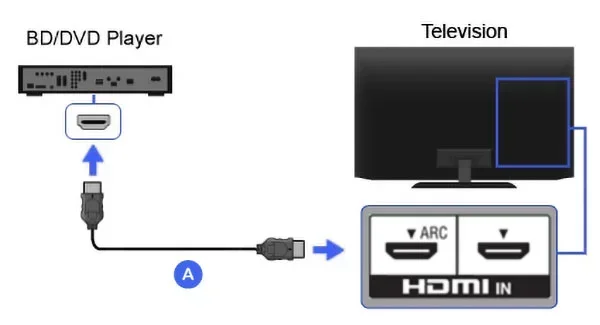
eARC stands for enhanced Audio Return Channel. It is a feature built into HDMI that allows your TV to send high-quality audio to a soundbar, AV receiver, or home theater system. The original ARC (Audio Return Channel) was introduced with HDMI 1.4 and served a basic purpose. It let you send audio from your TV back to your audio device using a single HDMI cable. This eliminated the need for optical audio cables in many setups.
However, standard ARC had serious limitations. It could not handle modern audio formats like Dolby Atmos or DTS:X. It also had limited bandwidth, which meant compressed audio at best. For many casual viewers, this was fine. But for anyone who cares about surround sound and cinematic audio quality, standard ARC was a major bottleneck.
eARC changed the game. It dramatically increased the bandwidth available for audio signals. This means your TV can now send uncompressed, lossless audio formats to your sound system. You get full Dolby Atmos, DTS:X, and other high-resolution audio formats through a single HDMI cable. For home theater enthusiasts, this is a game changer.
Think of it this way. Standard ARC is like a two-lane road. It gets the job done for basic traffic. eARC is like a multi-lane highway. It can handle much more data at much higher speeds. If you want the best audio experience from your TV, eARC is essential.
How eARC Differs from Standard ARC
The differences between standard ARC and eARC go beyond just bandwidth. Here is a quick comparison of what each supports:
- Audio Formats: Standard ARC supports basic compressed audio formats like Dolby Digital and DTS. eARC supports lossless formats including Dolby Atmos, DTS:X, and uncompressed multichannel audio.
- Bandwidth: Standard ARC uses a maximum bandwidth of about 1 Mbps. eARC supports up to 37 Mbps, which is enough for high-resolution audio.
- Lip Sync Correction: eARC includes automatic lip sync correction. Standard ARC does not have this feature built in.
- Device Control: eARC allows for better device control through HDMI-CEC. You can control multiple devices with a single remote more easily.
- Number of Audio Channels: Standard ARC is limited to 5.1 channels. eARC supports up to 7.1 channels and object-based audio formats.
These differences show why eARC is so important for anyone serious about audio quality. If you are investing in a soundbar or AV receiver that supports Dolby Atmos, you need eARC to get the full experience.
Understanding HDMI 2.1 Cables and Their Capabilities
HDMI 2.1 is the latest major version of the HDMI standard. It was released in 2017 and brought significant upgrades to both video and audio capabilities. HDMI 2.1 supports higher resolutions like 4K at 120Hz and even 8K at 60Hz. It also supports features like Variable Refresh Rate (VRR), Auto Low Latency Mode (ALLM), and enhanced audio formats.
But here is the critical point that many people miss. HDMI 2.1 is a specification standard, not a cable type. The HDMI 2.1 specification defines what devices and cables need to support to be certified. There are different cable categories within the HDMI 2.1 ecosystem, and not all of them support eARC.
When you buy a cable labeled HDMI 2.1, you need to check what specific version of the cable it is. The HDMI Forum introduced cable certification categories to help consumers identify what each cable can handle. These categories include Standard HDMI Cable, High Speed HDMI Cable, Premium High Speed HDMI Cable, and Ultra High Speed HDMI Cable.
The HDMI Cable Certification Categories
Understanding these categories is key to knowing whether a cable supports eARC. Let us break them down:
- Standard HDMI Cable: Supports up to 1080p or 720p video. Does not support eARC. Suitable for basic setups only.
- High Speed HDMI Cable: Supports 4K at 30Hz. Does not support eARC. Common in older setups.
- Premium High Speed HDMI Cable: Supports 4K at 60Hz with HDR. Does not support eARC. This is a common point of confusion because the word “premium” sounds advanced, but it still lacks eARC support.
- Ultra High Speed HDMI Cable: Supports 4K at 120Hz, 8K at 60Hz, and all HDMI 2.1 features. This is the only category that fully supports eARC.
So if you are looking for a cable that supports eARC, you need the Ultra High Speed HDMI Cable. Any cable below that category will not deliver the bandwidth or functionality needed for enhanced audio return channel.
Do All HDMI 2 1 Cables Support Earc
Now we get to the heart of the question. Do all HDMI 2.1 cables support eARC? The answer is no. Here is why. HDMI 2.1 is a version of the HDMI specification that defines maximum capabilities. A device or cable can be HDMI 2.1 compatible without supporting every feature in the specification. eARC is one of those features that requires specific hardware and bandwidth support.
Some manufacturers may label their cables as HDMI 2.1 even if the cable does not meet the Ultra High Speed certification requirements. This is where marketing language can mislead consumers. A cable might say HDMI 2.1 on the packaging but only support the bandwidth of a Premium High Speed cable. In that case, eARC will not work.
The HDMI Forum created the Ultra High Speed HDMI certification program specifically to address this confusion. A cable that carries the Ultra High Speed HDMI certification mark has been tested and verified to support all HDMI 2.1 features, including eARC, 4K at 120Hz, and Dynamic HDR.
So when you are shopping, look for the Ultra High Speed HDMI certification. That is your guarantee. Without it, you are taking a gamble that the cable will support eARC and other advanced features.
What Happens When You Use a Non-Compatible Cable
If you connect a device that supports eARC using a cable that does not, several things can happen. Your TV might not detect the eARC capability of your soundbar or receiver. Audio might fall back to standard ARC or even stereo PCM. In some cases, you might get no audio at all. Dolby Atmos and other lossless formats will be unavailable.
This is a frustrating experience, especially if you have invested in high-quality audio equipment. The problem is not with your TV or soundbar. It is with the cable connecting them. This is exactly why understanding cable compatibility before you buy is so important.
One thing to keep in mind is that your network setup can also affect overall performance. For example, if you are using a smart home setup alongside your entertainment system, having reliable connectivity matters. You can read more about how different devices connect in our article on Are All Rings Connected to WiFi to understand broader connectivity principles.
How to Identify a Cable That Supports eARC
Finding a cable that supports eARC does not have to be confusing. There are clear indicators you can look for on the packaging and the cable itself. Here is what to check before you buy.
Look for the Ultra High Speed HDMI Certification Mark
The Ultra High Speed HDMI certification mark is the gold standard. It is a specific logo that appears on certified cables and packaging. The mark includes the words “Ultra High Speed HDMI” and indicates that the cable has been tested for HDMI 2.1 performance. If you see this mark, the cable supports eARC.
Be cautious of cables that claim HDMI 2.1 support on the label but do not carry the Ultra High Speed certification mark. These cables may work for basic video but could fail when it comes to audio return channel support.
Check the Cable Specifications
Before purchasing, check the product specifications online or on the packaging. Look for the following details:
- HDMI Version: Should be 2.1 or higher.
- Bandwidth: Should be 48 Gbps. This is the bandwidth required for eARC support.
- Certification: Should include Ultra High Speed HDMI certification.
- eARC Support: Some manufacturers explicitly list eARC support in the product description.
If any of these details are missing or unclear, contact the manufacturer before buying. It is better to ask a question upfront than to deal with audio problems later.
Inspect the Cable Itself
Many Ultra High Speed HDMI cables have markings printed directly on the cable jacket. Look for text that says “Ultra High Speed” or “HDMI 2.1.” Some cables also include the certification logo on the connector or along the cable length. If you see only “High Speed” or “Premium High Speed,” the cable likely does not support eARC.
It is also worth noting that cable length can affect performance. Longer cables may suffer signal degradation at higher bandwidths. For eARC support, most cables up to 10 feet work reliably. For longer runs, consider a certified active HDMI cable or a signal booster.
Common Mistakes People Make With HDMI Cables and eARC
Even experienced tech users make mistakes when setting up HDMI cables with eARC. Here are the most common errors and how to avoid them.
Assuming All HDMI 2.1 Cables Are the Same
This is the number one mistake. HDMI 2.1 is a broad specification, and not every cable labeled HDMI 2.1 supports every feature. As we discussed earlier, only Ultra High Speed cables support eARC. Do not assume that the HDMI 2.1 label alone guarantees eARC capability.
Ignoring Device Compatibility
A compatible cable is only half the equation. Your TV, soundbar, and AV receiver must all support eARC for it to work. Check the specifications of each device in your chain. Look for eARC or HDMI 2.1 port labels on the back of each device. If even one device in the chain lacks eARC support, the feature will not work end to end.
Also, some older TVs have HDMI ports that support eARC on only one specific input. Check your TV manual to find which port supports eARC and make sure you connect your audio device to that port.
Using HDMI Adapters or Converters
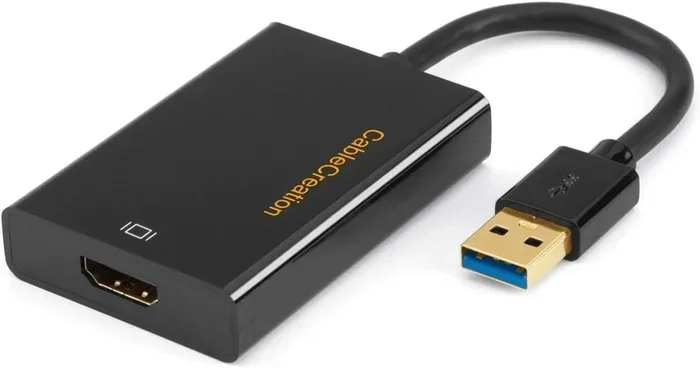
Adapters and converters can be convenient, but they can also break eARC functionality. Many cheap HDMI adapters do not pass through the full HDMI 2.1 signal. If you need to use an adapter, make sure it is rated for HDMI 2.1 and supports eARC. Otherwise, you may experience audio dropouts or reduced audio quality.
Not Enabling eARC in Your TV Settings
Even with the right cable and compatible devices, eARC will not work unless you enable it in your TV settings. Most TVs have an eARC setting buried in the audio or HDMI configuration menu. Go into your TV settings, find the eARC option, and make sure it is turned on. This simple step is often overlooked and causes a lot of frustration.
For more information on how different cables and connections affect your setup, check out our guide on Advantages and Disadvantages of Network Cables to understand how different connection types impact performance.
Benefits of Using eARC With HDMI 2.1
When you have the right HDMI 2.1 cable and eARC enabled, the benefits are significant. Here is what you gain:
- Lossless Audio: Enjoy uncompressed Dolby Atmos and DTS:X without any quality loss. Every detail of the original audio mix reaches your speakers.
- Higher Bandwidth: eARC provides up to 37 Mbps of audio bandwidth, compared to just 1 Mbps with standard ARC.
- Simplified Setup: One HDMI cable handles both video and high-quality audio. No need for extra optical or analog connections.
- Better Lip Sync: Automatic lip sync correction reduces audio-video mismatch without manual adjustments.
- Future Proofing: An Ultra High Speed HDMI cable with eARC support is ready for the next generation of audio and video formats.
These benefits make eARC a must-have for anyone building or upgrading a home theater. The difference in audio quality is immediately noticeable, especially with content from streaming services like Netflix, Disney+, and Apple TV+ that offer Dolby Atmos content.
Quick Tips for Getting the Best eARC Performance
- Always use an Ultra High Speed HDMI cable certified for HDMI 2.1.
- Enable eARC in your TV audio settings before troubleshooting any audio issues.
- Update the firmware on your TV, soundbar, and AV receiver regularly.
- Use the HDMI port on your TV that is labeled eARC or ARC.
- Avoid using HDMI switches or splitters unless they are explicitly rated for HDMI 2.1 and eARC.
- Keep cable runs under 10 feet for best performance without signal boosters.
Frequently Asked Questions
Can I Use an Older HDMI Cable With eARC?
No, older HDMI cables do not support eARC. Standard HDMI cables, High Speed cables, and even some Premium High Speed cables lack the bandwidth needed for enhanced audio return channel. You need an Ultra High Speed HDMI 2.1 cable to use eARC.
Does Every HDMI 2.1 Port on My TV Support eARC?
Not necessarily. Some TVs have multiple HDMI 2.1 ports, but only one or two of them support eARC. Check your TV manual or the manufacturer website to find which specific HDMI port supports eARC on your model.
Can I Get Dolby Atmos Without eARC?
In most cases, no. Dolby Atmos requires the higher bandwidth that eARC provides. Standard ARC and optical connections typically cannot pass lossless Dolby Atmos. You need eARC and an Ultra High Speed HDMI cable for the full Dolby Atmos experience.
What Is the Difference Between HDMI 2.1 and Ultra High Speed HDMI?
HDMI 2.1 is the specification standard that defines features like 4K at 120Hz and eARC. Ultra High Speed HDMI is the cable certification that guarantees a cable can handle all HDMI 2.1 features. Think of HDMI 2.1 as the blueprint and Ultra High Speed as the certified product built to meet that blueprint.
Do Soundbars Always Support eARC?
No, not all soundbars support eARC. Many budget soundbars only support standard ARC or optical audio. Before buying a soundbar, check the specifications to confirm eARC support. This is especially important if you want to enjoy Dolby Atmos from your TV.
Will eARC Work With HDMI Extension Cables?
It depends. HDMI extension cables or couplers can degrade the signal if they are not rated for HDMI 2.1. Use only certified Ultra High Speed extension cables to maintain eARC functionality. Poor quality extensions are a common cause of eARC failures.
Final Thoughts
The question “Do all HDMI 2.1 cables support eARC?” has a clear answer. No, they do not. Only Ultra High Speed HDMI cables certified for HDMI 2.1 fully support eARC. Understanding this distinction is essential for anyone who wants the best audio quality from their home entertainment setup.
When you are shopping for cables, do not just look at the HDMI version printed on the box. Check for the Ultra High Speed certification mark, verify the bandwidth rating, and confirm eARC support in the specifications. Take the extra few minutes to read the product details. It will save you from frustration and audio problems down the road.
Setting up a home theater is an investment. You want every component to work together seamlessly. The right HDMI cable is a small part of that setup, but it makes a huge difference. With the correct Ultra High Speed HDMI cable and eARC enabled on all your devices, you will experience lossless audio, perfect synchronization, and the kind of sound quality that makes movies and games come alive.
Take what you have learned here, apply it to your setup, and enjoy the full potential of your home entertainment system. The best audio experience starts with the right cable.
Frequently Asked Questions
What is Do All Hdmi 2 1 Cables Support Earc?
Do All Hdmi 2 1 Cables Support Earc is an important topic with many practical applications.