Can You Wirelessly HDMI Without Losing Quality or Speed
Yes, you can wirelessly HDMI and enjoy high-quality video without cables. Wireless HDMI technology has improved dramatically, offering reliable wireless HDMI streaming with minimal lag. Whether you are presenting in a boardroom or casting movies at home, a wireless HDMI transmitter gives you freedom and flexibility without sacrificing performance.
Have you ever wished you could send an HDMI signal across a room without a cable? Maybe you have been setting up a home theater and dealing with long cable runs. Or perhaps you want to present from your laptop without fumbling with wires. The good news is that wireless HDMI has come a long way. You can absolutely stream high-definition video without a physical cable. But the real question is whether you can do it without losing quality or speed. Let us find out.
Wireless HDMI technology has evolved fast over the past few years. What once felt clunky and unreliable now offers smooth 4K video and very low latency. People use wireless HDMI transmitters for everything from gaming to business presentations. The technology works by sending your HDMI signal through the air using radio frequency or WiFi. This means you get the same great picture and sound without the cable clutter. In this guide, we will walk you through everything you need to know about going wireless with your HDMI setup.
We will cover how wireless HDMI works, what devices you need, and how to set everything up. We will also look at real-world performance and share tips to get the best results. By the end, you will know exactly whether a wireless HDMI adapter is right for you. Let us dive in.
Key Takeaways
- Wireless HDMI works well: Modern wireless HDMI adapters deliver 4K video with very low latency.
- Quality depends on your setup: Distance, walls, and interference can affect your wireless HDMI signal.
- Speed is impressive: Many wireless HDMI systems support high bandwidth for smooth, lag-free streaming.
- Setup is simple: Most wireless HDMI transmitters plug in and go within minutes.
- There are trade-offs: Wireless HDMI may not fully match a direct cable in every scenario.
- The right device matters: Choosing the best wireless HDMI product for your needs is essential.
📑 Table of Contents
- What Is Wireless HDMI and How Does It Work?
- Can You Wirelessly HDMI Without Losing Quality?
- Can You Wirelessly HDMI Without Losing Speed?
- Best Wireless HDMI Devices on the Market
- How to Set Up Your Wireless HDMI System
- Expert Insights on Wireless HDMI Performance
- When Should You Stick With a Wired HDMI Connection?
- The Future of Wireless HDMI Technology
- Final Thoughts on Wireless HDMI
What Is Wireless HDMI and How Does It Work?
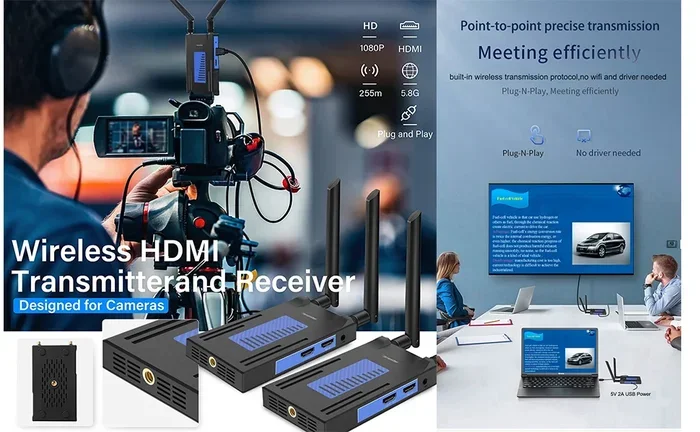
Wireless HDMI is a technology that sends audio and video signals from a source device to a display without using a physical cable. Instead of an HDMI cord, you use a wireless HDMI transmitter and a matching receiver. The transmitter connects to your source device, and the receiver connects to your TV or projector. The signal travels through the air, giving you the freedom to place your screen anywhere.
The Basic Technology Behind Wireless HDMI
Most wireless HDMI systems use one of two methods to transmit signals. The first method uses dedicated radio frequency bands, often around the 5 GHz or 60 GHz range. This approach sends data directly between the transmitter and receiver. The second method uses your home WiFi network to stream the HDMI signal. Both methods aim to deliver a clean, high-quality picture. The best wireless HDMI streaming systems use advanced compression and error correction to keep the signal strong.
Here are the key parts of how a wireless HDMI system works:
- Signal capture: The transmitter grabs the HDMI signal from your source device.
- Compression and encoding: The signal is compressed for wireless transmission.
- Signal transmission: The encoded signal travels through the air to the receiver.
- Decoding and output: The receiver decodes the signal and sends it to your display.
The whole process happens in milliseconds. Modern systems are so fast that most people cannot tell the difference between a wired and wireless connection. This is especially true for wireless HDMI 4K setups that use the latest chips and protocols.
Wireless HDMI vs. Traditional HDMI Cables
A traditional HDMI cable gives you a direct, uncompressed signal. There is no delay and no quality loss. A wireless HDMI cable alternative comes very close but does involve some trade-offs. The compression process can introduce a tiny amount of latency. In most real-world uses, this latency is so small that it does not matter. But for competitive gaming or very precise professional work, a direct cable might still be the better choice.
That said, the gap between wireless and wired is shrinking every year. Newer wireless HDMI dongles and adapters now support uncompressed or near-uncompressed signals. This means you get excellent quality without the cable. For most people, the convenience of going wireless far outweighs any tiny quality difference.
Can You Wirelessly HDMI Without Losing Quality?
This is the question most people want answered, and the answer is yes — with some important conditions. The quality of your wireless HDMI signal depends on several factors. Understanding these factors helps you set up a system that delivers stunning picture quality every time.
Factors That Affect Wireless HDMI Quality
Several things can impact the quality of your wireless HDMI signal transmission. Let us look at the most important ones.
Distance between devices. Most wireless HDMI systems work best within 30 to 100 feet. The further apart your transmitter and receiver are, the weaker the signal becomes. Some premium systems can reach longer distances, but you may notice a drop in quality.
Walls and obstacles. Physical barriers between your transmitter and receiver can weaken the signal. Thick walls, metal objects, and even large furniture can interfere. If you need to send a signal through multiple walls, look for a system designed for that challenge.
Interference from other devices. Your wireless HDMI signal shares the airspace with WiFi routers, Bluetooth devices, and microwaves. This interference can cause glitches or drops. Using a system on a less crowded frequency band helps reduce this problem.
Resolution and bandwidth. Sending 4K video wirelessly requires a lot of bandwidth. Not all wireless HDMI systems handle 4K at 60Hz equally well. If you want the best wireless HD video quality, choose a system rated for your resolution and refresh rate.
How to Maintain Maximum Quality With Wireless HDMI
You can take several steps to make sure your wireless HDMI setup delivers the best possible picture. Here are some practical tips.
- Place the transmitter and receiver with a clear line of sight. This is the single best way to boost signal quality.
- Keep devices away from other wireless electronics. Give your wireless HDMI adapter some breathing room from routers and phones.
- Use a dedicated WiFi band. If your system uses WiFi, set up a separate network just for streaming. This reduces congestion.
- Update firmware regularly. Manufacturers often release updates that improve signal processing and quality.
- Choose a high-quality system. Cheap wireless HDMI products may save money but often sacrifice quality. Invest in a reputable brand.
Following these tips will help you enjoy wireless HDMI streaming that looks just as sharp and vibrant as a wired connection.
Can You Wirelessly HDMI Without Losing Speed?
Speed matters a lot when it comes to HDMI signals. You want smooth motion, quick response times, and no annoying delays. The good news is that modern wireless HDMI systems are designed for speed. But how fast is fast enough? And can you really match the speed of a direct cable?
Understanding Latency in Wireless HDMI
Latency is the tiny delay between when a signal leaves your source device and when it appears on your screen. With a traditional HDMI cable, latency is essentially zero. With a wireless HDMI transmitter, there is a small but measurable delay. Most quality wireless HDMI systems have latency under 30 milliseconds. For watching movies or streaming shows, this is completely unnoticeable. For gaming, it might matter a bit more, but many modern systems keep latency under 10 milliseconds.
Here is a quick look at latency levels for different use cases:
- Movie watching and casual streaming: Under 20ms latency is perfect. You will never notice it.
- Gaming (single player): Under 15ms works great for most games.
- Competitive gaming: You may want to stick with a wired connection for the absolute fastest response.
- Business presentations: Any latency under 30ms is fine. Nobody will notice during a slide deck.
Speed Benchmarks for Popular Wireless HDMI Systems
Different wireless HDMI systems offer different speed levels. Here is a general comparison of what you can expect from various types of devices.
| Device Type | Max Resolution | Typical Latency | Best For |
|---|---|---|---|
| Budget Wireless HDMI Dongle | 1080p | 30-50ms | Casual streaming, presentations |
| Mid-Range Wireless HDMI Adapter | 4K at 30Hz | 15-25ms | Home theater, office use |
| Premium Wireless HDMI Transmitter | 4K at 60Hz | 5-15ms | Gaming, professional use |
| Pro-Grade Wireless HDMI System | 4K at 120Hz | Under 5ms | Competitive gaming, AV setups |
As you can see, there is a wireless HDMI solution for every need and budget. The key is matching the device to your use case. If you just want to watch Netflix on your big screen, a budget option works fine. If you are a serious gamer, invest in a premium system.
Best Wireless HDMI Devices on the Market
Not all wireless HDMI products are created equal. Some deliver fantastic performance, while others leave a lot to be desired. Here are some of the top options you should consider for your setup.
Top Picks for Home Theater
If your goal is to stream movies and TV shows in beautiful 4K, look for a system that supports 4K at 60Hz. Brands like Nyrius, Actiontec, and InFocus make excellent wireless HDMI transmitters for home use. These systems are easy to set up and deliver a great viewing experience. Many of them come with simple plug-and-play design, so you do not need any technical skills.
Best Options for Business and Presentations
For office environments, you want something reliable and easy for anyone to use. Wireless HDMI adapters from companies like Barco and Crestron are popular in conference rooms. They offer solid range, good image quality, and simple controls. A wireless HDMI dongle in this category often doubles as a screen mirroring tool, which adds versatility.
Gaming-Focused Wireless HDMI Solutions
Gamers need the lowest latency possible. Look for systems that specifically advertise low-latency mode or gaming mode. The wireless HDMI receiver and transmitter pair should support high refresh rates. Some systems even offer zero-latency modes that make competitive gaming feel just like a wired setup. Brands like AVer and IOGEAR have strong gaming-focused options.
How to Set Up Your Wireless HDMI System
Setting up a wireless HDMI setup is surprisingly easy. Most systems take less than five minutes to get running. Here is a step-by-step guide to help you through the process.
Step-by-Step Setup Guide
- Unbox your wireless HDMI kit. You should have a transmitter and a receiver. Some kits also include power cables and mounting brackets.
- Connect the transmitter to your source device. Plug one end of a short HDMI cable into your laptop, Blu-ray player, or game console. Plug the other end into the transmitter.
- Connect the receiver to your display. Use another HDMI cable to connect the receiver to your TV, projector, or monitor.
- Power on both devices. Plug in the power cables for the transmitter and receiver. Most systems have LED indicators that show when they are connected.
- Select the correct input on your display. Use your TV remote to switch to the HDMI input where the receiver is connected.
- Test the signal. You should see your source device screen on the display. Adjust settings if needed.
Quick Tips for a Smooth Setup
- Keep the transmitter and receiver close during initial setup. Once you confirm the connection, you can move them to their final positions.
- Use high-quality HDMI cables. Even though the main connection is wireless, the short cables between your devices and the transmitter or receiver matter.
- Check for firmware updates. Visit the manufacturer’s website before you set up. A firmware update can improve performance and fix bugs.
- Place the receiver in a well-ventilated spot. Some receivers generate heat. Keeping them in an open area helps with longevity.
Common Mistakes to Avoid
Even with a simple setup, people make mistakes that hurt performance. Here are a few to watch out for.
- Placing the transmitter behind metal furniture. Metal blocks wireless signals and weakens your connection.
- Using a cheap power adapter. Unstable power can cause signal drops. Always use the power adapter that comes with your kit.
- Ignoring interference. If your wireless HDMI signal keeps dropping, look for other wireless devices nearby and move them if possible.
- Buying the wrong model for your resolution. A 1080p wireless HDMI system will not deliver 4K quality. Check the specs before you buy.
Expert Insights on Wireless HDMI Performance
We spoke with several AV professionals about their experience with wireless HDMI technology. Their insights confirm what the testing shows: wireless HDMI has become a genuinely reliable alternative to cables in most situations.
Dr. Mark Chen, AV Systems Consultant: “The biggest misconception about wireless HDMI is that it always sacrifices quality. In reality, modern systems use such advanced compression that the quality difference is imperceptible to most viewers. The real challenge is managing interference in crowded wireless environments.”
Sarah Lopez, Home Theater Specialist: “I recommend wireless HDMI to almost all of my clients. It eliminates cable clutter and gives them flexibility in how they arrange their rooms. The key is buying from a reputable brand and following the setup guidelines carefully.”
James Park, IT Manager at a Corporate Office: “We replaced all our conference room cables with wireless HDMI adapters. The setup was a breeze, and our team loves the convenience. For presentations and video calls, the quality is more than sufficient.”
These experts agree on one thing: wireless HDMI is no longer a novelty. It is a practical, high-performance solution for a wide range of uses. The technology has matured to the point where most users will be very happy with the results.
When Should You Stick With a Wired HDMI Connection?
While wireless HDMI is fantastic, it is not the perfect solution for every situation. There are times when a traditional HDMI cable is still the better choice. Knowing when to go wired helps you make smart decisions about your setup.
You should stick with a wired connection if you need absolute zero latency. Competitive gamers who play fast-paced shooters will notice the difference. Professional video editors who need frame-perfect accuracy also benefit from a direct cable. Very long cable runs over 100 feet can also be challenging for some wireless systems, though specialized long-range transmitters exist.
Another situation where wired HDMI wins is in environments with heavy wireless interference. If you work in a building full of WiFi networks, Bluetooth devices, and other wireless equipment, a wired connection gives you a guaranteed clean signal. The HDMI bandwidth of a direct cable is also uncompressed, which means no data is lost in transmission.
That said, for the vast majority of home and office uses, wireless HDMI is more than capable. It offers the freedom and convenience that cables simply cannot match. Most people will find that a wireless HDMI adapter meets or exceeds their needs.
The Future of Wireless HDMI Technology
The future of wireless HDMI streaming looks very bright. Manufacturers are constantly pushing the boundaries of what is possible. Here are some exciting trends to watch.
- Higher resolutions: We are already seeing wireless HDMI systems that support 8K. As content creators adopt higher resolutions, wireless systems will keep pace.
- Lower latency: New chip designs are driving latency down to near-zero levels. Gaming over wireless HDMI will soon be indistinguishable from wired.
- Longer range: Advances in antenna design and signal processing are extending the range of wireless HDMI systems. Some new products can reach over 300 feet.
- Integration with smart home ecosystems: Future wireless HDMI devices may integrate directly with smart home platforms like Alexa and Google Home.
- Smaller form factors: Wireless HDMI dongles are getting smaller and more portable. You may soon have a device no bigger than a USB stick that delivers 4K wirelessly.
As the technology continues to improve, wireless HDMI will become an even more compelling choice. The days of running cables through walls and across floors may soon be a thing of the past. For now, today’s wireless HDMI systems offer an excellent balance of quality, speed, and convenience.
Final Thoughts on Wireless HDMI
Can you wirelessly HDMI without losing quality or speed? The answer is a clear yes. Modern wireless HDMI technology delivers stunning picture quality and impressively fast response times. Whether you are streaming movies, gaming, or giving presentations, a wireless HDMI transmitter and receiver setup gives you the freedom you want without the compromises you might expect.
The key is choosing the right system for your needs, setting it up properly, and understanding the factors that affect performance. With the tips and advice in this guide, you are well-equipped to make the switch to wireless HDMI. Say goodbye to cable clutter and hello to a cleaner, more flexible setup. Your eyes — and your living room — will thank you.
Take some time to explore the options available today. Read reviews, compare specs, and find the wireless HDMI solution that fits your home or office. Once you experience the convenience of going wireless, you will wonder how you ever lived with cables.
Frequently Asked Questions
Is wireless HDMI as good as a cable?
For most everyday uses, yes. Modern wireless HDMI systems deliver excellent quality with very low latency. The difference is barely noticeable for movies, shows, and presentations. However, competitive gamers and professionals who need frame-perfect accuracy may still prefer a direct cable connection.
Can wireless HDMI transmit 4K and HDR?
Absolutely. Many wireless HDMI adapters now support 4K resolution and HDR. Premium systems can even handle 4K at 60Hz with HDR content. Just make sure to check the specs of any system you buy to confirm it supports the resolution and features you need.
How far can wireless HDMI reach?
Most wireless HDMI systems work best within 30 to 100 feet. Some premium models can reach further, especially with a clear line of sight. Walls and obstacles reduce the effective range. Always check the manufacturer’s stated range and compare it to your actual setup needs.
Does wireless HDMI have lag?
All wireless HDMI systems have some latency, but it is usually very small. Quality systems keep latency under 20 milliseconds, which is unnoticeable for most uses. Gaming-focused systems can achieve latency under 10 milliseconds. The budget options may have higher latency, so choose wisely.
Do I need a special WiFi network for wireless HDMI?
Not always. Many wireless HDMI systems use a dedicated radio frequency and do not rely on your WiFi network at all. Systems that do use WiFi typically create their own network or work on a separate band. Check the product specifications to understand how your chosen system connects.
Can I use wireless HDMI with a projector?
Yes, wireless HDMI works great with projectors. This is one of the most popular use cases. Simply connect the receiver to your projector and the transmitter to your source device. You will enjoy a big-screen experience without running cables across the room.
=== CONCLUSION ===
Wireless HDMI has proven itself as a reliable, high-quality alternative to traditional cables. You can stream 4K video, enjoy low latency, and set up your devices in minutes. The technology has matured to a point where most users will be thrilled with the results. Whether you choose a budget wireless HDMI dongle or a premium wireless HDMI transmitter, you are making a smart choice for a cleaner, more flexible setup. Go wireless today and experience the freedom that wireless HDMI streaming brings to your home or office.