Can You Use HDMI With Gamecube For Better Graphics
Yes, you can use HDMI with your Gamecube through a special adapter that converts the original AV output into a clean digital signal. Using HDMI with Gamecube dramatically improves resolution, color accuracy, and overall Gamecube graphics compared to the old composite cables. Whether you are a retro gaming HDMI enthusiast or just want cleaner visuals, this upgrade is worth exploring.
The Gamecube is one of the most beloved consoles in retro gaming history. Released by Nintendo in 2001, it gave us incredible titles like Metroid Prime, The Legend of Zelda: Wind Waker, and Super Smash Bros. Melee. But here is the problem. The Gamecube video output was built for old CRT televisions. If you hook it up to a modern flat screen, the picture can look soft, blurry, or just plain dull.
That is where using HDMI with Gamecube comes in. Many gamers wonder whether this upgrade is even possible. The short answer is yes. But the full story is more interesting than you might think. In this guide, we will walk through everything you need to know about getting Gamecube HDMI output on your setup. We will cover how the technology works, which adapters to buy, and whether the visual improvement is really worth it.
By the end of this article, you will have a clear picture of what to expect. You will know exactly how to get the best Gamecube graphics possible on your modern display. Let us dive in.
Key Takeaways
- The Gamecube does not have native HDMI output: You need a third-party adapter or mod chip to get HDMI.
- HDMI significantly improves Gamecube graphics: You get sharper images, better colors, and cleaner text on modern TVs.
- Several adapter options exist: From plug-and-play devices to full console mods, there is a solution for every budget.
- Original AV cables limit your experience: Composite and component cables were designed for CRT televisions, not modern displays.
- Setting up HDMI is straightforward: Most adapters require no technical skills and connect between the console and your TV.
- Audio also improves: HDMI carries both video and sound in one cable, eliminating static and interference.
📑 Table of Contents
- Understanding the Gamecube Video Output
- Can You Use HDMI With Gamecube Directly?
- How Gamecube HDMI Adapters Work
- Comparing Original AV Cables vs HDMI Output
- Step-by-Step: Setting Up HDMI on Your Gamecube
- Does HDMI Actually Improve Gamecube Graphics?
- Common Mistakes When Setting Up Gamecube HDMI
- Expert Insights on Retro Gaming HDMI Upgrades
- Final Thoughts on Using HDMI With Gamecube
Understanding the Gamecube Video Output
Before we talk about HDMI adapters for Gamecube, it helps to understand what the console originally offered. The Gamecube AV port on the back of the unit was designed for a specific era of television technology. Back then, most households had CRT TVs with limited resolution capabilities.
The standard Gamecube AV cable that came in the box was a composite cable. It used a single yellow RCA connector for video, along with red and white connectors for audio. This setup carried an analog signal that looked fine on older screens. But on a modern LCD or LED television, the results are often disappointing.
What the Original Cables Look Like on Modern TVs
When you plug a composite cable into a modern TV, several issues pop up right away. The image looks soft around the edges. Text in menus becomes hard to read. Colors appear washed out or slightly tinted. And because the signal is analog, you often see a faint static or noise pattern across the screen.
Nintendo did offer a Gamecube component cable as a separate purchase. This cable used three video connectors (red, green, and blue) for a sharper picture. The component setup was a big step up from composite. It gave better color separation and slightly improved resolution. However, even component output still falls short by today’s standards.
The Gamecube resolution natively supports up to 480p. That sounds decent on paper, but the way the signal is processed through analog cables means the actual quality drops significantly. This is exactly why so many retro gamers have turned to digital HDMI output as the solution.
Can You Use HDMI With Gamecube Directly?
Here is the honest truth. The Gamecube does not have a built-in HDMI port. Nintendo never included digital video output in the original console design. So you cannot simply plug an HDMI cable into Gamecube and expect it to work. The console simply does not have the hardware for that.
But that does not mean you are stuck with poor image quality forever. The retro gaming HDMI community has found creative ways to bridge this gap. Through the use of external adapters and internal modifications, you can absolutely get a clean digital signal from your Gamecube to a modern television.
The Two Main Approaches to Gamecube HDMI
There are essentially two paths you can take when adding HDMI to Gamecube. The first is an external adapter that sits between the console and your TV. The second involves opening the console and installing a modification chip or replacing the video hardware entirely.
The external adapter route is much simpler. You plug the Gamecube’s AV cable into the adapter box, and the adapter outputs an HDMI signal to your television. No opening the console. No soldering. No technical expertise required. This is the best option for most casual gamers who just want better picture quality without the hassle.
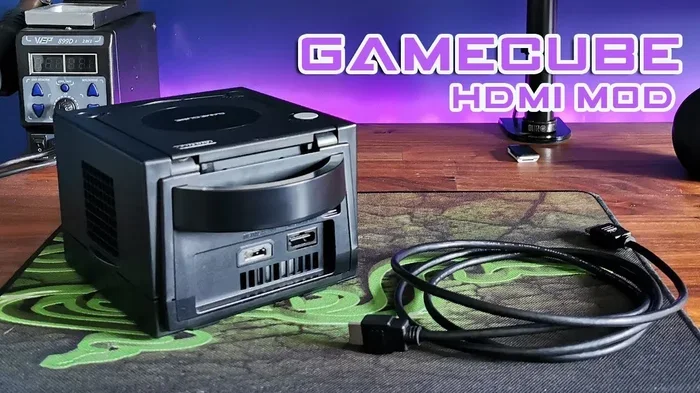
The internal mod route requires more effort but can yield even better results. A Gamecube mod chip replaces or bypasses the original video processing hardware. This gives you access to cleaner output options and sometimes even higher resolution settings. Modding is popular among enthusiasts who want full control over their setup.
How Gamecube HDMI Adapters Work
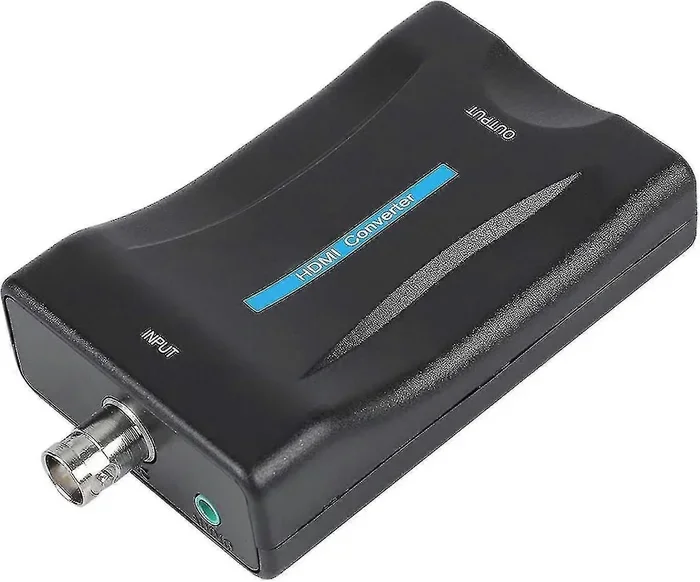
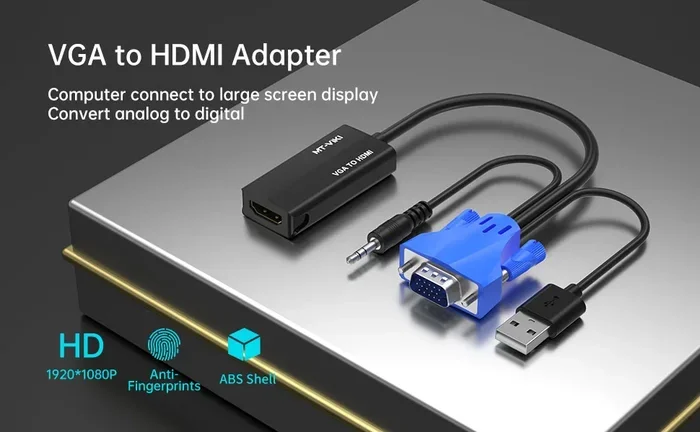
Understanding how a Gamecube HDMI adapter processes the signal helps you appreciate what the upgrade does. The adapter takes the analog video signal coming from the console and converts it into a clean digital format. This digital signal then travels through an HDMI cable to your television or monitor.
Inside the adapter, a small processing chip handles the conversion. It takes the raw analog input and translates it into a digital output that modern displays can read properly. The result is a much crisper, cleaner image with sharper edges and more accurate colors.
Signal Conversion Process
The conversion process happens in real time. There is no noticeable delay or lag added by the adapter. The Gamecube video quality improves because the digital signal is far less prone to interference than the original analog cable. You get a stable, noise-free picture every time.
Most adapters also handle the audio conversion. Instead of using separate red and white RCA cables for sound, the HDMI Gamecube setup carries both video and audio through a single cable. This simplifies your setup and eliminates the crackling or humming that sometimes comes with old analog connections.
Some advanced adapters also include upscaling features. Upscaling takes the native 480p signal and stretches it to fit your TV’s resolution. So if you have a 1080p or even a 4K television, the adapter can make the image fill the screen properly. Keep in mind that upscaling does not add new detail to the picture. It simply makes the existing image fit your screen without black bars or stretching artifacts.
Comparing Original AV Cables vs HDMI Output
To truly understand the value of Gamecube HDMI output, it helps to compare it side by side with the original cables. The difference is striking, especially on larger modern displays.
Visual Quality Comparison
When you look at the same game on composite cables versus HDMI, the gap is obvious. The composite image looks fuzzy and lacks detail. Text is hard to read. Colors bleed into each other slightly. The HDMI version looks crisp and clean. Edges are sharp. Colors are vibrant and accurate.
Here is a quick comparison of what each setup offers:
- Composite AV Cable: The default cable included with the console. Single yellow video connector. Lower resolution. Noticeable noise and static. Poor performance on modern TVs.
- Component AV Cable: Three video connectors for better color separation. Sharper than composite. Still analog. Better than composite but not as clean as HDMI.
- HDMI via Adapter: Digital output converted from the original signal. Clean, noise-free picture. Sharp text and edges. Best option for modern displays.
- HDMI with Upscaling: Same as above but with resolution scaling. Fills modern screens properly. Maintains aspect ratio. Ideal for large TVs and monitors.
Audio Quality Comparison
The audio improvement is also worth noting. The original composite and component cables carry sound through separate RCA connectors. Over time, these cables can develop a faint buzzing or humming sound. With Gamecube HDMI audio, the sound travels digitally. There is no interference, no static, and no buzzing. The audio is clean and clear, matching the improved video quality.
Step-by-Step: Setting Up HDMI on Your Gamecube
Setting up HDMI output on Gamecube is easier than most people expect. You do not need to be a tech expert. Here is a simple walkthrough for the most common approach using an external adapter.
What You Will Need
Before you start, gather these items. You need your Gamecube console with its original power cable. You need the standard AV cable that came with the console or a component cable if you already own one. You need a Gamecube HDMI adapter compatible with your model. And you need a standard HDMI cable to connect the adapter to your TV.
Setup Steps
- Plug your Gamecube’s AV cable into the back of the console as you normally would.
- Connect the other end of the AV cable into the input port on the HDMI adapter.
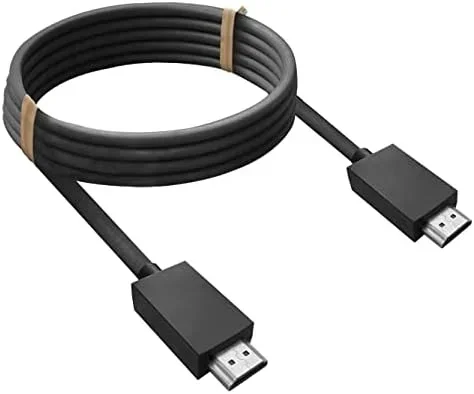
- Take your HDMI cable and plug one end into the adapter’s output port.
- Plug the other end of the HDMI cable into an available HDMI port on your television.
- Power on your Gamecube and switch your TV to the correct HDMI input.
- Go to the Gamecube video settings menu and select the output format if prompted.
- Adjust your TV’s picture settings for the best result. Brightness, contrast, and sharpness controls can help fine-tune the image.
That is it. In just a few minutes, you are enjoying Gamecube games in HDMI quality. The improvement is immediate and noticeable.
Tips for Best Results
Use a high-quality HDMI cable for the cleanest signal. Cheap cables can sometimes introduce minor issues. If your adapter has upscaling options, experiment with different settings to find what looks best on your specific TV. Some gamers prefer a slight sharpen filter, while others like the image more natural. Try different settings and see what works for your eyes.
Does HDMI Actually Improve Gamecube Graphics?
This is the question on every retro gamer’s mind. And the answer is a resounding yes. Using HDMI with Gamecube produces a noticeably better image in almost every way. But let us be specific about what changes and what does not.
HDMI does not add new detail to the games. The Gamecube graphics hardware is still the same hardware from 2001. The polygons, textures, and lighting effects are identical. What HDMI does is deliver the existing image in a much cleaner, more accurate way.
What Gets Better with HDMI
- Sharpness: Text and lines look crisp and well-defined. Menu text is easy to read even on large screens.
- Color Accuracy: Colors appear more vibrant and true to the developers’ intentions. There is no color bleeding or tinting.
- Noise Reduction: The analog static and noise that plagued composite cables completely disappear. The picture is clean and stable.
- Contrast: Blacks are deeper and whites are brighter. The image has more depth and dimension.
- Simplicity: One cable for both video and audio. No messy cable management behind your entertainment center.
What Does Not Change
It is important to set realistic expectations. HDMI will not turn the Gamecube into a modern console. The resolution is still capped at what the hardware supports. You will not see 1080p native rendering from the console itself. The polygon count and texture quality remain the same. What you gain is a cleaner delivery of the image that was always there.
Think of it this way. HDMI is like putting a fresh coat of paint on a classic car. The car is still the same car underneath. But the way it looks on the road is dramatically improved. That is exactly what Gamecube HDMI output does for your favorite retro titles.
Common Mistakes When Setting Up Gamecube HDMI
Even though the setup is simple, some common mistakes can cause frustration. Avoid these pitfalls to get the best experience with your Gamecube HDMI adapter.
Using the Wrong Adapter Model
Not all Gamecube HDMI adapters are created equal. Some are designed only for specific Gamecube models. Others may not support certain video modes. Before purchasing, double-check that the adapter is compatible with your specific console revision. The original model and the smaller redesign have slightly different internal hardware.
Ignoring Audio Settings
When you switch to HDMI audio from Gamecube, your TV may need a moment to recognize the new input. If you get no sound, check that your TV is set to the correct HDMI channel. Also make sure your Gamecube audio settings are not set to output through a format your TV does not support.
Skipping the Upscaling Step
If you are using a large TV, skipping upscaling can result in a small, centered image with black bars on all sides. Most Gamecube HDMI adapters include upscaling options. Take a few minutes to configure these properly. The difference on a 50-inch or larger screen is significant.
Using Low-Quality Cables
A cheap HDMI cable can undermine the entire setup. Invest in a certified high-speed HDMI cable from a reputable brand. This ensures the digital signal travels cleanly from the adapter to your TV without degradation.
Expert Insights on Retro Gaming HDMI Upgrades
Retro gaming HDMI upgrades have become one of the most popular ways to preserve and enjoy classic consoles. The Gamecube HDMI mod community is particularly active, with enthusiasts sharing tips, reviews, and custom builds online.
Many experts agree that the Gamecube video output upgrade is one of the best value-for-money improvements you can make to a retro setup. The cost of an adapter is modest compared to the dramatic improvement in visual quality. For collectors and casual players alike, it is a worthwhile investment.
Some purists argue that the original analog output is part of the authentic retro experience. They prefer the slight warmth and character of composite video. This is a valid perspective. But for those who want to enjoy their Gamecube games on modern displays without squinting at a fuzzy screen, HDMI is the clear winner.
Final Thoughts on Using HDMI With Gamecube
So, can you use HDMI with Gamecube for better graphics? Absolutely. The process is accessible, affordable, and delivers real results. Whether you choose a simple external adapter or dive into a full console modification, the upgrade transforms how your favorite Gamecube games look on a modern TV.
The Gamecube HDMI adapter market has matured significantly in recent years. Reliable options are available at various price points. You do not need to spend a fortune to enjoy cleaner, sharper visuals. Even a budget-friendly adapter makes a dramatic difference compared to the original composite cable.
If you love retro gaming and want to get the most out of your Gamecube console, this upgrade should be at the top of your list. The improved Gamecube image quality makes playing these classic titles a much more enjoyable experience. Text is easier to read. Colors pop. And the overall presentation feels more polished and professional.
Take the time to set up your HDMI Gamecube connection properly. Experiment with settings. Find what looks best on your specific display. Once you make the switch, you will wonder how you ever played with the original cables. The Gamecube graphics were always there, waiting to be seen the way they were meant to look.
Grab your adapter, plug in your console, and get ready to experience Nintendo’s beloved Gamecube library in a whole new light. Your eyes will thank you.
Frequently Asked Questions
Can you plug HDMI directly into a Gamecube?
No, the Gamecube does not have a built-in HDMI port. You need a separate Gamecube HDMI adapter to convert the original AV signal into a digital HDMI output. The adapter connects between the console and your TV.
Does using HDMI improve Gamecube graphics?
Yes, using HDMI with Gamecube significantly improves visual quality. You get sharper text, cleaner colors, and a noise-free image. The Gamecube graphics hardware stays the same, but the digital signal delivery makes everything look much better on modern displays.
Which Gamecube HDMI adapter is the best?
The best adapter depends on your budget and needs. Popular options include plug-and-play external adapters that require no modification. Some models include upscaling features for large TVs. Look for adapters that are specifically designed for the Gamecube and have positive reviews from the retro gaming community.
Can you get 1080p output from a Gamecube with HDMI?
The Gamecube’s hardware natively supports up to 480p. An HDMI adapter can upscale the 480p signal to fit a 1080p or 4K TV screen. However, the actual rendered content remains at 480p. The upscaling process fills the screen properly but does not add new detail to the image.
Is modding the Gamecube to add HDMI difficult?
Internal Gamecube modding for HDMI output requires opening the console and soldering or replacing components. It is not recommended for beginners. If you are comfortable with hands-on electronics work, it can be a rewarding project. For most users, an external adapter is the simpler and safer choice.
Does HDMI improve Gamecube audio quality too?
Yes, Gamecube HDMI audio is cleaner than the original RCA connections. HDMI carries both video and sound digitally, eliminating analog interference, buzzing, and humming. The result is clear, crisp audio that matches the improved video quality.
=== CONCLUSION ===
Using HDMI with Gamecube is one of the best upgrades you can make to your retro gaming setup. The process is simple, the cost is reasonable, and the visual improvement is undeniable. Your favorite Gamecube games deserve to look their best on modern screens, and a Gamecube HDMI adapter makes that possible.
From sharper text to cleaner colors and noise-free picture, every aspect of the Gamecube video output gets better with HDMI. Whether you are a casual player revisiting old favorites or a dedicated collector preserving your game library, this upgrade delivers real value.
Take action today. Research the available Gamecube HDMI output options, pick the adapter that fits your needs, and enjoy your retro games the way they were always meant to look. The difference is immediate, and once you make the switch, you will never go back to the old cables again.