Can You Get A Wifi Hotspot On Straight Talk Service
Yes, you can get a wifi hotspot on Straight Talk service. Straight Talk allows you to use your phone as a portable hotspot, sharing your data connection with other devices. This guide walks you through every step, from enabling the hotspot feature to troubleshooting common issues and choosing the best data plan for tethering.
Have you ever been stuck somewhere without a reliable internet connection and wished your phone could do more? Can you get a wifi hotspot on Straight Talk? The short answer is yes. Straight Talk Wireless lets you turn your phone into a mobile hotspot, giving you wireless internet wherever you go. Whether you are traveling, working remotely, or just need a backup connection, knowing how to set up and use your hotspot is a game changer. In this guide, we will walk you through everything you need to know about getting a wifi hotspot on Straight Talk.
Straight Talk is a popular prepaid carrier that runs on major networks like AT&T, T-Mobile, Verizon, and others. This means you get strong network coverage and decent speeds. The wifi hotspot feature lets you share your data plan with other devices. But there are some things you need to know first. Not all plans support tethering, and the way you enable it depends on your phone type. This article covers it all, from setup to troubleshooting and everything in between.
Key Takeaways
- Straight Talk supports wifi hotspot functionality: You can tether your phone and share data with laptops, tablets, and other devices.
- You need the right data plan: Not all Straight Talk plans include hotspot data, so check your plan details before tethering.
- Enabling the hotspot is simple: It works on both Android and iPhone devices through built-in settings.
- APN settings matter: Correct configuration ensures your hotspot works smoothly and reliably.
- Watch your data usage: Hotspot tethering can drain your data fast, so monitor consumption carefully.
- Common issues are fixable: Most hotspot problems can be solved with basic troubleshooting steps.
- Straight Talk uses major networks: Your hotspot speed depends on the underlying network coverage in your area.
📑 Table of Contents
- What Is a Wifi Hotspot on Straight Talk?
- Can You Get A Wifi Hotspot On Straight Talk Service?
- How to Enable Wifi Hotspot on Straight Talk
- Hotspot Data Usage and Limits
- Troubleshooting Common Hotspot Issues
- APN Settings for Straight Talk Hotspot
- Expert Tips for Getting the Most From Your Straight Talk Hotspot
- Is Straight Talk Hotspot Good for Remote Work?
- Straight Talk Hotspot vs. Other Carriers
- Conclusion
What Is a Wifi Hotspot on Straight Talk?
A wifi hotspot turns your phone into a mini router. It shares your cellular data connection with other devices like laptops, tablets, and gaming consoles. When you enable this feature, other devices can connect to the internet through your phone. Think of it as a portable internet source you can carry anywhere.
Straight Talk supports hotspot tethering on most plans. However, the amount of hotspot data you get depends on your specific plan. Some plans offer unlimited hotspot data, while others have strict limits. Before you start, it is important to understand how your plan handles tethering. This way, you avoid surprise charges or slow speeds.
How Does Mobile Hotspot Tethering Work?
Tethering works by using your phone’s cellular connection to create a wifi network. Your phone acts as a bridge between the cellular network and your other devices. When a device connects to your hotspot, it uses your phone’s data allowance. The speed and reliability depend on several factors. These include your network coverage, phone model, and data plan type.
Straight Talk uses the networks of major carriers. So your hotspot speed will largely depend on which network your SIM card is linked to. If you are on the Verizon network, for example, you can expect solid 4G LTE speeds. T-Mobile and AT&T also provide strong coverage in most areas. The key is knowing which network your Straight Talk plan uses and checking the coverage map for your region.
Can You Get A Wifi Hotspot On Straight Talk Service?
Absolutely. Can you get a wifi hotspot on Straight Talk? Yes, you can. Straight Talk supports wifi hotspot functionality on most smartphones. You can enable it on both Android and iPhone devices. The process is straightforward, but there are a few requirements you need to meet first.
Here is what you need to get started with your Straight Talk wifi hotspot:
- A Straight Talk phone that supports hotspot tethering
- A data plan that includes hotspot or tethering allowance
- A working SIM card with active service
- Sufficient data balance to share with connected devices
- A phone running a relatively recent operating system
Most modern smartphones come with built-in hotspot features. You do not need to download any extra apps. Just go into your phone settings and look for the hotspot or tethering option. If you cannot find it, your phone may not support the feature, or your plan may not include it. In that case, you can contact Straight Talk customer service for help.
Which Straight Talk Plans Support Hotspot?
Not every Straight Talk plan includes hotspot data. Some plans are designed for basic calling and texting only. Others come with data that can be used for tethering. Here is a quick overview of plan types that typically support hotspot use:
- Unlimited Data Plans: These plans usually include a set amount of hotspot data, often ranging from 5 GB to 15 GB per month.
- Prepaid Data Plans: Some prepaid plans offer hotspot tethering as part of the package. Check the plan details before purchasing.
- BYOP (Bring Your Own Phone) Plans: If you bring your own phone to Straight Talk, make sure it is compatible with hotspot features.
Always read the fine print of your plan. Some plans may throttle your hotspot speeds after a certain data threshold. Others may block tethering entirely unless you upgrade. Contacting Straight Talk support can clarify any doubts about your specific plan.
How to Enable Wifi Hotspot on Straight Talk
Setting up your Straight Talk mobile hotspot is easy. The steps vary slightly depending on whether you use an Android phone or an iPhone. Below, we break down the process for both platforms.
Enabling Hotspot on Android Phones
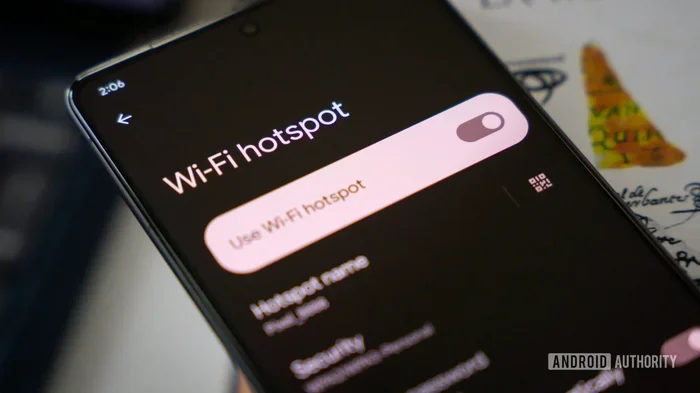
Most Android phones make it simple to turn on your hotspot. Here is how to do it step by step:
- Open the Settings app on your phone.
- Look for Network and Internet or Connections (the name varies by brand).
- Tap on Hotspot and Tethering or Mobile Hotspot.
- Toggle the Mobile Hotspot switch to On.
- Set a hotspot name and password for security.
- Save your settings and connect other devices.
Once enabled, your phone will broadcast a wifi network. Other devices can find it in their wifi settings. Enter the password you set, and you are good to go. You can also change the hotspot band to 5 GHz for faster speeds if your phone supports it.
Enabling Hotspot on iPhone
iPhone users can also set up a personal hotspot with Straight Talk. Here is what to do:
- Open the Settings app on your iPhone.
- Tap on Personal Hotspot.
- Toggle Allow Others to Join to On.
- Set a password for your hotspot.
- Connect other devices to the iPhone hotspot network.
If you do not see the Personal Hotspot option, go to Settings, then Cellular, and turn on Cellular Data. The Personal Hotspot option should appear after that. Some Straight Talk plans may require you to enable tethering through your account online or by contacting support.
Hotspot Data Usage and Limits
One of the most important things to understand about using a Straight Talk wifi hotspot is data consumption. Hotspot tethering uses a lot of data. Streaming videos, browsing websites, and downloading files all eat up your data allowance quickly. Here is a closer look at how data usage works with your hotspot.
How Much Data Does a Hotspot Use?
The amount of data your hotspot uses depends on what you do. Here are some rough estimates:
- Web browsing: About 60 MB per hour
- Streaming video (SD): About 1 GB per hour
- Streaming video (HD): About 3 GB per hour
- Video calls: About 1.5 GB per hour
- Music streaming: About 100 MB per hour
- Social media browsing: About 200 MB per hour
As you can see, video activities use the most data. If you plan to use your hotspot for streaming, make sure you have enough data. Unlimited data plans with a hotspot cap are ideal for heavy users. For lighter use, a smaller data plan may be enough.
Tips to Reduce Hotspot Data Usage
Want to make your hotspot data last longer? Try these practical tips:
- Lower the streaming quality on devices connected to your hotspot
- Turn off auto-updates on connected devices
- Use data-saving mode on your phone when tethering
- Disconnect devices when you are not using them
- Monitor your data usage through your Straight Talk account dashboard
These small changes can make a big difference. You will get more out of your data plan and avoid running out of hotspot data too quickly.
Troubleshooting Common Hotspot Issues
Sometimes your Straight Talk hotspot may not work as expected. This can be frustrating, but most issues have simple solutions. Here are the most common problems and how to fix them.
Hotspot Not Showing Up on Other Devices
If other devices cannot find your hotspot, try these steps:
- Make sure your hotspot is turned on
- Restart your phone and try again
- Check if your phone is in airplane mode (turn it off if it is)
- Move closer to your phone to improve signal strength
- Change the hotspot name and password, then reconnect
Sometimes the issue is as simple as a temporary software glitch. Restarting your phone often fixes it. If the problem persists, check your APN settings. Incorrect APN configuration can prevent your hotspot from broadcasting properly.
Slow Hotspot Speeds
Slow speeds are a common complaint among hotspot users. Here is what you can do:
- Check your signal strength in your current location
- Switch your hotspot band from 2.4 GHz to 5 GHz if possible
- Reduce the number of devices connected to your hotspot
- Make sure your data plan has not been throttled
- Contact Straight Talk to check for network outages in your area
Network congestion can also slow down your speeds. If many people are using the same cell tower, your connection may suffer. Moving to a different location can sometimes help significantly.
Hotspot Disconnects Frequently
If your hotspot keeps dropping the connection, try these fixes:
- Update your phone to the latest software version
- Reset your network settings on your phone
- Remove and reinsert your SIM card
- Check for carrier settings updates on iPhone
- Contact Straight Talk support if the issue continues
Frequent disconnections can also be caused by battery optimization settings. Some phones turn off hotspot features to save battery. Go into your battery settings and disable any restrictions that might affect your hotspot.
APN Settings for Straight Talk Hotspot
APN stands for Access Point Name. It is a set of settings that tells your phone how to connect to the internet through your carrier. Correct APN settings are essential for your Straight Talk wifi hotspot to work properly. If your hotspot is not functioning, incorrect APN settings could be the culprit.
Here is how to check and update your APN settings on most phones:
- Go to Settings on your phone
- Navigate to Network and Internet or Mobile Networks
- Tap on Access Point Names or APN
- Look for the Straight Talk APN entry
- Check that the APN name, APN address, and other fields are correct
- Reset to default if needed
Straight Talk APN settings are usually pre-configured when you activate your service. However, they can sometimes get changed accidentally. Resetting to default is the safest way to ensure everything is set correctly. You can also find the latest APN settings on the Straight Talk website or by contacting their support team.
Expert Tips for Getting the Most From Your Straight Talk Hotspot
Now that you know how to set up and troubleshoot your hotspot, here are some expert tips to help you get the best experience with your Straight Talk mobile hotspot.
Use a Hotspot Case or Stand
Running a hotspot can drain your phone battery quickly. A portable battery case or stand can help keep your phone charged while tethering. This is especially useful during long trips or workdays away from a power outlet.
Secure Your Hotspot
Always use a strong password for your hotspot. This prevents unauthorized users from connecting and using your data. WPA2 or WPA3 encryption is the best choice for security. Never leave your hotspot open or with a default password.
Monitor Your Data Regularly
Straight Talk provides a way to check your data usage through your online account or the My Straight Talk app. Make it a habit to check your usage regularly. This helps you stay within your plan limits and avoid unexpected overages or speed throttling.
Consider a Dedicated Hotspot Device
If you use your hotspot frequently and need more data, consider a dedicated mobile hotspot device. These devices are designed specifically for tethering and often have better battery life and stronger antennas than phones. Some Straight Talk plans even support dedicated hotspot devices.
Is Straight Talk Hotspot Good for Remote Work?
Many people use their Straight Talk wifi hotspot for remote work. It is a convenient way to stay connected when you are away from your home internet. But is it good enough for work tasks? The answer depends on your needs and your plan.
For basic tasks like email, document editing, and video calls, a Straight Talk hotspot works well. You need a stable connection and enough data. If you do a lot of video conferencing, make sure your plan has sufficient hotspot data. A 10 GB or higher hotspot allowance should handle most remote work scenarios comfortably.
For heavy data tasks like uploading large files or streaming high-quality video, a dedicated home internet connection is still better. But as a backup or for on-the-go work, Straight Talk hotspot is a solid choice. The key is choosing the right plan and managing your data wisely.
Straight Talk Hotspot vs. Other Carriers
How does Straight Talk compare to other carriers when it comes to hotspot functionality? Here is a quick comparison:
- Straight Talk: Affordable plans with hotspot support on most options. Coverage depends on the underlying network.
- T-Mobile Prepaid: Offers unlimited hotspot data on some plans. Generally fast speeds on their 5G network.
- Mint Mobile: Budget-friendly with hotspot included on most plans. Runs on T-Mobile network.
- Visible (Verizon): Unlimited hotspot data on all plans. Runs on Verizon network with strong coverage.
- Google Fi: Flexible plans with hotspot included. Uses T-Mobile and U.S. Cellular networks.
Straight Talk holds its own in the prepaid market. It offers competitive hotspot features at affordable prices. The main advantage is the ability to choose between multiple network partners. This gives you flexibility based on your coverage needs and budget.
Conclusion
Can you get a wifi hotspot on Straight Talk? Yes, you absolutely can. Straight Talk supports wifi hotspot functionality on most plans and devices. Whether you use an Android phone or an iPhone, enabling your hotspot is quick and easy. Just make sure your plan includes hotspot data, and you are ready to share your connection with other devices.
Remember to monitor your data usage, secure your hotspot with a strong password, and troubleshoot any issues using the tips in this guide. A Straight Talk wifi hotspot is a powerful tool for staying connected on the go. With the right plan and a little know-how, you can enjoy reliable wireless internet wherever you are. Take action today, enable your hotspot, and stay connected no matter where life takes you.