Can You Plug A Usb Into A Wall Outlet Here Are Answers
Yes, you can plug a USB directly into a wall outlet using a USB wall outlet or adapter. This convenient setup lets you charge devices without a bulky power brick. USB wall outlets are safe, efficient, and becoming standard in modern homes and offices. In this guide, we cover every type, safety tip, and setup option so you can make an informed choice.
Have you ever looked at your wall outlet and wondered if you could just plug a USB cable straight into it? The short answer is yes. But there is a lot more to know about how this works, what options are available, and whether it is safe for your home. Plugging a USB into a wall outlet has become one of the most popular ways to charge phones, tablets, and other gadgets. Gone are the days when you needed a clunky power adapter taking up two outlet spaces. Today, USB wall outlets and adapters make life simpler.
This guide walks you through every option. Whether you want to install a permanent USB wall outlet or just use a quick adapter, we have you covered. We also look at safety, charging speeds, and common mistakes to avoid. Let us get started.
Key Takeaways
- USB wall outlets work: You can install them directly into your existing electrical boxes for a clean, cord-free setup.
- Multiple USB types exist: USB-A, USB-C, and combo ports offer different speeds and power levels for your devices.
- Safety matters: Always choose UL-certified outlets and avoid overloading circuits to prevent hazards.
- Adapters are a quick fix: A simple USB wall plug adapter lets you add USB charging without rewiring.
- Charging speed varies: Power output and USB standard (like USB Power Delivery) determine how fast your device charges.
- Installation is straightforward: Most USB wall outlets can replace a standard outlet with basic tools and some electrical know-how.
📑 Table of Contents
- What Is a USB Wall Outlet?
- Types of USB Wall Outlets and Adapters
- Can You Plug a USB Directly Into a Wall Outlet?
- Charging Speeds and Power Output
- Safety Considerations for USB Wall Outlets
- How to Install a USB Wall Outlet
- USB Wall Outlets vs. Traditional Adapters
- Best USB Wall Outlets to Consider
- Future of USB Wall Charging
- Conclusion
What Is a USB Wall Outlet?
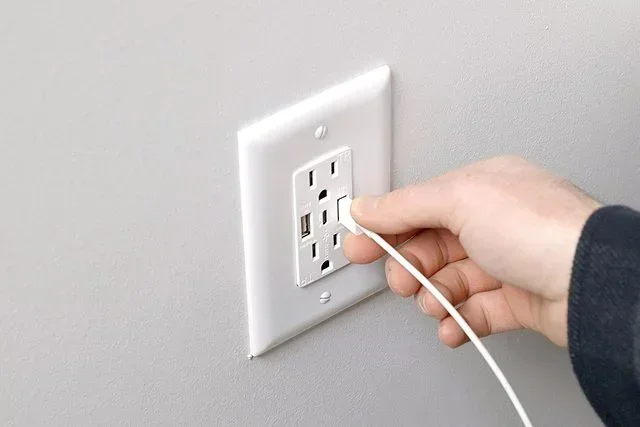
A USB wall outlet is an electrical receptacle that has one or more USB ports built right into it. Instead of using a separate adapter, you plug your USB cable directly into the wall. This saves space and looks much cleaner. These outlets come in different shapes and sizes to fit your needs.
Most USB wall outlets replace a standard duplex outlet. That means you swap out your old outlet for one that has USB ports alongside regular plug slots. Some models have a single USB-A port. Others offer dual USB-A, USB-C, or even a mix of both. The choice depends on what devices you charge most often.
How Does a USB Wall Outlet Work?
Inside a USB wall outlet, there is a small circuit board. This board converts the alternating current (AC) from your wall into the direct current (DC) that USB devices need. The conversion happens safely inside the outlet itself. Your device only receives the right amount of power. You do not need to worry about damaging your gadgets when you use a quality USB wall outlet.
The outlet detects what device is connected and adjusts the power output accordingly. This is called USB Power Delivery or PD. It ensures your phone, tablet, or other device gets exactly the charge it needs without overloading.
Types of USB Wall Outlets and Adapters
Not all USB wall solutions are the same. There are several types to choose from, and each has its own benefits. Let us break them down so you can find the right fit for your home or office.
USB Wall Outlet Replacements
These are full replacement outlets that go directly into your wall. They look just like a regular outlet but include USB ports. You will need to turn off the breaker and swap out the old outlet. It is a simple job if you are comfortable with basic electrical work.
Some popular options include:
- Single USB-A outlets: Great for older devices like e-readers and basic phones.
- Dual USB-A outlets: Perfect for charging two devices at once from one wall spot.
- USB-C outlets: Best for modern devices that use the newer USB-C standard.
- Combo outlets: These have both USB-A and USB-C ports, giving you maximum flexibility.
USB Wall Plug Adapters
If you do not want to replace your outlet, a USB wall plug adapter is the way to go. These small plugs fit into your existing outlet and provide one or more USB ports. They are portable, affordable, and easy to use. You can plug one in anywhere and start charging immediately.
Adapters come in single-port and multi-port versions. Some even support fast charging standards like USB Power Delivery. They are ideal for travel or for rooms where you do not want to do any wiring.
USB Power Strips
Another option is a USB power strip. These combine traditional outlets with USB charging ports in one strip. They are great for desks, entertainment centers, and kitchens. A power strip gives you multiple places to plug in both standard devices and USB gadgets.
Just make sure your power strip has surge protection. This shields your devices from power spikes and electrical surges. A good surge-protected power strip adds an extra layer of safety to your setup.
Can You Plug a USB Directly Into a Wall Outlet?
Yes, you absolutely can. But there are a few things to keep in mind before you do. The most important factor is using the right type of outlet or adapter. A standard wall outlet delivers 120 volts (or 240 volts in some countries). USB devices only need 5 volts. That is why you need a USB wall outlet or adapter with built-in conversion.
Never plug a USB cable directly into an unprotected outlet. Without the proper circuitry, you risk damaging your device or creating a safety hazard. Always use a certified USB power adapter or a USB wall outlet that handles the voltage conversion for you.
Which USB Port Should You Use?
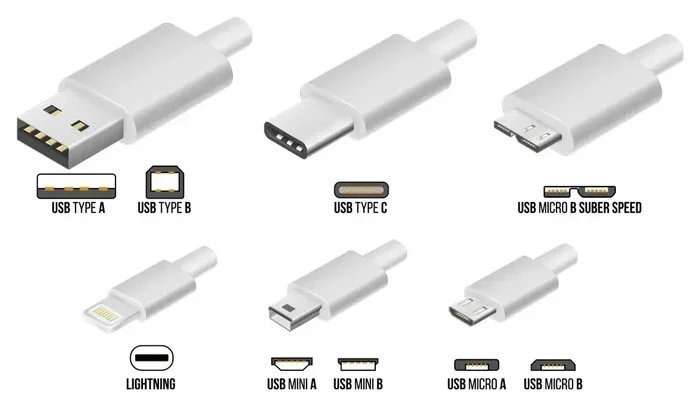
Most USB wall outlets come with USB-A ports. These are the classic rectangular USB plugs. They work well for most devices but charge at slower speeds compared to newer standards.
USB-C ports are the modern choice. They are smaller, reversible, and support faster charging speeds. If your device supports USB-C, look for an outlet with a USB-C port. Many USB wall outlets now offer both USB-A and USB-C ports in one unit. This gives you the best of both worlds.
When choosing, think about what devices you use most. If you have a mix of old and new gadgets, a combo outlet is your safest bet.
Charging Speeds and Power Output
Not all USB wall outlets charge at the same speed. The power output of an outlet determines how fast your device charges. This is measured in watts (W) or amps (A). Higher wattage means faster charging.
Here is a quick look at common USB power standards:
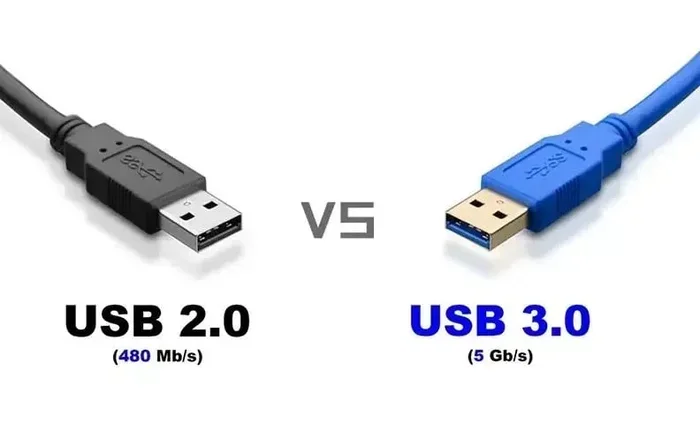
- USB 2.0: Delivers up to 2.5 watts (0.5 amps). Suitable for basic charging but slow.
- USB 3.0: Provides up to 4.5 watts (0.9 amps). A moderate improvement over USB 2.0.
- USB BC 1.2: Offers up to 7.5 watts (1.5 amps). Common in many wall outlets.
- USB Power Delivery (PD): Can deliver up to 100 watts or more. This is the fastest standard available today.
If you want fast charging, look for outlets that support USB PD or Qualcomm Quick Charge. These standards adjust the power output based on what your device needs. A USB-C outlet with PD support will charge most modern phones and laptops much faster than a basic USB-A port.
What Affects Charging Speed?
Several factors play a role in how fast your device charges from a USB wall outlet:
- The USB standard: USB PD is faster than older standards like USB 2.0.
- The cable quality: A cheap or damaged cable slows down charging. Always use a good-quality cable.
- The device itself: Some phones and tablets charge faster than others, regardless of the outlet.
- Power draw: If you are using the device while it charges, the speed drops significantly.
Keep these factors in mind when choosing your USB wall outlet. A high-quality outlet paired with a good cable gives the best results.
Safety Considerations for USB Wall Outlets
Safety should always come first when dealing with electricity. The good news is that most USB wall outlets are designed with built-in protections. These include over-current protection, short-circuit protection, and thermal sensors. But you still need to be smart about how you use them.
Here are some important safety tips:
- Buy UL-certified products: UL certification means the outlet has been tested for safety. Always look for this mark on the packaging.
- Do not overload circuits: Too many devices on one circuit can trip your breaker or cause overheating. Spread your USB devices across different outlets.
- Keep outlets away from water: Water and electricity are a dangerous mix. Do not place USB outlets near sinks or in damp areas.
- Check for damage regularly: Inspect your outlets and cables for wear, cracks, or discoloration. Replace anything that looks damaged.
- Use surge protectors: A surge protector guards your devices against power spikes. This is especially important for expensive electronics.
If you are not comfortable doing electrical work yourself, hire a licensed electrician. Installing a USB wall outlet is simple for a professional and very safe when done correctly.
Common Mistakes to Avoid
Even with the best intentions, people make mistakes when setting up USB wall charging. Here are the most common ones:
- Using a cheap, uncertified adapter: Low-quality adapters can overheat and damage your devices. Always choose reputable brands.
- Ignoring the wattage rating: Every outlet has a maximum load. Do not plug in too many high-power devices on one circuit.
- Forgetting to turn off the breaker: Always shut off power before installing any outlet. This is a basic but critical safety step.
- Using the wrong cable: Some cables only support data transfer, not charging. Make sure your cable is rated for the power output you need.
Avoiding these mistakes keeps your home safe and your devices charging efficiently.
How to Install a USB Wall Outlet
Installing a USB wall outlet is easier than most people think. You can do it yourself if you are comfortable with basic electrical tasks. Here is a step-by-step overview of the process.
Step 1: Turn Off the Power
Go to your electrical panel and switch off the breaker for the outlet you will be working on. Use a voltage tester to confirm the power is off. Never work on a live circuit.
Step 2: Remove the Old Outlet
Unscrew the face plate and pull the old outlet out of the electrical box. Disconnect the wires by loosening the terminal screws. Take a photo before you disconnect anything so you can remember the wiring layout.
Step 3: Connect the New USB Outlet
Connect the wires to your new USB wall outlet following the manufacturer’s instructions. Typically, you connect the black (hot) wire, white (neutral) wire, and green (ground) wire to the corresponding terminals. Tighten all connections securely.
Step 4: Mount and Test
Push the outlet back into the electrical box and screw it in place. Attach the face plate. Turn the breaker back on and test the outlet with a device. If everything works, you are all set.
If at any point you feel unsure, call a licensed electrician. Electrical work should never be taken lightly. A professional can install your USB wall outlet quickly and safely.
USB Wall Outlets vs. Traditional Adapters
So, should you install a permanent USB wall outlet or stick with a traditional adapter? Both have their pros and cons. Let us compare them side by side.
| Feature | USB Wall Outlet | Traditional Adapter |
|---|---|---|
| Installation | Requires wiring (DIY or pro) | Plug and play, no installation |
| Aesthetics | Clean, built into wall | Bulky, protrudes from wall |
| Portability | Fixed in one location | Easy to move or travel with |
| Cost | $15-$40 per outlet plus installation | $5-$20 per adapter |
| Durability | Built to last, no moving parts | Can wear out or break easily |
| Number of Ports | 1 to 4 USB ports built in | Usually 1 to 2 ports |
| Fast Charging | Supports USB PD and fast standards | Varies widely by model |
For a permanent home setup, a USB wall outlet wins on looks and convenience. For travel or temporary use, a traditional adapter is the better choice. Many people use both. They install USB wall outlets in key rooms and keep adapters for on-the-go charging.
One thing to note: if you are setting up a workspace, the way you organize your cables and outlets matters a lot. A clean setup improves both looks and function. Some people even compare the experience of cable management to organizing data in a spreadsheet, where everything needs to be in the right place to work properly. Much like how you would never want a line that won’t delete in Microsoft Excel cluttering your workspace, you do not want tangled cables cluttering your charging area.
Similarly, your charging setup is part of your broader computer accessories ecosystem. Just as the advantages and disadvantages of a computer mouse affect your daily workflow, the way you power your devices affects how smoothly your day goes.
Best USB Wall Outlets to Consider
Not all USB wall outlets are created equal. Here are some features to look for when shopping:
- USB Power Delivery support: Ensures fast, safe charging for compatible devices.
- Multiple port options: Combo outlets with USB-A and USB-C give you the most flexibility.
- UL certification: Guarantees the outlet meets safety standards.
- Compact design: Some outlets are slimmer than others, making them easier to install in tight spaces.
- Smart charging technology: Some outlets automatically detect your device and adjust the power output for optimal charging.
Brands like Leviton, Legrand, and Eaton offer reliable USB wall outlets at various price points. Read reviews and compare features before you buy. The right outlet for you depends on your devices, your budget, and your installation preferences.
Future of USB Wall Charging
The future of USB wall charging looks bright. New standards like USB4 are bringing even faster speeds and higher power delivery. More homes and offices are being built with USB outlets pre-installed. This trend means fewer adapters and cleaner walls.
Wireless charging is also gaining ground. Some USB wall outlets now include built-in wireless charging pads. You simply place your phone on the outlet and it starts charging. No cables needed. This technology is still evolving, but it is an exciting development for the future of home charging.
As more devices move toward USB-C, the demand for versatile USB wall outlets will only grow. Investing in a quality combo outlet today means your setup will stay relevant for years to come.
Conclusion
Plugging a USB into a wall outlet is not only possible but also one of the smartest upgrades you can make for your home. Whether you choose a permanent USB wall outlet or a simple adapter, you gain convenience, cleaner walls, and faster charging. Safety should always be your top priority, so stick with certified products and follow proper installation steps.
Take a look at your current charging setup. Could a USB wall outlet make your life easier? The answer is probably yes. Start with one outlet in the room you use most and see how much of a difference it makes. Once you experience the simplicity of built-in USB charging, you will wonder how you ever lived without it.
Make the switch today. Your devices and your walls will thank you.
Frequently Asked Questions
Is it safe to plug a USB cable directly into a wall outlet?
Yes, as long as you use a certified USB wall outlet or a UL-approved adapter. These devices convert the high voltage from your wall to the safe 5 volts that USB devices need. Never plug a USB cable into an unprotected outlet without proper conversion circuitry.
Do USB wall outlets cost more than regular outlets?
They cost a bit more, typically $15 to $40 for the outlet itself. If you hire an electrician for installation, add another $50 to $150 depending on your location. The convenience and cleaner look are well worth the small extra cost.
Can I install a USB wall outlet myself?
Yes, if you are comfortable with basic electrical work. You need to turn off the breaker, remove the old outlet, and connect the wires to the new USB wall outlet. If you are not confident, hire a licensed electrician. Safety always comes first.
What is the difference between USB-A and USB-C wall outlets?
USB-A is the older, rectangular port found on many devices. It charges at slower speeds. USB-C is the newer, smaller, reversible port that supports faster charging speeds and higher power delivery through standards like USB PD. Most modern devices now use USB-C.
Will a USB wall outlet work with all my devices?
Most USB wall outlets work with any device that charges via USB. This includes phones, tablets, e-readers, Bluetooth speakers, and smartwatches. Just check that the outlet’s power output matches your device’s charging requirements for the best results.
Can I use a USB wall outlet for a laptop?
Yes, if the outlet supports USB Power Delivery at the right wattage. Many laptops require 60W or more to charge. Look for a USB wall outlet with USB PD support and check that it can deliver enough power for your specific laptop model.