Can Phomemo Print Photos Here Is Everything You Need to Know
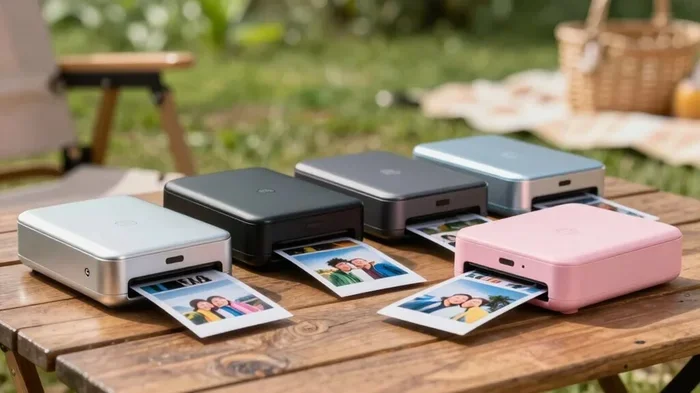
Can Phomemo print photos? Yes, it absolutely can. The Phomemo portable printer is a compact, inkless device that lets you print photos directly from your phone using Bluetooth or USB. Whether you want instant prints, stickers, or labels, this small printer delivers surprisingly good results with thermal printing technology.
Have you ever wanted to print a photo right from your phone without lugging around a heavy printer? Maybe you are planning a trip, throwing a party, or just love the idea of having physical copies of your favorite memories. The Phomemo printer has been gaining a lot of attention lately, and one question keeps popping up: can Phomemo print photos?
The short answer is yes. But there is so much more to know about how this little device works, what it can do, and whether it is the right choice for you. In this guide, we will walk through everything you need to know about Phomemo photo printing. We will cover how it works, print quality, compatibility, and even compare it to other options on the market.
By the end of this article, you will have a clear picture of whether a portable photo printer like Phomemo fits your needs. Let us dive in.
Key Takeaways
- Phomemo can print photos directly from your smartphone using a free mobile app via Bluetooth or USB connection.
- It uses thermal printing technology, which means no ink, no cartridges, and no messy refills needed.
- Print quality is decent for a portable device, with resolutions that handle photos, stickers, and labels well.
- Phomemo supports multiple print sizes and paper types, making it versatile for different uses.
- Battery life is solid for on-the-go printing, and the device is lightweight and easy to carry.
- It works with both iOS and Android devices, making it accessible to most smartphone users.
- Phomemo is affordable compared to traditional photo printers, making it a great entry-level option.
📑 Table of Contents
- What Is Phomemo and Why Is It So Popular?
- Can Phomemo Print Photos? Here Is How It Works
- Print Quality and Resolution: What Can You Expect?
- Phomemo vs Other Portable Printers: A Comparison
- Tips for Getting the Best Prints from Your Phomemo
- Common Mistakes to Avoid with Phomemo
- Who Should Buy a Phomemo Printer?
- Final Thoughts
What Is Phomemo and Why Is It So Popular?
Phomemo is a brand that makes portable printers designed for everyday use. These printers are small enough to fit in your pocket or bag. They use thermal printing technology, which means they do not need ink or toner. Instead, they use heat to create images on special thermal paper.
This technology has been around for a while, but Phomemo has made it stylish and user-friendly. The printers come in fun colors and compact designs. They appeal to people who love instant prints, sticker making, and label printing. Students, travelers, parents, and small business owners all use Phomemo devices for different purposes.
The brand has built a strong following because the printers are affordable, easy to set up, and work well with smartphones. You do not need a computer or any technical skills to get started. Just download the app, connect your phone, and start printing.
Who Uses Phomemo Printers?
Phomemo printers attract a wide range of users. Here are some of the most common groups:
- Travelers who want to print photos on the go without carrying bulky equipment.
- Parents who love printing their kids’ photos and sticking them on the fridge.
- Students who need to print labels for school supplies or create custom stickers.
- Small business owners who need quick labels or price tags for products.
- Event planners who want to create custom stickers or photo booth prints.
- Photography enthusiasts who enjoy having physical copies of their digital photos.
As you can see, the uses are very broad. And the core function that brings most people to Phomemo is simple: can Phomemo print photos? The answer is a definite yes, and it does so in several different ways.
Can Phomemo Print Photos? Here Is How It Works
The main question this whole article is built around deserves a detailed answer. Can Phomemo print photos? Absolutely. The device is specifically designed for photo printing, among other tasks. But how does the process actually work? Let us break it down step by step.
Step 1: Download the Phomemo App
First, you need to download the free Phomemo mobile app. It is available for both iOS and Android devices. The app acts as the bridge between your phone and the printer. Once installed, you can browse your photo gallery, select images, and send them directly to the printer.
Step 2: Connect Your Phone to the Printer
Phomemo printers connect via Bluetooth or USB. The Bluetooth connection is wireless and very easy to set up. You simply turn on the printer, open the app, and pair the devices. The process usually takes less than a minute. For a wired option, you can use a USB cable to connect your phone directly to the printer.
Step 3: Choose Your Photo and Edit
Once connected, you can select any photo from your phone’s gallery. The app gives you basic editing tools. You can crop, adjust brightness, add filters, or include text overlays. You can also resize the image to fit different print dimensions. These features make it easy to customize your photos before printing.
Step 4: Print Your Photo
When you are happy with the image, simply hit the print button. The thermal printer does the rest. The print comes out almost instantly. There is no waiting for ink to dry, and there are no smudges. The whole process from tap to print takes just a few seconds.
What Paper Does Phomemo Use?
Phomemo printers work with thermal paper and adhesive sticker paper. The thermal paper is the most common option for photo printing. It is thin, lightweight, and produces clean images. The sticker paper lets you create custom stickers with your photos, which is a huge hit with kids and crafters alike.
It is important to note that thermal paper has a limited lifespan. Prints may fade over time, especially if exposed to direct sunlight or heat. For short-term use like party favors or fridge decorations, this is usually not a problem. But if you want prints that last for decades, you might want to consider other printing methods.
Print Quality and Resolution: What Can You Expect?
Print quality is one of the most important factors when evaluating any portable photo printer. When it comes to Phomemo print quality, the results are impressive for the price point, but they do have limitations.
The Phomemo printer typically offers a print resolution of 203 DPI (dots per inch). For a portable device, this is quite respectable. It produces clear images with good color accuracy for photos, stickers, and labels. The prints are not as sharp as what you would get from a high-end inkjet printer, but for a compact, inkless device, the quality is very good.
Factors That Affect Print Quality
Several factors influence how your prints turn out:
- Photo resolution: Higher resolution photos from your phone produce better prints.
- Paper quality: Using good quality thermal paper makes a noticeable difference.
- Lighting conditions: The printer works best in normal room temperatures.
- Print settings: Adjusting brightness and contrast in the app can improve results.
- Distance from the print head: The thermal paper needs to be properly aligned.
For everyday use like printing social media photos, vacation snapshots, or custom stickers, the quality is more than sufficient. If you are a professional photographer looking for gallery-quality prints, a Phomemo is not the right tool. But for casual and fun printing, it delivers great value.
Print Speed
One of the best things about Phomemo is the speed. A single photo print takes just seconds. This makes it perfect for events where you need multiple prints quickly. Imagine a birthday party where kids want their photos turned into stickers within minutes. A Phomemo printer handles this with ease.
Phomemo vs Other Portable Printers: A Comparison
The portable printer market is growing fast, and there are several options to choose from. How does Phomemo stack up against the competition? Let us look at a quick comparison.
| Feature | Phomemo | HP Sprocket | Kodak Step |
|---|---|---|---|
| Print Technology | Thermal | Thermal (ZINK) | Thermal (ZINK) |
| Ink Required | No | No | No |
| Connectivity | Bluetooth, USB | Bluetooth | Bluetooth |
| Print Resolution | 203 DPI | 313 DPI | 314 DPI |
| Battery Life | Good (multiple prints per charge) | Moderate | Moderate |
| Price Range | Affordable | Mid-range | Mid-range |
| Sticker Printing | Yes | Yes | Yes |
| Label Printing | Yes | No | No |
| App Compatibility | iOS and Android | iOS and Android | iOS and Android |
As you can see, Phomemo holds its own against bigger brands. The main advantages are its affordability and versatility. It can do sticker printing and label printing, which many competing models do not support as well. The print resolution is slightly lower than some competitors, but the difference is barely noticeable for everyday photos.
Why Choose Phomemo Over Others?
Here are a few reasons why people choose Phomemo for their mobile printing needs:
- Lower cost: Phomemo printers and paper are generally more affordable than ZINK-based options.
- Label printing capability: Not many portable printers offer this feature at such a low price.
- Compact design: The devices are lightweight and easy to carry in a bag or even a large pocket.
- Easy setup: No complicated installation process. Download the app, pair, and print.
- Good battery life: A single charge gives you enough power for many print sessions.
Tips for Getting the Best Prints from Your Phomemo
Want to get the most out of your Phomemo printer? Here are some practical tips that make a big difference.
Use High-Quality Source Photos
The better your original photo, the better the print. Choose images that are well-lit, in focus, and high resolution. Avoid using heavily compressed photos from social media, as they may look blurry or pixelated when printed.
Use the Right Paper
Not all thermal paper is created equal. Phomemo-compatible paper is designed to work with their thermal print heads. Using cheap or incompatible paper can result in faded prints, uneven coloring, or even damage to the printer over time.
Keep the Printer Clean
Dust and debris can affect print quality. Wipe the print head area gently with a soft, dry cloth after every few uses. This keeps the printer running smoothly and extends its lifespan.
Store Paper Properly
Thermal paper is sensitive to heat and light. Store it in a cool, dry place. Keep it away from direct sunlight and hot surfaces. Proper storage ensures your paper stays fresh and produces consistent results.
Experiment with the App Settings
The Phomemo app gives you control over brightness, contrast, and crop settings. Play around with these options to find the best look for each photo. A small adjustment can make a huge difference in the final print.
Print in Draft Mode for Labels
If you are printing labels or stickers, you do not always need the highest quality setting. Using a faster draft mode saves battery and paper while still producing perfectly readable text and images.
Common Mistakes to Avoid with Phomemo
Even though Phomemo is user-friendly, there are a few common mistakes that new users make. Avoiding these will save you time and frustration.
- Using regular paper: Phomemo only works with thermal paper and adhesive sticker paper. Regular paper will not produce any image.
- Ignoring firmware updates: The app occasionally releases updates that improve performance and fix bugs. Always keep your app and printer firmware up to date.
- Overloading the printer: Trying to print too many photos in a row without letting the printer rest can cause overheating.
- Using low-quality paper: Cheap paper may seem like a good deal, but it often produces poor results and can clog the print head.
- Not aligning the paper correctly: Misaligned paper leads to crooked or partially cut-off prints. Always make sure the paper is seated properly before printing.
Who Should Buy a Phomemo Printer?
After learning all of this, you might be wondering if a Phomemo is right for you. Here is a quick guide to help you decide.
You should buy a Phomemo if:
- You want a fun, affordable way to print photos from your phone.
- You love making custom stickers for scrapbooking, planners, or kids’ crafts.
- You need a portable printer for travel or events.
- You want a simple device that does not require ink or cartridges.
- You are looking for a gift that is creative and practical.
You might want to look elsewhere if:
- You need professional-grade photo prints with archival quality.
- You print large volumes of photos regularly.
- You need wireless printing over a Wi-Fi network (Phomemo uses Bluetooth and USB).
- You want prints that last for many years without fading.
For most casual users, the Phomemo hits the sweet spot between price, portability, and print quality. It is one of the best entry-level portable printers on the market right now.
Final Thoughts
So, can Phomemo print photos? Without a doubt, yes. This little printer punches well above its weight. It delivers quick, clean photo prints using thermal technology that requires no ink. The setup is simple, the app is intuitive, and the results are fun and satisfying.
Whether you are a parent capturing your child’s first steps, a traveler printing memories on the road, or a creative person making custom stickers, Phomemo has you covered. It is affordable, portable, and easy to use. For anyone looking to bring their digital photos into the physical world, it is a fantastic choice.
Give it a try, and you will see why so many people are falling in love with portable photo printing. The Phomemo makes it simple, fun, and accessible to everyone.
Frequently Asked Questions
Can Phomemo print photos from social media apps?
Yes, you can print photos directly from most social media apps through the Phomemo mobile app. Simply save the image to your phone first, then open the Phomemo app, select the photo, and print. The app supports images from your phone gallery, which includes photos downloaded from social media.
How much does it cost to print a photo with Phomemo?
The cost depends on the type of paper you use. Thermal paper is very affordable, with sheets typically costing just a few cents each. Compared to traditional photo printing services, Phomemo saves you a lot of money in the long run, especially if you print frequently.
Can Phomemo print photos in color?
Yes, Phomemo printers produce color prints using thermal technology. The colors are vibrant and clear, though they may not match the exact richness of a professional inkjet printer. For everyday photos and stickers, the color output is more than satisfactory.
Does Phomemo require ink or cartridges?
No, Phomemo uses thermal printing technology, which does not require any ink, toner, or cartridges. The printer uses heat to create images on special thermal paper. This makes it mess-free, maintenance-free, and very convenient for on-the-go use.
Can I print stickers with Phomemo?
Absolutely. Phomemo supports adhesive sticker paper, allowing you to create custom stickers with your photos. This is one of the most popular uses for the printer. You can design stickers in the app, print them on sticker paper, and peel them off for use on notebooks, water bottles, or anywhere else.
Is Phomemo easy to use for beginners?
Yes, Phomemo is designed to be extremely user-friendly. The setup process is straightforward, the mobile app is intuitive, and printing takes just a few taps. Even people with very little tech experience can start printing photos within minutes of unboxing the device.