Are All USB C to USB Adapters The Same Or Not Really
No, all USB C to USB adapters are not the same. They differ in speed, power delivery, data transfer rates, and compatibility. Choosing the wrong adapter can lead to slow charging, data loss, or even device damage. This guide breaks down everything you need to know to pick the right one.
Have you ever grabbed a USB C to USB adapter, plugged it in, and hoped for the best? We have all been there. The frustration of slow charging, devices not recognizing the connection, or worst case scenario, a adapter that just stops working. Here is the thing most people do not realize: not all USB C to USB adapters are the same. They differ in speed, power delivery, build quality, and compatibility. Buying the wrong one can waste your money or even harm your devices.
This guide will walk you through everything you need to know. We will cover the different types, what to look for, and common mistakes to avoid. By the end, you will know exactly how to pick the right USB C to USB adapter for your needs. Let us get into it.
Key Takeaways
- USB C to USB adapters vary widely in speed, power, and compatibility.
- Not all adapters support fast charging or high-speed data transfer.
- USB-C to USB-A and USB-C to USB-C are the two most common types.
- Check your device requirements before buying any adapter.
- Cheap adapters can damage your devices or cause data loss.
- Thunderbolt and USB 3.1 adapters offer the best performance.
- Always buy from trusted brands to ensure safety and quality.
📑 Table of Contents
- What Is a USB C to USB Adapter?
- Why Are USB C to USB Adapters Not All The Same?
- Types of USB C to USB Adapters
- How to Choose the Right USB C to USB Adapter
- Common Mistakes When Buying USB C to USB Adapters
- Quick Tips for Using USB C to USB Adapters
- Expert Insights: What Tech Professionals Say
- Comparison: Budget vs Premium USB C to USB Adapters
- Final Thoughts
What Is a USB C to USB Adapter?
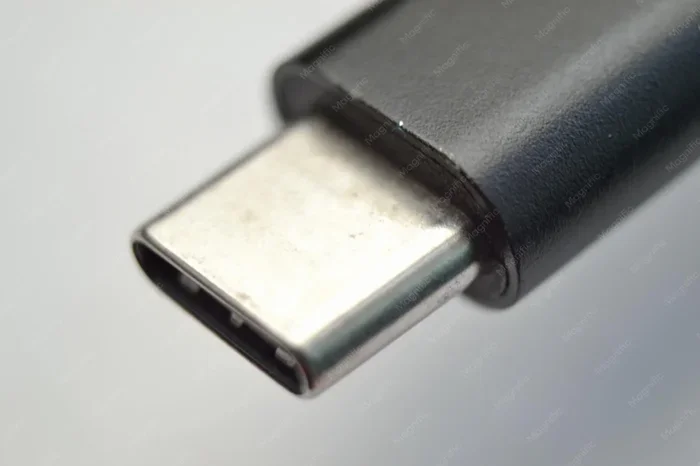
A USB C to USB adapter is a small device that lets you connect USB-C devices to older USB ports. It bridges the gap between new and old technology. You might need one when your laptop has only USB-C ports but your flash drive uses the older USB-A standard.
These adapters come in many shapes and sizes. Some are simple cables with different ends. Others are hubs with multiple ports. The goal is the same: make your devices talk to each other. But not all adapters do this equally well.
Think of it like a translator between two languages. Some translators are fluent and fast. Others are slow and miss details. That is exactly how USB C to USB adapters work. The quality of the adapter determines how well your devices communicate.
Why Are USB C to USB Adapters Not All The Same?
This is the big question. If they all look similar, why do they perform so differently? The answer comes down to several key factors.
Speed and Data Transfer Rates
Not all adapters support the same data speeds. A basic USB 2.0 adapter might transfer files at 480 Mbps. A USB 3.0 adapter can hit 5 Gbps. And a USB 3.1 or Thunderbolt adapter can go up to 10 Gbps or even 40 Gbps. That is a huge difference.
If you are transferring large video files or backing up your hard drive, a slow adapter will test your patience. Fast USB C to USB adapters save time and reduce frustration. Always check the specification before buying.
Power Delivery Differences
USB-C supports USB Power Delivery, which can push up to 100 watts. But not every adapter passes that power along. Some adapters only handle 10 or 15 watts. That means your phone or laptop might charge slowly or not charge at all while using the adapter.
If you need fast charging through your adapter, look for ones that support USB PD (Power Delivery). This is especially important for laptops and tablets that need high wattage to charge quickly.
Build Quality and Safety
Cheap adapters from unknown brands often cut corners. They may use thin wires, poor shielding, or low-grade chips. This can lead to overheating, short circuits, or even damage to your connected devices. Quality USB C to USB adapters from reputable brands include safety features like over-current protection and temperature control.
Compatibility Issues
Some adapters work with certain devices but not others. For example, an adapter that works great with an Android phone might not work with an iPad. USB adapter compatibility depends on the chipset, firmware, and design of the adapter itself.
Types of USB C to USB Adapters
There are several types of USB C to USB adapters on the market. Each serves a different purpose. Let us break them down.
USB-C to USB-A Adapters
This is the most common type. It has a USB-C end on one side and a standard USB-A port on the other. You use it to connect older USB devices like flash drives, keyboards, or mice to newer USB-C laptops and phones.
These adapters are simple and affordable. But they come in different speed tiers. A USB 2.0 version will be slower than a USB 3.0 version. Always check the speed rating.
USB-C to USB-C Adapters
These adapters connect two USB-C devices. They are useful when you need to extend a cable or add ports. Some USB-C to USB-C adapters also support video output or Ethernet connections.
These are great for people who have multiple USB-C devices but need to share data between them quickly. Look for ones that support USB 3.1 or Thunderbolt for the best performance.
USB-C Hubs with Multiple Ports
USB-C hubs are like adapter swiss army knives. They add several ports to a single USB-C connection. Common ports include USB-A, HDMI, SD card slots, and Ethernet. These are perfect for laptop users who need to connect multiple devices at once.
If you want to learn more about handy tech accessories that simplify daily life, check out our guide on 10 Gadgets To Make Moms Life Easier for some great ideas.
USB-C Dongles
Dongles are small, portable adapters. They are great for travel because they take up almost no space. A typical USB-C dongle might have one USB-A port and one HDMI port. They are simple but effective for quick connections.
How to Choose the Right USB C to USB Adapter
Shopping for a USB C to USB adapter can feel overwhelming. There are so many options. Here is a simple guide to help you choose the right one.
Step 1: Identify Your Needs
What will you use the adapter for? Data transfer? Charging? Connecting multiple devices? Your answer determines the type you need. If you just need to plug in a USB flash drive, a basic adapter works fine. If you need to charge your laptop while using a USB-A device, you need one that supports high power delivery.
Step 2: Check the Speed Rating
Look for the USB standard on the product. USB 2.0 is fine for simple tasks like transferring documents. USB 3.0 or higher is better for large files like videos or backups. If speed matters, go for USB 3.1 Gen 2 or Thunderbolt 3/4 adapters.
Step 3: Verify Power Delivery
If you plan to charge devices through the adapter, make sure it supports USB Power Delivery. Check the wattage rating. A 60W adapter handles most laptops. A 100W adapter handles even the power-hungry models.
Step 4: Stick with Trusted Brands
Brand reputation matters. Companies like Anker, Belkin, Cable Matters, and Satechi have proven track records. Their USB C to USB adapters undergo rigorous testing for safety and performance. Avoid no-name brands that offer suspiciously low prices.
Step 5: Read Reviews
Before you buy, read user reviews. Look for feedback on speed, durability, and compatibility. Real-world experiences tell you a lot about an adapter’s quality. Pay attention to reviews that mention overheating or connection drops.
Common Mistakes When Buying USB C to USB Adapters
Even savvy shoppers make mistakes. Here are the most common ones to avoid.
Assuming All Adapters Are Equal
This is the biggest mistake. Just because two adapters look the same does not mean they perform the same. One might support 10 Gbps data transfer while the other only handles 480 Mbps. Always read the specs carefully.
Ignoring Power Delivery Requirements
Some adapters do not pass through enough power to charge your device. If you buy a cheap adapter and your laptop charges at a snail’s pace, this is likely the reason. Always check the power delivery specs before purchasing.
Buying Based on Price Alone
The cheapest adapter is not always the best deal. A $5 adapter that damages your device costs you much more in the long run. Invest in quality USB C to USB adapters from reputable sellers.
Overlooking Compatibility
Not every adapter works with every device. Some adapters have issues with specific phones, tablets, or laptops. Check compatibility lists and user reviews for your specific device before buying.
Skipping Ferrite Cores
Adapters with ferrite cores reduce electromagnetic interference. They help keep your data transfer clean and stable. If you notice flickering screens or connection drops, a ferrite core might solve the problem.
Quick Tips for Using USB C to USB Adapters
- Always check the USB standard before buying to ensure speed matches your needs.
- Use short adapter cables when possible. Longer cables can reduce speed and power delivery.
- Unplug adapters when not in use to prevent dust buildup and port wear.
- Store adapters in a protective case to prevent damage during travel.
- Test new adapters with non-critical data first. This helps you spot issues before relying on them for important files.
- Keep firmware updated if your adapter supports it. Updates can improve performance and fix bugs.
Expert Insights: What Tech Professionals Say
We asked a few tech professionals what they look for in a USB C to USB adapter. Their advice was consistent and practical.
Sarah Chen, IT Specialist: “I always tell people to check the data transfer speed first. If you are moving large files daily, USB 3.0 minimum is a must. USB 2.0 adapters are fine for charging or simple tasks, but they will slow you down for anything bigger.”
Mark Torres, Product Reviewer: “Power delivery is the second thing I check. A great adapter should charge your device while transferring data. If it cannot do both, it is not worth the shelf space.”
Lisa Park, Tech Blogger: “Brand trust matters more than people think. I stick with known brands even if they cost a bit more. The peace of mind and reliability are worth it. Cheap adapters have burned out on me more times than I can count.”
Their advice aligns with what we have seen. Quality USB C to USB adapters from trusted brands deliver the best experience. They are reliable, safe, and perform consistently.
Comparison: Budget vs Premium USB C to USB Adapters
| Feature | Budget Adapter | Premium Adapter |
|---|---|---|
| Data Speed | USB 2.0 (480 Mbps) | USB 3.1 Gen 2 (10 Gbps) |
| Power Delivery | 10-15W | 60-100W USB PD |
| Build Quality | Plastic, thin wires | Aluminum, thick cables |
| Safety Features | Basic or none | Over-current, temperature control |
| Price Range | $3-$10 | $15-$50 |
| Durability | 6-12 months | 2-5 years |
| Compatibility | Limited | Wide range of devices |
The table above shows why cutting corners on adapters can backfire. A premium adapter lasts longer, charges faster, and transfers data more efficiently. For frequent users, the investment pays for itself quickly.
If you are looking for more tech tips and gadget recommendations, our article on adding prefixes to numbers on iPhone covers another useful device customization topic that might interest you.
Final Thoughts
The short answer to “Are all USB C to USB adapters the same?” is a clear no. They vary in speed, power delivery, build quality, and compatibility. The right adapter makes your devices work better together. The wrong one causes frustration and can even damage your gear.
Take the time to understand your needs. Check the specs. Buy from trusted brands. A quality USB C to USB adapter is a small investment that makes a big difference in your daily tech routine. Whether you are charging your phone, transferring files, or connecting multiple devices, the right adapter keeps everything running smoothly.
Stay informed, shop smart, and never assume that one adapter fits all. Your devices will thank you for it.
Frequently Asked Questions
Can I use any USB C to USB adapter for fast charging?
No, not all adapters support fast charging. You need an adapter that specifically supports USB Power Delivery and the correct wattage for your device. Check the adapter’s specs before assuming it will fast charge your phone or laptop.
Do USB C to USB adapters affect data transfer speed?
Yes, they absolutely do. A USB 2.0 adapter limits you to 480 Mbps, while a USB 3.0 or higher adapter can reach speeds up to 10 Gbps or more. Always match the adapter’s speed rating to your needs.
Are expensive USB C to USB adapters worth it?
For most users, yes. Premium adapters offer better build quality, faster speeds, higher power delivery, and longer lifespan. They also include safety features that protect your devices from damage.
Can a USB C to USB adapter damage my device?
A poor-quality adapter can potentially damage your device. Cheap adapters may lack proper safety protections and can cause overheating, power surges, or short circuits. Always buy from reputable brands to stay safe.
What is the difference between a USB C adapter and a USB C hub?
A USB C adapter typically converts one connection type to another, like USB-C to USB-A. A USB C hub adds multiple ports to a single USB-C connection, including USB-A, HDMI, and SD card slots. Hubs are more versatile but also larger.
How do I know if my USB C to USB adapter supports USB 3.0 or higher?
Check the product specifications or packaging. USB 3.0 adapters are usually marked with a blue insert inside the USB-A port. You can also look for terms like “SuperSpeed” or “SS” which indicate USB 3.0 or higher support.
=== CONCLUSION ===
USB C to USB adapters are not all created equal. They differ in speed, power delivery, build quality, and compatibility. The key to finding the right one is understanding what you need and checking the specs carefully. Whether you need a simple adapter for occasional file transfers or a premium hub for daily professional use, there is an option that fits. Invest in quality, avoid the cheapest options, and your devices will perform at their best every time.