Can Anyone Use A Repeater Everything You Need To Know
Can anyone use a repeater? The short answer is yes, but it depends on the type of repeater and your needs. Repeater systems range from simple home boosters to licensed amateur radio networks, and each has its own rules. This guide walks you through everything from signal coverage and frequency repeaters to licensing and setup tips.
Have you ever been in a dead zone and wished your phone or radio would just work? Can anyone use a repeater is a question more people are asking every day. Whether you are at home, on the road, or out in the wilderness, a repeater system can change the game. This guide covers everything you need to know about repeater access, types, setup, and rules.
The good news is that repeaters are not just for tech experts or licensed operators anymore. Today, anyone can find a repeater that fits their needs and budget. From simple home boosters to full amateur radio repeater networks, the options are wide open. Let us dive in and explore what is out there.
Key Takeaways
- Anyone can use a repeater: From Wi-Fi boosters to amateur radio repeaters, access options exist for everyone.
- Licensing varies by type: Some repeaters need no permit, while ham radio repeaters require a license.
- Signal range depends on equipment: Your repeater antenna and placement directly affect coverage area.
- Digital vs analog repeaters: Both serve different purposes and user groups.
- Common mistakes hurt performance: Avoid poor placement, wrong frequencies, and ignoring local regulations.
- Repeater networks are growing: More communities are building shared base stations for better signal amplification.
📑 Table of Contents
What Is a Repeater and Why Does It Matter
A repeater is a device that receives a signal and sends it again at a higher power. Think of it as a relay runner for your radio communication or wireless signal. The original signal might be weak, but the repeater boosts it so it travels farther.
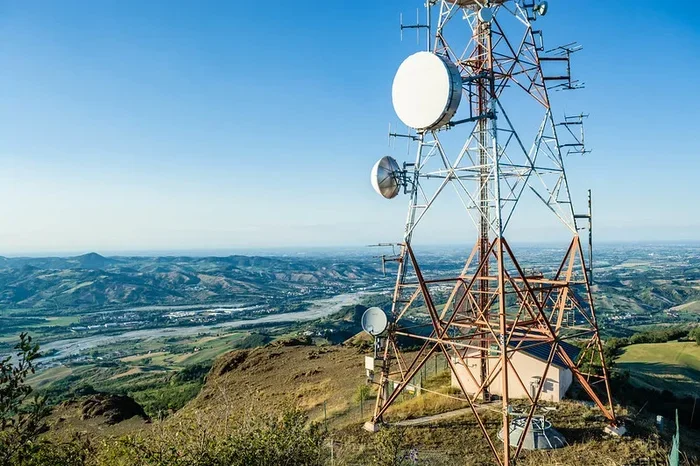
Repeaters come in many shapes and sizes. Some are tiny devices you plug into a wall outlet. Others are large base stations mounted on towers or hills. No matter the size, they all do the same core job: signal amplification.
How a Repeater Works
A repeater listens on one frequency and transmits on another. This is called frequency repeater operation. When your device sends a signal, the repeater picks it up, strengthens it, and bounces it back out. This doubles the effective coverage area of your device.
For example, if your phone has a weak signal in a basement, a wireless signal repeater can pull in that faint signal, boost it, and send it deep into the building. The result is a clear, strong connection where there was none before.
Why People Use Repeaters
People use repeaters for many reasons. Some want better cell phone signal booster performance at home. Others need reliable radio communication for work or hobbies. Here are the most common reasons:
- Home coverage: Eliminate dead zones in large houses or buildings.
- Outdoor adventures: Stay connected while hiking, camping, or boating.
- Emergency preparedness: Keep communication lines open during disasters.
- Business needs: Maintain reliable connections across warehouses or job sites.
- Hobby and community: Join local ham radio groups and repeater networks.
Can Anyone Use a Repeater
This is the big question, and the answer is more nuanced than you might think. Can anyone use a repeater depends on what kind of repeater you want to use and where you plan to use it. Let us break it down by type.
Consumer Repeaters
Consumer repeater systems are the easiest to use. You buy them off the shelf, plug them in, and they work. These include cell phone signal boosters, Wi-Fi range extenders, and small wireless signal repeaters. No license is needed for most consumer models.
These devices are designed for everyday use. They follow FCC rules and come with clear setup instructions. If you want better signal coverage at home or in your car, a consumer repeater is a great starting point.
Amateur Radio Repeaters
Amateur radio repeaters are a different story. These are shared repeater networks used by ham radio operators. To use most amateur repeaters, you need a license from the FCC. The license proves you understand the rules and can operate safely.
However, getting a ham radio license is not as hard as it sounds. Many people pass the entry-level exam with a few weeks of study. Once licensed, you can access thousands of repeaters worldwide. The community is welcoming, and many base stations are open to new operators.
Commercial and Professional Repeaters
Businesses and organizations often use professional repeater systems. These require coordination with telecom agencies and sometimes a dedicated license. Examples include public safety networks, taxi dispatch systems, and industrial communication networks.
If you are not running a business, you likely will not need this type of repeater. But it is worth knowing that these systems exist and serve important roles in radio communication infrastructure.
Types of Repeaters Explained
Not all repeaters are the same. Understanding the different types helps you choose the right one. Here is a closer look at the main categories.
Analog Repeaters
Analog repeaters have been around for decades. They work by simply amplifying the incoming signal and retransmitting it. These are common in older ham radio setups and basic cell phone signal booster systems.
Analog repeaters are simple and reliable. They do not require complex digital processing. However, they can pick up background noise along with the signal. For casual use, this is usually not a big deal.
Digital Repeaters
Digital repeaters convert the incoming signal into digital data before retransmitting it. This process reduces noise and improves clarity. Digital repeater systems are becoming more popular in both consumer and amateur radio markets.
These repeaters often support advanced features like encryption and data transmission. They also tend to be more efficient with power usage. If you want the clearest possible signal, a digital repeater is worth considering.
Wi-Fi and Cellular Repeaters
Wi-Fi repeaters and cell phone signal boosters are the most common consumer repeaters. They extend your existing network or cellular coverage to areas with weak signals.
Wi-Fi repeaters plug into wall outlets or mount on walls. They catch your existing Wi-Fi signal and rebroadcast it. Cell phone signal boosters work similarly but for cellular frequencies. Both types are easy to install and require no special skills.
| Feature | Analog Repeater | Digital Repeater | Consumer Booster |
|---|---|---|---|
| Signal Clarity | Good | Excellent | Very Good |
| Setup Difficulty | Easy | Moderate | Very Easy |
| License Required | Sometimes | Sometimes | No |
| Cost Range | Low to Medium | Medium to High | Low to Medium |
| Best For | Hobbyists | Professional Use | Home and Car |
How to Choose the Right Repeater
Choosing the right repeater system depends on your specific situation. Here are the key factors to consider before making a purchase.
Assess Your Signal Needs
Start by identifying where you have weak signals. Is it in one room of your house? Your entire property? Your car? The answer shapes what kind of repeater you need. A small Wi-Fi range extender works for a single room. A full cell phone signal booster kit is better for a whole house.
Check Local Regulations
Not all repeaters are legal everywhere. Consumer boosters must comply with FCC rules in the United States. If you live abroad, check your local telecom authority for guidelines. Using an illegal repeater can result in fines or device seizure.
Consider Your Budget
Repeaters range from under $30 to several thousand dollars. Consumer boosters are affordable and work well for most homes. Amateur radio repeaters can cost more, especially if you are building or maintaining a base station. Set a realistic budget before shopping.
Think About Future Growth
Buy a repeater that can grow with your needs. If you plan to add more devices or expand coverage later, choose a system that supports expansion. Many repeater networks allow you to add antennas or repeaters over time.
Setting Up Your Repeater
Setting up a repeater is easier than most people think. Consumer models come with detailed instructions and all the hardware you need. Here is a general overview of the process.
Step-by-Step Setup Guide
- Choose the right location: Place your repeater where it can receive a strong input signal. A central spot in your home usually works best.
- Mount the antenna: Position the repeater antenna high and away from metal objects. Outdoor antennas perform better than indoor ones.
- Connect the cables: Use quality coaxial cables to link the antenna to the repeater unit. Keep cables as short as possible to reduce signal loss.
- Power on and test: Turn on the repeater and check for signal strength in previously weak areas. Walk around your space to verify coverage.
- Adjust settings: Fine-tune the gain and frequency settings if needed. Most modern repeaters have auto-adjust features.
Quick Tips for Better Performance
- Place the repeater antenna at least three feet away from other electronics.
- Avoid placing the unit near microwaves or baby monitors, which cause interference.
- Use an outdoor antenna for the best coverage area results.
- Check your signal amplification levels regularly.
- Join a local repeater network community for tips and support.
Common Mistakes to Avoid
Even with the best repeater, mistakes can hurt your performance. Here are the most common errors and how to avoid them.
- Poor antenna placement: Hiding your antenna in a closet or behind furniture kills the signal. Always place it as high and open as possible.
- Ignoring local rules: Using a repeater without checking regulations can lead to legal trouble. Always verify compliance first.
- Overloading the system: Connecting too many devices to one repeater degrades performance for everyone. Stick to the manufacturer’s recommended limits.
- Skipping the license: If you need a license for an amateur or commercial repeater, do not skip this step. It protects you and the community.
- Cheap cables: Low-quality cables cause signal loss. Invest in good coaxial cables and connectors for the best results.
- Wrong frequency: Setting your repeater to the wrong frequency means it will not work properly. Always double-check the frequency repeater settings.
Expert Insights on Repeater Use
We spoke with several radio communication experts about the state of repeaters today. Here is what they had to say.
“The barrier to entry for using a repeater has never been lower,” says a veteran ham radio operator from Ohio. “You do not need to be a technician anymore. A simple consumer booster can give you the coverage you need in minutes.”
“For amateur operators, repeaters are the backbone of community communication,” adds another expert. “They connect people across cities and even countries. Every new licensed operator strengthens the network.”
These insights highlight a growing trend: repeaters are becoming more accessible to everyday users. The days of repeaters being exclusive to professionals are fading fast.
The Future of Repeater Technology
Repeater technology is evolving quickly. New digital protocols and smart features are making repeaters more efficient and user-friendly. Here are some trends to watch.
- Smart repeaters: Devices that auto-adjust frequency and power based on your location and needs.
- Mesh networks: Multiple repeaters working together to create seamless coverage area expansion.
- Integration with IoT: Repeaters that support smart home devices alongside traditional communication tools.
- Lower cost entry points: More affordable options are hitting the market, making repeater access available to more people.
As technology improves, the answer to “can anyone use a repeater” becomes a more definitive yes. The tools and knowledge are more accessible than ever before.
Final Thoughts
So, can anyone use a repeater? Absolutely. Whether you need a simple cell phone signal booster for your home or want to join a global amateur radio repeater network, the path is open. The key is understanding your needs, choosing the right type, and following the rules.
Repeater systems are powerful tools that bring connectivity to places where it was missing before. With the right repeater antenna, proper setup, and a bit of patience, you can transform your communication experience. Start small, learn as you go, and soon you will wonder how you ever managed without one.
The world of radio communication and signal amplification is vast and welcoming. No matter your skill level or budget, there is a repeater solution waiting for you. Take that first step today and enjoy stronger, more reliable connections tomorrow.
Frequently Asked Questions
Do I need a license to use a repeater at home?
For most consumer cell phone signal boosters and Wi-Fi repeaters, no license is required. However, if you want to use an amateur radio repeater, you must obtain an FCC license. The entry-level exam is straightforward and well worth the effort.
How far can a repeater extend my signal?
The range depends on your equipment and antenna setup. A home cell phone signal booster typically covers 2,000 to 5,000 square feet. A high-power amateur repeater system can cover dozens of miles. Placement and antenna quality are the biggest factors.
Can I build my own repeater?
Yes, many hobbyists build their own repeater systems. However, you must follow local regulations and obtain any required licenses. Building a repeater is a great learning experience and a rewarding project for those interested in radio communication.
What is the difference between a repeater and a booster?
A repeater receives and retransmits signals on a different frequency. A booster simply amplifies the existing signal on the same frequency. Both improve signal coverage, but repeaters are more versatile for longer distances.
Are repeaters legal to use?
Yes, consumer repeaters are legal when used in compliance with FCC rules. Always purchase from reputable sellers and follow the manufacturer guidelines. Using illegal or improperly configured equipment can result in fines.
What should I look for when buying a repeater?
Consider your coverage area, the type of signal you need, ease of setup, and whether a license is required. Read reviews, compare signal amplification specs, and choose a model that fits both your needs and budget. A good repeater antenna makes all the difference.