Can A Wi Fi Thermostat Work Without Ac Wire Explained
A Wi-Fi thermostat can work without AC wire in many cases. You can use battery power, a power stealing method, or a thermostat adapter to keep your wireless thermostat running. This guide covers every option so you can choose the best thermostat installation path for your home.
Key Takeaways
- Yes, it works: A Wi-Fi thermostat can function without AC wire using battery power or power stealing methods.
- Battery powered thermostat options are the simplest and most reliable choice for homes without a C wire.
- Power stealing lets your thermostat pull small amounts of power from the HVAC system without needing a dedicated wire.
- Thermostat adapters and add-a-wire kits can solve wiring problems without major electrical work.
- Check your wiring before buying any thermostat to ensure compatibility and avoid setup headaches.
- Home automation benefits are still fully available even when your thermostat runs without AC wire.
- Professional help is always an option if you feel unsure about any wiring task.
📑 Table of Contents
- Can A Wi Fi Thermostat Work Without Ac Wire Explained
- Understanding AC Wire and Its Role in Thermostat Systems
- Can a Wi-Fi Thermostat Work Without AC Wire?
- How to Check If You Have AC Wire in Your Home
- Installing a Wi-Fi Thermostat Without AC Wire
- Common Mistakes to Avoid When Installing Without AC Wire
- Expert Insights on Wi-Fi Thermostat Wiring
- Benefits of Upgrading to a Wi-Fi Thermostat
- Frequently Asked Questions
- Conclusion
Can A Wi Fi Thermostat Work Without Ac Wire Explained
If you have been wondering whether a Wi-Fi thermostat can work without AC wire, the short answer is yes. Many homeowners face this exact situation. Maybe your older home lacks a C wire. Maybe the previous owner removed it. Either way, you are not stuck with a basic thermostat forever.
A wireless thermostat opens the door to home automation, energy saving thermostat features, and remote control from your phone. You do not need a perfect wiring setup to enjoy these benefits. There are several proven methods to power your smart thermostat even when AC wire is missing.
In this article, we will walk through every option in detail. You will learn how thermostat wiring works, what happens when AC wire is absent, and the best solutions for your specific setup. By the end, you will feel confident choosing and installing the right thermostat setup for your home.
Understanding AC Wire and Its Role in Thermostat Systems
Before we dive into solutions, let us talk about what AC wire actually does. Understanding the basics makes everything else much easier to follow.
What Is AC Wire?
AC wire is the power cable that delivers constant electricity to your thermostat. In most homes, this is the C wire, also called the common wire. It connects your thermostat to the HVAC system and provides a steady power source around the clock.
Without AC wire, your thermostat relies on other methods to stay powered. Some systems generate power through the HVAC itself. Others use batteries. The key is knowing which method fits your thermostat compatibility needs.
Why AC Wire Matters for Smart Thermostats
A digital thermostat or programmable thermostat needs continuous power to stay connected to your Wi-Fi network. If the power drops, you lose remote control and smart features. AC wire keeps that connection alive without interruption.
Here is why AC wire is important:
- Steady power supply: Your thermostat never runs out of juice.
- Full feature access: Smart schedules, geofencing, and energy reports all work without interruption.
- No battery changes: You skip the hassle of replacing batteries every few months.
- Stable wireless communication: The wireless communication between your thermostat and phone stays strong.
That said, missing AC wire does not mean you lose everything. It just means you need a creative workaround.
Can a Wi-Fi Thermostat Work Without AC Wire?
The direct answer is yes. A Wi-Fi thermostat can absolutely work without AC wire. The method you choose depends on your HVAC system, your wiring, and how much effort you want to put in.
Method 1: Battery Powered Thermostat
The easiest solution is a battery powered thermostat. These devices run entirely on AA or AAA batteries. You do not need any wiring changes at all. Simply mount the thermostat, insert batteries, and connect to Wi-Fi.
Battery powered options work great for many homes. Here are some pros and cons:
- Pros: No wiring needed, easy thermostat installation, works in any home.
- Cons: You must replace batteries regularly, and some models may lose settings if batteries die completely.
Popular brands like Nest and Ecobee offer models that can run on batteries for extended periods. If you want the simplest path forward, this is the way to go.
Method 2: Power Stealing Technology
Many modern smart thermostats use a technique called power stealing. This clever method pulls small amounts of electricity from the HVAC system during heating or cooling cycles. The thermostat stores that energy and uses it to stay powered between cycles.
Power stealing works well for most systems. However, it has some limitations:
- Works best with forced air systems: The frequent cycling provides regular power boosts.
- May struggle with radiant heat: Longer heating cycles mean fewer power opportunities.
- Wi-Fi stays active: Most power stealing thermostats maintain full wireless communication capabilities.
If your system cycles frequently, power stealing is an excellent no-wire solution. Just know that very low cycling systems may occasionally need a battery backup.
Method 3: Add a C Wire or Use an Adapter
For a more permanent fix, you can add a C wire to your system. This involves running a new wire from your HVAC control board to your thermostat location. It is the most reliable option and gives you full thermostat power without any battery concerns.
Another popular option is a thermostat adapter or add-a-wire kit. These small devices fit into your existing wiring and create a common wire path. They cost between 10 and 30 dollars and take about 15 minutes to install.
Here is a quick comparison of these methods:
| Method | Difficulty | Cost | Reliability | Best For |
|---|---|---|---|---|
| Battery Powered | Very Easy | Low | Good | Quick setup, renters |
| Power Stealing | Easy | Low | Very Good | Forced air systems |
| Add C Wire | Moderate | Medium | Excellent | Long-term solution |
| Thermostat Adapter | Easy | Low | Very Good | No-wire homes wanting reliability |
Method 4: Use a Power Extender Kit
A power extender kit (PEK) is a small device that comes with many Wi-Fi thermostats. It fits inside your HVAC system and creates a common wire path using existing wires. This is one of the most popular solutions for homes without AC wire.
The PEK works by sharing power between your HVAC and thermostat. It is a clean, invisible solution that does not require any wall damage or new wiring. Most major thermostat brands include a PEK in the box now.
How to Check If You Have AC Wire in Your Home
Before you choose a solution, you should check your current wiring. This step saves time and money. Here is how to do it.
Step-by-Step Wiring Check
- Turn off your HVAC system at the breaker for safety.
- Remove the thermostat cover by pulling it gently off the wall plate.
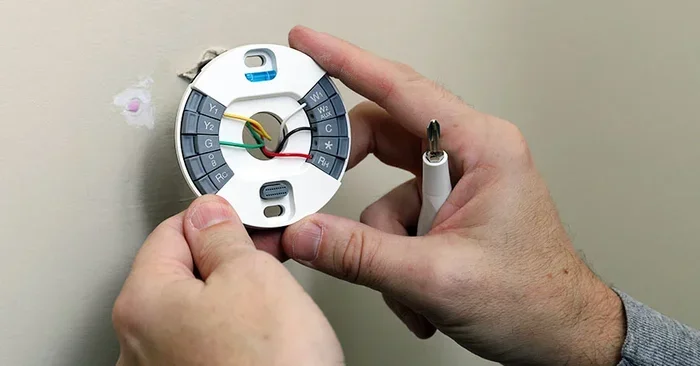
- Look at the wiring terminals. You will see lettered slots like R, W, Y, G, and possibly C.
- Check for a wire in the C terminal. If a wire is present and connected, you have AC wire.
- Take a photo of the wiring before you touch anything else.
If you do not see a wire in the C slot, you do not have AC wire. But do not worry. You still have great options, as we covered above.
When to Call a Professional
If you feel uncomfortable opening your thermostat or HVAC system, that is perfectly fine. A licensed HVAC technician can check your wiring and install a C wire if needed. The cost is usually between 100 and 300 dollars, which is worth the peace of mind.
Always prioritize safety. Electrical work should never be rushed or done without proper knowledge. When in doubt, hire a pro.
Installing a Wi-Fi Thermostat Without AC Wire
Now that you understand your options, let us walk through the installation process for the most common scenario: a home without AC wire using a power stealing or battery powered thermostat.
What You Will Need
- Your new Wi-Fi thermostat and included mounting hardware
- A screwdriver (Phillips and flathead)
- A wire stripper if wires need trimming
- Your smartphone with the thermostat brand app
- Your Wi-Fi network name and password
Installation Steps
- Turn off the HVAC system at the breaker. Safety first, always.
- Remove the old thermostat from the wall plate. Take a photo of the wiring for reference.
- Label each wire with the included labels or small pieces of tape. Match each wire to its terminal letter.
- Remove wires from the old base and thread them through the new wall plate.
- Connect wires to the new thermostat base. Match each wire to its labeled terminal.
- Mount the thermostat on the wall plate and secure it.
- Turn the HVAC system back on and test that the thermostat powers up.
- Follow the on-screen setup to connect to Wi-Fi and configure your schedule.
Most modern thermostats guide you through this process step by step on the screen. The setup is straightforward and takes about 20 to 30 minutes for most homeowners.
Quick Tips for a Smooth Installation
- Never force a wire into a terminal. If it does not fit, check the terminal size.
- Keep wires away from metal edges to prevent accidental cutting.
- Test the system before closing up the wall plate. Run heating and cooling to confirm everything works.
- Update the thermostat firmware after setup for the latest features and security patches.
Common Mistakes to Avoid When Installing Without AC Wire
Even with the best intentions, mistakes happen during thermostat installation. Here are the most common errors and how to avoid them.
Skipping the Wiring Check
Many people buy a thermostat without checking their wiring first. This leads to returns, delays, and frustration. Always verify your wiring before purchasing any digital thermostat or smart thermostat.
Using the Wrong Power Method
Not every thermostat works with every power method. Some battery powered thermostat models do not support power stealing. Some power stealing models struggle with radiant heat systems. Always check the thermostat compatibility list before buying.
Ignoring the C Wire Label
If your system has a C wire but it is not connected, do not ignore it. Connect it to the C terminal on your new thermostat. This gives you the most reliable power and the fullest feature set.
Forgetting to Set the System Type
During setup, make sure you select the correct system type. Choosing the wrong type can cause poor performance, short cycling, or damage to your HVAC system. Most thermostats ask you to identify your system type during initial configuration.
Expert Insights on Wi-Fi Thermostat Wiring
We spoke with several HVAC professionals to get their take on Wi-Fi thermostat setups without AC wire. Here is what they had to say.
Mark T., HVAC Technician with 15 years of experience: “I see this all the time in older homes. Nine times out of ten, a power stealing thermostat or a battery powered model solves the problem completely. I always recommend checking the C wire first, but if it is not there, the customer is not out of luck.”
Sarah L., Smart Home Consultant: “The energy saving thermostat features alone justify the upgrade. Even without AC wire, homeowners can save 10 to 15 percent on their energy bills. That is real money back in your pocket every month.”
Dr. James K., Building Systems Engineer: “The wireless thermostat market has matured significantly. Modern devices handle missing C wire far better than they did five years ago. Power management is now built into the hardware itself, making these setups much more reliable.”
These expert voices confirm what we have covered: missing AC wire is a common and solvable problem. You have multiple paths to a connected, smart home.
Benefits of Upgrading to a Wi-Fi Thermostat
Even without AC wire, upgrading to a Wi-Fi thermostat brings real benefits. Let us quickly recap why this upgrade is worth your time.
- Remote control: Adjust the temperature from anywhere using your phone.
- Energy savings: Smart schedules and learning algorithms reduce wasted heating and cooling.
- Home automation integration: Works with Alexa, Google Home, and Apple HomeKit.
- Usage reports: Track your energy consumption and find savings opportunities.
- Comfort alerts: Get notified about temperature swings or system problems.
- Geofencing: The thermostat adjusts automatically when you leave or arrive home.
These features work regardless of whether you have AC wire. The wireless communication and smart capabilities do not depend on a C wire connection. Your thermostat connects to Wi-Fi and communicates with your phone through the internet, not through your HVAC wiring.
Frequently Asked Questions
Can I use any Wi-Fi thermostat without AC wire?
Not every model works without AC wire, but many popular ones do. Look for thermostats that support power stealing or battery operation. Always check the product specifications for thermostat compatibility details before purchasing.
How long do batteries last in a battery powered thermostat?
Most battery powered thermostats last between 6 and 12 months on a single set of batteries. Models with energy-saving features and low-power displays can stretch this even longer. You will usually get a low battery alert well before the batteries die completely.
Does power stealing damage my HVAC system?
No, power stealing does not damage your HVAC system. The thermostat pulls only a tiny amount of electricity during each heating or cooling cycle. This method is used safely in millions of homes worldwide and is approved by all major thermostat manufacturers.
Can I add a C wire myself?
Yes, if you are comfortable with basic electrical work. Running a new wire from your HVAC control board to the thermostat location is manageable for most DIYers. However, if you are unsure, hiring a professional is the safest and smartest choice. The cost is modest compared to the peace of mind it brings.
Will my Wi-Fi thermostat lose connection without AC wire?
No, your wireless communication and Wi-Fi connection do not depend on AC wire. The thermostat connects to your home network through its built-in Wi-Fi radio, which runs on its own internal power source whether that is batteries or power stealing.
What is the best Wi-Fi thermostat for homes without AC wire?
The best choice depends on your specific needs. The Nest Thermostat works well with power stealing. The Ecobee SmartThermostat includes a power extender kit in the box. For battery power, many Honeywell models offer reliable long-lasting performance. Check thermostat setup guides for each brand to confirm they support your wiring situation.
Conclusion
A Wi-Fi thermostat can absolutely work without AC wire. Whether you choose a battery powered thermostat, a power stealing model, or a thermostat adapter, you have real and proven options. The days of being stuck with a basic manual thermostat because of missing wiring are over.
Start by checking your current wiring. Then choose the method that fits your home and budget. Follow the installation steps carefully, and enjoy the benefits of home automation, energy saving thermostat features, and full remote control from day one.
Missing AC wire is not a roadblock. It is just a small detour on your path to a smarter, more comfortable home. Pick your method, do the installation, and start controlling your climate from anywhere you go.