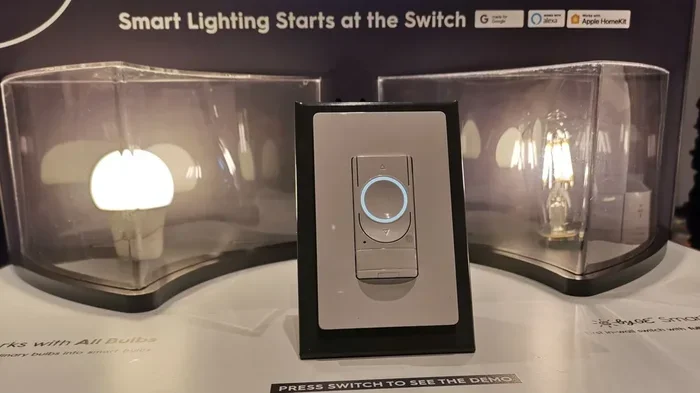
Do Smart Dimmer Switches Really Need Special Bulbs
Smart dimmer switches do not always need special bulbs, but using the right dimmable LED bulbs makes a huge difference in performance. Many standard LED bulbs work fine with modern smart dimmers, but incompatibility can cause flickering, buzzing, or flickering lights. Choosing compatible bulbs ensures smooth dimming, longer bulb life, and better smart home lighting control.
Smart dimmer switches have become a staple in modern homes. They let you control the brightness of your lights with a tap on your phone or a simple voice command. But one question keeps popping up among homeowners and renters alike: do smart dimmer switches really need special bulbs? The short answer is no, but the full story is a bit more nuanced.
When you switch to smart dimmers, you want everything to work smoothly. No flickering. No buzzing. No wasted money on bulbs that don’t play nice with your new switch. That is why understanding bulb compatibility matters so much. In this guide, we will walk you through everything you need to know about choosing the right bulbs for your smart dimmer switches.
Whether you are upgrading a single room or wiring your entire house with smart lighting, this article has you covered. We will break down the science behind dimming, explain which bulbs work best, and share practical tips to avoid common pitfalls. By the end, you will feel confident picking out bulbs that make your smart dimmer shine.
Key Takeaways
- Not all dimmer switches need special bulbs: Many standard dimmable LEDs work with modern smart dimmers.
- Incompatibility causes common issues: Flickering, buzzing, and minimum load problems are signs of bulb-switch mismatch.
- LED bulbs are the best choice: They are energy efficient, long lasting, and widely compatible with smart dimmers.
- Check the label: Always look for “dimmable” on the bulb packaging before purchasing.
- Smart home integration matters: Just like smart locks that work with apps, smart dimmers need to pair well with your home automation ecosystem.
- Wireless control is key: Similar to how you can mirror your phone to a smart TV without Wi-Fi, smart dimmers offer wireless control from your phone.
- Voice control adds convenience: Smart dimmers work with voice assistants, much like smart speakers that respond to voice commands.
📑 Table of Contents
- What Are Smart Dimmer Switches?
- Why Do People Think Special Bulbs Are Required?
- Do Smart Dimmer Switches Really Need Special Bulbs?
- Best Bulb Types for Smart Dimmer Switches
- Common Problems and How to Fix Them
- Tips for Choosing the Right Bulbs for Your Smart Dimmer
- Expert Insights on Smart Dimmer and Bulb Compatibility
- Conclusion
What Are Smart Dimmer Switches?
A smart dimmer switch is a device that replaces your standard light switch. It lets you adjust the brightness of your lights using a smartphone app, a remote control, or voice commands through smart home assistants like Alexa or Google Assistant. Unlike traditional dimmers that use a simple rotary knob, smart dimmers connect to your home Wi-Fi network or a smart home hub.
These switches work by controlling the amount of electrical current that reaches the bulb. When you turn the brightness down, the switch reduces the power flowing to the light. When you turn it up, more power flows through. This process is called phase control dimming, and it is the same basic principle behind old-school dimmer switches.
What makes smart dimmers different is the added layer of technology. They include wireless chips, microprocessors, and software that lets you schedule lights, set scenes, and integrate with other smart devices. Some models even learn your habits and adjust lighting automatically. Brands like Lutron, Leviton, and TP-Link make popular smart dimmer switches that work with a wide range of bulbs.
How Do Smart Dimmer Switches Communicate With Bulbs?
Smart dimmer switches send signals to bulbs using different protocols depending on the type of switch. Some use Wi-Fi to communicate directly with your home network. Others use Zigbee or Z-Wave protocols that require a hub. There are also Bluetooth-enabled dimmers that connect to your phone over short distances.
The switch tells the bulb how much power to receive, and the bulb responds by changing brightness. For this to work properly, the bulb must be able to receive and interpret those signals. This is where compatibility comes into play. Not all bulbs respond the same way to dimmer signals, which is why some work beautifully while others cause problems.
Why Do People Think Special Bulbs Are Required?
The idea that smart dimmer switches need special bulbs comes from years of experience with older dimming technology. In the past, dimming a light often meant using incandescent bulbs. These bulbs had a simple filament that glowed when electricity passed through it. Dimming them was straightforward because the switch just reduced the current flowing to the filament.
Then LED bulbs came along. LEDs are very different from incandescent bulbs. They use a driver chip to convert electrical current into light. That driver chip can react strangely when the current is reduced by a dimmer switch. Early LED bulbs were not designed to handle the fluctuating current that dimmers produce. The result was flickering, buzzing, and bulbs that refused to dim below a certain level.
Over time, bulb manufacturers developed dimmable LED bulbs specifically designed to work with dimmer switches. These bulbs have better driver chips that can handle the changing current smoothly. But because of the early bad experiences, many people still believe that you need to buy expensive or specialty bulbs for dimmers to work properly.
The truth is that modern dimmable LED bulbs are affordable and widely available. You do not need to spend a fortune or hunt down hard-to-find specialty bulbs. You just need to know what to look for.
The Role of Incandescent Bulbs in Dimming History
For decades, incandescent bulbs were the go-to choice for dimmable lighting. They were cheap, dimmed smoothly, and worked with virtually every dimmer switch on the market. The problem was that they wasted a lot of energy as heat. A typical incandescent bulb converts only about 10% of its energy into light. The rest becomes heat.
As energy efficiency standards tightened, incandescent bulbs started to phase out. LED bulbs stepped in as the replacement. LEDs use up to 80% less energy than incandescent bulbs and last much longer. But their different electrical characteristics meant that older dimming technology did not always work well with them. This created the misconception that dimmers and LEDs are inherently incompatible.
Do Smart Dimmer Switches Really Need Special Bulbs?
Here is the clear answer: no, smart dimmer switches do not need special bulbs. They need dimmable bulbs, and that is a key distinction. Any bulb labeled “dimmable” should work with a smart dimmer switch. The bulb does not need to be a “smart bulb” either. You can pair a smart dimmer switch with a regular dimmable LED bulb and get full dimming control through the switch.
However, not all dimmable bulbs are created equal. Some dimmable bulbs work better with certain dimmer switches than others. The compatibility depends on the type of dimmer, the bulb’s driver design, and the electrical characteristics of your home. This is why you sometimes hear about people having trouble with their dimmers even when using dimmable bulbs.
The best approach is to check the manufacturer’s compatibility list. Most smart dimmer switch brands publish a list of bulbs that they have tested and verified. These lists are usually available on the brand’s website. If you are buying bulbs in bulk for a large project, this step can save you a lot of frustration.
Smart Bulbs vs. Dimmable Bulbs With Smart Dimmer Switches
There is another option to consider: smart bulbs. Smart bulbs like those from Philips Hue or LIFX have built-in smart technology. They connect to your Wi-Fi network directly and can be controlled through an app or voice assistant. You do not need a smart dimmer switch to dim smart bulbs because the dimming function is built into the bulb itself.
But here is the catch. If you install a smart dimmer switch on a fixture that has smart bulbs, you can run into problems. Smart bulbs need constant power to stay connected to the network. Some smart dimmer switches cut power completely when the light is turned off, which can disconnect the smart bulb. This creates a situation where you cannot turn the light back on using the switch.
So which is better? It depends on your setup. If you want full smart home control and scene setting, smart bulbs are a great choice. If you want to use existing fixtures and bulbs, a smart dimmer switch with dimmable LED bulbs is the way to go. Many homeowners use both strategies in different rooms of their house.
Best Bulb Types for Smart Dimmer Switches
Not all bulbs are compatible with smart dimmer switches. Here is a breakdown of the most common bulb types and how well they work with smart dimmers.
Dimmable LED Bulbs
Dimmable LED bulbs are the best choice for smart dimmer switches. They are energy efficient, long lasting, and available in a wide range of brightness levels and color temperatures. Most modern dimmable LEDs work seamlessly with smart dimmers from major brands.
When shopping for dimmable LED bulbs, look for the following features:
- Dimmable rating on the packaging: This is the most important label to look for.
- Compatible with smart dimmers: Some bulbs are specifically tested with popular dimmer brands.
- Wide dimming range: Look for bulbs that can dim from 10% to 100% without flickering.
- Appropriate wattage equivalent: Match the bulb’s brightness to the room’s needs.
Incandescent and Halogen Bulbs
Traditional incandescent and halogen bulbs work perfectly with smart dimmer switches. They dim smoothly and have no compatibility issues. However, they use a lot of energy and have a short lifespan compared to LEDs. If you are trying to save on electricity bills, these are not the best choice.
Some people still prefer incandescent bulbs for their warm, natural light quality. If that is important to you, there are now halogen incandescent bulbs that offer a similar warm tone with better efficiency. But even these are less efficient than standard dimmable LEDs.
Smart Bulbs
Smart bulbs like Philips Hue, LIFX, and Wyze Bulb can be dimmed without a smart dimmer switch. They dim through the app or voice commands. If you use a smart dimmer switch with smart bulbs, make sure the switch does not cut power completely when turned off. Look for smart dimmers that maintain a small amount of standby power to keep smart bulbs connected.
CFL Bulbs
Compact fluorescent (CFL) bulbs are an older energy-efficient option. Some CFL bulbs are dimmable, but they do not always work well with smart dimmer switches. CFLs can flicker, hum, or fail to dim smoothly. If you have CFL bulbs in your fixtures, it is worth upgrading to dimmable LEDs for the best experience with your smart dimmer.
Common Problems and How to Fix Them
Even when you use the right bulbs, you might run into issues with your smart dimmer switch. Here are the most common problems and how to solve them.
Flickering Lights
Flickering is the most common complaint with dimmer switches and bulbs. It usually happens when the bulb and dimmer are not fully compatible. The flickering may be subtle at first but can become worse over time.
To fix flickering:
- Make sure the bulb is labeled as dimmable.
- Check the manufacturer’s compatibility list for your dimmer switch.
- Try a different brand of dimmable LED bulb.
- Ensure the bulb is screwed in tightly and making good contact.
Buzzing or Humming Sounds
A buzzing sound coming from the bulb or the switch is another sign of incompatibility. This happens when the electrical current does not flow smoothly between the dimmer and the bulb. LED bulbs are especially prone to buzzing when paired with the wrong dimmer.
To reduce buzzing:
- Use high-quality dimmable LED bulbs from reputable brands.
- Install a dimmer switch that is rated for LED loads.
- Check if the fixture has multiple bulbs and try removing one to see if the buzzing stops.
Minimum Load Issues
Some older dimmer switches require a minimum amount of power to work properly. This is called the minimum load requirement. LED bulbs use very little power, so if you have too few LED bulbs on a single dimmer circuit, the switch may not function correctly. The lights might flicker at low brightness or not dim at all.
To fix minimum load issues:
- Add more dimmable LED bulbs to the circuit.
- Use a dimmer switch designed specifically for LED loads.
- Install a load bypass module that tricks the dimmer into thinking there are more bulbs connected.
Bulbs Not Dimming Smoothly
If your bulbs jump from bright to off instead of dimming gradually, the dimmer and bulb are likely not compatible. This is a common issue with cheaper dimmable LEDs paired with high-end smart dimmers. The solution is usually to upgrade the bulbs to a higher quality dimmable LED or choose a dimmer with a broader compatibility range.
Tips for Choosing the Right Bulbs for Your Smart Dimmer
Buying the right bulbs does not have to be confusing. Follow these tips to make the process easy and stress free.
Check the Dimmer Compatibility List
Before you buy bulbs in bulk, visit the dimmer manufacturer’s website. Most brands publish a compatibility list that tells you exactly which bulbs have been tested with their switches. This is the single best way to avoid compatibility issues.
Buy from Reputable Brands
Cheap no-name bulbs may save you a few dollars upfront, but they often have poor driver designs that cause flickering and buzzing. Stick with well-known brands like Philips, Cree, GE, and Sylvania for the best results with your smart dimmer switches.
Consider the Room’s Lighting Needs
Different rooms need different levels of brightness. A bedroom might need soft, warm light for relaxing, while a kitchen needs bright, cool light for cooking. Choose bulbs with the right brightness (measured in lumens) and color temperature (measured in Kelvin) for each room.
Think About Future Upgrades
When you buy bulbs, think about whether you might want to upgrade to smart bulbs later. If you plan to add smart bulbs eventually, make sure your dimmer switch is compatible with them. This way, you can transition smoothly without replacing the switch later.
Test Before You Commit
If you are unsure about compatibility, buy one bulb first and test it with your smart dimmer switch. Turn it on and off, dim it up and down, and check for flickering or buzzing. If it works well, you can buy the rest with confidence.
Expert Insights on Smart Dimmer and Bulb Compatibility
Lighting professionals and electricians agree that the key to a great smart dimming experience is matching the right bulb with the right switch. According to industry experts, the vast majority of compatibility issues come from using non-dimmable bulbs with dimmer switches. Always double-check that the bulb is rated as dimmable before purchasing.
Electricians also recommend paying attention to the type of dimmer switch you are installing. Leading-edge dimmers work best with incandescent bulbs, while trailing-edge dimmers are designed for LED loads. If you are installing a new smart dimmer, make sure it is rated for the type of bulbs you plan to use.
One expert tip from lighting designers is to avoid mixing different bulb types on the same dimmer circuit. If you have three bulbs on one fixture, make sure all three are the same brand, model, and wattage. Mixing different bulbs can cause uneven dimming and shorten the lifespan of the bulbs.
Another important consideration is the age of your home’s wiring. Older homes may have wiring that does not support the low-wattage demands of LED bulbs. If you live in an older home and are experiencing dimming issues, it is worth having an electrician check your wiring before assuming the bulbs are at fault.
The smart home lighting market is evolving rapidly. New bulbs and switches are being released all the time, and compatibility is improving with each generation. By staying informed and choosing quality products, you can build a smart lighting setup that works beautifully for years to come.
Conclusion
So, do smart dimmer switches really need special bulbs? The answer is clear: they need dimmable bulbs, not special or expensive bulbs. Most modern dimmable LED bulbs work perfectly with smart dimmer switches, and you do not need to spend extra money on specialty products.
The secret is to check compatibility, buy from reputable brands, and test your setup before committing. Avoid the common mistakes of using non-dimmable bulbs, mixing bulb types, or ignoring minimum load requirements. With the right bulbs and a quality smart dimmer switch, you can enjoy smooth, reliable dimming control in every room of your home.
Smart lighting is one of the easiest ways to upgrade your home. It saves energy, adds convenience, and creates the perfect ambiance for any occasion. Start with one room, experiment with different bulbs, and build your smart lighting setup from there. You will be amazed at how much of a difference the right bulbs make.
Frequently Asked Questions
Can I use any LED bulb with a smart dimmer switch?
Not all LED bulbs work with smart dimmer switches. The bulb must be labeled as “dimmable” on the packaging. Even then, compatibility can vary between brands. Always check the dimmer manufacturer’s compatibility list before buying bulbs in bulk.
Do smart bulbs work with smart dimmer switches?
Smart bulbs can work with smart dimmer switches, but there are some caveats. Smart bulbs need constant power to stay connected to the network. Some smart dimmers cut power completely when turned off, which can disconnect the smart bulb. Look for smart dimmers that maintain standby power if you plan to use smart bulbs.
Why do my LED bulbs flicker when I dim them?
Flickering usually happens when the bulb and dimmer are not fully compatible. It can also occur if the bulb is not screwed in tightly or if the dimmer is an older model not designed for LED loads. Try using a different brand of dimmable LED bulb or upgrading to a trailing-edge dimmer designed for LEDs.
What is the difference between leading-edge and trailing-edge dimmers?
Leading-edge dimmers are older technology designed for incandescent bulbs. They cut the front part of the electrical wave and work best with high-wattage bulbs. Trailing-edge dimmers are newer and designed for low-wattage LED bulbs. They cut the back part of the wave and provide smoother, more reliable dimming for LEDs.
Can I use a smart dimmer switch with a single bulb?
Yes, you can use a smart dimmer switch with a single bulb. However, some older dimmer switches have a minimum load requirement that may not be met by a single low-wattage LED bulb. If you experience flickering or buzzing with a single bulb, try adding a small load resistor or switching to a dimmer rated for LED loads.
Are smart dimmer switches hard to install?
Most smart dimmer switches are designed for DIY installation and come with clear instructions. However, if you are not comfortable working with electrical wiring, it is best to hire a licensed electrician. Always turn off the power at the circuit breaker before starting any electrical work.