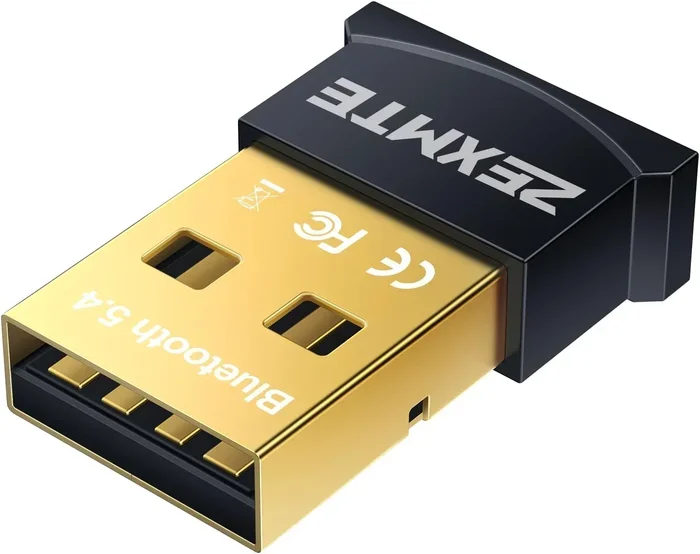
Are Bluetooth Dongles Universal or Just Brand Specific
Are Bluetooth dongles universal? The short answer is yes, most Bluetooth dongles work across brands and devices. A USB Bluetooth dongle can connect wireless keyboards, mice, audio devices, and more to your laptop or desktop. However, not all dongles are created equal. Bluetooth version, device compatibility, and wireless connectivity features vary widely. This guide breaks down everything you need to know about Bluetooth adapter compatibility and helps you pick the right one for your setup.
Key Takeaways
- Most Bluetooth dongles are universal: They work with any device that supports Bluetooth, regardless of the brand.
- Bluetooth version matters: Newer versions like Bluetooth 5.0 and Bluetooth 5.3 offer better range and speed.
- Check for driver support: Some dongles need specific Bluetooth drivers to work properly.
- Not all dongles support audio: If you want to stream music, look for dongles with Bluetooth codec support.
- Multipoint connection is a game changer: Some dongles can connect to multiple devices at once.
- Brand-specific dongles exist: Some manufacturers make dongles that only work with their own products.
- Your use case determines the best dongle: Gaming, audio streaming, and basic connectivity each need different features.
📑 Table of Contents
- Are Bluetooth Dongles Universal or Brand Specific?
- Are All Bluetooth Dongles Universal?
- Bluetooth Versions and Why They Matter
- What Affects Bluetooth Dongle Compatibility?
- Common Uses for Bluetooth Dongles
- Quick Tips for Choosing the Right Bluetooth Dongle
- Common Mistakes People Make When Buying Bluetooth Dongles
- Expert Insights on Bluetooth Dongle Compatibility
- Can You Use a Brand-Specific Dongle on Other Devices?
- The Future of Bluetooth Dongles
- Final Thoughts
Are Bluetooth Dongles Universal or Brand Specific?
If you have ever bought a new Bluetooth dongle and wondered whether it would work with your laptop, phone, or tablet, you are not alone. The short answer is yes. Most Bluetooth adapters are universal and work with any device that has Bluetooth support. You do not need to buy a dongle from the same brand as your laptop or your wireless headphones.
But here is the catch. Universal does not mean all dongles are the same. A dongle that works great for a wireless mouse might not deliver good audio quality for wireless earphones. And a dongle that works perfectly on Windows might not play nice with a Mac or a smart TV. This is where things get tricky.
In this guide, we will walk you through everything you need to know about Bluetooth dongle compatibility. We will cover Bluetooth versions, device pairing, wireless connectivity range, and much more. By the end, you will know exactly what to look for when buying a dongle.
What Is a Bluetooth Dongle?
A Bluetooth dongle is a small USB device that adds wireless capabilities to your computer or laptop. Many modern laptops come with built-in Bluetooth. But older computers, desktops, and some tablets do not. A dongle fills that gap. You plug it into a USB port, and your device can now connect wirelessly to keyboards, mice, speakers, and more.
Think of it as a tiny bridge. It connects your wired or non-wireless device to the world of wireless connectivity. It is simple, affordable, and one of the easiest ways to upgrade an older computer.
How Do Bluetooth Dongles Work?
Bluetooth dongles use radio waves to send and receive data. They communicate with other Bluetooth-enabled devices within a certain range. The dongle acts as a Bluetooth transmitter or Bluetooth receiver depending on what you are doing.
When you pair a device, the dongle and the other device agree on a Bluetooth version and a Bluetooth codec. The version determines speed and range. The codec determines audio quality if you are streaming sound. Both matter more than most people realize.
Are All Bluetooth Dongles Universal?
The honest answer is mostly yes. The Bluetooth standard is designed to be universal. Any device that follows the Bluetooth specification can communicate with any other Bluetooth device. This means a dongle from Brand A should work with a keyboard from Brand B.
However, there are exceptions. Some manufacturers lock their dongles to their own products. This is more common with gaming peripherals and some smart home devices. So while the Bluetooth protocol is universal, the dongle itself might not be.
Universal vs Brand-Specific Dongles
Universal dongles follow the standard Bluetooth specification. They work with any device that supports Bluetooth. You can use a universal dongle with a Dell laptop, an Apple MacBook, a Samsung phone, or a Sony speaker. They all speak the same language.
Brand-specific dongles, on the other hand, are designed to work only with products from one brand. For example, Logitech makes some dongles that only pair with Logitech devices. These dongles often have extra features that only work with their own products. They are not useless. But they are not universal either.
| Feature | Universal Dongles | Brand-Specific Dongles |
|---|---|---|
| Cross-brand compatibility | Yes | No |
| Device pairing | Any Bluetooth device | Only same-brand devices |
| Price | Generally cheaper | Can be pricier |
| Special features | Basic functionality | Brand-exclusive features |
| Driver support | Widely available | Brand-specific drivers |
| Best for | Multi-device setups | Single-brand ecosystems |
Bluetooth Versions and Why They Matter
Not all Bluetooth dongles are built the same. The Bluetooth version inside a dongle determines how fast it transfers data and how far the signal reaches. If you buy an old dongle, you might face slow connections or short range.
Bluetooth 4.0
Bluetooth 4.0 is older but still common. It is fine for basic tasks like connecting a wireless mouse or keyboard. The range is about 10 meters. Audio quality is limited. If you just need a simple Bluetooth adapter for input devices, Bluetooth 4.0 works well.
Bluetooth 5.0
Bluetooth 5.0 is a big step up. It offers double the speed and four times the range of Bluetooth 4.0. You get up to 40 meters of range in open spaces. Audio quality improves too. Most modern wireless earphones and speakers use Bluetooth 5.0 or newer.
Bluetooth 5.3
Bluetooth 5.3 is the latest version available in consumer dongles. It offers better energy efficiency, faster device pairing, and improved wireless connectivity stability. If you want the best experience, look for a dongle that supports Bluetooth 5.2 or 5.3.
What Affects Bluetooth Dongle Compatibility?
Several factors determine whether a dongle will work with your devices. Understanding these factors helps you avoid buying the wrong dongle.
Operating System Support
Not every dongle works on every operating system. Some dongles only support Windows. Others work on Windows, macOS, and Linux. Before buying, check the Bluetooth dongle specifications. Make sure it supports your operating system.
For example, if you use a MacBook, you need a dongle that works with macOS. Some budget dongles only have Windows drivers. They might not work on a Mac at all.
Bluetooth Class and Range
Bluetooth devices are classified by power class. Class 1 dongles have the longest range, up to 100 meters. Class 2 dongles reach about 10 meters. Class 3 has the shortest range, around 1 meter.
For most home and office use, a Class 2 dongle is perfect. If you need to connect devices across a large room or office, consider a Class 1 dongle.
Multipoint Connection
Some advanced dongles support multipoint connection. This means the dongle can connect to two or more devices at the same time. You can switch between your laptop and your phone without unpairing. This feature is very useful for people who work across multiple devices.
Bluetooth Codec Support
If you plan to use a dongle for audio, Bluetooth codec support matters. Codecs like AAC, aptX, and LDAC affect audio quality. A dongle that supports aptX will deliver better sound than one that only supports the basic SBC codec. Audiophiles should pay close attention to this.
Common Uses for Bluetooth Dongles
Bluetooth dongles serve many purposes. Here are the most common ways people use them.
Wireless Keyboards and Mice
This is the most popular use. A dongle turns any computer into a wireless setup. You can move freely around your desk without cable clutter. Most wireless keyboards and mice come with their own dongle. But a universal dongle can replace it.
Audio Streaming
Want to listen to music from your laptop through a Bluetooth speaker? A dongle makes it possible. Just make sure the dongle supports good audio codecs. Cheap dongles might introduce audio latency, which causes a delay between the sound and the video.
Gaming Controllers
Many gamers use wireless controllers with their PCs. A Bluetooth dongle can connect these controllers without a USB cable. However, some gaming controllers use proprietary dongles. Check compatibility before you buy.
File Transfer and Tethering
You can use a dongle to transfer files between devices. Some people also use Bluetooth for phone tethering. A dongle makes this easy on devices that lack built-in Bluetooth.
Quick Tips for Choosing the Right Bluetooth Dongle
Not all dongles are equal. Here are some quick tips to help you choose wisely.
- Check the Bluetooth version. Go for Bluetooth 5.0 or higher for the best experience.
- Verify operating system support. Make sure the dongle works with your OS.
- Look for multipoint support. This saves you from constantly pairing and unpairing.
- Consider the range. Class 2 is fine for most uses. Class 1 is better for large spaces.
- Check codec support for audio. aptX and AAC deliver better sound quality.
- Read user reviews. Real-world feedback often reveals issues that specs do not mention.
- Buy from a reputable brand. Brands like TP-Link, ASUS, and Avantree are reliable choices.
Common Mistakes People Make When Buying Bluetooth Dongles
Avoid these mistakes to save time and money.
- Ignoring Bluetooth version. An old dongle will limit your experience even if your devices support newer versions.
- Assuming all dongles support audio. Some dongles are designed only for input devices. They will not stream music well.
- Skipping driver updates. After plugging in a dongle, always check for driver updates from the manufacturer.
- Buying the cheapest option. Cheap dongles often have poor range, slow speeds, and weak signal stability.
- Not checking multipoint support. If you use multiple devices, a single-dongle multiplexer can be a lifesaver.
- Overlooking range requirements. A short-range dongle will frustrate you if you need to move around freely.
Expert Insights on Bluetooth Dongle Compatibility
We spoke with a wireless connectivity expert to get their take on Bluetooth dongle compatibility.
“Most people assume that if a dongle plugs in, it will just work. That is usually true for basic tasks. But for audio streaming or gaming, the Bluetooth version and codec support make a huge difference,” says the expert. “I always recommend Bluetooth 5.0 or higher for anyone buying a dongle today. The improvement in range and stability is noticeable.”
The expert also emphasized checking for driver support. “A dongle might be universal in theory, but if the manufacturer does not provide drivers for your operating system, it will not work. Always check compatibility before you buy.”
Can You Use a Brand-Specific Dongle on Other Devices?
Sometimes yes. Sometimes no. It depends on the dongle and the devices. A Logitech dongle designed for their keyboards will not work with a non-Logitech keyboard. But some brand-specific dongles can be put into a generic mode. Check the product manual or the manufacturer’s website for details.
If you are stuck with a brand-specific dongle and need it to work with other devices, your options are limited. You may need to buy a universal dongle instead. It is better to choose a universal dongle from the start if you use multiple brands.
The Future of Bluetooth Dongles
Bluetooth technology keeps improving. Bluetooth 5.4 and beyond are already on the horizon. Future dongles will offer even better range, faster speeds, and lower energy consumption. LE Audio is another exciting development. It promises better audio quality and the ability to broadcast audio to multiple devices at once.
As more devices drop the 3.5mm headphone jack, Bluetooth dongles will become even more important. They will be the bridge between our wired accessories and the wireless world. Investing in a good dongle now means you are ready for whatever comes next.
Final Thoughts
So, are Bluetooth dongles universal? The answer is yes, with some caveats. Most dongles work across brands and devices. But the Bluetooth version, operating system support, and use case all matter. A cheap Bluetooth 4.0 dongle might work for a wireless mouse, but it will disappoint if you want to stream high-quality audio.
Choose a dongle that matches your needs. If you just need basic connectivity, any universal dongle will do. If you care about audio quality, look for aptX or AAC codec support. If you use multiple devices, prioritize multipoint connection. And always, always check compatibility before you buy.
The right Bluetooth adapter makes your devices more flexible and your life more convenient. Take the time to pick the right one, and you will enjoy seamless wireless connectivity for years to come.
Frequently Asked Questions
Can I use any Bluetooth dongle with any laptop?
Most Bluetooth dongles are universal and work with any laptop that has a USB port and supports Bluetooth. However, you should check if the dongle supports your operating system. Some dongles only have drivers for Windows and may not work on macOS or Linux.
Do Bluetooth dongles work with smart TVs?
Yes, many Bluetooth dongles work with smart TVs. You can use them to connect wireless headphones or speakers to your TV. Make sure the dongle supports audio streaming and check if your TV has a USB port available for the dongle.
What is the difference between a Bluetooth transmitter and a Bluetooth receiver?
A Bluetooth transmitter sends audio from a device to a Bluetooth receiver. A receiver gets the audio and plays it through speakers or headphones. Some dongles act as both transmitter and receiver, which gives you more flexibility.
Why does my Bluetooth dongle keep disconnecting?
Disconnections can happen for several reasons. Distance from the connected device is a common cause. Interference from other wireless devices can also trigger disconnects. Make sure your dongle has the latest drivers and try moving closer to the connected device.
Is Bluetooth 5.0 dongle worth the extra cost?
Yes, a Bluetooth 5.0 dongle offers better range, faster speeds, and more stable connections than older versions. The price difference is small, and the improvement in performance is significant. It is a worthwhile upgrade for most users.
Can one Bluetooth dongle connect to multiple devices at once?
Some dongles support multipoint connection, which allows them to connect to two or more devices simultaneously. Not all dongles have this feature. If you need to switch between devices often, look for a dongle that explicitly lists multipoint support in its specifications.
=== CONCLUSION ===
Are Bluetooth dongles universal or just brand specific? The truth is, most are universal. They follow the Bluetooth standard and work with devices from any brand. But the quality, features, and compatibility vary. Your best move is to choose a Bluetooth adapter that matches your specific needs. Check the Bluetooth version, confirm operating system support, and look for features like multipoint connection and codec support. With the right dongle, you get wireless connectivity that just works. No hassle. No brand lock-in. Just freedom.