Do Bluetooth Speakers Have Their Own Volume Control
Do Bluetooth speakers have their own volume control? Yes, most Bluetooth speakers come with built-in volume buttons, knobs, or touch controls that let you adjust sound levels directly from the device. You don’t always need to depend on your phone or tablet to change the speaker volume. The way each speaker handles volume control can vary depending on the brand, model, and design. In this guide, we’ll walk through everything you need to know about Bluetooth speaker volume, from physical buttons to app-based settings and practical tips.
You just unboxed your new portable Bluetooth speaker. You pair it with your phone, play your favorite song, and then… you realize you need to turn it up. But wait. Where is the volume control? This is a question that trips up a lot of people, especially those new to wireless audio devices. The good news is that do Bluetooth speakers have their own volume control? In most cases, the answer is a clear yes. But the details matter, and they can make a big difference in how you enjoy your music, podcasts, and calls.
Bluetooth speakers come in all shapes and sizes. Some are tiny enough to fit in your pocket. Others are big enough to fill a room. Despite these differences, nearly all of them include some form of volume control built right into the device. Understanding how these controls work can help you get the best experience from your speaker. It can also save you from frustration when the volume isn’t behaving the way you expect.
In this article, we will explore every angle of speaker volume control. We will look at the different types of controls, how they work, common problems, and tips for getting the loudest and clearest sound possible. Whether you use a small wireless speaker at home or a powerful boom box at the beach, this guide has you covered.
Key Takeaways
- Most Bluetooth speakers have built-in volume controls: Whether buttons, knobs, or touch sensors, you can adjust the volume right on the speaker itself.
- Volume can be controlled from multiple sources: Your phone, tablet, voice assistant, or the speaker’s own controls can all manage audio output volume.
- Some speakers have volume limits: Certain models cap the maximum volume for safety or legal reasons, which can be frustrating for users.
- App-based control offers more precision: Many modern speakers let you fine-tune volume and equalizer settings through a dedicated mobile app.
- Paired speakers may sync volume automatically: When you connect two speakers together, volume settings often sync between both devices.
- Physical controls vary by design: Some speakers use tactile buttons, while others rely on touch-sensitive panels or rotary dials.
📑 Table of Contents
- How Do Bluetooth Speakers Control Volume?
- Can You Adjust Volume Without a Phone?
- Common Volume Control Issues and How to Fix Them
- Best Bluetooth Speakers with Great Volume Controls
- Tips for Getting the Best Volume from Your Bluetooth Speaker
- Do All Bluetooth Speakers Have Volume Controls?
- Final Thoughts
How Do Bluetooth Speakers Control Volume?
The way a Bluetooth speaker manages volume depends on its design and price point. Budget speakers might have simple press buttons. Premium speakers often feature touch-sensitive panels or even voice commands. Let us break down the most common methods you will find on today’s market.
Physical Buttons
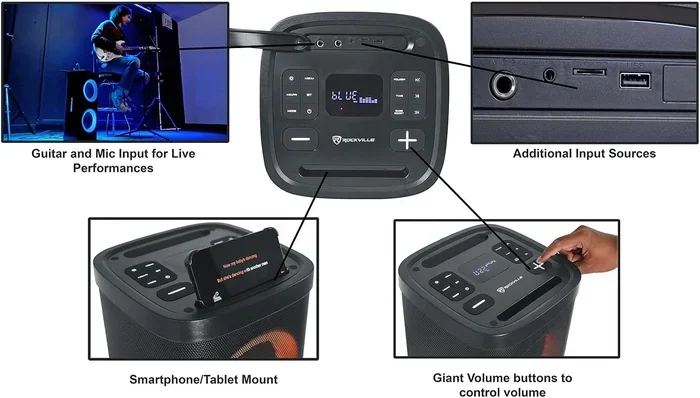
The most traditional method is the humble volume button. These are small, raised buttons on the top or side of the speaker. They usually come in pairs: one for up and one for down. Physical buttons are reliable and easy to use, even in the dark. You can feel them with your fingers, which makes them a popular choice for outdoor use. Many portable Bluetooth speakers from brands like JBL, Anker, and Ultimate Ears use this approach.
Physical buttons have a few advantages. They are durable. They work even if the speaker’s battery is low and the screen is off. They also do not require you to open an app or touch a flat surface. However, they can sometimes be hard to find by touch alone, especially on speakers with a smooth, seamless design.
Rotary Knobs
Some speakers use a rotary knob for volume control. You simply turn the knob clockwise to increase volume and counterclockwise to decrease it. This design feels very natural and gives you precise control. You can slowly turn it up or down without pressing multiple times. Speakers like the Marshall Emberton and some Bose models use this approach. A speaker volume knob is often preferred by people who want a more tactile and refined experience.
Rotary knobs also tend to last longer than push buttons because they have fewer moving parts that wear out. The downside is that they take up a bit more space on the speaker’s body. They can also get stuck if dirt or moisture gets inside, though this is rare with quality speakers.
Touch-Sensitive Controls
Modern Bluetooth speakers increasingly use touch-sensitive panels. These flat surfaces respond to taps, swipes, or presses. You might tap the top of the speaker twice to increase volume or swipe your finger along the side to adjust it. Touch controls look sleek and futuristic. They also eliminate moving parts, which can improve durability.
However, touch controls can be finicky. They may not respond well with wet fingers. They can also be confusing if you do not know exactly where to tap. Some users accidentally skip tracks or pause music when they only meant to adjust the volume. If you are considering a speaker with touch controls, it is worth reading reviews to see how responsive the wireless speaker controls really are.
Voice Control
Many smart Bluetooth speakers now include voice assistants like Alexa or Google Assistant. With voice control, you can simply say, “Turn it up” or “Set volume to 50 percent.” This is incredibly convenient, especially when your hands are full or the speaker is across the room. Voice control is becoming a standard feature on many wireless audio devices in 2024 and beyond.
Voice control is not perfect, though. It requires an active internet connection in most cases. It can also be less precise than physical controls. If you want the volume at exactly 63 percent, voice commands may not give you that level of granularity. Still, for quick adjustments, it is one of the most hands-free options available.
Can You Adjust Volume Without a Phone?
One of the biggest advantages of Bluetooth speakers is that they are wireless and portable. But does that mean you can control volume without your phone? The answer depends on the speaker. Most speakers allow you to adjust volume directly on the device. This means you do not need to pull out your phone every time you want to make the sound louder or softer.
Here is how it works in practice. When your phone is connected to the speaker via Bluetooth connectivity, the phone sends the audio signal. But the speaker still controls how loud that signal plays. Think of it like a TV. The TV receives the signal from a cable box, but the TV has its own volume knob. The same principle applies to Bluetooth speakers.
There are some exceptions. A few very basic speakers rely entirely on the phone’s volume buttons. If you turn the phone’s volume all the way down, the speaker will be silent even if its own volume is turned up. This is not common with modern speakers, but it does happen with older or very cheap models. If you are dealing with this issue, you might want to turn your phone into a Bluetooth speaker and use the phone’s own controls more directly.
Using the Speaker’s Own Volume When Phone Is Disconnected
Some speakers allow you to play music from a USB drive or an SD card without a phone connected. In these cases, the speaker’s own volume control is essential. You cannot adjust the volume through the phone because the phone is not involved at all. This is another reason why having built-in volume controls is so important. It gives the speaker true independence as a wireless audio device.
Volume Control When Using AUX Input
Many Bluetooth speakers also have an AUX input port. You can plug in a guitar, a keyboard, or another audio source using a 3.5mm cable. When using AUX input, the speaker’s volume control takes over completely. Your source device’s volume becomes less relevant. This is a great feature for musicians or anyone who wants to use the speaker as a small amplifier for live performances or practice sessions.
Common Volume Control Issues and How to Fix Them
Even though Bluetooth speakers are designed to be simple, volume-related problems can still occur. Here are the most common issues and what you can do about them.
Volume Is Too Low Even at Maximum
If your speaker is not loud enough, there could be several reasons. First, check if the speaker has a volume limit setting enabled. Some speakers have a safety feature that caps the maximum volume. This is often found in the speaker’s app settings. Disabling the volume limit can unlock louder playback.
Second, consider the environment. A small bathroom will make any speaker sound louder than a large open park. The acoustics of the room matter. Placing the speaker in a corner can also boost perceived volume because the sound bounces off two walls.
Third, check the source device’s volume. If your phone is set to 40 percent volume, even the best speaker will sound quiet. Turn your phone’s volume all the way up and then adjust the speaker’s volume. This two-step approach ensures you are getting the maximum audio output volume possible.
Volume Buttons Are Not Working
If the buttons on your speaker stop responding, try a hard reset. Most speakers have a reset button or a specific button combination that restores factory settings. Check the user manual or the manufacturer’s website for instructions. A reset often fixes unresponsive buttons caused by software glitches.
Another common cause is dirt or debris around the buttons. Use a soft, dry brush to gently clean around the buttons. Avoid using liquids, as moisture can damage the internal electronics. If the buttons still do not work after cleaning and resetting, the speaker may need professional repair or replacement.
Volume Fluctuates on Its Own
Some users report that their speaker volume goes up and down randomly. This is often caused by interference from other Bluetooth devices nearby. Microwaves, baby monitors, and even other speakers can cause signal disruption. Moving away from these devices can stabilize the connection and prevent volume fluctuations.
If the problem persists, try unpairing and re-pairing the speaker with your phone. This refreshes the Bluetooth connection and can resolve many connectivity-related issues. Also, make sure your speaker’s firmware is up to date. Manufacturers often release updates that fix bugs, including random volume changes.
Best Bluetooth Speakers with Great Volume Controls
Not all speakers are created equal when it comes to volume control. Some offer excellent physical controls, while others rely too heavily on phone-based adjustments. Here are a few speakers known for their great volume control options.
JBL Charge 5
The JBL Charge 5 features large, easy-to-press volume buttons on the top of the speaker. It also has a built-in power button and playback controls. The volume response is fast and responsive. You can adjust volume quickly without ever touching your phone. This speaker is a favorite among people who want reliable wireless speaker volume control on the go.
Marshall Emberton II
The Marshall Emberton II uses a single rotary dial on the top for volume control. It feels premium and gives you smooth, precise adjustments. You can turn it up gradually or jump to maximum volume with a firm twist. The design is stylish and functional, making it one of the best speakers for people who value tactile control.
Ultimate Ears Hyperboom
The Hyperboom is a larger, more powerful speaker designed for outdoor use. It has dedicated volume buttons and also supports the UE app for advanced volume control settings. The app lets you adjust the equalizer, set volume limits, and even create custom presets. This is a great option for power users who want full control over their Bluetooth audio experience.
Sony SRS-XB43
Sony’s SRS-XB43 features a simple but effective control layout. The volume buttons are well-spaced and easy to find. The speaker also supports Sony’s Music Center app, which provides additional EQ and volume settings. It is a solid choice for anyone who wants both physical controls and app-based fine-tuning.
Tips for Getting the Best Volume from Your Bluetooth Speaker
Want to squeeze every last bit of sound out of your speaker? Here are some practical tips that really work.
Place the Speaker on a Hard Surface
Soft surfaces like beds and couches absorb sound and reduce volume. Placing your speaker on a hard table or the floor can make it noticeably louder. The surface acts as a reflector, bouncing the sound waves outward and filling the room better.
Position the Speaker in a Corner
Corners naturally amplify sound because the walls reflect the audio back into the room. If you need extra volume, try placing your speaker in a corner. This simple trick can make a big difference without any extra effort.
Keep the Speaker Close to You
Sound gets quieter as it travels. The closer you are to the speaker, the louder it will seem. If you are having trouble hearing the audio, try moving the speaker closer to where you are sitting or standing. This is especially important in large rooms or outdoor settings.
Update Your Speaker’s Firmware
Manufacturers often release firmware updates that improve audio performance. These updates can fix bugs, enhance volume output, and add new features. Check the speaker’s app regularly to make sure you are running the latest version. Keeping your Bluetooth speaker battery healthy also helps maintain consistent volume levels over time.
Use Volume Normalization
Many music streaming apps offer a volume normalization feature. This setting makes quiet parts of songs louder and loud parts quieter. The result is a more consistent listening experience. You can find this setting in apps like Spotify, Apple Music, and YouTube Music. It is a simple trick that can improve your overall listening experience significantly.
Pair Two Speakers for More Volume
If one speaker is not loud enough, consider pairing two speakers together. Many brands support dual-speaker pairing, which doubles the volume and creates a richer sound. For example, you can pair two Marshall speakers to create a stereo setup that fills a large space with powerful sound. This is one of the best ways to boost volume without buying a bigger speaker.
Avoid Blocking the Speaker Grille
The grille on your speaker is designed to let sound pass through freely. If you place the speaker face-down on a table or cover it with a cloth, the sound will be muffled. Always keep the grille exposed and unobstructed for the best speaker volume output.
Do All Bluetooth Speakers Have Volume Controls?
The vast majority of Bluetooth speakers do include some form of volume control. However, there are exceptions. Very small or novelty speakers, especially those designed as keychains or fridge magnets, may not have physical buttons. In these cases, volume control is handled entirely through the connected phone. If you are buying a speaker specifically for volume control convenience, always check the product description before purchasing.
Some speakers also have a feature called volume sync. When you connect two speakers, the volume on both speakers adjusts together. This is convenient but can also be confusing if you only want to change the volume on one speaker. Always check your speaker’s manual to understand how volume sync works on your specific model.
Final Thoughts
So, do Bluetooth speakers have their own volume control? Yes, the vast majority do. Whether through physical buttons, rotary knobs, touch panels, or voice commands, you have multiple ways to adjust the volume without relying on your phone. Understanding how your specific speaker handles volume control can help you get the best audio experience every time.
Take a few minutes to explore your speaker’s controls and settings. Try the physical buttons, download the companion app, and experiment with placement. Small adjustments can lead to big improvements in sound quality and volume. With the right knowledge and a little practice, you will be getting the most out of your Bluetooth speaker in no time.
Remember, every speaker is different. What works for one model may not work for another. The key is to understand your specific device and use all the tools at your disposal. Whether you are at home, at the beach, or hosting a backyard party, you now know exactly how to take charge of your speaker volume adjustment and enjoy your audio exactly the way you want it.
Frequently Asked Questions
Can I control the volume of my Bluetooth speaker from my phone?
Yes, in most cases you can control the volume using your phone’s volume buttons while the speaker is connected via Bluetooth. However, some speakers also allow you to adjust volume directly on the speaker itself, giving you more flexibility.
Why is my Bluetooth speaker not getting louder even at full volume?
This can happen if the speaker has a volume limit setting enabled, if the source device’s volume is too low, or if the speaker is placed in a soft or absorbent environment. Try turning up your phone’s volume, checking the speaker’s app settings, and moving the speaker to a hard surface for better sound projection.
Do all Bluetooth speakers have physical volume buttons?
No, not all speakers have physical buttons. Some use touch-sensitive controls, rotary knobs, or rely entirely on the connected phone for volume adjustment. Always check the product specifications before buying if physical buttons are important to you.
Can I pair two Bluetooth speakers to make them louder?
Yes, many modern Bluetooth speakers support dual-speaker pairing. This feature doubles the volume and creates a stereo effect. Check your speaker’s manual or app to see if this feature is available for your model.
Does volume control work when the speaker is not connected to a phone?
Yes, if the speaker has built-in volume controls, they will work regardless of whether a phone is connected. This is especially useful when playing music from a USB drive, SD card, or AUX input source.
Can I use voice commands to control Bluetooth speaker volume?
Yes, if your speaker supports a voice assistant like Alexa or Google Assistant, you can use voice commands to adjust the volume. Simply say commands like “turn it up” or “set volume to 50 percent” for hands-free control.