Can I Use Ac750 As A Wifi Extender For Stronger Coverage
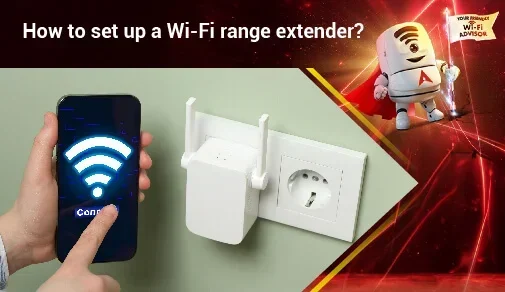
Yes, you can use an AC750 as a WiFi extender to strengthen your wireless coverage. This affordable dual-band device works as a wireless repeater to fill dead zones and extend your network range. Setting it up is simple, and the results are noticeable in most homes. AC750 WiFi extenders are perfect for small to medium spaces where your main router signal weakens.
Have you ever walked into a room and your WiFi signal just disappears? It is one of the most frustrating things about modern home internet. You pay for a good plan, your router is decent, but somehow the signal just does not reach everywhere you need it.
This is where a WiFi range extender comes in handy. And one of the most popular options people look at is the AC750 model. But can I use AC750 as a WiFi extender? The short answer is yes. The longer answer is that it depends on how you set it up and where you place it.
In this guide, I will walk you through everything you need to know. From understanding what an AC750 device actually is to setting it up as a repeater, I have got you covered. You will learn about placement tips, common mistakes, and whether this budget-friendly option is right for your home.
Key Takeaways
- Easy Setup: You can set up an AC750 as a WiFi extender in minutes using WPS or a web interface.
- Dual-Band Support: AC750 devices use both 2.4GHz and 5GHz bands for better flexibility and speed.
- Affordable Solution: AC750 WiFi extenders are budget-friendly and deliver solid performance for most households.
- Dead Zone Elimination: Placing the extender correctly removes weak signal areas from your home or office.
- Not a Replacement: An AC750 extender boosts range but works best alongside a good primary router.
- Common Issues Exist: Speed drops and setup problems can happen but are easy to troubleshoot.
📑 Table of Contents
- What Is an AC750 WiFi Extender?
- Can I Use AC750 As a WiFi Extender? Yes, Here is How
- Best Placement Tips for Your AC750 Extender
- AC750 WiFi Extender vs Other Options
- Common Problems and How to Fix Them
- Expert Tips to Maximize Your AC750 Extender Performance
- Is Using an AC750 as a WiFi Extender Worth It?
- Final Thoughts
What Is an AC750 WiFi Extender?
Before we dive into setup, let us understand what an AC750 WiFi extender actually is. The “AC750” label refers to the wireless standard and speed rating. The “AC” stands for WiFi 5, also known as 802.11ac. The “750” refers to the combined speed across both bands.
Here is a quick breakdown of what that means:
- 2.4GHz band: Up to 300 Mbps speed
- 5GHz band: Up to 433 Mbps speed
- Combined total: 733 Mbps (rounded to 750)
When you use an AC750 as a wireless repeater, it receives your existing WiFi signal and rebroadcasts it. This helps cover areas where your main router signal is too weak. It is not a magic box that creates internet out of thin air. But it does a great job of extending WiFi range in most homes.
AC750 devices are compact and affordable. They typically cost between $15 and $40, making them one of the most accessible WiFi booster options on the market. Brands like TP-Link, NETGEAR, and Tenda all offer popular AC750 models.
How Dual-Band Technology Works in AC750
The dual-band feature is a big advantage. Your router likely broadcasts on both 2.4GHz and 5GHz frequencies. The 2.4GHz band travels farther but is slower. The 5GHz band is faster but has a shorter range.
An AC750 extender supports both bands. This means it can extend your network on either frequency depending on your needs. For basic browsing and email, the 2.4GHz band works fine. For streaming or gaming, the 5GHz band gives you better performance.
Can I Use AC750 As a WiFi Extender? Yes, Here is How
So, can I use AC750 as a WiFi extender? Absolutely. Most AC750 devices come with a built-in extender mode. You just need to switch it on and follow a few simple steps. Let me walk you through the process.
Method 1: Using WPS Push Button
This is the easiest way to set up your AC750 WiFi extender. Here is what you need to do:
- Plug your AC750 device into a power outlet halfway between your router and the weak signal area.
- Wait for the power LED to turn solid green or blue.
- Press the WPS button on your main router within two minutes.
- Press the WPS button on your AC750 extender.
- Wait for the link LED to light up. This means the connection is established.
That is it. Your AC750 is now acting as a wireless range extender. The whole process takes about two minutes.
Method 2: Using the Web Interface
If WPS is not available or not working, you can use the web interface. This method gives you more control over your settings:
- Connect your computer or phone to the AC750 extender’s default network.
- Open a browser and go to the extender’s setup page (usually tplinkrepeater.net or myrepeater.com).
- Scan for available WiFi networks.
- Select your main WiFi network and enter the password.
- Choose the band you want to extend (2.4GHz, 5GHz, or both).
- Save settings and wait for the connection to establish.
This method takes about five to ten minutes. But it gives you more options to customize your WiFi coverage.
Method 3: Using the Manufacturer App
Many modern AC750 extenders come with a dedicated app. TP-Link has the Tether app, and NETGEAR has the Nighthawk app. These apps make setup even simpler:
- Download the app on your phone.
- Plug in the extender and open the app.
- Follow the on-screen instructions to connect to your main network.
- The app will test your connection and confirm the setup is complete.
Using an app is great for people who are not comfortable with web interfaces. It is a very user-friendly way to get your WiFi extender running.
Best Placement Tips for Your AC750 Extender
Placement is everything when you use an AC750 as a WiFi extender. Put it in the wrong spot, and you will not get much improvement. Put it in the right spot, and your coverage will transform.
Where to Place Your Extender
Follow these rules for the best wireless signal extension:
- Halfway between router and dead zone: Place the extender where it can still receive a strong signal from your router.
- Avoid thick walls: Concrete and brick walls block WiFi signals. Keep the extender in open areas.
- Stay away from metal objects: Metal appliances and furniture can interfere with your wireless signal.
- Elevate the device: Place it on a shelf or table rather than on the floor.
- Keep it away from microwaves: Microwaves operate on the same 2.4GHz frequency and cause interference.
The Goldilocks Zone
Think of it as the “Goldilocks zone.” You do not want the extender too close to the router. If it is right next to it, there is nothing to extend. You also do not want it too far away. If it cannot pick up a strong signal from the router, it will rebroadcast a weak signal.
The sweet spot is usually about halfway between your router and the area with poor coverage. Walk around with your phone and check where the signal starts to drop. That is where you want to place your AC750 WiFi extender.
Quick Placement Test
Before you permanently set up the extender, do a quick test:
- Plug the extender into an outlet in the potential location.
- Check the signal strength on your phone or laptop.
- If the signal is at least 50% strong, that spot works well.
- If it is too weak, try a different outlet closer to the router.
This simple test saves a lot of frustration later. It only takes two minutes and makes a huge difference in your WiFi coverage area.
AC750 WiFi Extender vs Other Options
Not all WiFi boosters are the same. Let us compare the AC750 extender with other popular options so you can make an informed decision.
Comparison Table
| Feature | AC750 Extender | AC1200 Extender | Mesh WiFi System |
|---|---|---|---|
| Max Speed | 750 Mbps | 1200 Mbps | Varies by model |
| Price Range | $15-$40 | $30-$70 | $100-$300+ |
| Coverage Area | Small to medium | Medium to large | Large to very large |
| Setup Difficulty | Easy | Easy | Moderate |
| Best For | Budget setups | Better speed needs | Whole-home coverage |
| Scalability | Limited | Moderate | High |
When to Choose an AC750 Extender
An AC750 extender is a great choice when:
- You have a small to medium-sized home.
- You only need to cover one or two weak spots.
- You are on a tight budget but still want better coverage.
- Your primary router is decent but just needs a signal boost.
- You want a simple plug-and-play solution.
When to Look Beyond AC750
You might want a more powerful option if:
- Your home is larger than 2000 square feet.
- You need coverage for multiple floors.
- You have many devices streaming simultaneously.
- You need the fastest possible WiFi speeds.
- You want a seamless network with one SSID throughout your home.
In these cases, an AC1200 extender or a mesh WiFi system would be a better fit. But for many homes, the AC750 does the job perfectly well.
Common Problems and How to Fix Them
Using an AC750 as a WiFi extender is generally straightforward. But sometimes you run into issues. Here are the most common problems and their solutions.
Slow Speeds After Setup
One of the biggest complaints is that the WiFi speed drops when using an extender. This happens because the extender receives and retransmits the signal, which takes time. Here is how to fix it:
- Use the 5GHz band: It is less congested and faster than 2.4GHz.
- Move the extender closer to the router: A stronger incoming signal means a stronger outgoing signal.
- Reduce the number of connected devices: Too many devices on one extender can slow things down.
- Check for interference: Other electronics can disrupt your wireless signal.
Extender Not Connecting to the Network
If your AC750 will not connect, try these steps:
- Reset the extender to factory settings.
- Make sure your router is broadcasting on compatible bands.
- Check that you are entering the correct WiFi password.
- Move the extender closer to the router temporarily.
- Update the extender firmware through the web interface or app.
WiFi Keeps Disconnecting
An unstable connection can be annoying. Here is what usually causes it:
- Firmware is outdated: Always keep your extender updated.
- Overheating: Make sure the extender has good ventilation.
- Channel congestion: Change the WiFi channel in the extender settings.
- Power supply issues: Try a different wall outlet or power strip.
Extender Shows Connected But No Internet
This is a tricky one. If the extender shows connected but you have no internet:
- Restart your main router first.
- Check if other devices can access the internet through the router directly.
- Re-run the setup process from scratch.
- Make sure your ISP is not experiencing an outage.
Expert Tips to Maximize Your AC750 Extender Performance
Want to get the most out of your AC750 WiFi extender? Here are some expert-level tips that make a real difference.
Update the Firmware Regularly
Manufacturers release firmware updates to fix bugs and improve performance. Check for updates every few months. Most extenders have an auto-update feature you can turn on in the settings.
Use a Dedicated WiFi Channel
If you live in a densely populated area, your neighbors WiFi networks can interfere with yours. Use your extender’s settings to pick a less congested channel. The 5GHz band typically has more available channels and less interference.
Set Up a Separate Network Name
Some people prefer to give the extended network a different name. This helps you know which network your device is connected to. But if you want a seamless experience, keep the same name and password for both the router and extender.
Restart Your Extender Periodically
Just like any electronic device, your extender benefits from occasional restarts. Unplug it for 30 seconds once a week. This clears the memory and refreshes the connection.
Consider Using Ethernet Backhaul
If your AC750 has an Ethernet port, you can connect it to your router with a cable. This is called wired backhaul. It gives you the best possible performance because the extender does not have to split its bandwidth between receiving and transmitting the wireless signal.
Is Using an AC750 as a WiFi Extender Worth It?
The answer depends on your situation. If you have a small to medium home with one or two dead zones, an AC750 WiFi extender is an excellent choice. It is affordable, easy to set up, and delivers solid results.
For larger homes or more demanding internet usage, you might want to step up to an AC1200 model or a mesh system. But as a budget-friendly WiFi booster, the AC750 is hard to beat.
The key is proper placement and realistic expectations. An extender will not make your internet faster than what your ISP provides. But it will extend the range so you can enjoy a strong signal in rooms that previously had weak or no coverage at all.
Many users report a noticeable improvement in signal strength and reliability after setting up an AC750 wireless repeater. The setup takes less than 10 minutes in most cases. And the cost is minimal compared to other solutions like mesh systems or buying a new router.
If you are dealing with WiFi dead zones in your home, I highly recommend giving an AC750 extender a try. It is one of the simplest and most cost-effective ways to improve your wireless network coverage without spending a lot of money.
Final Thoughts
So, can I use AC750 as a WiFi extender? The answer is a resounding yes. Whether you need to cover a dead bedroom, a backyard patio, or a basement office, an AC750 extender gets the job done. It is affordable, easy to set up, and delivers reliable performance for most home internet needs.
Remember to place your extender strategically, keep the firmware updated, and manage your expectations. An AC750 WiFi range extender is not a replacement for a great router. But it is a powerful addition that fills in the gaps where your main signal falls short.
Take action today. Plug in an AC750 extender, follow the setup steps in this guide, and enjoy stronger WiFi coverage throughout your home. You will wonder how you ever lived without it.
Frequently Asked Questions
Can I use an AC750 WiFi extender with any router?
Yes, AC750 extenders work with virtually any router that supports WiFi. They are compatible with most major brands including TP-Link, NETGEAR, ASUS, and more. Just make sure your router broadcasts on the 2.4GHz or 5GHz bands, which virtually all modern routers do.
Will using an AC750 extender slow down my internet speed?
There may be a slight speed reduction because the extender has to receive and rebroadcast the signal. However, the speed loss is usually minimal for basic tasks like browsing and streaming. Using the 5GHz band helps minimize this speed drop.
How far can an AC750 WiFi extender reach?
An AC750 extender can typically extend your WiFi range by 1,000 to 1,500 square feet, depending on your home layout and walls. The actual coverage depends on placement, interference, and the strength of your main router’s signal.
Can I use two AC750 extenders in my home?
Yes, you can use multiple AC750 extenders to cover different areas of your home. However, each extender will share the bandwidth and may cause some speed reduction. For best results, place them strategically to avoid overlapping coverage areas.
Do I need to pay for WiFi extender setup?
No, setting up an AC750 WiFi extender is completely free. You just plug it in and follow the setup steps. There are no monthly fees or subscriptions required. It is a one-time purchase that improves your network immediately.
What is the difference between a WiFi extender and a WiFi booster?
There is no real difference. The terms “WiFi extender,” “WiFi booster,” and “WiFi repeater” are used interchangeably. They all refer to devices that receive your existing WiFi signal and rebroadcast it to extend coverage. An AC750 device can function as any of these.
=== CONCLUSION ===
Using an AC750 as a WiFi extender is one of the simplest and most affordable ways to improve your wireless coverage at home. Whether you are dealing with a single dead zone or need better signal in multiple rooms, this compact device delivers real results. The setup process is quick, the cost is low, and the performance is solid for most everyday internet activities.
Remember to place your extender in the right spot, use the 5GHz band when possible, and keep the firmware updated. These small steps go a long way in maximizing your WiFi range extender performance.
Give it a try and see the difference for yourself. A stronger, more reliable WiFi connection is just one plug away.