Do You Need A Phone Line For Simplisafe Home Security
Do you need a phone line for SimpliSafe? The short answer is no. SimpliSafe is a modern wireless security system that works without a traditional landline phone. It uses cellular connection and Wi-Fi monitoring to keep your home security system running 24/7. This guide breaks down everything you need to know about SimpliSafe and phone line requirements.
Your home is your sanctuary. You want it protected around the clock. But when you start looking at home security systems, one question keeps popping up: Do You Need A Phone Line For Simplisafe?
The good news is you do not need a phone line. Not even close. SimpliSafe was built for the modern home. It uses wireless technology that replaces old-school landline connections entirely. Whether you rent an apartment or own a house, this system fits your life without asking you to dig up phone wires or sign up for a traditional phone plan.
In this article, we will walk you through exactly how SimpliSafe connects, what options you have, and why going phone-free is actually a smart move. Let us dive in.
Key Takeaways
- No phone line needed: SimpliSafe works fully without a traditional landline connection.
- Cellular and Wi-Fi are the go-to options: The system uses a built-in cellular module and your home Wi-Fi for communication.
- Professional monitoring stays active: Even without a phone line, your monitoring center receives alerts and dispatches help.
- Multiple connection types available: You can choose between cellular, Wi-Fi, or a mix of both for redundancy.
- No landline required for self-monitoring: The SimpliSafe mobile app lets you manage your alarm system from anywhere.
- Backup power keeps things running: A backup battery ensures your base station stays online during outages.
- Smart home integration works seamlessly: Security cameras, entry sensors, and motion detectors all connect wirelessly.
📑 Table of Contents
- What Is SimpliSafe and How Does It Work?
- Do You Need A Phone Line For SimpliSafe?
- How SimpliSafe Connects Without a Phone Line
- Cellular vs. Wi-Fi vs. Landline for SimpliSafe
- What Happens If Your Internet Goes Down?
- Setting Up SimpliSafe Without a Phone Line
- Common Mistakes People Make With SimpliSafe Connectivity
- Expert Insights: The Future of Phone-Free Home Security
- Key Takeaways: Why SimpliSafe Is the Smart Choice
What Is SimpliSafe and How Does It Work?
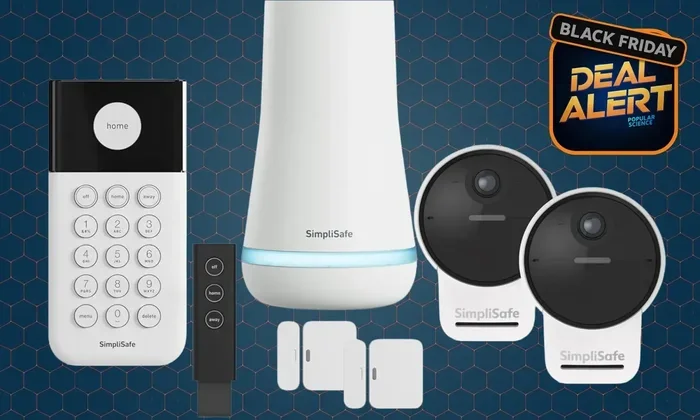
SimpliSafe is a wireless security system designed to protect your home without the hassle of contracts or complicated installations. It is a DIY alarm system that you set up yourself in under an hour. The system includes a base station, entry sensors, motion detectors, and a key fob for quick arming and disarming.
Here is how it works in simple terms. You place the base station in your home. This is the brain of the operation. It connects to your Wi-Fi network and uses a built-in cellular connection to communicate with the outside world. When a sensor detects something unusual, it sends a signal to the base station. The base station then alerts the monitoring center if you have professional monitoring enabled.
The SimpliSafe mobile app lets you control everything from your phone. You can arm the system, check sensor status, and receive real-time alerts. It is a smart home security solution that puts you in charge.
What Makes SimpliSafe Different From Traditional Systems?
Old-school security systems relied heavily on landline phones. The alarm panel would call the monitoring center through a phone line. If someone cut the phone cord, the system was useless. SimpliSafe completely eliminates this vulnerability. It uses wireless communication that cannot be disabled by cutting a single wire.
Here are the key differences:
- No physical phone line required — the system uses cellular networks instead.
- No drilling or wiring — everything is wireless and adhesive-mounted.
- No long-term contracts — you can cancel monitoring anytime.
- No hidden fees — the pricing is transparent and straightforward.
- No landline dependency — perfect for renters and cord-cutters alike.
This is why so many people are switching to SimpliSafe. It is simple, effective, and built for how people live today.
Do You Need A Phone Line For SimpliSafe?
The direct answer to Do You Need A Phone Line For Simplisafe is a firm no. SimpliSafe does not require a landline phone to function. It was designed from the ground up to work without one. Whether you have never had a landline or you have already cut the cord, SimpliSafe has you covered.
The system communicates using two primary methods: Wi-Fi and cellular connection. The base station has a built-in cellular modem. This means it can reach the monitoring center even if your Wi-Fi goes down. You do not need a second phone line or any special phone service. The cellular plan is built into the system and included in your monitoring fee.
Some people worry that going without a phone line means their alarm system will be weaker. That is not true at all. In fact, wireless security systems like SimpliSafe are often more reliable than traditional landline-based systems. A phone line can be cut or disabled. Cellular networks are monitored and maintained by the provider, making them far harder to interfere with.
Why No Phone Line Is Actually Better
There are several real advantages to not needing a phone line for your home security system.
- Cut the cord for good. Landlines are becoming obsolete. Many households have already dropped them. SimpliSafe works perfectly without one.
- Harder to tamper with. Burglars know how to disable landline-based alarms by cutting phone lines. Cellular connections cannot be cut that easily.
- No extra bill. You do not need to pay for a separate phone line just to support your security system.
- More flexible placement. Without phone wires, you can place your base station anywhere in your home.
- Future-proof technology. Wireless security is the direction the industry is heading. SimpliSafe is ahead of the curve.
So if you have been on the fence about SimpliSafe because you are not sure about phone line requirements, you can relax. It is designed to work fully without one.
How SimpliSafe Connects Without a Phone Line
Understanding how SimpliSafe connects without a phone line helps you feel confident about your home security setup. The system uses a combination of technologies to maintain constant communication with the monitoring center and your mobile app.
The Base Station: Your System’s Hub
The base station is the heart of your SimpliSafe system. It connects to your home Wi-Fi network for high-speed data transfer. It also has a built-in cellular module that acts as a backup communication channel. This dual-connection approach means your security system stays online even if one connection fails.
When you arm your alarm system, the base station enters a monitoring state. It listens for signals from your entry sensors and motion detectors. If any sensor is triggered, the base station immediately sends an alert. This alert travels through Wi-Fi or cellular to reach the monitoring center. From there, professionals assess the situation and dispatch help if needed.
Cellular Connection: Your Primary Backup
The cellular connection is a game-changer for SimpliSafe users. Even if your internet service goes down, the cellular module keeps working. Your monitoring center still receives alerts. Your security cameras can still send notifications. The system does not skip a beat.
The cellular plan is included in your monitoring subscription. You do not need to purchase a separate cellular plan or SIM card. Everything is managed by SimpliSafe behind the scenes. This makes setup incredibly simple. You plug in the base station, connect to Wi-Fi, and you are done.
Wi-Fi Monitoring for Everyday Use
Your Wi-Fi connection handles most of the day-to-day communication. When you check your SimpliSafe mobile app, it pulls data through Wi-Fi. When you receive push notifications about sensor activity, those travel through your home wireless network. Wi-Fi provides fast, reliable communication for routine tasks.
However, Wi-Fi alone is not enough for a complete home security system. If your internet provider has an outage, your Wi-Fi goes down. This is where the cellular connection steps in as a failsafe. Together, Wi-Fi and cellular create a robust communication network that keeps your alarm system connected no matter what.
Cellular vs. Wi-Fi vs. Landline for SimpliSafe
When you are setting up a home security system, you have options for how it communicates. Let us compare the three main connection types and see why SimpliSafe favors cellular and Wi-Fi over traditional landline connections.
| Feature | Landline Phone | Wi-Fi Connection | Cellular Connection |
|---|---|---|---|
| Requires phone company | Yes | No | No |
| Vulnerable to cutting | Yes | No | No |
| Works during internet outage | Sometimes | No | Yes |
| Monthly cost | Varies | Included in internet | Included in monitoring |
| Speed of communication | Slow | Fast | Fast |
| Reliability | Low | Medium | High |
| Modern compatibility | Outdated | Excellent | Excellent |
As you can see from the comparison, cellular connection and Wi-Fi both offer major advantages over a landline phone. SimpliSafe leverages both to provide the most reliable wireless security experience possible.
The landline option is essentially obsolete for modern home security. Phone companies are phasing out copper wire networks across the country. Even if you still have a landline, it is not the best choice for your alarm system. SimpliSafe wisely avoids this outdated technology entirely.
Which Connection Should You Choose for SimpliSafe?
For most users, the best setup is to use both Wi-Fi and cellular. This gives you the speed of Wi-Fi for everyday tasks and the reliability of cellular as a backup. You do not have to choose one or the other. SimpliSafe handles both automatically.
If you live in an area with unreliable Wi-Fi, the cellular connection alone can keep your security system running. You can still monitor your home through the mobile app using your phone’s data connection. This flexibility is one of the biggest strengths of SimpliSafe.
What Happens If Your Internet Goes Down?
This is one of the most common concerns people have about wireless security systems. What happens if the power goes out? What if your internet service drops? Will your home security system stop working?
The answer is no. SimpliSafe is designed to handle these situations gracefully. Here is what keeps your system running:
- Built-in backup battery: The base station has a rechargeable backup battery that kicks in during power outages. Your alarm system stays active for hours without electricity.
- Cellular fallback: If your Wi-Fi goes down, the cellular connection takes over. The monitoring center still receives alerts and can still dispatch emergency services.
- Offline sensor monitoring: Your entry sensors and motion detectors continue to detect activity even without Wi-Fi. They communicate with the base station locally through radio frequency.
- Mobile app access: You can still arm and disarm your system using the mobile app over your phone’s cellular data, even if your home Wi-Fi is down.
This level of redundancy is exactly why SimpliSafe is such a reliable home security system. It is not dependent on a single point of failure. Multiple layers of communication ensure your home stays protected no matter what happens.
Self-Monitoring vs. Professional Monitoring
SimpliSafe offers two monitoring options. Self-monitoring means you receive alerts on your phone and decide what to do. You can call the police yourself if an alarm goes off. This option does not require a phone line or even Wi-Fi — it works through the SimpliSafe mobile app using your cellular data.
Professional monitoring means the SimpliSafe monitoring center watches your alarm system 24/7. When an alert comes in, trained professionals assess the situation and contact emergency services on your behalf. This also does not require a phone line. The monitoring center communicates with your base station through cellular networks.
Both options work beautifully without a landline phone. You get full protection either way.
Setting Up SimpliSafe Without a Phone Line
Setting up SimpliSafe without a phone line is incredibly straightforward. You do not need any special equipment or technical skills. Here is what the process looks like.
- Unbox your system. You will receive a base station, entry sensors, motion detectors, and a key fob.
- Place the base station. Set it in a central location in your home. Plug it into a power outlet.
- Connect to Wi-Fi. Use the SimpliSafe mobile app to connect your base station to your home wireless network.
- Install sensors. Attach entry sensors to doors and windows using the adhesive backing. Place motion detectors in key rooms.
- Test the system. Arm and disarm your alarm system through the app to make sure everything is working.
- Enable monitoring. Choose between self-monitoring or professional monitoring through the app settings.
That is it. No phone line. No technician visit. No complicated wiring. In about 30 minutes, your wireless security system is up and running.
Quick Tips for a Smooth Setup
- Place your base station near your router for the strongest Wi-Fi signal.
- Test your cellular connection by turning off your Wi-Fi temporarily and checking if alerts still come through.
- Keep your backup battery charged by plugging in the base station regularly.
- Use the mobile app to rename your sensors so you can easily identify which door or window they are attached to.
- Set up notification preferences so you only get alerts for the events that matter to you.
Common Mistakes People Make With SimpliSafe Connectivity
Even though SimpliSafe is designed to be simple, there are a few common mistakes that can affect your home security system performance. Avoiding these will keep your wireless security running smoothly.
Assuming Wi-Fi Alone Is Enough
Some users rely solely on Wi-Fi and forget about the cellular connection. If your internet goes down, your alarm system loses its link to the monitoring center. Always make sure your cellular module is active. Check the SimpliSafe mobile app to confirm both connections are working.
Placing the Base Station Too Far From the Router
Weak Wi-Fi signal means slow communication. If your base station is too far from your router, you may experience delays in receiving alerts. Keep the base station in the same room as your router or use a Wi-Fi extender to boost the signal.
Ignoring the Backup Battery
The backup battery is your security system during a power outage. If you unplug the base station and forget to keep it charged, you lose protection when you need it most. Make it a habit to check the battery level regularly through the mobile app.
Not Updating Your System Firmware
SimpliSafe regularly releases firmware updates that improve wireless security and fix bugs. Ignoring these updates can leave your home security system vulnerable. Check for updates in the mobile app and install them promptly.
Expert Insights: The Future of Phone-Free Home Security
The trend in home security is clearly moving away from landline phones. Major telecom companies are retiring copper wire networks, and homeowners are cutting traditional phone lines in favor of cellular and VoIP services. SimpliSafe is perfectly positioned for this shift.
Experts agree that wireless security systems are the future. They are more secure, more flexible, and more affordable than landline-based alternatives. SimpliSafe leads this charge with a system that requires zero phone lines and delivers enterprise-grade home security.
Smart home security is also evolving rapidly. Security cameras, smart locks, and environmental sensors are all connecting through wireless networks. SimpliSafe integrates with many of these devices, creating a comprehensive home security ecosystem that works without a single phone wire.
Industry analysts predict that within the next five years, landline-based alarm systems will be virtually extinct. The cellular connection and Wi-Fi monitoring model that SimpliSafe pioneered will become the industry standard. By choosing SimpliSafe today, you are investing in a home security system that is built for the future.
Key Takeaways: Why SimpliSafe Is the Smart Choice
Do You Need A Phone Line For Simplisafe? Absolutely not. SimpliSafe is a cutting-edge wireless security system that works entirely without a landline phone. It uses cellular connection and Wi-Fi monitoring to keep your home protected around the clock. The base station serves as the central hub, communicating with entry sensors, motion detectors, and the monitoring center through wireless channels.
Whether you choose self-monitoring through the SimpliSafe mobile app or opt for professional monitoring, your alarm system will function perfectly without a phone line. The built-in backup battery and cellular fallback ensure your home security system stays online during power outages and internet disruptions.
Setting up SimpliSafe is fast, easy, and requires no technical expertise. You can have your entire wireless security system running in under an hour. No phone line, no contracts, no headaches. Just reliable, modern home security that fits your lifestyle.
So if you have been hesitating because you do not have a landline or you have already cut the cord, do not worry. SimpliSafe was made for you. It is time to protect your home with a system that is as smart and connected as the one you live in today.
Frequently Asked Questions
Can SimpliSafe work with only Wi-Fi and no cellular connection?
Yes, SimpliSafe can function using just Wi-Fi for everyday monitoring. However, having the cellular connection active as a backup is highly recommended. If your Wi-Fi goes down, the cellular module ensures your alarm system still communicates with the monitoring center. For the best protection, use both connections together.
Do I need a special phone plan for SimpliSafe?
No. SimpliSafe does not require any special phone plan or landline service. The cellular connection is built into the base station and is included in your monitoring subscription. You do not need to purchase a separate SIM card or cellular plan. Everything is handled automatically by SimpliSafe.
Will my SimpliSafe system work during a power outage?
Yes. The base station has a built-in backup battery that keeps your security system running during power outages. The cellular connection also stays active, so your monitoring center continues to receive alerts. Your home security is not affected by electricity or internet interruptions.
Can I use SimpliSafe if I have never had a phone line?
Absolutely. SimpliSafe is designed for homes that never had a landline phone or have already canceled their service. The system uses Wi-Fi and cellular networks for all communication. You do not need any phone service at all to enjoy full home security protection.
Is professional monitoring possible without a phone line?
Yes, 100%. Professional monitoring works through the cellular connection built into the base station. The monitoring center receives alerts via cellular networks, not through a phone line. You get 24/7 professional protection without needing a landline or any phone service whatsoever.
How does SimpliSafe compare to other phone-line-free security systems?
SimpliSafe stands out because it combines Wi-Fi and cellular communication in a single, affordable package. Many competing home security systems require expensive equipment or complex setups. SimpliSafe offers a simpler, more reliable approach. It is a true wireless security system that delivers professional-grade protection without a phone line or long-term contract.
=== CONCLUSION ===
Do You Need A Phone Line For Simplisafe? The answer is clear and definitive: no. SimpliSafe is a modern, wireless security system that thrives without a landline phone. It uses cellular connection and Wi-Fi monitoring to keep your home protected 24/7. From the base station to your entry sensors and motion detectors, every component communicates wirelessly and reliably.
Whether you are a renter, a homeowner, or someone who has already ditched the landline, SimpliSafe is built for you. It is easy to set up, affordable, and incredibly effective. The monitoring center stays connected through cellular networks, and the SimpliSafe mobile app puts you in control of your home security from anywhere in the world.
Do not let the lack of a phone line hold you back from protecting what matters most. SimpliSafe proves that you do not need outdated technology to have a secure home. Embrace the future of smart home security and enjoy the peace of mind that comes with a system designed for today’s connected world.