Do Plantronics Headsets Work With Cell Phones Easily
Yes, Do Plantronics Headsets Work With Cell Phones easily through Bluetooth or wired connections. Most Plantronics models pair seamlessly with smartphones in minutes. You get crystal-clear calls, hands-free convenience, and reliable audio quality whether you are at home, in the office, or on the go.
So you just got a Plantronics headset and you want to know if it works with your cell phone. The short answer is yes. The longer answer is that it depends on the model, the connection type, and a few simple setup steps. But don’t worry. Getting your Plantronics headset to work with your phone is easier than you think.
In this guide, I will walk you through everything you need to know. I will show you how to connect your headset, which models work best, and what to do if something goes wrong. Whether you use an iPhone or an Android device, this article has you covered. Let us dive right in.
Key Takeaways
- Plantronics headsets work with cell phones: Most models connect via Bluetooth or a 3.5mm jack with no hassle.
- Pairing is simple: Just put the headset in pairing mode and select it from your phone’s Bluetooth settings.
- Top models include the Voyager and Explorer series: These are built specifically for mobile phone use.
- Multipoint connection lets you switch devices: You can pair with a phone and laptop at the same time.
- Common issues are easy to fix: Reset the headset, update firmware, or re-pair to solve most problems.
- Battery life is impressive: Many models last 10+ hours on a single charge.
- Noise cancellation improves call quality: Plantronics uses advanced mic technology to block background noise.
📑 Table of Contents
- Do Plantronics Headsets Work With Cell Phones?
- How to Connect Your Plantronics Headset to a Cell Phone
- Best Plantronics Headsets for Cell Phone Use
- Features That Make Plantronics Headsets Great for Cell Phones
- Common Issues and How to Fix Them
- Expert Tips for Getting the Most Out of Your Plantronics Headset
- Final Thoughts
Do Plantronics Headsets Work With Cell Phones?
The short answer is a solid yes. Do Plantronics headsets work with cell phones? Absolutely. Plantronics has been making headsets for decades. They design their products to work with a wide range of devices. This includes cell phones, tablets, laptops, and desktop computers.
Most Plantronics headsets use Bluetooth technology. Bluetooth is the wireless standard that lets devices talk to each other without cables. Nearly every modern cell phone supports Bluetooth. That means your Plantronics Bluetooth headset should connect without any extra adapters or dongles.
Some older or budget models might use a wired connection. These headsets plug into your phone’s headphone jack or USB port. Even if you have an older phone, there is likely a Plantronics headset that will work with it.
What Makes Plantronics Headsets Compatible With Cell Phones?
There are a few key reasons why Plantronics headsets work so well with cell phones. First, Plantronics uses standard Bluetooth profiles. These are called HFP (Hands-Free Profile) and A2DP (Advanced Audio Distribution Profile). Your phone recognizes these profiles right away. That means no special software or apps are needed.
Second, Plantronics designs its headsets with mobile users in mind. The Plantronics Voyager series, for example, was built for people who make lots of calls on the go. The Plantronics Explorer series targets everyday smartphone users. Both lines focus on easy pairing, solid battery life, and clear audio.
Third, Plantronics headsets often support multipoint connection. This means the headset can connect to two devices at once. You could be listening to music on your phone while your laptop sends you a call. The headset switches between them automatically. This feature is a game changer for people who juggle multiple devices.
How to Connect Your Plantronics Headset to a Cell Phone
Connecting your Plantronics headset to a cell phone is a straightforward process. It usually takes less than two minutes. Here is a step-by-step guide that works for most models.
Step 1: Charge Your Headset Fully
Before you start, make sure your headset has enough battery. Plug it into the charging cable and let it charge for at least 30 minutes. A low battery can cause pairing problems. A full charge ensures a smooth connection.
Step 2: Put the Headset in Pairing Mode
Each Plantronics headset has a slightly different way to enter pairing mode. Most models require you to hold down the power button for five to seven seconds. You will see a flashing LED light. That flashing light means the headset is ready to be found.
Check your specific model’s manual if you are unsure. The pairing process is usually printed on the first page. Some newer models also have a dedicated Bluetooth button.
Step 3: Turn on Bluetooth on Your Cell Phone
Go to your phone’s Settings menu. Tap on Bluetooth and make sure it is turned on. Your phone will start scanning for nearby devices. This usually takes about 10 seconds.
Step 4: Select Your Plantronics Headset
Look for your headset’s name in the list of available devices. It might show up as “Plantronics Voyager” or “Plantronics Explorer” depending on your model. Tap on the name to pair.
You may need to enter a PIN. The default PIN for most Plantronics headsets is 0000 or 1234. Once paired, your headset will connect automatically in the future as long as Bluetooth is on.
Quick Tips for a Smooth Connection
- Keep your phone within 3 feet during the first pairing. After that, Bluetooth range extends to about 30 feet.
- Turn off Bluetooth on other devices nearby. This prevents your phone from connecting to the wrong device.
- Restart your phone if the headset does not show up. A simple reboot fixes many connection issues.
- Delete old pairings from your headset before trying again. A clean slate often solves stubborn problems.
Best Plantronics Headsets for Cell Phone Use
Not all Plantronics headsets are the same. Some are designed for office use. Others are built specifically for cell phone users. Here are the best options if your main goal is mobile phone compatibility.
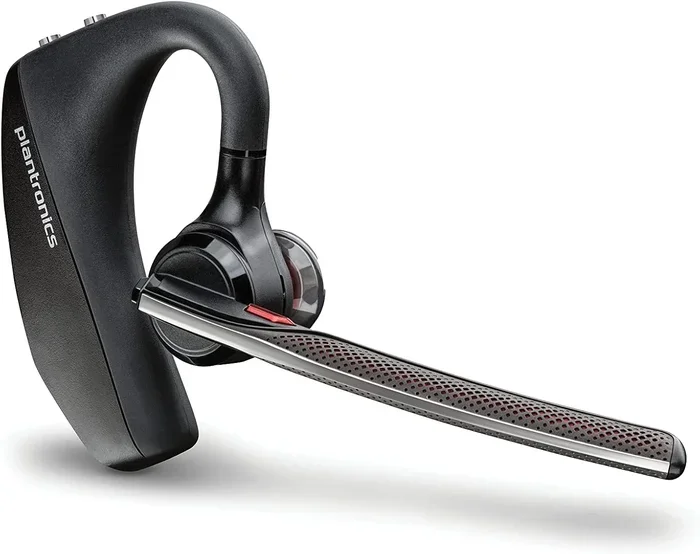
Plantronics Voyager Series
The Plantronics Voyager line is the gold standard for mobile calling. These headsets are lightweight, comfortable, and built for long wear. The Voyager Legend and Voyager Focus are two of the most popular models.
The Voyager Legend uses noise-canceling microphone technology. It filters out wind and background noise so your voice comes through clearly. The Voyager Focus adds active noise cancellation. This is great if you are in a loud environment like a coffee shop or airport.
Plantronics Explorer Series
The Plantronics Explorer series is more affordable and compact. The Explorer 50 and Explorer 80 are excellent choices for casual cell phone users. They are small, easy to store, and offer solid battery life.
The Explorer 50 gives you about 11 hours of talk time. The Explorer 80 offers a charging case that extends the total battery life to 35 hours. Both models support multipoint connection, so you can pair with your phone and another device at the same time.
Plantronics Savi Series
The Plantronics Savi series is a bit different. These headsets are designed for desk use but also connect to cell phones via Bluetooth. The Savi W740 and Savi W730 are popular choices. They let you move around your office while staying connected to your phone and computer.
If you work from home and need a headset that handles both your desk phone and cell phone, the Savi series is worth a look.
Comparison Table: Top Plantronics Headsets for Cell Phones
| Model | Type | Battery Life | Multipoint | Best For |
|---|---|---|---|---|
| Voyager Legend | In-ear Bluetooth | 7 hours | Yes | Frequent mobile callers |
| Voyager Focus | Over-ear Bluetooth | 12 hours | Yes | Noisy environments |
| Explorer 50 | In-ear Bluetooth | 11 hours | Yes | Everyday use |
| Explorer 80 | In-ear Bluetooth | 35 hours (with case) | Yes | Travel and long days |
| Savi W740 | Desk + Bluetooth | 13 hours | Yes | Work from home |
Features That Make Plantronics Headsets Great for Cell Phones
What sets Plantronics headsets apart from the competition? There are several standout features that make them a top choice for cell phone users.
Crystal-Clear Audio Quality
Plantronics uses what they call audio driver technology to deliver rich, clear sound. Whether you are listening to music or taking a call, the audio quality is consistently excellent. The microphones are also top-notch. They pick up your voice clearly even in noisy places.
Comfortable Fit for Long Wear
Nobody wants a headset that hurts after 20 minutes. Plantronics headsets are designed with soft ear cushions and lightweight builds. The Voyager Legend, for example, weighs just a few ounces. You can wear it for hours without discomfort.
Long Battery Life
Battery life is a big deal for cell phone users. You do not want your headset dying in the middle of an important call. Most Plantronics headsets offer 7 to 12 hours of talk time on a single charge. The Explorer 80 with its charging case extends this to 35 hours. That is more than enough for a full workday or a long road trip.
Quick Charge Capability
Many newer Plantronics headsets support quick charge. A 15-minute charge gives you enough battery for 2 to 3 hours of calls. This is a lifesaver if you forgot to charge overnight. Just plug it in while you drink your morning coffee and you are good to go.
Noise Cancellation and Wind Blocking
If you take calls while walking or driving, wind noise can be a real problem. Plantronics addresses this with noise cancellation and wind-blocking microphone technology. The Voyager Focus, in particular, uses advanced algorithms to suppress background noise. Your call partner hears your voice clearly, not the sound of traffic or wind.
Easy Voice Assistant Integration
Most Plantronics headsets work with Siri, Google Assistant, and Alexa. You can make calls, send texts, and get directions using just your voice. This makes cell phone use even more hands-free and convenient.
Common Issues and How to Fix Them
Even though Plantronics headsets are reliable, you might run into occasional issues. Here are the most common problems and their solutions.
Headset Will Not Pair With Phone
This is the most common complaint. Usually, it happens because the headset is not in pairing mode. Make sure the LED light is flashing. Also, check that your phone’s Bluetooth is turned on and actively searching. If it still does not work, try resetting the headset. Most Plantronics models have a reset procedure that involves holding down multiple buttons for 10 seconds.
Audio Sounds Muffled or Quiet
If your call audio sounds unclear, the issue might be earwax or debris on the speaker mesh. Gently clean the speaker area with a dry cloth. Also, check your phone’s audio settings. Make sure the volume is turned up and the audio driver is not being blocked by another app.
Headset Keeps Disconnecting
Intermittent disconnections are usually caused by distance or interference. Stay within 30 feet of your phone. Also, keep your headset away from Wi-Fi routers and other Bluetooth devices that might cause signal interference. Updating the headset firmware can also fix this issue.
Battery Drains Quickly
If your Plantronics headset battery is dying faster than expected, try these steps. First, make sure you are using the original charging cable. Third-party cables sometimes charge slowly or inconsistently. Second, check for firmware updates. Plantronics occasionally releases updates that improve battery performance.
Expert Tips for Getting the Most Out of Your Plantronics Headset
Here are some insider tips that will help you get the best experience from your Plantronics headset and cell phone setup.
- Keep firmware updated. Plantronics releases firmware updates that improve performance and fix bugs. Check the Plantronics app or website regularly.
- Use the Plantronics Hub app. This free app lets you customize settings, update firmware, and manage connections from your phone.
- Store your headset in the case. This protects it from dust and damage. It also ensures the battery stays charged between uses.
- Clean the ear cushions regularly. Sweat and oils can degrade the cushions over time. A quick wipe with a damp cloth keeps them comfortable.
- Use the multipoint feature wisely. If you connect to two devices, make sure both are within range. Otherwise, the headset might struggle to switch between them.
- Turn off Bluetooth when not in use. This saves battery life on both your headset and your phone.
Final Thoughts
So, do Plantronics headsets work with cell phones? The answer is a resounding yes. Whether you need a headset for work calls, casual chatting, or listening to music on the go, Plantronics has a model that fits your needs. The connection process is simple, the audio quality is excellent, and the features are built with mobile users in mind.
From the Voyager series for heavy callers to the Explorer series for everyday users, there is a Plantronics headset for everyone. The multipoint connection, long battery life, and noise cancellation make these headsets stand out in a crowded market.
Take the time to find the right model for your needs. Follow the pairing steps in this guide, and you will be making crystal-clear calls within minutes. Plantronics headsets and cell phones are a match made in heaven. Once you try one, you will wonder how you ever managed without it.
Grab your Plantronics headset, charge it up, and connect it to your cell phone today. You will not regret it. Happy calling!
Frequently Asked Questions
Can I connect a Plantronics headset to any cell phone?
Yes, most Plantronics headsets work with any cell phone that supports Bluetooth. This includes iPhones and Android devices. If your phone has Bluetooth, your Plantronics Bluetooth headset should connect without any issues. For wired models, check that your phone has a headphone jack or the right adapter.
How do I know which Plantronics headset works best with my cell phone?
Think about how you will use the headset. If you make lots of calls on the go, the Voyager series is a great choice. For everyday casual use, the Explorer series offers excellent value. If you need a headset for both your desk phone and cell phone, look at the Savi series. Each line is designed with specific user needs in mind.
Why does my Plantronics headset keep disconnecting from my cell phone?
Intermittent disconnections are usually caused by distance or interference. Stay within 30 feet of your phone. Also, other Bluetooth devices or Wi-Fi routers nearby can cause signal issues. Try resetting the headset, updating the firmware, or moving closer to your phone. These steps resolve most disconnection problems.
Can I use a Plantronics headset for music on my cell phone?
Yes, Plantronics headsets support the A2DP Bluetooth profile, which allows you to stream music from your phone. The audio quality is clear and balanced. Keep in mind that some models are optimized for calls rather than music. If music quality is your priority, look for models with larger speakers and richer audio drivers.
How long does it take to charge a Plantronics headset?
Most Plantronics headsets fully charge in about 1.5 to 2 hours. The Explorer 80 with its charging case takes a bit longer to charge the case itself. A quick 15-minute charge gives you 2 to 3 hours of talk time. Always use the included charging cable for the best results.
Do Plantronics headsets work with cell phones that do not have Bluetooth?
Some Plantronics headsets come with a wired connection option. These models use a 3.5mm audio jack or USB connection. If your cell phone does not have Bluetooth, look for a wired Plantronics model. You may need a 3.5mm to USB-C adapter for newer phones without a headphone jack.