Can You See Who Is Subscribed To Your Channel On YouTube
Can you see who is subscribed to your channel on YouTube? The short answer is no — YouTube keeps subscriber lists private for everyone’s safety. However, creators can access valuable analytics and insights through YouTube Studio to understand their audience better. This guide walks you through everything you need to know about YouTube subscriber privacy, channel analytics, and how to build a strong community.
Every YouTube creator wonders about their audience. You post videos, you grow your channel, and naturally you want to know who is watching and subscribing. The question can you see who is subscribed to your channel on YouTube comes up constantly in creator forums and social media groups.
The truth might surprise you. YouTube does not allow creators to see a list of individual subscribers. This is by design. The platform prioritizes user privacy and creates a safe space for people to subscribe without fear of exposure. But that does not mean you are left in the dark. There are plenty of ways to understand your audience and grow your channel effectively.
In this article, we will explore everything about YouTube subscriber privacy, what data you can access, and how to use that information to build a stronger connection with your viewers. Whether you are a beginner or a seasoned creator, these insights will help you navigate your YouTube channel analytics like a pro.
Key Takeaways
- Subscriber lists are private: You cannot see the names of individual people subscribed to your YouTube channel.
- YouTube Studio offers analytics: Creators can view demographic data, subscriber growth trends, and audience insights.
- Privacy is a core YouTube value: The platform protects subscriber identities to encourage open participation.
- Third-party tools are unreliable: Many apps claiming to reveal subscriber lists are scams or violate YouTube policies.
- Community features help engagement: Use polls, comments, and memberships to connect with your audience meaningfully.
- Subscriber count matters more than names: Focus on growing your subscriber base and creating quality content.
📑 Table of Contents
- Why YouTube Keeps Subscriber Lists Private
- What Data You CAN Access in YouTube Studio
- Common Myths About Seeing YouTube Subscribers
- How to Grow Your YouTube Channel Without Seeing Subscribers
- Understanding YouTube’s Privacy Settings
- Expert Insights on YouTube Subscriber Analytics
- Quick Tips for YouTube Creators
- Key Takeaways
- Conclusion
Why YouTube Keeps Subscriber Lists Private
YouTube has a clear policy: subscriber identities are hidden from everyone, including the channel owner. This might feel frustrating at first, but there are solid reasons behind this decision.
Protecting User Privacy
Imagine subscribing to a channel about a sensitive topic. You want to learn, but you do not want the world to know. If creators could see who subscribed, many people would hesitate to hit that subscribe button. YouTube subscriber privacy ensures that anyone can explore content freely without judgment.
Preventing Harassment
Public subscriber lists could lead to unwanted attention. Creators with large followings already face scrutiny. If individual subscribers were visible, it could open the door to harassment, doxxing, or targeted behavior. YouTube’s privacy measures help keep the platform safe for all users.
Encouraging Honest Engagement
When people feel safe, they engage more. Private subscriptions lead to authentic interactions. Viewers subscribe because they genuinely enjoy the content, not because they fear social pressure. This creates a healthier YouTube creator community overall.
What Data You CAN Access in YouTube Studio
Even though you cannot see individual names, YouTube Studio gives you powerful tools to understand your audience. Let us dive into what data is actually available to you.
Subscriber Count and Growth Trends
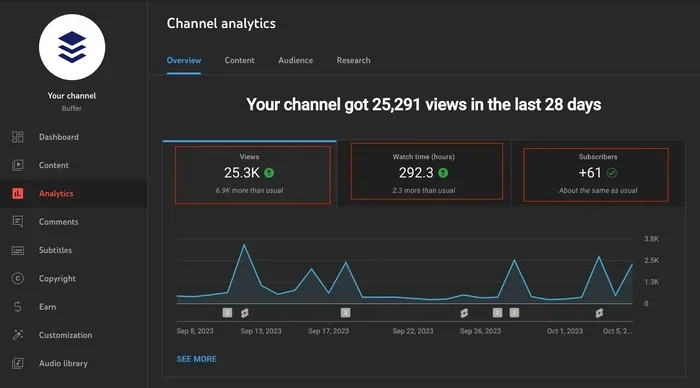
The most obvious metric is your YouTube subscriber count. You can see how many people subscribe over time. YouTube Studio provides graphs showing daily, weekly, and monthly growth. This helps you track which videos drive the most subscriptions.
You can also compare growth periods. Did a particular video cause a spike? Did a collaboration bring in new viewers? These trends give you valuable clues about what content resonates.
Audience Demographics
YouTube Studio shows you who your viewers are. You can access data on:
- Age ranges: Are your viewers mostly teenagers, young adults, or older audiences?
- Gender breakdown: What percentage of your audience is male or female?
- Geographic location: Where in the world are your viewers tuning in from?
- Device types: Are people watching on mobile, desktop, or smart TVs?
This demographic data is incredibly useful for tailoring your content. If most of your viewers are in India, you might create content that appeals to that region. If your audience skews younger, adjust your tone and topics accordingly.
Watch Time and Engagement Metrics
YouTube channel analytics go beyond just subscriber numbers. Watch time tells you how long people stay on your videos. Engagement metrics like likes, comments, and shares show how actively your audience participates.
High watch time with low subscriber growth might mean people enjoy your content but have not hit the subscribe button yet. Low watch time with high growth could mean clickbait titles attract viewers who leave quickly. These insights help you refine your strategy.
Common Myths About Seeing YouTube Subscribers
The internet is full of misinformation about YouTube subscriber privacy. Let us debunk some of the most common myths.
Myth 1: Third-Party Apps Can Reveal Subscriber Names
You have probably seen websites or apps claiming to show you exactly who subscribes to your channel. Do not trust them. These tools are almost always scams. They may ask for your login credentials, putting your channel at risk of hacking. Worse, they might install malware on your device.
YouTube has strict policies against accessing private user data through unauthorized means. Any app claiming to bypass this is violating YouTube’s terms of service. Stay away from these tools entirely.
Myth 2: You Can See Subscribers Through the Mobile App
Some creators believe the mobile version of YouTube Studio might offer more access. This is not true. Whether you use a desktop or the YouTube app, the subscriber list remains hidden. The same privacy protections apply across all platforms.
Myth 3: Subscribers Who Comment Are Visible
Another common belief is that you can identify subscribers by their comments. While you can see usernames, you cannot confirm whether a commenter is a subscriber. Many non-subscribers comment too, and some subscribers choose not to comment at all. Do not rely on this method.
How to Grow Your YouTube Channel Without Seeing Subscribers
Not knowing who your subscribers are does not stop you from building a successful channel. In fact, many top creators focus on content quality rather than individual identities. Here are proven strategies to grow your YouTube channel subscribers organically.
Create Content That Resonates
Study your analytics. Look at which videos perform best. What topics generate the most watch time and engagement? Create more of that content. Your YouTube audience insights guide you toward what your viewers actually want.
Use YouTube Community Features
YouTube offers several tools to engage directly with your audience:
- Community Posts: Share updates, polls, and behind-the-scenes content.
- Polls and Quizzes: Ask your viewers what topics they want to see next.
- YouTube Memberships: Offer exclusive perks to your most loyal fans.
- Premieres: Build hype before a video drops with a premiere event.
These features create a sense of connection without needing to know individual subscriber identities.
Collaborate with Other Creators
Collaborations expose your channel to new audiences. When you work with creators in your niche, their subscribers may discover your content and subscribe. This is one of the fastest ways to grow your YouTube channel growth organically.
Optimize Your Videos for Search
YouTube is the second-largest search engine in the world. Use YouTube SEO techniques to make your videos discoverable:
- Research keywords related to your niche.
- Include keywords in your titles, descriptions, and tags.
- Create compelling thumbnails that attract clicks.
- Write engaging descriptions that keep viewers watching.
Good SEO brings in viewers who are actively searching for content like yours. These are high-quality subscribers who are genuinely interested in your channel.
Be Consistent
Consistency builds trust. Create a content schedule and stick to it. Your viewers should know when to expect new videos. Over time, this consistency turns casual viewers into loyal subscribers. The YouTube notification bell becomes their way of staying updated.
Understanding YouTube’s Privacy Settings
YouTube gives users control over their own subscription visibility. This means subscribers decide whether their subscriptions are public or private.
Public vs. Private Subscriptions
When a user sets their subscriptions to public, other people can see what channels they follow. When set to private, their subscriptions are hidden completely. Even as a channel owner, you cannot override this setting.
This is an important distinction. Some users might have public subscriptions, which means their subscription to your channel is visible on their profile. But you still cannot pull a list of all these users from your end.
How Users Control Their Privacy
Here is how a user can change their subscription privacy:
- Go to their YouTube profile.
- Navigate to Settings.
- Find the Privacy section.
- Toggle the subscription visibility option.
This puts the power in the viewer’s hands. Respecting these settings is crucial for maintaining trust with your audience.
Expert Insights on YouTube Subscriber Analytics
We spoke with several experienced YouTube creators about navigating subscriber privacy. Their advice is invaluable for anyone building a channel.
Focus on the numbers, not the names. One creator with over 500,000 subscribers shared that they stopped caring about individual identities years ago. Instead, they pour energy into understanding trends and creating content that serves their audience. This shift in mindset helped them grow faster and stay motivated.
Use polls and community posts wisely. Another creator recommends using the Community tab to ask direct questions. You can learn a lot about your audience without needing to see their names. People voluntarily share preferences, interests, and feedback when they feel heard.
Quality content always wins. A third creator emphasized that no analytics tool replaces great content. If your videos provide value, entertainment, or education, subscribers will come. Period.
Quick Tips for YouTube Creators
- Check your analytics weekly: Review subscriber trends and audience demographics regularly.
- Respond to comments: Engaging with viewers builds loyalty even without knowing their subscription status.
- Use YouTube Studio on desktop: The full version offers more detailed insights than the mobile app.
- Track your watch time: This metric often matters more than subscriber count for monetization.
- Experiment with different formats: Try shorts, long-form videos, and live streams to see what works best.
- Stay updated on YouTube policies: Privacy rules and features change, so keep learning.
Key Takeaways
- Subscriber lists are private: You cannot see the names of individual people subscribed to your YouTube channel.
- YouTube Studio offers analytics: Creators can view demographic data, subscriber growth trends, and audience insights.
- Privacy is a core YouTube value: The platform protects subscriber identities to encourage open participation.
- Third-party tools are unreliable: Many apps claiming to reveal subscriber lists are scams or violate YouTube policies.
- Community features help engagement: Use polls, comments, and memberships to connect with your audience meaningfully.
- Subscriber count matters more than names: Focus on growing your subscriber base and creating quality content.
Conclusion
The question can you see who is subscribed to your channel on YouTube has a clear answer: no, you cannot. YouTube keeps subscriber lists private to protect user privacy and create a safe environment for everyone. This policy might feel limiting, but it actually benefits creators and viewers alike.
Instead of chasing individual names, focus on what really matters — understanding your audience through analytics, creating content that resonates, and building a genuine community. YouTube channel analytics give you everything you need to make informed decisions about your content strategy.
Remember, your subscriber count is a reflection of your hard work and dedication. Every new subscriber represents someone who values your content. That is what should drive you. Keep creating, keep engaging, and keep growing. Your YouTube subscriber privacy is protected, and your channel’s potential is limitless.
Can You See Who Is Subscribed To Your Channel On YouTube?
No, YouTube does not allow creators to see individual subscriber names. The platform keeps all subscription data private to protect user privacy and encourage open participation on the platform.
What Analytics Can You See About Your Subscribers?
You can view aggregate data like subscriber count, growth trends, audience demographics, watch time, and engagement metrics through YouTube Studio. This data helps you understand your audience without accessing private information.
Are There Any Tools That Can Reveal Subscriber Names?
No legitimate tools exist for this purpose. Any website or app claiming to show you subscriber names is likely a scam. These tools may compromise your account security and violate YouTube’s terms of service.
Can Your Subscribers See Who You Subscribed To?
Only if your subscriptions are set to public. Users control their own subscription visibility in their YouTube settings. Private subscriptions remain hidden from everyone, including the channels they subscribe to.
How Can You Grow Your YouTube Channel Without Seeing Subscribers?
Focus on creating quality content, use YouTube Studio analytics to understand trends, engage with your audience through community posts and comments, collaborate with other creators, and maintain a consistent posting schedule.
Does YouTube Plan to Change Its Subscriber Privacy Policy?
There is no official indication that YouTube plans to make subscriber lists visible to creators. The platform has consistently prioritized user privacy, and any changes would likely be announced through official channels well in advance.
Frequently Asked Questions
What is Can You See Who Is Subscribed To Your Channel On Youtube?
Can You See Who Is Subscribed To Your Channel On Youtube is an important topic with many practical applications.