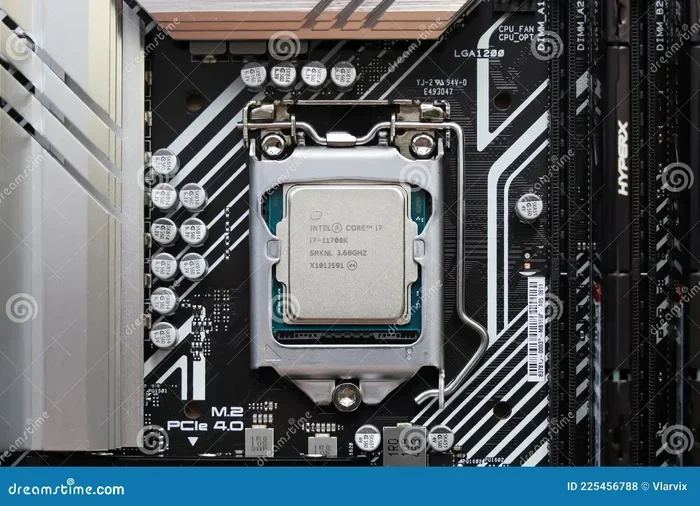
Disadvantages Of An Intel Processor You Need To Know
Intel processors dominate the market, but they come with real drawbacks. Many users face issues with high power consumption, overheating, and limited value compared to rivals like AMD. Whether you are building a desktop or shopping for a laptop, understanding these Intel processor disadvantages can save you money and frustration.
Intel has been a household name in the computing world for decades. From the first Pentium chips to the latest Core processors, Intel shaped how we think about desktop and laptop performance. But dominance does not mean perfection.
Today, the landscape has changed dramatically. Rival brands offer strong competition. Consumers now have more choices than ever before. And with those choices come questions about whether sticking with Intel is really the best move.
In this article, we will explore the disadvantages of an Intel processor in detail. We will look at real-world issues like power draw, heat output, pricing, and compatibility. By the end, you will have a clear picture of where Intel falls short. You will also understand when a different chip might be the smarter buy.
Key Takeaways
- High Power Consumption: Intel chips often draw more electricity than competitors, leading to higher energy bills and more heat.
- Overheating and Thermal Issues: Without proper cooling, Intel processors can throttle performance under heavy loads.
- Price Premium: Intel CPUs frequently cost more per core compared to rival brands offering similar or better performance.
- Compatibility and Upgrade Limits: Socket changes and chipset restrictions can lock you into expensive motherboard upgrades.
- Battery Life Impact: Laptop users may experience shorter battery life due to Intel’s higher power draw.
- Performance Gaps in Specific Tasks: AMD and other rivals sometimes outperform Intel in multi-threaded workloads and gaming value.
📑 Table of Contents
- High Power Consumption and Heat Output
- Price Premium and Value Concerns
- Compatibility and Upgrade Limitations
- Thermal Management and Throttling Issues
- Battery Life Challenges for Laptops
- Performance Gaps in Multi-Threaded Workloads
- Integrated Graphics Limitations
- Market Competition and Innovation Pace
- Conclusion
High Power Consumption and Heat Output
One of the biggest complaints about Intel chips is how much power they use. Compared to some competitors, Intel processors tend to draw more electricity. This is especially true for their high-end desktop and workstation chips.
More power draw means more heat. And more heat creates a chain of problems. Your cooling system has to work harder. Your electricity bill goes up. Your system can become noisy under load.
Understanding TDP and Power Draw
Every processor has a Thermal Design Power rating, commonly called TDP. This number tells you how much heat the chip generates under normal load. Intel chips, especially the performance-tier models, often have high TDP numbers.
For example, some Intel Core i9 processors have TDPs around 125 watts or even higher when boosted. Compare that to some rival chips that deliver similar performance at lower wattage. The difference adds up over time, especially if you run demanding workloads for hours every day.
Here is a quick look at why high power consumption matters:
- Higher electricity costs: A power-hungry chip increases your monthly energy bill, especially in systems that run long hours.
- More heat generation: Excess heat degrades components faster over time.
- Louder fans: Your cooling fans spin faster and louder to manage the heat.
- Bigger power supply needs: You may need a larger, more expensive power supply unit.
Real-World Impact on Desktop Users
If you build a desktop PC, you feel this disadvantage immediately. You need a beefy cooler, often a 280mm or 360mm liquid cooler, just to keep high-end Intel chips in check. Air coolers sometimes struggle. This adds cost and complexity to your build.
Many users report that their Intel-based systems run fans at full speed even during moderate tasks. This is not just annoying. It is a sign that the chip is pushing thermal limits. Over time, this can reduce the lifespan of other components nearby, like your SSD or RAM.
Quick Tip: If you are sensitive to noise or heat, consider pairing any Intel processor with a quality aftermarket cooler. Do not rely on the stock cooler for high-performance chips.
Price Premium and Value Concerns
Intel processors often carry a higher price tag. This is especially noticeable when you compare chips with similar core counts and clock speeds to rival offerings. The disadvantages of an Intel processor in terms of value are hard to ignore in today’s market.
When you shop for a CPU, you want the best performance per dollar. Intel does not always win that comparison. AMD, in particular, has made huge strides in offering competitive chips at lower prices. Their Ryzen lineup has won over many budget-conscious builders.
Cost Per Core Analysis
One way to measure value is cost per core. Intel chips, especially the flagship models, often cost more for each core they offer. A mid-range AMD chip might give you 16 cores at a price point where Intel offers 8 or 12 cores.
For content creators, video editors, and 3D modelers, core count matters a lot. These users benefit from more threads and parallel processing. Intel’s pricing strategy sometimes leaves them at a disadvantage in this area.
Here is a simple comparison of what shoppers often face:
- Intel Core i7: Strong single-thread performance, but often priced higher than AMD equivalents with more cores.
- AMD Ryzen 7: Frequently offers more cores and threads at a lower price point.
- Intel Core i9: Top-tier performance, but the premium price may not justify the gains for most users.
- AMD Ryzen 9: Competitive or superior multi-threaded performance at a lower cost.
Who Pays the Price Premium?
The people who feel this disadvantage the most are budget builders and small business owners. If you are assembling multiple workstations, those extra dollars per CPU add up fast. Over time, the Intel processor price gap can mean hundreds or even thousands of dollars in extra spending.
Casual gamers might also feel the squeeze. Intel does offer excellent gaming performance. But for many gamers, the performance difference between Intel and AMD is small. Paying a premium for that small difference does not always make sense.
Compatibility and Upgrade Limitations
Another area where Intel has faced criticism is compatibility. The company has changed socket types across generations. This means that upgrading your processor sometimes requires a new motherboard too.
This is not unique to Intel. AMD has also changed sockets over the years. But Intel’s frequent socket changes can feel frustrating, especially if you have invested in a quality motherboard.
Socket Changes and Motherboard Lock-In
Each Intel socket generation typically supports only one or two processor generations. For example, LGA 1700 boards supported 12th, 13th, and 14th Gen Intel Core chips. But moving to the next generation means a new motherboard and often new RAM too.
This creates a lock-in effect. You cannot simply drop a new CPU into your existing board and expect it to work. You have to replace the motherboard, and sometimes the memory as well. This adds cost and e-waste.
Here are common compatibility headaches Intel users face:
- New motherboard required: Each major chip generation may need a different socket.
- RAM compatibility issues: New platforms sometimes mean new DDR generations, forcing a memory upgrade.
- BIOS updates: Even within the same socket, you may need a BIOS update to support newer chips.
- Chipset limitations: Budget motherboards may not support all features of newer processors.
What This Means for Your Upgrade Path
If you plan to keep your PC for several years, these limitations matter. You want a system that can grow with your needs. Intel’s frequent platform changes make long-term planning harder. You may find yourself replacing more components than you expected just to stay current.
AMD has tried to address this with longer socket lifespans. Their AM4 platform lasted for many generations before moving to AM5. This gave users more upgrade flexibility. Intel’s approach has not always matched that level of longevity.
Expert Insight: When choosing a platform, look at how many processor generations the motherboard manufacturer supports. A longer support window gives you more room to upgrade without replacing your entire board.
Thermal Management and Throttling Issues
Intel processors are known for their high performance. But that performance comes at a thermal cost. Many Intel chips run hot, and without proper cooling, they can throttle. Thermal throttling is when the processor slows itself down to prevent damage from overheating.
This is one of the most frustrating Intel processor disadvantages for users who push their systems hard. You paid for a powerful chip, but it may not sustain peak performance if temperatures climb too high.
What Causes Thermal Throttling?
Several factors contribute to thermal throttling in Intel chips:
- High power draw: More electricity converts to more heat.
- Small chip designs: Smaller transistor sizes can concentrate heat in a smaller area.
- Boost behavior: Intel’s boost algorithms push clocks high, generating bursts of heat.
- Poor thermal paste application: Even a small gap between the CPU and cooler reduces heat transfer.
- Ambient temperature: Hot room temperatures make cooling harder.
When throttling kicks in, you notice it. Your frame rates drop in games. Your render times increase. Your system feels sluggish. For users who rely on their PC for work or play, this is a real problem.
How to Manage Intel Heat
The good news is that you can manage these thermal issues. Here are some practical steps:
- Invest in a strong cooler: A dual-tower air cooler or 240mm AIO liquid cooler makes a big difference.
- Apply thermal paste correctly: Use a pea-sized dot or cross pattern. Replace paste every few years.
- Keep your case airflow clean: Dust builds up and blocks airflow. Clean your PC regularly.
- Undervolt the CPU: Reducing voltage can lower temperatures significantly without hurting performance much.
- Monitor temperatures: Use free software like HWMonitor or Core Temp to keep an eye on your chip.
These steps do not eliminate the underlying thermal challenges. But they help you get the most out of your Intel processor without constant throttling.
Battery Life Challenges for Laptops
If you buy a laptop with an Intel processor, battery life may not be your best friend. Intel chips, especially the performance-oriented models, consume more power than some alternatives. This directly impacts how long your laptop lasts on a single charge.
For professionals who work on the go, this is a serious Intel processor disadvantage. You may find yourself hunting for an outlet by midday. Ultrabook users who expect all-day battery life may feel disappointed.
Why Intel Laptops Drain Faster
Several reasons explain why Intel laptop chips can be power-hungry:
- Higher TDP designs: Even mobile Intel chips can have TDPs that drain batteries faster.
- Boost power spikes: When Intel chips boost, they draw significantly more power for short bursts.
- Integrated graphics limitations: Intel’s integrated graphics use shared system memory, adding to the power load.
- Less efficient low-power states: Some Intel chips do not idle as efficiently as competitors.
Intel has made improvements with its newer generations. Chips like the Intel Core Ultra series focus more on efficiency. But the gap between Intel and rival mobile processors still exists in many scenarios.
Who Feels This the Most?
Students, remote workers, and travelers feel this disadvantage the most. You carry your laptop everywhere. You need it to last through classes, meetings, or flights. If your Intel laptop only lasts 5-6 hours on light tasks, that is a problem.
Some laptops use Intel’s lower-power chip variants to address this. But these versions often sacrifice peak performance. You end up with a trade-off between battery life and speed. AMD and ARM-based chips like Apple Silicon often handle this balance better.
Performance Gaps in Multi-Threaded Workloads
Intel excels at single-threaded tasks. Many everyday applications and older games rely heavily on single-core performance. Intel has historically dominated this area. But the computing world has shifted.
More software now takes advantage of multiple cores. Video editing, 3D rendering, scientific simulations, and modern game engines all benefit from strong multi-threaded performance. And in these workloads, Intel sometimes falls behind.
Where Intel Struggles
Here are specific areas where the disadvantages of an Intel processor become more apparent:
- Video encoding and rendering: Rival chips often complete these tasks faster thanks to more cores.
- 3D modeling and simulation: Heavy multi-threaded workloads expose Intel’s core count limitations.
- Streaming and content creation: Running a game and a stream simultaneously benefits from more threads.
- Compilation and development: Developers compiling large codebases see faster times on chips with more cores.
This does not mean Intel is bad at these tasks. It means that for the same price, you might get better multi-threaded results from a competitor. The value proposition shifts depending on what you do with your PC.
The Single-Core Advantage
Intel still holds a strong single-core advantage in many scenarios. This matters for gaming and older applications. If your primary use is gaming and your workload is mostly single-threaded, Intel remains a solid choice.
The key is knowing your needs. If you do heavy multi-threaded work, look beyond Intel. If you game and want the best single-threaded speed, Intel still has a strong argument.
Integrated Graphics Limitations
Intel includes integrated graphics in most of its processors. This is convenient. You do not need a separate graphics card for basic tasks or light gaming. But Intel’s integrated graphics have clear limitations compared to dedicated GPUs or even some rival integrated solutions.
For casual browsing, video watching, and light office work, Intel’s built-in graphics work fine. But push into more demanding territory, and the shortcomings show.
Where Intel Integrated Graphics Falls Short
Here is where users notice the gap:
- Modern gaming: Most new games require a dedicated GPU. Intel’s integrated graphics cannot deliver smooth frame rates.
- Content creation: GPU-accelerated tasks in video editing and 3D software benefit from a dedicated graphics card.
- Display support: Some Intel integrated graphics limit the number or resolution of external displays.
- Driver updates: Intel’s GPU driver updates sometimes lag behind competitors in optimization.
If you buy an Intel processor expecting strong integrated graphics, you may be disappointed. Most users planning any kind of gaming or creative work will still need a dedicated GPU. This adds to the total cost of your system.
Market Competition and Innovation Pace
The CPU market is more competitive than it has ever been. AMD has closed the gap significantly. Companies like Apple have created their own chips that outperform Intel in certain areas. Even ARM-based processors are making inroads into the laptop and server markets.
This competition is good for consumers. But it also highlights Intel’s disadvantages. When rivals offer better performance per watt, lower prices, or more cores, Intel has to respond. Sometimes it does. Sometimes it does not move fast enough.
What This Means for Buyers
The takeaway is simple. Do not buy an Intel processor just because it is Intel. Evaluate your needs. Compare options. Consider AMD, Apple Silicon, or other alternatives. The best processor is the one that fits your budget and workload, not the one with the most famous logo.
Intel still makes excellent chips. They are not bad products. But they are no longer the unquestioned best in every category. Understanding this helps you make a smarter purchase decision.
Key Takeaway: Always compare processors based on your specific use case. Benchmark results, real-world reviews, and value per dollar matter more than brand loyalty.
Conclusion
The disadvantages of an Intel processor are real and worth considering. From high power consumption and heat output to price premiums and upgrade limitations, Intel chips come with trade-offs. These disadvantages do not make Intel processors bad. They make them less ideal for certain users and use cases.
If you are a casual gamer or do light work, Intel still serves you well. If you are a content creator on a budget, a laptop user who needs all-day battery, or a builder who wants long-term upgrade flexibility, you should weigh these drawbacks carefully.
The computing market offers more choices than ever. AMD, Apple, and other players have raised the bar. Intel must keep evolving to stay competitive. As a buyer, you benefit from this competition. Use it to your advantage by comparing all options before you decide.
Knowledge is power. Now that you understand the Intel processor disadvantages, you can shop with confidence. Choose the chip that fits your needs, your budget, and your future plans. That is the smartest decision you can make.
Frequently Asked Questions
Is Intel still worth buying in 2024?
Yes, Intel is still worth buying for many users. Their processors offer strong single-thread performance and broad software compatibility. However, you should compare them with AMD and other options based on your specific needs and budget before making a decision.
Why do Intel processors run hotter than competitors?
Intel processors tend to draw more power, which generates more heat. Their high-performance boost behaviors also push thermal limits. Without proper cooling solutions, this heat can cause throttling and reduce system longevity.
Can I upgrade my Intel CPU without replacing the motherboard?
It depends on the socket and generation. Intel changes sockets frequently, which limits upgrade paths. Some motherboards support two processor generations, but moving to a newer platform often requires a motherboard and RAM replacement.
Are AMD processors better than Intel for productivity work?
AMD processors often offer more cores at competitive prices, making them strong for productivity tasks like video editing and rendering. However, Intel still excels in single-threaded applications and gaming. Your specific workload determines which is better.
Do Intel laptops have worse battery life than other brands?
Intel laptop processors generally consume more power than some alternatives, which can reduce battery life. Newer Intel chips like the Core Ultra series have improved efficiency, but they still often lag behind ARM-based or AMD options in battery endurance.
What should I consider before buying an Intel processor?
Consider your budget, intended use case, cooling solution, and long-term upgrade plans. Compare benchmarks for your specific workloads. Think about whether the price premium over competitors is justified by the performance gains you actually need.