Can A Laptop Sleeve Be Too Big And How To Pick The Right One
Yes, a laptop sleeve can absolutely be too big. When your laptop sleeve is oversized, your device slides around, loses protection, and becomes vulnerable to drops and scratches. Choosing the correct sleeve size ensures a snug fit that keeps your laptop safe during daily commutes and travel. This guide covers everything you need to know about picking the right laptop sleeve for your device.
You just bought a sleek new laptop sleeve online. It looked perfect in the photo. But when you slide your computer inside, something feels off. The laptop wobbles. There is too much room. You start wondering, can a laptop sleeve be too big?
The short answer is yes. And it is a problem more people run into than you might think. A lot of shoppers focus only on the brand or the look of a sleeve. They forget about fit. But fit is everything when it comes to protecting your device. A loose sleeve does not protect much at all.
In this guide, we will walk through why size matters, what goes wrong when a sleeve is too large, and how you can pick the perfect laptop sleeve size every single time. Whether you use a 13-inch notebook or a 17-inch gaming beast, this article has you covered.
Key Takeaways
- An oversized sleeve puts your laptop at risk: A loose fit means more movement, more impact, and more chance of damage.
- Measure your laptop before buying: Always check the diagonal screen size and the actual dimensions of your device.
- A snug fit is the goal: Your laptop should fit securely without being forced into the sleeve.
- Material matters just as much as size: Neoprene, leather, and padded fabrics each offer different levels of protection.
- Extra compartments can help or hurt: Some sleeves add bulk that defeats the purpose of a slim carry solution.
- Common mistakes include ignoring thickness: Your laptop’s depth and weight matter when choosing a sleeve.
- The right sleeve extends your device’s lifespan: Proper protection reduces wear and tear over time.
📑 Table of Contents
- Why Sleeve Size Actually Matters
- What Happens When A Sleeve Is Too Big
- How To Measure Your Laptop For The Perfect Fit
- How To Pick The Right Laptop Sleeve Size
- Common Mistakes People Make When Choosing A Sleeve
- Best Practices For Keeping Your Laptop Safe
- Expert Insights On Laptop Sleeve Selection
- Key Takeaways
- Conclusion
Why Sleeve Size Actually Matters
Many people treat a laptop sleeve like a simple accessory. They think it is just a nice cover. But a sleeve serves a real purpose. It shields your laptop from scratches, bumps, and minor drops. When the size is wrong, that purpose falls apart.
Think of it like shoes. A shoe that is two sizes too big does not feel good. Your foot slides around. You trip more easily. A laptop sleeve works the same way. A sleeve that is too big lets your device shift inside. That movement creates real risks.
The Role Of A Laptop Sleeve In Daily Protection
Every day, you carry your laptop to coffee shops, offices, and classrooms. Your bag gets bumped. You set it down on hard surfaces. Without a proper laptop carry sleeve, all that contact adds up. Scratches appear on the lid. Keys press into the screen. Corners get dinged.
A well-fitted padded laptop sleeve absorbs shock and blocks surface damage. It keeps your device from rattling around inside your bag. The padding does its job best when the fit is tight. A loose sleeve means the padding cannot stay in contact with the laptop. That defeats the whole point.
How Size Impacts Protection And Safety
When you ask can a laptop sleeve be too big, the answer comes down to physics. A laptop inside a large sleeve has room to move. If you drop your bag, the laptop flies forward. It hits the side of the bag or the ground. A snug sleeve cushions that impact. A loose one does not.
Here is what happens with a poor fit:
- Your laptop slides around every time you walk or move.
- The padding shifts away from the device during impact.
- Edges and corners stay exposed to bumps and scratches.
- Your screen can press against other objects in your bag.
- You lose the shock absorption that quality padding provides.
None of these sound good. And they all happen more often with an oversized laptop protection sleeve. So the next time you wonder if bigger is better, remember: it is not.
What Happens When A Sleeve Is Too Big
A lot of people assume a bigger sleeve gives more room for accessories. They stuff in chargers, mice, and notebooks. But this habit creates a cascade of problems for your laptop.
Laptop Movement And Internal Damage
When your laptop bounces around inside a loose sleeve, the hard shell takes the brunt of the force. Over time, this movement can cause internal damage. Hard drives can get jarred. Screens can develop stress cracks. Even solid-state drives are not fully immune to constant shaking.
A laptop sleeve that fits snugly keeps everything in place. Your device stays still. The padding stays where it should. And your laptop avoids the micro-impacts that add up over months and years.
Reduced Shock Absorption
Good neoprene laptop sleeves and other padded options are designed to compress slightly on impact. This compression absorbs energy. It spreads the force across the surface of the sleeve. But if your laptop is too small for the sleeve, there is no compression. The padding just sits there, doing nothing.
It is like wearing a seatbelt that is too loose. It looks like it is there, but it will not protect you in a crash. The same logic applies to your laptop carrying sleeve.
Scratching And Surface Wear
Even if you do not drop your bag, a loose sleeve causes wear. Your laptop rubs against the inside walls of the sleeve. It scratches the exterior finish. Over weeks, you will notice dull spots and fine scratches. A tight-fitting laptop skin sleeve prevents this rubbing entirely.
Difficulty Finding Your Laptop In Your Bag
This one is simple but annoying. If your laptop rattles around in a huge sleeve, you have to dig for it. You feel around in your bag every time. A properly sized laptop fit sleeve holds your device securely. You grab it and go. That small convenience adds up over a busy day.
How To Measure Your Laptop For The Perfect Fit
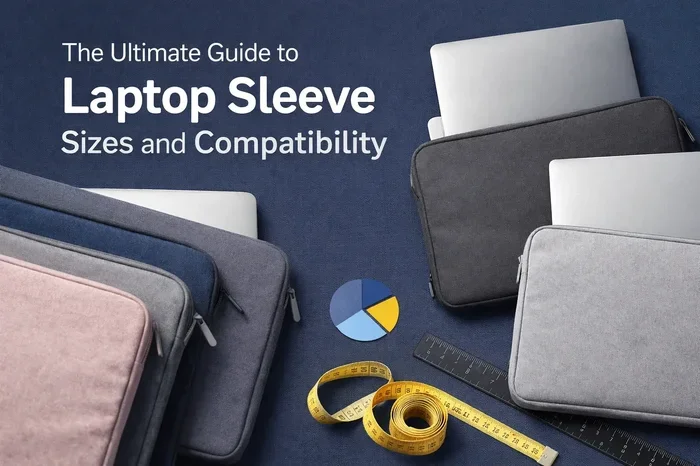
Before you shop for a laptop sleeve, grab a measuring tape. This one simple step saves you from buying the wrong size. Measuring takes about two minutes. And it makes all the difference.
Step By Step Measurement Guide
Follow these steps to get accurate dimensions of your laptop:
- Measure the diagonal screen size. Start at one corner of the screen and go to the opposite corner. This is the standard size label (like 14 inches or 15.6 inches).
- Measure the width. Lay your laptop flat and measure from left edge to right edge.
- Measure the depth. This is the front-to-back measurement when the laptop is closed.
- Measure the thickness. This is the most overlooked dimension. Many people forget that thick laptops need deeper sleeves.
- Measure the weight. While weight does not change the dimensions, it helps you judge how much padding you need.
Understanding Laptop Size Labels
Laptop sizes can be confusing. A “15.6-inch” laptop does not always measure exactly 15.6 inches across. The label refers to the diagonal screen measurement. The actual body is often a bit larger. This is why you should always measure your device directly instead of relying on the label alone.
For example, a Dell XPS 15 might measure 14.2 inches wide but still be labeled a 15.6-inch laptop. If you buy a sleeve meant for a 15-inch device, you might get lucky. Or you might end up with a sleeve that is too big for the actual body size.
Adding Extra Space For A Comfortable Fit
You want your laptop to fit snugly. But snug does not mean forced. You should be able to slide the laptop in and out with gentle effort. If you have to wrestle it in, the sleeve is too small. If it drops in like a loose sock, the sleeve is too big.
A good rule of thumb is to allow about half an inch of extra space on each side. This gives room for a thin cloth lining or a little wiggle room. Anything more than that, and you are compromising on protection.
How To Pick The Right Laptop Sleeve Size
Now that you know your laptop dimensions, it is time to shop. But not all laptop sleeves are created equal. The right one depends on more than just matching numbers on a label.
Matching Sleeve Size To Your Laptop Model
Most brands list their laptop sleeves by the laptop size they fit. You will see tags like “fits 13-inch laptops” or “compatible with 16-inch devices.” Always match the sleeve to your measured dimensions, not just the label on your laptop.
If you are between sizes, size down. A slightly tight sleeve is better than a loose one. You can always slip a thin cloth between the laptop and the sleeve for a better fit.
Material Choices And Their Impact On Fit
The material of your laptop sleeve affects how it fits and feels. Here is a quick look at common options:
- Neoprene sleeves are stretchy and soft. They conform closely to your laptop. They are great for a snug fit.
- Leather sleeves are rigid and structured. They hold their shape well. But they do not stretch much, so precision matters.
- Fabric sleeves with padding offer a middle ground. They are comfortable and often come in fun designs.
- Waterproof sleeves protect against spills and rain. Look for ones with a snug interior lining.
Each material behaves differently. A neoprene laptop sleeve might stretch slightly to accommodate a slightly bigger device. A leather sleeve will not give at all. Keep this in mind when you shop.
Considering Extra Pockets And Bulk
Some laptop sleeves come with extra pockets for chargers, pens, and documents. These additions can change the overall size of the sleeve. A sleeve that fits your laptop perfectly on its own might feel bulky once you add pockets.
Ask yourself what you actually need. If you carry your laptop alone, a simple padded laptop sleeve is all you need. If you carry accessories too, look for a slim sleeve with a single front pocket. Avoid anything that adds unnecessary bulk.
The Difference Between A Sleeve And A Case
People often confuse laptop sleeves with laptop cases. A sleeve is a thin cover that slides into your bag. A case is a standalone carrier with handles and zippers. Both serve to protect your laptop, but they work differently.
A laptop sleeve is usually lighter and more compact. A laptop case offers more structure. When choosing between the two, consider your daily routine. If you already have a good backpack, a sleeve is enough. If you carry your laptop in a messenger bag alone, a case might be better.
| Feature | Laptop Sleeve | Laptop Case |
|---|---|---|
| Weight | Very light | Moderate to heavy |
| Bulk | Minimal | Noticeable |
| Protection Level | Good for minor bumps | Better for drops and impacts |
| Extra Storage | Usually none | Often has compartments |
| Portability | Excellent | Good |
| Best For | Daily commuting | Travel and heavy use |
Common Mistakes People Make When Choosing A Sleeve
Even careful shoppers make mistakes. Here are the most common ones when picking a laptop sleeve.
Buying Based On Brand Alone
A popular brand does not guarantee the right fit. You see a sleek logo on a sleeve and buy it. Later, you realize the laptop slides around inside. Always prioritize dimensions over branding when you shop for laptop protection.
Ignoring Laptop Thickness
Screen size gets all the attention. But thickness is just as important. A thick gaming laptop needs a deeper sleeve than a thin ultrabook. If you ignore thickness, your laptop sleeve might be too big in depth even if the width looks right.
Choosing Style Over Function
Let us be honest. We all want our gear to look good. But a beautiful sleeve that does not fit your laptop is useless. Function should always come before fashion. Once you find a well-fitting sleeve, you can always find one in a style you love.
Forgetting About Bag Compatibility
Your laptop sleeve needs to fit inside your bag too. A bulky sleeve that fits your laptop perfectly might not slide into your backpack or tote. Think about the full picture. Consider both the laptop fit and the bag fit before you buy.
Assuming All 15-Inch Sleeves Are The Same
This is a big one. Not all 15-inch laptops are the same size. A MacBook Pro 15-inch has different dimensions than a Dell Inspiron 15. Always measure your specific model. Do not assume that a generic size label will match your device perfectly.
Best Practices For Keeping Your Laptop Safe
Picking the right laptop sleeve is only half the battle. How you use and care for it also makes a big difference.
Inspect Your Sleeve Regularly
Over time, padding can compress. Zippers can break. Fabric can wear thin. Check your laptop carry sleeve every few months. If the padding feels flat or the interior is fraying, it is time for a replacement.
Keep Your Sleeve Clean
Dirt and dust can scratch your laptop. Wipe down the inside of your padded laptop sleeve regularly. If the sleeve is machine washable, toss it in occasionally. A clean sleeve means a cleaner laptop.
Avoid Overstuffing
It might be tempting to cram everything into one bag with your laptop. But overstuffing puts pressure on your device. Keep your laptop protection sleeve as the main layer of defense. Do not stack heavy items on top of your laptop inside your bag.
Use Both Hands When Carrying
This is a small habit that makes a big difference. Carry your bag with both hands. Avoid swinging it by one strap. The more stable you keep your bag, the less your laptop moves inside its laptop fit sleeve.
Store Your Laptop In A Safe Spot
When you are at home or in the office, store your laptop in a cool, dry place. Avoid direct sunlight. Keep it away from liquids. Even the best laptop skin sleeve cannot protect against a coffee spill if the laptop is sitting right next to the mug.
Expert Insights On Laptop Sleeve Selection
We asked a few tech experts about the most common sleeve mistakes they see. Here is what they had to say.
Most people underestimate thickness, says Jake Torres, a laptop accessories reviewer. “They measure the screen size and call it a day. But a laptop that is 0.8 inches thick needs a very different sleeve than one that is 0.4 inches thick. Always measure all three dimensions.”
Material choice affects longevity, adds Priya Mehta, a tech blogger who reviews over 50 laptop sleeves a year. “A cheap neoprene sleeve might feel fine today. But after six months of daily use, the padding flattens. Invest in a quality laptop sleeve that holds its shape. Your device will thank you.”
The snugness test is the simplest way to check fit, recommends Sam Okafor, a repair technician. “If your laptop slides around when you tilt the sleeve, it is too big. If you cannot get it in without straining, it is too small. The sweet spot is a firm but gentle fit.”
Key Takeaways
- An oversized sleeve puts your laptop at risk: A loose fit means more movement, more impact, and more chance of damage.
- Measure your laptop before buying: Always check the diagonal screen size and the actual dimensions of your device.
- A snug fit is the goal: Your laptop should fit securely without being forced into the sleeve.
- Material matters just as much as size: Neoprene, leather, and padded fabrics each offer different levels of protection.
- Extra compartments can help or hurt: Some sleeves add bulk that defeats the purpose of a slim carry solution.
- Common mistakes include ignoring thickness: Your laptop’s depth and weight matter when choosing a sleeve.
- The right sleeve extends your device’s lifespan: Proper protection reduces wear and tear over time.
Conclusion
So, can a laptop sleeve be too big? Absolutely. And now you know exactly why it matters and what to do about it. A laptop sleeve that is too large leaves your device unprotected. It lets your laptop shift, slide, and suffer. That is the opposite of what you want from a protective cover.
The good news is that finding the right fit is straightforward. Measure your laptop carefully. Choose a laptop sleeve size that matches those measurements. Pick a material that suits your needs. And always do the snugness test before you commit.
Your laptop is a significant investment. It holds your work, your memories, and your daily tools. Treating it with proper laptop protection starts with something as simple as the right sleeve. A well-chosen laptop carrying sleeve keeps your device safe for years to come.
Take a few minutes today. Measure your laptop. Look at your current sleeve. If it feels loose, it is time for a change. Your laptop will be safer, more secure, and ready for whatever your day throws at it.
Frequently Asked Questions
Can I Use A Bigger Sleeve If I Add Padding?
You can, but it is not ideal. Adding extra padding to fill a large laptop sleeve might help a little. But it changes the way the sleeve absorbs impact. The padding will not sit against your laptop the way it was designed to. A properly sized laptop fit sleeve always works better than a DIY fix.
What Size Laptop Sleeve Fits A 14-Inch Laptop?
A 14-inch laptop sleeve typically fits laptops with a 14-inch diagonal screen. But always measure your actual device. Check the width, depth, and thickness. Some 14-inch laptops are thicker or wider than others. Matching the real dimensions is the safest approach.
Is A Tight Laptop Sleeve Bad For The Device?
A slightly snug fit is perfectly fine. You should be able to slide the laptop in with gentle pressure. If you have to force it, the laptop sleeve is too small. A forced fit can put pressure on the laptop’s edges and corners. Always aim for a firm but comfortable fit.
Can An Oversized Sleeve Cause My Laptop To Overheat?
Not directly. A loose laptop sleeve does not affect your laptop’s internal temperature. But if the oversized sleeve causes your laptop to sit in a poorly ventilated spot in your bag, heat can build up. Always make sure your bag allows some airflow around the laptop.
How Do I Know If My Current Sleeve Fits Correctly?
Do the tilt test. Place your laptop in the sleeve and tilt it sideways. If the laptop slides around, the laptop sleeve is too big. If it stays firmly in place, the fit is good. You should also check that there is no more than half an inch of extra space on each side.
Should I Buy A Sleeve With Extra Pockets?
Only if you actually need them. Extra pockets add bulk and can make a laptop sleeve too large for your device. If you carry just your laptop, a simple padded laptop sleeve is the best choice. If you need to carry a charger or mouse, look for a slim front pocket design that does not expand the sleeve’s interior volume.